Desafio 32: Regras do Azure Front Door e Private Link
60-90 minutos | ~$35/mês base (Front Door Premium necessário para Private Link) | Peso do exame: 15-20%
Cenário
A Northwind SaaS opera uma aplicação multi-tenant onde cada tenant acessa a plataforma por meio de um prefixo de caminho (ex.: /tenant-alpha/, /tenant-beta/). A equipe de plataforma precisa implementar regras de reescrita de URL para remover prefixos de tenant antes de encaminhar ao backend, configurar redirecionamentos HTTP para HTTPS, modificar cabeçalhos de resposta para segurança e conectar-se aos backends do App Service via Private Link para eliminar a exposição à internet pública. Domínios personalizados com certificados TLS gerenciados pelo Azure também devem ser configurados para cada tenant.
Você criará conjuntos de regras com condições e ações, configurará origens com Private Link e configurará domínios personalizados com certificados gerenciados.
Habilidades do exame abordadas
| Habilidade | Peso |
|---|---|
| Criar e configurar conjuntos de regras (condições e ações) | Alto |
| Configurar ações de reescrita e redirecionamento de URL | Alto |
| Configurar modificações de cabeçalhos de solicitação/resposta | Médio |
| Configurar origens com Private Link | Alto |
| Configurar domínios personalizados com certificados gerenciados | Alto |
| Entender a ordem de avaliação do conjunto de regras | Médio |
Pré-requisitos
- Assinatura do Azure com função de Colaborador
- Azure CLI 2.60+ ou Azure PowerShell Az 12.0+
- Perfil Front Door Premium existente (do Challenge 31 ou novo)
- Plano do App Service com um aplicativo web implantado (para origem Private Link)
- Um domínio personalizado com acesso ao DNS (para a tarefa de domínio personalizado)
Tarefa 1: Criar um conjunto de regras
Conjuntos de regras contêm regras de entrega que modificam solicitações e respostas conforme fluem pelo Front Door. Cada regra possui condições (quando aplicar) e ações (o que fazer).
Azure CLI
# Set variables
RG="rg-northwind-frontdoor"
LOCATION="eastus2"
FD_PROFILE="fd-northwind-saas"

# Create resource group and Front Door profile
az group create --name $RG --location $LOCATION

az afd profile create \
  --resource-group $RG \
  --profile-name $FD_PROFILE \
  --sku Premium_AzureFrontDoor

# Create the endpoint
az afd endpoint create \
  --resource-group $RG \
  --profile-name $FD_PROFILE \
  --endpoint-name ep-northwind-saas \
  --enabled-state Enabled

# Create origin group (needed before routes)
az afd origin-group create \
  --resource-group $RG \
  --profile-name $FD_PROFILE \
  --origin-group-name og-northwind-backend \
  --probe-request-type GET \
  --probe-protocol Https \
  --probe-interval-in-seconds 30 \
  --probe-path "/health" \
  --sample-size 4 \
  --successful-samples-required 3 \
  --additional-latency-in-milliseconds 50

# Create a rule set for tenant URL rewrites
az afd rule-set create \
  --resource-group $RG \
  --profile-name $FD_PROFILE \
  --rule-set-name RuleSetTenantRewrite

# Create a second rule set for security headers
az afd rule-set create \
  --resource-group $RG \
  --profile-name $FD_PROFILE \
  --rule-set-name RuleSetSecurityHeaders

# List rule sets
az afd rule-set list \
  --resource-group $RG \
  --profile-name $FD_PROFILE \
  --query "[].name" \
  --output tsv
Azure PowerShell
# Set variables
$rg = "rg-northwind-frontdoor"
$location = "eastus2"
$fdProfile = "fd-northwind-saas"

# Create resource group and Front Door profile
New-AzResourceGroup -Name $rg -Location $location

New-AzFrontDoorCdnProfile `
  -ResourceGroupName $rg `
  -ProfileName $fdProfile `
  -SkuName "Premium_AzureFrontDoor"

# Create endpoint
New-AzFrontDoorCdnEndpoint `
  -ResourceGroupName $rg `
  -ProfileName $fdProfile `
  -EndpointName "ep-northwind-saas" `
  -Location "Global" `
  -EnabledState "Enabled"

# Create rule set
New-AzFrontDoorCdnRuleSet `
  -ResourceGroupName $rg `
  -ProfileName $fdProfile `
  -RuleSetName "RuleSetTenantRewrite"

New-AzFrontDoorCdnRuleSet `
  -ResourceGroupName $rg `
  -ProfileName $fdProfile `
  -RuleSetName "RuleSetSecurityHeaders"
Tarefa 2: Criar regras com ações de reescrita de URL
Configure uma regra que remove o prefixo do tenant do caminho da URL antes de encaminhar ao backend. Por exemplo, /tenant-alpha/products/123 se torna /products/123 na origem.
Azure CLI
# Rule 1: Rewrite tenant-alpha paths
# Match: RequestUri path starts with /tenant-alpha/
# Action: URL Rewrite to strip the prefix
az afd rule create \
  --resource-group $RG \
  --profile-name $FD_PROFILE \
  --rule-set-name RuleSetTenantRewrite \
  --rule-name RewriteTenantAlpha \
  --order 1 \
  --match-variable RequestUri \
  --operator Contains \
  --match-values "/tenant-alpha/" \
  --action-name UrlRewrite \
  --source-pattern "/tenant-alpha/" \
  --destination "/" \
  --preserve-unmatched-path true

# Rule 2: Rewrite tenant-beta paths
az afd rule create \
  --resource-group $RG \
  --profile-name $FD_PROFILE \
  --rule-set-name RuleSetTenantRewrite \
  --rule-name RewriteTenantBeta \
  --order 2 \
  --match-variable RequestUri \
  --operator Contains \
  --match-values "/tenant-beta/" \
  --action-name UrlRewrite \
  --source-pattern "/tenant-beta/" \
  --destination "/" \
  --preserve-unmatched-path true

# Rule 3: HTTP to HTTPS redirect (in security rule set)
az afd rule create \
  --resource-group $RG \
  --profile-name $FD_PROFILE \
  --rule-set-name RuleSetSecurityHeaders \
  --rule-name RedirectHttpToHttps \
  --order 1 \
  --match-variable RequestScheme \
  --operator Equal \
  --match-values "HTTP" \
  --action-name UrlRedirect \
  --redirect-type Moved \
  --redirect-protocol Https \
  --match-processing-behavior Stop
Azure PowerShell
# Create the URL rewrite rule for tenant-alpha
$condition = New-AzFrontDoorCdnRuleRequestUriConditionObject `
-Name "RequestUri" `
-ParameterOperator "Contains" `
-ParameterMatchValue "/tenant-alpha/"
$action = New-AzFrontDoorCdnRuleUrlRewriteActionObject `
-Name "UrlRewrite" `
-ParameterSourcePattern "/tenant-alpha/" `
-ParameterDestination "/" `
-ParameterPreserveUnmatchedPath $true
New-AzFrontDoorCdnRule `
-ResourceGroupName $rg `
-ProfileName $fdProfile `
-RuleSetName "RuleSetTenantRewrite" `
-RuleName "RewriteTenantAlpha" `
-Order 1 `
-Condition $condition `
-Action $action
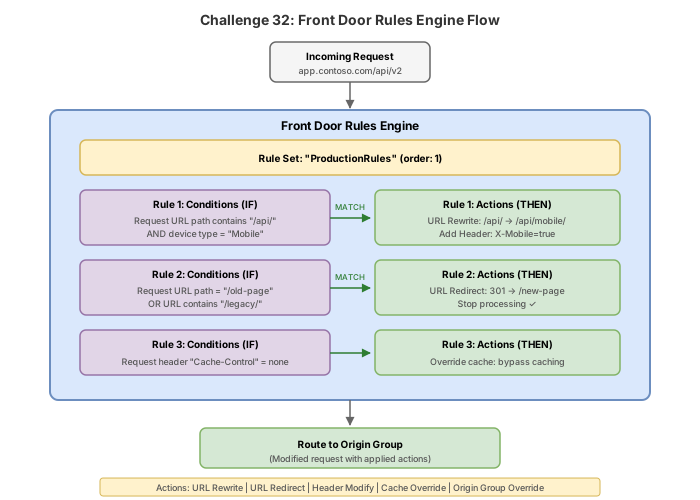
### Azure PowerShell
```powershell
# Add HSTS header action
$hstsAction = New-AzFrontDoorCdnRuleResponseHeaderActionObject `
-Name "ModifyResponseHeader" `
-ParameterHeaderAction "Overwrite" `
-ParameterHeaderName "Strict-Transport-Security" `
-ParameterValue "max-age=31536000; includeSubDomains"
New-AzFrontDoorCdnRule `
-ResourceGroupName $rg `
-ProfileName $fdProfile `
-RuleSetName "RuleSetSecurityHeaders" `
-RuleName "AddHstsHeader" `
-Order 2 `
-Action $hstsAction
Tarefa 4: Configurar uma origem com Private Link
Origens com Private Link permitem que o Front Door Premium se conecte ao seu backend pela rede backbone da Microsoft sem expor o backend à internet pública.
Origens com Private Link estão disponíveis apenas com o SKU Front Door Premium. Perfis com SKU Standard não suportam esse recurso.
Azure CLI
# First, create the App Service that will serve as our Private Link origin
APP_SERVICE_PLAN="asp-northwind-backend"
WEB_APP="app-northwind-api-eastus2"

az appservice plan create \
  --resource-group $RG \
  --name $APP_SERVICE_PLAN \
  --location $LOCATION \
  --sku P1V3 \
  --is-linux

az webapp create \
  --resource-group $RG \
  --plan $APP_SERVICE_PLAN \
  --name $WEB_APP \
  --runtime "NODE:20-lts"

# Get the App Service resource ID
APP_SERVICE_ID=$(az webapp show \
  --resource-group $RG \
  --name $WEB_APP \
  --query "id" \
  --output tsv)

# Create origin with Private Link enabled
az afd origin create \
  --resource-group $RG \
  --profile-name $FD_PROFILE \
  --origin-group-name og-northwind-backend \
  --origin-name origin-privatelink-api \
  --host-name "${WEB_APP}.azurewebsites.net" \
  --origin-host-header "${WEB_APP}.azurewebsites.net" \
  --http-port 80 \
  --https-port 443 \
  --priority 1 \
  --weight 1000 \
  --enabled-state Enabled \
  --enable-private-link true \
  --private-link-resource $APP_SERVICE_ID \
  --private-link-location $LOCATION \
  --private-link-request-message "Front Door Private Link connection" \
  --private-link-sub-resource-type "sites"

# Check the private link connection state (will be Pending until approved)
az afd origin show \
  --resource-group $RG \
  --profile-name $FD_PROFILE \
  --origin-group-name og-northwind-backend \
  --origin-name origin-privatelink-api \
  --query "sharedPrivateLinkResource.status" \
  --output tsv
Aprovar a conexão Private Link
Após criar a origem com Private Link, você deve aprovar a conexão pendente no lado do App Service:
# List pending Private Endpoint connections on the App Service
az network private-endpoint-connection list \
  --id $APP_SERVICE_ID \
  --query "[?properties.privateLinkServiceConnectionState.status=='Pending'].{id:id, status:properties.privateLinkServiceConnectionState.status}" \
  --output table

# Approve the pending connection
PE_CONN_ID=$(az network private-endpoint-connection list \
  --id $APP_SERVICE_ID \
  --query "[?properties.privateLinkServiceConnectionState.status=='Pending'].id" \
  --output tsv)

az network private-endpoint-connection approve \
  --id $PE_CONN_ID \
  --description "Approved for Front Door"
Azure PowerShell
# Create App Service
New-AzAppServicePlan `
  -ResourceGroupName $rg `
  -Name "asp-northwind-backend" `
  -Location $location `
  -Tier "PremiumV3" `
  -WorkerSize "Small" `
  -Linux

New-AzWebApp `
  -ResourceGroupName $rg `
  -AppServicePlan "asp-northwind-backend" `
  -Name "app-northwind-api-eastus2" `
  -Location $location

# Get resource ID
$appId = (Get-AzWebApp -ResourceGroupName $rg -Name "app-northwind-api-eastus2").Id

# Create Private Link origin
New-AzFrontDoorCdnOrigin `
  -ResourceGroupName $rg `
  -ProfileName $fdProfile `
  -OriginGroupName "og-northwind-backend" `
  -OriginName "origin-privatelink-api" `
  -HostName "app-northwind-api-eastus2.azurewebsites.net" `
  -OriginHostHeader "app-northwind-api-eastus2.azurewebsites.net" `
  -HttpPort 80 `
  -HttpsPort 443 `
  -Priority 1 `
  -Weight 1000 `
  -EnabledState "Enabled" `
  -SharedPrivateLinkResourcePrivateLinkLocation $location `
  -SharedPrivateLinkResourceRequestMessage "Front Door Private Link" `
  -SharedPrivateLinkResourcePrivateLink $appId `
  -SharedPrivateLinkResourceGroupId "sites"

# Approve the private endpoint connection
$peConnections = Get-AzPrivateEndpointConnection -PrivateLinkResourceId $appId |
  Where-Object { $_.PrivateLinkServiceConnectionState.Status -eq "Pending" }

$peConnections | ForEach-Object {
  Approve-AzPrivateEndpointConnection -ResourceId $_.Id -Description "Approved for Front Door"
}
Após aprovar a conexão Private Link, restrinja o App Service para aceitar tráfego apenas do ponto de extremidade privado:
az webapp update \
  --resource-group $RG \
  --name $WEB_APP \
  --set publicNetworkAccess=Disabled
Isso garante que todo o tráfego para o backend flua pelo Front Door via Private Link.
Tarefa 5: Configurar um domínio personalizado com certificado gerenciado
Domínios personalizados permitem que você use seu próprio nome de domínio (ex.: app.northwindtraders.com) em vez do hostname gerado pelo Front Door.
Azure CLI
# Create custom domain with managed certificate
az afd custom-domain create \
  --resource-group $RG \
  --profile-name $FD_PROFILE \
  --custom-domain-name cd-northwind-app \
  --host-name "app.northwindtraders.com" \
  --minimum-tls-version TLS12 \
  --certificate-type ManagedCertificate

# Show the validation token (needed for DNS TXT record)
az afd custom-domain show \
  --resource-group $RG \
  --profile-name $FD_PROFILE \
  --custom-domain-name cd-northwind-app \
  --query "{hostname:hostName, validationState:domainValidationState, validationToken:validationProperties.validationToken}" \
  --output json
Antes que o certificado gerenciado seja emitido, você deve criar os registros DNS:
- Registro CNAME: Aponte
app.northwindtraders.compara o hostname do ponto de extremidade do Front Door - Registro TXT: Crie
_dnsauth.app.northwindtraders.comcom o valor do token de validação
# After DNS records are created, associate the custom domain with the route
az afd route update \
  --resource-group $RG \
  --profile-name $FD_PROFILE \
  --endpoint-name ep-northwind-saas \
  --route-name route-default \
  --custom-domains cd-northwind-app

# Check domain validation state (wait for DomainValidationState: Approved)
az afd custom-domain show \
  --resource-group $RG \
  --profile-name $FD_PROFILE \
  --custom-domain-name cd-northwind-app \
  --query "domainValidationState" \
  --output tsv
Azure PowerShell
# Create custom domain with managed certificate
New-AzFrontDoorCdnCustomDomain `
  -ResourceGroupName $rg `
  -ProfileName $fdProfile `
  -CustomDomainName "cd-northwind-app" `
  -HostName "app.northwindtraders.com" `
  -TlsSettingMinimumTlsVersion "TLS12" `
  -TlsSettingCertificateType "ManagedCertificate"

# Get validation token
$domain = Get-AzFrontDoorCdnCustomDomain `
  -ResourceGroupName $rg `
  -ProfileName $fdProfile `
  -CustomDomainName "cd-northwind-app"

Write-Host "Validation token: $($domain.ValidationPropertyValidationToken)"
Write-Host "Add TXT record _dnsauth.app.northwindtraders.com with this value"
Portal
- No perfil do Front Door, vá para Domínios > + Adicionar.
- Selecione Gerenciamento de DNS: Outro (DNS não Azure).
- Insira o hostname
app.northwindtraders.com. - Selecione Tipo de certificado: Gerenciado pelo AFD.
- Defina a versão mínima do TLS como TLS 1.2.
- Clique em Adicionar e anote o token de validação exibido.
- Crie os registros DNS necessários no seu provedor de DNS.
- Retorne a Domínios e associe-o à sua rota.
Tarefa 6: Associar conjuntos de regras a uma rota
Conjuntos de regras devem ser explicitamente associados a rotas para entrarem em vigor.
Azure CLI
# Create a route and associate both rule sets
az afd route create \
  --resource-group $RG \
  --profile-name $FD_PROFILE \
  --endpoint-name ep-northwind-saas \
  --route-name route-default \
  --origin-group og-northwind-backend \
  --patterns-to-match "/*" \
  --supported-protocols Http Https \
  --https-redirect Enabled \
  --forwarding-protocol HttpsOnly \
  --link-to-default-domain Enabled \
  --rule-sets RuleSetTenantRewrite RuleSetSecurityHeaders
Conjuntos de regras são executados na ordem em que estão listados no parâmetro --rule-sets. Neste exemplo, as reescritas de URL de tenant acontecem primeiro, depois os cabeçalhos de segurança são adicionados. Essa ordem importa: se a regra de redirecionamento de segurança dispara primeiro (com --match-processing-behavior Stop), as regras subsequentes em outros conjuntos de regras não seriam executadas para aquela solicitação.
Quebra & conserta
Cenário 1: Conjunto de regras não sendo avaliado (incompatibilidade de ordem/condição)
# Create a rule with conflicting conditions
az afd rule create \
  --resource-group $RG \
  --profile-name $FD_PROFILE \
  --rule-set-name RuleSetTenantRewrite \
  --rule-name BrokenRule \
  --order 0 \
  --match-variable RequestScheme \
  --operator Equal \
  --match-values "HTTP" \
  --action-name UrlRewrite \
  --source-pattern "/tenant-alpha/" \
  --destination "/" \
  --preserve-unmatched-path true \
  --match-processing-behavior Stop
Sintoma: As reescritas de URL de tenant param de funcionar. Solicitações para /tenant-alpha/products chegam na origem sem alteração.
Causa raiz: A regra na ordem 0 é executada antes das regras de reescrita (ordem 1, 2). Ela corresponde a solicitações HTTP e define --match-processing-behavior Stop, impedindo que regras subsequentes sejam executadas. Como o redirecionamento HTTPS também acontece, as regras de reescrita nunca são acionadas.
Correção: Exclua a regra quebrada ou altere sua ordem e comportamento:
az afd rule delete \
  --resource-group $RG \
  --profile-name $FD_PROFILE \
  --rule-set-name RuleSetTenantRewrite \
  --rule-name BrokenRule \
  --yes
Cenário 2: Private Link não aprovado (estado pendente)
Sintoma: Após criar uma origem com Private Link, a origem aparece como não íntegra e as solicitações expiram ou retornam 503.
Causa raiz: A conexão Private Link ainda está no estado Pending. Até que o proprietário do recurso aprove a conexão, nenhum tráfego flui por ela.
Diagnóstico:
# Check Private Link status on the origin
az afd origin show \
  --resource-group $RG \
  --profile-name $FD_PROFILE \
  --origin-group-name og-northwind-backend \
  --origin-name origin-privatelink-api \
  --query "sharedPrivateLinkResource.status" \
  --output tsv
# Expected output: "Pending" (when not yet approved)
Correção: Aprove a conexão no recurso de destino:
PE_CONN_ID=$(az network private-endpoint-connection list \
  --id $APP_SERVICE_ID \
  --query "[?properties.privateLinkServiceConnectionState.status=='Pending'].id" \
  --output tsv)

az network private-endpoint-connection approve \
  --id $PE_CONN_ID \
  --description "Approved for Front Door"
Cenário 3: Falha na validação CNAME do domínio personalizado
Sintoma: O domínio personalizado permanece no estado de validação Pending. O certificado gerenciado não é emitido.
Causa raiz: O registro CNAME do DNS aponta para o destino errado, ou o registro TXT de validação está ausente ou incorreto.
Diagnóstico:
# Check what validation expects
az afd custom-domain show \
  --resource-group $RG \
  --profile-name $FD_PROFILE \
  --custom-domain-name cd-northwind-app \
  --query "{state:domainValidationState, token:validationProperties.validationToken, expiresOn:validationProperties.expirationDate}" \
  --output json

# Verify DNS from command line
nslookup -type=TXT _dnsauth.app.northwindtraders.com
nslookup -type=CNAME app.northwindtraders.com
Correção: Certifique-se de que os registros DNS estão corretos:
- CNAME:
app.northwindtraders.comapontando paraep-northwind-saas-xxxxxx.z01.azurefd.net - TXT:
_dnsauth.app.northwindtraders.comcom o valor exato do token de validação
Se o token expirou, regenere-o:
az afd custom-domain regenerate-validation-token \
  --resource-group $RG \
  --profile-name $FD_PROFILE \
  --custom-domain-name cd-northwind-app
Verificação de conhecimento
1. Em qual ordem os rule sets são executados quando múltiplos estão associados a uma única rota?
2. Após criar uma origem com Private Link no Front Door Premium, o status da origem mostra 'Pending'. O que deve acontecer em seguida?
3. Você configura um certificado gerenciado para o domínio personalizado 'app.contoso.com'. Quais registros DNS você deve criar para validação?
4. Uma regra tem --match-processing-behavior definido como 'Stop'. O que acontece quando esta regra corresponde a uma requisição?
5. Qual SKU do Front Door suporta origens com Private Link?
6. Você cria uma regra de reescrita de URL com source-pattern '/api/v1/' e destination '/api/v2/' com preserve-unmatched-path definido como true. Uma requisição chega para '/api/v1/users/123'. Qual caminho chega à origem?
Limpeza
Remova todos os recursos criados neste desafio.
Azure CLI
# Delete the entire resource group and all resources within it
az group delete --name rg-northwind-frontdoor --yes --no-wait
Azure PowerShell
# Delete the entire resource group and all resources within it
Remove-AzResourceGroup -Name "rg-northwind-frontdoor" -Force -AsJob
O Azure Front Door Premium custa aproximadamente $35/mês base mais cobranças por solicitação. O App Service no P1V3 adiciona aproximadamente $100/mês. Exclua todos os recursos imediatamente após concluir este desafio para evitar cobranças desnecessárias.
Após alguns minutos, confirme a exclusão:
az group show --name rg-northwind-frontdoor 2>&1 | grep -q "not found" && echo "Deleted" || echo "Still exists"