Challenge 40: Regras de NSG e grupos de segurança de aplicativo
60-90 minutos | ~$0,00 (NSGs e ASGs são gratuitos) | Peso do exame: 15-20%
Cenário
A Northwind Traders está implantando uma aplicação de três camadas (web, aplicação, banco de dados) no Azure. A equipe de segurança exige microssegmentação entre as camadas para que cada camada se comunique apenas com sua camada adjacente. Especificamente:
- A camada web aceita HTTP (80) e HTTPS (443) da internet
- A camada de aplicação aceita tráfego apenas da camada web na porta 8080
- A camada de banco de dados aceita tráfego apenas da camada de aplicação na porta 1433
- Nenhuma camada deve ser capaz de se comunicar diretamente com uma camada não adjacente (web não pode alcançar o banco de dados diretamente)
Você deve implementar isso usando Network Security Groups com Application Security Groups para criar regras baseadas em função que permaneçam válidas mesmo quando as VMs aumentam ou diminuem em escala.
Habilidades do exame abordadas
| Habilidade | Peso |
|---|---|
| Criar e configurar grupos de segurança de rede (NSGs) | Alto |
| Criar e configurar grupos de segurança de aplicativo (ASGs) | Alto |
| Associar NSGs a sub-redes e interfaces de rede | Alto |
| Configurar regras de NSG com tags de serviço e ASGs | Alto |
| Avaliar regras de segurança efetivas | Médio |
| Entender regras de segurança padrão e prioridade de regra | Médio |
Pré-requisitos
- Assinatura do Azure com função de Colaborador
- Azure CLI 2.60+ ou Azure PowerShell Az 12.0+
- Conhecimento básico de TCP/IP e números de porta
Tarefa 1: Criar a VNet e sub-redes para a arquitetura de três camadas
Azure CLI
# Set variables
RG="rg-nsg-challenge"
LOCATION="eastus2"

# Create resource group
az group create --name $RG --location $LOCATION

# Create VNet with web subnet
az network vnet create \
  --resource-group $RG \
  --name vnet-threetier \
  --location $LOCATION \
  --address-prefixes 10.0.0.0/16 \
  --subnet-name snet-web \
  --subnet-prefixes 10.0.1.0/24

# Add application tier subnet
az network vnet subnet create \
  --resource-group $RG \
  --vnet-name vnet-threetier \
  --name snet-app \
  --address-prefixes 10.0.2.0/24

# Add database tier subnet
az network vnet subnet create \
  --resource-group $RG \
  --vnet-name vnet-threetier \
  --name snet-db \
  --address-prefixes 10.0.3.0/24
Azure PowerShell
# Set variables
$rg = "rg-nsg-challenge"
$location = "eastus2"

# Create resource group
New-AzResourceGroup -Name $rg -Location $location

# Define subnets
$webSubnet = New-AzVirtualNetworkSubnetConfig `
  -Name "snet-web" -AddressPrefix "10.0.1.0/24"
$appSubnet = New-AzVirtualNetworkSubnetConfig `
  -Name "snet-app" -AddressPrefix "10.0.2.0/24"
$dbSubnet = New-AzVirtualNetworkSubnetConfig `
  -Name "snet-db" -AddressPrefix "10.0.3.0/24"

# Create VNet with all subnets
New-AzVirtualNetwork `
  -ResourceGroupName $rg `
  -Name "vnet-threetier" `
  -Location $location `
  -AddressPrefix "10.0.0.0/16" `
  -Subnet $webSubnet, $appSubnet, $dbSubnet
Tarefa 2: Criar grupos de segurança de aplicativo
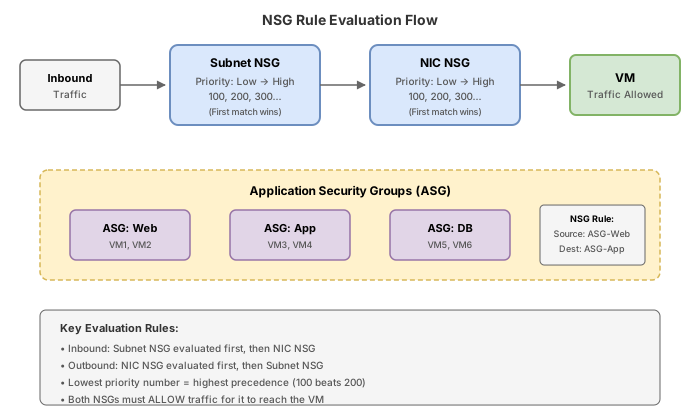
Application Security Groups permitem agrupar NICs de VMs por função. As regras referenciam ASGs em vez de endereços IP, portanto, quando você adiciona um novo servidor web, ele herda automaticamente as regras de segurança corretas simplesmente atribuindo sua NIC ao ASG.
Todas as NICs atribuídas ao mesmo ASG devem existir na mesma rede virtual. Você não pode usar um ASG em uma regra se a NIC de origem/destino estiver em uma VNet diferente.
Azure CLI
# Create ASG for each tier
az network asg create \
  --resource-group $RG \
  --name asg-web \
  --location $LOCATION

az network asg create \
  --resource-group $RG \
  --name asg-app \
  --location $LOCATION

az network asg create \
  --resource-group $RG \
  --name asg-db \
  --location $LOCATION
Azure PowerShell
# Create ASGs for each tier
New-AzApplicationSecurityGroup `
  -ResourceGroupName $rg `
  -Name "asg-web" `
  -Location $location

New-AzApplicationSecurityGroup `
  -ResourceGroupName $rg `
  -Name "asg-app" `
  -Location $location

New-AzApplicationSecurityGroup `
  -ResourceGroupName $rg `
  -Name "asg-db" `
  -Location $location
Tarefa 3: Criar NSGs com regras usando ASGs e tags de serviço
As regras de NSG são avaliadas por prioridade (número menor = prioridade mais alta). O Azure possui regras padrão nas prioridades 65000-65500 que permitem VNet-para-VNet e internet de saída por padrão. Suas regras personalizadas devem usar prioridades entre 100-4096.
Ordem de processamento das regras:
- Entrada: NSG na sub-rede primeiro, depois NSG na NIC
- Saída: NSG na NIC primeiro, depois NSG na sub-rede
- Número de prioridade menor vence (avaliado primeiro)
- Quando uma regra corresponde, a avaliação para
Azure CLI
# Create NSG for the web tier
az network nsg create \
  --resource-group $RG \
  --name nsg-web \
  --location $LOCATION

# Allow HTTP from Internet to web ASG
az network nsg rule create \
  --resource-group $RG \
  --nsg-name nsg-web \
  --name Allow-HTTP-Inbound \
  --priority 100 \
  --direction Inbound \
  --access Allow \
  --protocol Tcp \
  --source-address-prefixes Internet \
  --source-port-ranges '*' \
  --destination-asgs asg-web \
  --destination-port-ranges 80

# Allow HTTPS from Internet to web ASG
az network nsg rule create \
  --resource-group $RG \
  --nsg-name nsg-web \
  --name Allow-HTTPS-Inbound \
  --priority 110 \
  --direction Inbound \
  --access Allow \
  --protocol Tcp \
  --source-address-prefixes Internet \
  --source-port-ranges '*' \
  --destination-asgs asg-web \
  --destination-port-ranges 443

# Allow Azure Load Balancer health probes
az network nsg rule create \
  --resource-group $RG \
  --nsg-name nsg-web \
  --name Allow-AzureLB-Inbound \
  --priority 120 \
  --direction Inbound \
  --access Allow \
  --protocol '*' \
  --source-address-prefixes AzureLoadBalancer \
  --source-port-ranges '*' \
  --destination-address-prefixes '*' \
  --destination-port-ranges '*'

# Deny all other inbound traffic
az network nsg rule create \
  --resource-group $RG \
  --nsg-name nsg-web \
  --name Deny-All-Inbound \
  --priority 4096 \
  --direction Inbound \
  --access Deny \
  --protocol '*' \
  --source-address-prefixes '*' \
  --source-port-ranges '*' \
  --destination-address-prefixes '*' \
  --destination-port-ranges '*'

# Create NSG for the app tier
az network nsg create \
  --resource-group $RG \
  --name nsg-app \
  --location $LOCATION

# Allow port 8080 from web ASG to app ASG only
az network nsg rule create \
  --resource-group $RG \
  --nsg-name nsg-app \
  --name Allow-Web-To-App \
  --priority 100 \
  --direction Inbound \
  --access Allow \
  --protocol Tcp \
  --source-asgs asg-web \
  --source-port-ranges '*' \
  --destination-asgs asg-app \
  --destination-port-ranges 8080

# Deny all other inbound
az network nsg rule create \
  --resource-group $RG \
  --nsg-name nsg-app \
  --name Deny-All-Inbound \
  --priority 4096 \
  --direction Inbound \
  --access Deny \
  --protocol '*' \
  --source-address-prefixes '*' \
  --source-port-ranges '*' \
  --destination-address-prefixes '*' \
  --destination-port-ranges '*'

# Create NSG for the database tier
az network nsg create \
  --resource-group $RG \
  --name nsg-db \
  --location $LOCATION

# Allow SQL from app ASG to db ASG only
az network nsg rule create \
  --resource-group $RG \
  --nsg-name nsg-db \
  --name Allow-App-To-DB \
  --priority 100 \
  --direction Inbound \
  --access Allow \
  --protocol Tcp \
  --source-asgs asg-app \
  --source-port-ranges '*' \
  --destination-asgs asg-db \
  --destination-port-ranges 1433

# Deny all other inbound
az network nsg rule create \
  --resource-group $RG \
  --nsg-name nsg-db \
  --name Deny-All-Inbound \
  --priority 4096 \
  --direction Inbound \
  --access Deny \
  --protocol '*' \
  --source-address-prefixes '*' \
  --source-port-ranges '*' \
  --destination-address-prefixes '*' \
  --destination-port-ranges '*'
Azure PowerShell
# Get ASG references
$asgWeb = Get-AzApplicationSecurityGroup -ResourceGroupName $rg -Name "asg-web"
$asgApp = Get-AzApplicationSecurityGroup -ResourceGroupName $rg -Name "asg-app"
$asgDb = Get-AzApplicationSecurityGroup -ResourceGroupName $rg -Name "asg-db"

# Web tier NSG rules
$webRule1 = New-AzNetworkSecurityRuleConfig `
  -Name "Allow-HTTP-Inbound" `
  -Priority 100 `
  -Direction Inbound `
  -Access Allow `
  -Protocol Tcp `
  -SourceAddressPrefix Internet `
  -SourcePortRange '*' `
  -DestinationApplicationSecurityGroupId $asgWeb.Id `
  -DestinationPortRange 80

$webRule2 = New-AzNetworkSecurityRuleConfig `
  -Name "Allow-HTTPS-Inbound" `
  -Priority 110 `
  -Direction Inbound `
  -Access Allow `
  -Protocol Tcp `
  -SourceAddressPrefix Internet `
  -SourcePortRange '*' `
  -DestinationApplicationSecurityGroupId $asgWeb.Id `
  -DestinationPortRange 443

$webRule3 = New-AzNetworkSecurityRuleConfig `
  -Name "Deny-All-Inbound" `
  -Priority 4096 `
  -Direction Inbound `
  -Access Deny `
  -Protocol '*' `
  -SourceAddressPrefix '*' `
  -SourcePortRange '*' `
  -DestinationAddressPrefix '*' `
  -DestinationPortRange '*'

New-AzNetworkSecurityGroup `
  -ResourceGroupName $rg `
  -Name "nsg-web" `
  -Location $location `
  -SecurityRules $webRule1, $webRule2, $webRule3

# App tier NSG rules
$appRule1 = New-AzNetworkSecurityRuleConfig `
  -Name "Allow-Web-To-App" `
  -Priority 100 `
  -Direction Inbound `
  -Access Allow `
  -Protocol Tcp `
  -SourceApplicationSecurityGroupId $asgWeb.Id `
  -SourcePortRange '*' `
  -DestinationApplicationSecurityGroupId $asgApp.Id `
  -DestinationPortRange 8080

$appRule2 = New-AzNetworkSecurityRuleConfig `
  -Name "Deny-All-Inbound" `
  -Priority 4096 `
  -Direction Inbound `
  -Access Deny `
  -Protocol '*' `
  -SourceAddressPrefix '*' `
  -SourcePortRange '*' `
  -DestinationAddressPrefix '*' `
  -DestinationPortRange '*'

New-AzNetworkSecurityGroup `
  -ResourceGroupName $rg `
  -Name "nsg-app" `
  -Location $location `
  -SecurityRules $appRule1, $appRule2

# DB tier NSG rules
$dbRule1 = New-AzNetworkSecurityRuleConfig `
  -Name "Allow-App-To-DB" `
  -Priority 100 `
  -Direction Inbound `
  -Access Allow `
  -Protocol Tcp `
  -SourceApplicationSecurityGroupId $asgApp.Id `
  -SourcePortRange '*' `
  -DestinationApplicationSecurityGroupId $asgDb.Id `
  -DestinationPortRange 1433

$dbRule2 = New-AzNetworkSecurityRuleConfig `
  -Name "Deny-All-Inbound" `
  -Priority 4096 `
  -Direction Inbound `
  -Access Deny `
  -Protocol '*' `
  -SourceAddressPrefix '*' `
  -SourcePortRange '*' `
  -DestinationAddressPrefix '*' `
  -DestinationPortRange '*'

New-AzNetworkSecurityGroup `
  -ResourceGroupName $rg `
  -Name "nsg-db" `
  -Location $location `
  -SecurityRules $dbRule1, $dbRule2
Tarefa 4: Associar NSGs às sub-redes
Azure CLI
# Associate NSGs with their respective subnets
az network vnet subnet update \
  --resource-group $RG \
  --vnet-name vnet-threetier \
  --name snet-web \
  --network-security-group nsg-web

az network vnet subnet update \
  --resource-group $RG \
  --vnet-name vnet-threetier \
  --name snet-app \
  --network-security-group nsg-app

az network vnet subnet update \
  --resource-group $RG \
  --vnet-name vnet-threetier \
  --name snet-db \
  --network-security-group nsg-db
Azure PowerShell
$vnet = Get-AzVirtualNetwork -ResourceGroupName $rg -Name "vnet-threetier"
$nsgWeb = Get-AzNetworkSecurityGroup -ResourceGroupName $rg -Name "nsg-web"
$nsgApp = Get-AzNetworkSecurityGroup -ResourceGroupName $rg -Name "nsg-app"
$nsgDb = Get-AzNetworkSecurityGroup -ResourceGroupName $rg -Name "nsg-db"
# Associate NSG to web subnet
$webSubnetConfig = Get-AzVirtualNetworkSubnetConfig -VirtualNetwork $vnet -Name "snet-web"
$webSubnetConfig.NetworkSecurityGroup = $nsgWeb
Set-AzVirtualNetwork -VirtualNetwork $vnet
# Refresh VNet reference and associate app subnet
$vnet = Get-AzVirtualNetwork -ResourceGroupName $rg -Name "vnet-threetier"
$appSubnetConfig = Get-AzVirtualNetworkSubnetConfig -VirtualNetwork $vnet -Name "snet-app"
$appSubnetConfig.NetworkSecurityGroup = $nsgApp
Set-AzVirtualNetwork -VirtualNetwork $vnet
# Refresh and associate db subnet
$vnet = Get-AzVirtualNetwork -ResourceGroupName $rg -Name "vnet-threetier"
$dbSubnetConfig = Get-AzVirtualNetworkSubnetConfig -VirtualNetwork $vnet -Name "snet-db"
$dbSubnetConfig.NetworkSecurityGroup = $nsgDb
Set-AzVirtualNetwork -VirtualNetwork $vnet
### Azure PowerShell
```powershell
# After VM creation, assign NICs to ASGs
$webNic = Get-AzNetworkInterface -ResourceGroupName $rg | Where-Object { $_.Name -like "*web*" }
$appNic = Get-AzNetworkInterface -ResourceGroupName $rg | Where-Object { $_.Name -like "*app*" }
$dbNic = Get-AzNetworkInterface -ResourceGroupName $rg | Where-Object { $_.Name -like "*db*" }
$asgWeb = Get-AzApplicationSecurityGroup -ResourceGroupName $rg -Name "asg-web"
$asgApp = Get-AzApplicationSecurityGroup -ResourceGroupName $rg -Name "asg-app"
$asgDb = Get-AzApplicationSecurityGroup -ResourceGroupName $rg -Name "asg-db"
# Assign web NIC to web ASG
$webNic.IpConfigurations[0].ApplicationSecurityGroups = @($asgWeb)
$webNic | Set-AzNetworkInterface
# Assign app NIC to app ASG
$appNic.IpConfigurations[0].ApplicationSecurityGroups = @($asgApp)
$appNic | Set-AzNetworkInterface
# Assign db NIC to db ASG
$dbNic.IpConfigurations[0].ApplicationSecurityGroups = @($asgDb)
$dbNic | Set-AzNetworkInterface
Tarefa 6: Visualizar regras de segurança efetivas
As regras de segurança efetivas mostram o resultado combinado de todos os NSGs aplicados a uma NIC (tanto no nível da sub-rede quanto no nível da NIC), incluindo regras padrão.
Azure CLI
# View effective NSG rules for the web VM NIC
az network nic list-effective-nsg \
  --resource-group $RG \
  --name $WEB_NIC \
  --output table

# View effective NSG rules for the app VM NIC
az network nic list-effective-nsg \
  --resource-group $RG \
  --name $APP_NIC \
  --output table

# Use IP flow verify to test connectivity (web to app on 8080)
az network watcher test-ip-flow \
  --direction Outbound \
  --protocol TCP \
  --local 10.0.1.4:* \
  --remote 10.0.2.4:8080 \
  --vm vm-web-01 \
  --resource-group $RG

# Test blocked path (web directly to db on 1433 - should be denied)
az network watcher test-ip-flow \
  --direction Outbound \
  --protocol TCP \
  --local 10.0.1.4:* \
  --remote 10.0.3.4:1433 \
  --vm vm-web-01 \
  --resource-group $RG
Azure PowerShell
# View effective NSG rules
Get-AzEffectiveNetworkSecurityGroup `
  -NetworkInterfaceName $webNic.Name `
  -ResourceGroupName $rg

# Test IP flow (requires Network Watcher enabled)
Test-AzNetworkWatcherIPFlow `
  -NetworkWatcher (Get-AzNetworkWatcher -ResourceGroupName "NetworkWatcherRG") `
  -TargetVirtualMachineId (Get-AzVM -ResourceGroupName $rg -Name "vm-web-01").Id `
  -Direction Outbound `
  -Protocol TCP `
  -LocalIPAddress "10.0.1.4" `
  -LocalPort "*" `
  -RemoteIPAddress "10.0.2.4" `
  -RemotePort "8080"
Etapas no portal
- Navegue até Virtual machines > selecione vm-web-01
- Em Networking > Network settings, clique em Effective security rules
- Revise a lista combinada de regras do NSG da sub-rede e de qualquer NSG no nível da NIC
- Use a aba Connection troubleshoot para testar a conectividade entre VMs
Quebra & conserta
Cenário 1: Conflito de prioridade de regra (negação avaliada antes da permissão)
# Create a deny-all rule at a LOW priority number (evaluated first)
az network nsg rule create \
  --resource-group $RG \
  --nsg-name nsg-web \
  --name Deny-All-Inbound \
  --priority 200 \
  --direction Inbound \
  --access Deny \
  --protocol '*' \
  --source-address-prefixes '*' \
  --source-port-ranges '*' \
  --destination-address-prefixes '*' \
  --destination-port-ranges '*'

# Create an allow rule for SSH at a HIGHER priority number (evaluated after the deny)
az network nsg rule create \
  --resource-group $RG \
  --nsg-name nsg-web \
  --name Allow-SSH-Broken \
  --priority 4095 \
  --direction Inbound \
  --access Allow \
  --protocol Tcp \
  --source-address-prefixes '*' \
  --source-port-ranges '*' \
  --destination-address-prefixes '*' \
  --destination-port-ranges 22
Sintoma: O tráfego SSH é negado mesmo que exista uma regra de permissão para a porta 22.
Causa raiz: A regra Deny-All-Inbound tem prioridade 200 e a regra Allow-SSH-Broken tem prioridade 4095. Como números de prioridade menores são avaliados primeiro, a regra de negação na prioridade 200 corresponde a todo o tráfego de entrada e o bloqueia antes que a regra de permissão na prioridade 4095 seja alcançada.
Correção: Altere a regra Allow-SSH para um número de prioridade menor que a regra de negação (200) para que seja avaliada primeiro, evitando conflitos com regras existentes nas prioridades 100 e 110:
az network nsg rule delete \
  --resource-group $RG \
  --nsg-name nsg-web \
  --name Allow-SSH-Broken

az network nsg rule create \
  --resource-group $RG \
  --nsg-name nsg-web \
  --name Allow-SSH-Fixed \
  --priority 150 \
  --direction Inbound \
  --access Allow \
  --protocol Tcp \
  --source-address-prefixes '*' \
  --source-port-ranges '*' \
  --destination-asgs asg-web \
  --destination-port-ranges 22
Cenário 2: ASG usado entre VNets (não suportado)
# Create a second VNet
az network vnet create \
  --resource-group $RG \
  --name vnet-separate \
  --location $LOCATION \
  --address-prefixes 10.1.0.0/16 \
  --subnet-name snet-other \
  --subnet-prefixes 10.1.1.0/24

# Create a NIC in the second VNet and try to assign it to the same ASG
az network nic create \
  --resource-group $RG \
  --name nic-crossvnet \
  --vnet-name vnet-separate \
  --subnet snet-other \
  --application-security-groups asg-web
Sintoma: O comando falha com um erro indicando que o ASG e a NIC devem estar na mesma rede virtual.
Causa raiz: Application Security Groups têm uma restrição de escopo de VNet. Todas as NICs atribuídas a um determinado ASG devem residir na mesma rede virtual. Esta é uma limitação da plataforma por design.
Correção: Crie um ASG separado na segunda VNet se você precisar do mesmo agrupamento lógico:
az network asg create \
  --resource-group $RG \
  --name asg-web-vnet2 \
  --location $LOCATION

az network nic create \
  --resource-group $RG \
  --name nic-crossvnet \
  --vnet-name vnet-separate \
  --subnet snet-other \
  --application-security-groups asg-web-vnet2
Cenário 3: Incompreensão do comportamento com estado (stateful)
# A student adds an explicit outbound deny rule blocking all traffic from DB tier
az network nsg rule create \
  --resource-group $RG \
  --nsg-name nsg-db \
  --name Deny-All-Outbound \
  --priority 4000 \
  --direction Outbound \
  --access Deny \
  --protocol '*' \
  --source-address-prefixes '*' \
  --source-port-ranges '*' \
  --destination-address-prefixes '*' \
  --destination-port-ranges '*'
Sintoma: O aluno espera que as conexões SQL existentes da camada de aplicação para o banco de dados sejam interrompidas porque o tráfego de retorno (banco de dados para aplicação) agora está bloqueado.
Causa raiz: NSGs são com estado (stateful). Uma vez que uma conexão de entrada é permitida (aplicação para banco de dados na porta 1433), o tráfego de retorno para essa conexão estabelecida é automaticamente permitido independentemente das regras de saída. A regra de negação de saída afetará apenas NOVAS conexões de saída iniciadas pela camada de banco de dados.
Lição: Você não precisa de regras explícitas de permissão de saída para o tráfego de retorno em conexões estabelecidas. O rastreamento com estado (stateful) lida com isso automaticamente.
Verificação de conhecimento
1. As regras de NSG são avaliadas em ordem de prioridade. Qual afirmação está correta sobre a avaliação de regras?
2. Você cria um ASG chamado 'asg-web' na VNet-A. Um colega tenta atribuir uma NIC na VNet-B a esse ASG. O que acontece?
3. Uma VM tem um NSG em sua sub-rede que permite TCP/443 de entrada e um NSG em sua NIC que nega toda entrada. Qual é o resultado para tráfego HTTPS?
4. Quais das seguintes são regras padrão de NSG que não podem ser excluídas?
5. Uma regra de permissão de entrada permite TCP/1433 da camada de aplicação para a camada de banco de dados. Você precisa de uma regra de saída separada no NSG do banco de dados para o tráfego de retorno?
6. Com regras de segurança aumentadas, qual é o número máximo de regras por NSG?
Limpeza
Remova todos os recursos criados neste desafio.
Azure CLI
az group delete --name rg-nsg-challenge --yes --no-wait
Azure PowerShell
Remove-AzResourceGroup -Name "rg-nsg-challenge" -Force -AsJob
Após alguns minutos, confirme a exclusão:
az group show --name rg-nsg-challenge 2>&1 | grep -q "not found" && echo "Deleted" || echo "Still exists"
NSGs e ASGs são recursos gratuitos. Os únicos custos neste desafio vêm das VMs criadas na Tarefa 5. Se você pular a criação das VMs e focar apenas na configuração de NSG/ASG, o custo é $0,00. Se você criar as VMs, espere aproximadamente $0,03/hora para três instâncias Standard_B1s.