Challenge 40: NSG rules and application security groups
60-90 minutes | ~$0.00 (NSGs and ASGs are free) | Exam weight: 15-20%
Scenario
Northwind Traders is deploying a three-tier application (web, application, database) in Azure. The security team requires microsegmentation between tiers so that each layer communicates only with its adjacent layer. Specifically:
- The web tier accepts HTTP (80) and HTTPS (443) from the internet
- The application tier accepts traffic only from the web tier on port 8080
- The database tier accepts traffic only from the application tier on port 1433
- No tier should be able to communicate directly with a non-adjacent tier (web cannot reach DB directly)
You must implement this using Network Security Groups with Application Security Groups to create role-based rules that remain valid even as VMs scale in and out.
Exam skills covered
| Skill | Weight |
|---|---|
| Create and configure network security groups (NSGs) | High |
| Create and configure application security groups (ASGs) | High |
| Associate NSGs to subnets and network interfaces | High |
| Configure NSG rules with service tags and ASGs | High |
| Evaluate effective security rules | Medium |
| Understand default security rules and rule priority | Medium |
Prerequisites
- Azure subscription with Contributor role
- Azure CLI 2.60+ or Azure PowerShell Az 12.0+
- Basic understanding of TCP/IP and port numbers
Task 1: Create the VNet and subnets for the three-tier architecture
Azure CLI
# Set variables
RG="rg-nsg-challenge"
LOCATION="eastus2"

# Create resource group
az group create --name $RG --location $LOCATION

# Create VNet with web subnet
az network vnet create \
  --resource-group $RG \
  --name vnet-threetier \
  --location $LOCATION \
  --address-prefixes 10.0.0.0/16 \
  --subnet-name snet-web \
  --subnet-prefixes 10.0.1.0/24

# Add application tier subnet
az network vnet subnet create \
  --resource-group $RG \
  --vnet-name vnet-threetier \
  --name snet-app \
  --address-prefixes 10.0.2.0/24

# Add database tier subnet
az network vnet subnet create \
  --resource-group $RG \
  --vnet-name vnet-threetier \
  --name snet-db \
  --address-prefixes 10.0.3.0/24
Azure PowerShell
# Set variables
$rg = "rg-nsg-challenge"
$location = "eastus2"

# Create resource group
New-AzResourceGroup -Name $rg -Location $location

# Define subnets
$webSubnet = New-AzVirtualNetworkSubnetConfig `
  -Name "snet-web" -AddressPrefix "10.0.1.0/24"
$appSubnet = New-AzVirtualNetworkSubnetConfig `
  -Name "snet-app" -AddressPrefix "10.0.2.0/24"
$dbSubnet = New-AzVirtualNetworkSubnetConfig `
  -Name "snet-db" -AddressPrefix "10.0.3.0/24"

# Create VNet with all subnets
New-AzVirtualNetwork `
  -ResourceGroupName $rg `
  -Name "vnet-threetier" `
  -Location $location `
  -AddressPrefix "10.0.0.0/16" `
  -Subnet $webSubnet, $appSubnet, $dbSubnet
Task 2: Create application security groups
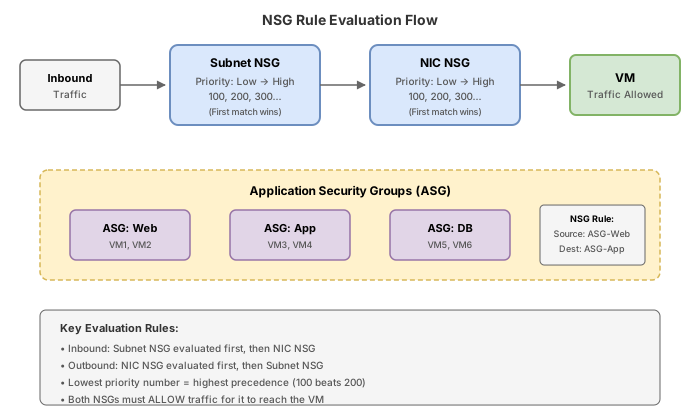
Application Security Groups allow you to group VM NICs by role. Rules reference ASGs instead of IP addresses, so when you add a new web server, it automatically inherits the correct security rules simply by assigning its NIC to the ASG.
All NICs assigned to the same ASG must exist in the same virtual network. You cannot use an ASG in a rule if the source/destination NIC is in a different VNet.
Azure CLI
# Create ASG for each tier
az network asg create \
  --resource-group $RG \
  --name asg-web \
  --location $LOCATION

az network asg create \
  --resource-group $RG \
  --name asg-app \
  --location $LOCATION

az network asg create \
  --resource-group $RG \
  --name asg-db \
  --location $LOCATION
Azure PowerShell
# Create ASGs for each tier
New-AzApplicationSecurityGroup `
  -ResourceGroupName $rg `
  -Name "asg-web" `
  -Location $location

New-AzApplicationSecurityGroup `
  -ResourceGroupName $rg `
  -Name "asg-app" `
  -Location $location

New-AzApplicationSecurityGroup `
  -ResourceGroupName $rg `
  -Name "asg-db" `
  -Location $location
Task 3: Create NSGs with rules using ASGs and service tags
NSG rules are evaluated by priority (lowest number = highest priority). Azure has default rules at priority 65000-65500 that allow VNet-to-VNet and outbound internet by default. Your custom rules must use priorities between 100-4096.
Rule processing order:
- Inbound: NSG on subnet first, then NSG on NIC
- Outbound: NSG on NIC first, then NSG on subnet
- Lower priority number wins (evaluated first)
- Once a rule matches, evaluation stops
Azure CLI
# Create NSG for the web tier
az network nsg create \
  --resource-group $RG \
  --name nsg-web \
  --location $LOCATION

# Allow HTTP from Internet to web ASG
az network nsg rule create \
  --resource-group $RG \
  --nsg-name nsg-web \
  --name Allow-HTTP-Inbound \
  --priority 100 \
  --direction Inbound \
  --access Allow \
  --protocol Tcp \
  --source-address-prefixes Internet \
  --source-port-ranges '*' \
  --destination-asgs asg-web \
  --destination-port-ranges 80

# Allow HTTPS from Internet to web ASG
az network nsg rule create \
  --resource-group $RG \
  --nsg-name nsg-web \
  --name Allow-HTTPS-Inbound \
  --priority 110 \
  --direction Inbound \
  --access Allow \
  --protocol Tcp \
  --source-address-prefixes Internet \
  --source-port-ranges '*' \
  --destination-asgs asg-web \
  --destination-port-ranges 443

# Allow Azure Load Balancer health probes
az network nsg rule create \
  --resource-group $RG \
  --nsg-name nsg-web \
  --name Allow-AzureLB-Inbound \
  --priority 120 \
  --direction Inbound \
  --access Allow \
  --protocol '*' \
  --source-address-prefixes AzureLoadBalancer \
  --source-port-ranges '*' \
  --destination-address-prefixes '*' \
  --destination-port-ranges '*'

# Deny all other inbound traffic
az network nsg rule create \
  --resource-group $RG \
  --nsg-name nsg-web \
  --name Deny-All-Inbound \
  --priority 4096 \
  --direction Inbound \
  --access Deny \
  --protocol '*' \
  --source-address-prefixes '*' \
  --source-port-ranges '*' \
  --destination-address-prefixes '*' \
  --destination-port-ranges '*'

# Create NSG for the app tier
az network nsg create \
  --resource-group $RG \
  --name nsg-app \
  --location $LOCATION

# Allow port 8080 from web ASG to app ASG only
az network nsg rule create \
  --resource-group $RG \
  --nsg-name nsg-app \
  --name Allow-Web-To-App \
  --priority 100 \
  --direction Inbound \
  --access Allow \
  --protocol Tcp \
  --source-asgs asg-web \
  --source-port-ranges '*' \
  --destination-asgs asg-app \
  --destination-port-ranges 8080

# Deny all other inbound
az network nsg rule create \
  --resource-group $RG \
  --nsg-name nsg-app \
  --name Deny-All-Inbound \
  --priority 4096 \
  --direction Inbound \
  --access Deny \
  --protocol '*' \
  --source-address-prefixes '*' \
  --source-port-ranges '*' \
  --destination-address-prefixes '*' \
  --destination-port-ranges '*'

# Create NSG for the database tier
az network nsg create \
  --resource-group $RG \
  --name nsg-db \
  --location $LOCATION

# Allow SQL from app ASG to db ASG only
az network nsg rule create \
  --resource-group $RG \
  --nsg-name nsg-db \
  --name Allow-App-To-DB \
  --priority 100 \
  --direction Inbound \
  --access Allow \
  --protocol Tcp \
  --source-asgs asg-app \
  --source-port-ranges '*' \
  --destination-asgs asg-db \
  --destination-port-ranges 1433

# Deny all other inbound
az network nsg rule create \
  --resource-group $RG \
  --nsg-name nsg-db \
  --name Deny-All-Inbound \
  --priority 4096 \
  --direction Inbound \
  --access Deny \
  --protocol '*' \
  --source-address-prefixes '*' \
  --source-port-ranges '*' \
  --destination-address-prefixes '*' \
  --destination-port-ranges '*'
Azure PowerShell
# Get ASG references
$asgWeb = Get-AzApplicationSecurityGroup -ResourceGroupName $rg -Name "asg-web"
$asgApp = Get-AzApplicationSecurityGroup -ResourceGroupName $rg -Name "asg-app"
$asgDb = Get-AzApplicationSecurityGroup -ResourceGroupName $rg -Name "asg-db"

# Web tier NSG rules
$webRule1 = New-AzNetworkSecurityRuleConfig `
  -Name "Allow-HTTP-Inbound" `
  -Priority 100 `
  -Direction Inbound `
  -Access Allow `
  -Protocol Tcp `
  -SourceAddressPrefix Internet `
  -SourcePortRange '*' `
  -DestinationApplicationSecurityGroupId $asgWeb.Id `
  -DestinationPortRange 80

$webRule2 = New-AzNetworkSecurityRuleConfig `
  -Name "Allow-HTTPS-Inbound" `
  -Priority 110 `
  -Direction Inbound `
  -Access Allow `
  -Protocol Tcp `
  -SourceAddressPrefix Internet `
  -SourcePortRange '*' `
  -DestinationApplicationSecurityGroupId $asgWeb.Id `
  -DestinationPortRange 443

$webRule3 = New-AzNetworkSecurityRuleConfig `
  -Name "Deny-All-Inbound" `
  -Priority 4096 `
  -Direction Inbound `
  -Access Deny `
  -Protocol '*' `
  -SourceAddressPrefix '*' `
  -SourcePortRange '*' `
  -DestinationAddressPrefix '*' `
  -DestinationPortRange '*'

New-AzNetworkSecurityGroup `
  -ResourceGroupName $rg `
  -Name "nsg-web" `
  -Location $location `
  -SecurityRules $webRule1, $webRule2, $webRule3

# App tier NSG rules
$appRule1 = New-AzNetworkSecurityRuleConfig `
  -Name "Allow-Web-To-App" `
  -Priority 100 `
  -Direction Inbound `
  -Access Allow `
  -Protocol Tcp `
  -SourceApplicationSecurityGroupId $asgWeb.Id `
  -SourcePortRange '*' `
  -DestinationApplicationSecurityGroupId $asgApp.Id `
  -DestinationPortRange 8080

$appRule2 = New-AzNetworkSecurityRuleConfig `
  -Name "Deny-All-Inbound" `
  -Priority 4096 `
  -Direction Inbound `
  -Access Deny `
  -Protocol '*' `
  -SourceAddressPrefix '*' `
  -SourcePortRange '*' `
  -DestinationAddressPrefix '*' `
  -DestinationPortRange '*'

New-AzNetworkSecurityGroup `
  -ResourceGroupName $rg `
  -Name "nsg-app" `
  -Location $location `
  -SecurityRules $appRule1, $appRule2

# DB tier NSG rules
$dbRule1 = New-AzNetworkSecurityRuleConfig `
  -Name "Allow-App-To-DB" `
  -Priority 100 `
  -Direction Inbound `
  -Access Allow `
  -Protocol Tcp `
  -SourceApplicationSecurityGroupId $asgApp.Id `
  -SourcePortRange '*' `
  -DestinationApplicationSecurityGroupId $asgDb.Id `
  -DestinationPortRange 1433

$dbRule2 = New-AzNetworkSecurityRuleConfig `
  -Name "Deny-All-Inbound" `
  -Priority 4096 `
  -Direction Inbound `
  -Access Deny `
  -Protocol '*' `
  -SourceAddressPrefix '*' `
  -SourcePortRange '*' `
  -DestinationAddressPrefix '*' `
  -DestinationPortRange '*'

New-AzNetworkSecurityGroup `
  -ResourceGroupName $rg `
  -Name "nsg-db" `
  -Location $location `
  -SecurityRules $dbRule1, $dbRule2
Task 4: Associate NSGs to subnets
Azure CLI
# Associate NSGs with their respective subnets
az network vnet subnet update \
  --resource-group $RG \
  --vnet-name vnet-threetier \
  --name snet-web \
  --network-security-group nsg-web

az network vnet subnet update \
  --resource-group $RG \
  --vnet-name vnet-threetier \
  --name snet-app \
  --network-security-group nsg-app

az network vnet subnet update \
  --resource-group $RG \
  --vnet-name vnet-threetier \
  --name snet-db \
  --network-security-group nsg-db
Azure PowerShell
$vnet = Get-AzVirtualNetwork -ResourceGroupName $rg -Name "vnet-threetier"
$nsgWeb = Get-AzNetworkSecurityGroup -ResourceGroupName $rg -Name "nsg-web"
$nsgApp = Get-AzNetworkSecurityGroup -ResourceGroupName $rg -Name "nsg-app"
$nsgDb = Get-AzNetworkSecurityGroup -ResourceGroupName $rg -Name "nsg-db"
# Associate NSG to web subnet
$webSubnetConfig = Get-AzVirtualNetworkSubnetConfig -VirtualNetwork $vnet -Name "snet-web"
$webSubnetConfig.NetworkSecurityGroup = $nsgWeb
Set-AzVirtualNetwork -VirtualNetwork $vnet
# Refresh VNet reference and associate app subnet
$vnet = Get-AzVirtualNetwork -ResourceGroupName $rg -Name "vnet-threetier"
$appSubnetConfig = Get-AzVirtualNetworkSubnetConfig -VirtualNetwork $vnet -Name "snet-app"
$appSubnetConfig.NetworkSecurityGroup = $nsgApp
Set-AzVirtualNetwork -VirtualNetwork $vnet
# Refresh and associate db subnet
$vnet = Get-AzVirtualNetwork -ResourceGroupName $rg -Name "vnet-threetier"
$dbSubnetConfig = Get-AzVirtualNetworkSubnetConfig -VirtualNetwork $vnet -Name "snet-db"
$dbSubnetConfig.NetworkSecurityGroup = $nsgDb
Set-AzVirtualNetwork -VirtualNetwork $vnet
### Azure PowerShell
```powershell
# After VM creation, assign NICs to ASGs
$webNic = Get-AzNetworkInterface -ResourceGroupName $rg | Where-Object { $_.Name -like "*web*" }
$appNic = Get-AzNetworkInterface -ResourceGroupName $rg | Where-Object { $_.Name -like "*app*" }
$dbNic = Get-AzNetworkInterface -ResourceGroupName $rg | Where-Object { $_.Name -like "*db*" }
$asgWeb = Get-AzApplicationSecurityGroup -ResourceGroupName $rg -Name "asg-web"
$asgApp = Get-AzApplicationSecurityGroup -ResourceGroupName $rg -Name "asg-app"
$asgDb = Get-AzApplicationSecurityGroup -ResourceGroupName $rg -Name "asg-db"
# Assign web NIC to web ASG
$webNic.IpConfigurations[0].ApplicationSecurityGroups = @($asgWeb)
$webNic | Set-AzNetworkInterface
# Assign app NIC to app ASG
$appNic.IpConfigurations[0].ApplicationSecurityGroups = @($asgApp)
$appNic | Set-AzNetworkInterface
# Assign db NIC to db ASG
$dbNic.IpConfigurations[0].ApplicationSecurityGroups = @($asgDb)
$dbNic | Set-AzNetworkInterface
Task 6: View effective security rules
Effective security rules show the combined result of all NSGs applied to a NIC (both subnet-level and NIC-level), including default rules.
Azure CLI
# View effective NSG rules for the web VM NIC
az network nic list-effective-nsg \
  --resource-group $RG \
  --name $WEB_NIC \
  --output table

# View effective NSG rules for the app VM NIC
az network nic list-effective-nsg \
  --resource-group $RG \
  --name $APP_NIC \
  --output table

# Use IP flow verify to test connectivity (web to app on 8080)
az network watcher test-ip-flow \
  --direction Outbound \
  --protocol TCP \
  --local 10.0.1.4:* \
  --remote 10.0.2.4:8080 \
  --vm vm-web-01 \
  --resource-group $RG

# Test blocked path (web directly to db on 1433 - should be denied)
az network watcher test-ip-flow \
  --direction Outbound \
  --protocol TCP \
  --local 10.0.1.4:* \
  --remote 10.0.3.4:1433 \
  --vm vm-web-01 \
  --resource-group $RG
Azure PowerShell
# View effective NSG rules
Get-AzEffectiveNetworkSecurityGroup `
  -NetworkInterfaceName $webNic.Name `
  -ResourceGroupName $rg

# Test IP flow (requires Network Watcher enabled)
Test-AzNetworkWatcherIPFlow `
  -NetworkWatcher (Get-AzNetworkWatcher -ResourceGroupName "NetworkWatcherRG") `
  -TargetVirtualMachineId (Get-AzVM -ResourceGroupName $rg -Name "vm-web-01").Id `
  -Direction Outbound `
  -Protocol TCP `
  -LocalIPAddress "10.0.1.4" `
  -LocalPort "*" `
  -RemoteIPAddress "10.0.2.4" `
  -RemotePort "8080"
Portal steps
- Navigate to Virtual machines > select vm-web-01
- Under Networking > Network settings, click Effective security rules
- Review the combined list of rules from subnet NSG and any NIC-level NSG
- Use the Connection troubleshoot tab to test connectivity between VMs
Break & fix
Scenario 1: Rule priority conflict (deny evaluated before allow)
# Create a deny-all rule at a LOW priority number (evaluated first)
az network nsg rule create \
  --resource-group $RG \
  --nsg-name nsg-web \
  --name Deny-All-Inbound \
  --priority 200 \
  --direction Inbound \
  --access Deny \
  --protocol '*' \
  --source-address-prefixes '*' \
  --source-port-ranges '*' \
  --destination-address-prefixes '*' \
  --destination-port-ranges '*'

# Create an allow rule for SSH at a HIGHER priority number (evaluated after the deny)
az network nsg rule create \
  --resource-group $RG \
  --nsg-name nsg-web \
  --name Allow-SSH-Broken \
  --priority 4095 \
  --direction Inbound \
  --access Allow \
  --protocol Tcp \
  --source-address-prefixes '*' \
  --source-port-ranges '*' \
  --destination-address-prefixes '*' \
  --destination-port-ranges 22
Symptom: SSH traffic is denied even though an Allow rule exists for port 22.
Root cause: The Deny-All-Inbound rule has priority 200 and the Allow-SSH-Broken rule has priority 4095. Because lower priority numbers are evaluated first, the Deny rule at 200 matches all inbound traffic and blocks it before the Allow rule at 4095 is ever reached.
Fix: Change the Allow-SSH rule to a priority number lower than the Deny rule (200) so it is evaluated first, while avoiding conflicts with existing rules at priorities 100 and 110:
az network nsg rule delete \
  --resource-group $RG \
  --nsg-name nsg-web \
  --name Allow-SSH-Broken

az network nsg rule create \
  --resource-group $RG \
  --nsg-name nsg-web \
  --name Allow-SSH-Fixed \
  --priority 150 \
  --direction Inbound \
  --access Allow \
  --protocol Tcp \
  --source-address-prefixes '*' \
  --source-port-ranges '*' \
  --destination-asgs asg-web \
  --destination-port-ranges 22
Scenario 2: ASG used across VNets (not supported)
# Create a second VNet
az network vnet create \
  --resource-group $RG \
  --name vnet-separate \
  --location $LOCATION \
  --address-prefixes 10.1.0.0/16 \
  --subnet-name snet-other \
  --subnet-prefixes 10.1.1.0/24

# Create a NIC in the second VNet and try to assign it to the same ASG
az network nic create \
  --resource-group $RG \
  --name nic-crossvnet \
  --vnet-name vnet-separate \
  --subnet snet-other \
  --application-security-groups asg-web
Symptom: The command fails with an error indicating the ASG and NIC must be in the same virtual network.
Root cause: Application Security Groups have a VNet-scope constraint. All NICs assigned to a given ASG must reside in the same virtual network. This is a platform limitation by design.
Fix: Create a separate ASG in the second VNet if you need the same logical grouping:
az network asg create \
  --resource-group $RG \
  --name asg-web-vnet2 \
  --location $LOCATION

az network nic create \
  --resource-group $RG \
  --name nic-crossvnet \
  --vnet-name vnet-separate \
  --subnet snet-other \
  --application-security-groups asg-web-vnet2
Scenario 3: Misunderstanding stateful behavior
# A student adds an explicit outbound deny rule blocking all traffic from DB tier
az network nsg rule create \
  --resource-group $RG \
  --nsg-name nsg-db \
  --name Deny-All-Outbound \
  --priority 4000 \
  --direction Outbound \
  --access Deny \
  --protocol '*' \
  --source-address-prefixes '*' \
  --source-port-ranges '*' \
  --destination-address-prefixes '*' \
  --destination-port-ranges '*'
Symptom: The student expects that existing SQL connections from app to DB will break because return traffic (DB to app) is now blocked.
Root cause: NSGs are stateful. Once an inbound connection is allowed (app to DB on 1433), the return traffic for that established connection is automatically allowed regardless of outbound rules. The outbound deny rule will only affect NEW outbound connections initiated by the DB tier.
Lesson: You do not need explicit outbound allow rules for return traffic on established connections. The stateful tracking handles this automatically.
Knowledge check
1. NSG rules are evaluated in order of priority. Which statement is correct about rule evaluation?
2. You create an ASG named 'asg-web' in VNet-A. A colleague tries to assign a NIC in VNet-B to this ASG. What happens?
3. A VM has an NSG on its subnet that allows TCP/443 inbound and an NSG on its NIC that denies all inbound. What is the result for HTTPS traffic?
4. Which of the following are default NSG rules that cannot be deleted?
5. An inbound allow rule permits TCP/1433 from the app tier to the database tier. Do you need a separate outbound rule on the database NSG for return traffic?
6. With augmented security rules, what is the maximum number of rules per NSG?
Cleanup
Remove all resources created in this challenge.
Azure CLI
az group delete --name rg-nsg-challenge --yes --no-wait
Azure PowerShell
Remove-AzResourceGroup -Name "rg-nsg-challenge" -Force -AsJob
After a few minutes, confirm deletion:
az group show --name rg-nsg-challenge 2>&1 | grep -q "not found" && echo "Deleted" || echo "Still exists"
NSGs and ASGs are free resources. The only costs in this challenge come from the VMs created in Task 5. If you skip VM creation and focus only on NSG/ASG configuration, the cost is $0.00. If you create the VMs, expect approximately $0.03/hour for three Standard_B1s instances.