Challenge 43: Azure Firewall Manager and policy hierarchy
60-90 minutes | ~$1.75/hour (Premium SKU) | Exam weight: 10-15%
Azure Firewall Premium costs approximately $1.75/hour ($1,277/month). This is significantly more expensive than Standard. Deploy only for the duration of this lab and delete immediately after. The Premium tier is required for TLS inspection and IDPS features covered in this challenge.
Scenario
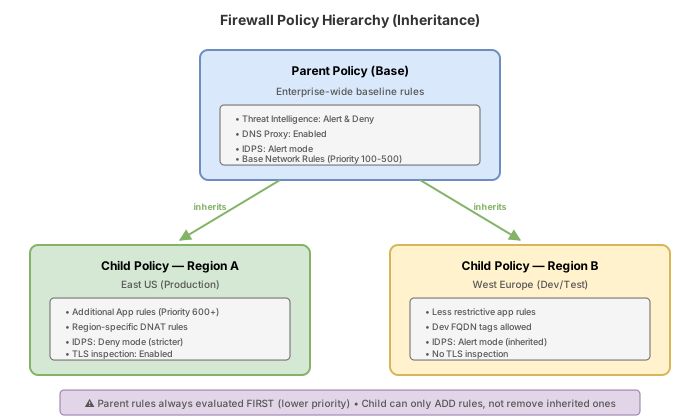
Contoso Financial Services operates in multiple Azure regions (East US 2 and West Europe). Their security policy mandates:
- A baseline set of rules that applies globally to all regions (parent policy)
- Region-specific rules for compliance with local regulations (child policies)
- Intrusion Detection and Prevention System (IDPS) for detecting and blocking known attack patterns
- TLS inspection to detect threats in encrypted traffic to external services
- URL-level filtering (not just FQDN) and Web category blocking
You must implement a policy hierarchy using Azure Firewall Manager, deploy Premium SKU firewalls, and enable the advanced security features.
Exam skills covered
| Skill | Weight |
|---|---|
| Create and manage firewall policies with inheritance | High |
| Understand parent/child policy relationships | High |
| Deploy Azure Firewall Premium SKU | Medium |
| Configure IDPS (Intrusion Detection and Prevention) | Medium |
| Understand TLS inspection requirements | Medium |
| Configure URL filtering and Web categories | Medium |
| Compare Firewall SKUs (Basic/Standard/Premium) | High |
Prerequisites
- Azure subscription with Contributor role
- Azure CLI 2.60+ with the
azure-firewallextension - Azure PowerShell Az 12.0+
- Completion of Challenge 42 (understanding of firewall policies and rules)
- A Key Vault (for TLS inspection certificate storage)
Azure Firewall SKU comparison
| Feature | Basic | Standard | Premium |
|---|---|---|---|
| Threat intelligence | Alert only | Alert + Deny | Alert + Deny |
| FQDN filtering | Limited | Full | Full |
| Network rules | Yes | Yes | Yes |
| DNAT | Yes | Yes | Yes |
| IDPS | No | No | Yes |
| TLS inspection | No | No | Yes |
| URL filtering | No | No | Yes |
| Web categories | No | FQDN-based | Full URL-based |
| Policy inheritance | No | Yes | Yes |
| Forced tunneling | No | Yes | Yes |
| Cost (approx.) | $0.395/hr | $1.25/hr | $1.75/hr |
Task 1: Create a parent (base) firewall policy
The parent policy contains baseline rules that apply to all regions. Child policies inherit these rules and cannot override or delete them, only add additional rules.
- Child policies inherit ALL rule collection groups from the parent
- A child policy cannot delete or modify inherited parent rules
- Child policies can only ADD new rule collection groups with different priorities
- Priority numbers used in the parent are reserved and cannot be reused in children
- Parent policy can be Standard SKU; child policies can be Premium (but not the reverse)
Azure CLI
# Set variables
RG="rg-fwmanager-challenge"
LOCATION_PRIMARY="eastus2"
LOCATION_SECONDARY="westeurope"

# Create resource group
az group create --name $RG --location $LOCATION_PRIMARY

# Create the parent (base) policy - Premium SKU needed since children use Premium features
az network firewall policy create \
  --resource-group $RG \
  --name policy-parent-global \
  --location $LOCATION_PRIMARY \
  --sku Premium \
  --threat-intel-mode Deny

# Create a rule collection group in the parent for baseline rules
az network firewall policy rule-collection-group create \
  --resource-group $RG \
  --policy-name policy-parent-global \
  --name rcg-baseline-network \
  --priority 200

# Add baseline network rule - Allow DNS everywhere
az network firewall policy rule-collection-group collection add-filter-collection \
  --resource-group $RG \
  --policy-name policy-parent-global \
  --rule-collection-group-name rcg-baseline-network \
  --name rc-global-dns \
  --collection-priority 100 \
  --action Allow \
  --rule-name allow-dns-global \
  --rule-type NetworkRule \
  --source-addresses "10.0.0.0/8" \
  --destination-addresses "168.63.129.16" \
  --destination-ports 53 \
  --ip-protocols UDP TCP

# Add baseline network rule - Allow NTP everywhere
az network firewall policy rule-collection-group collection add-filter-collection \
  --resource-group $RG \
  --policy-name policy-parent-global \
  --rule-collection-group-name rcg-baseline-network \
  --name rc-global-ntp \
  --collection-priority 200 \
  --action Allow \
  --rule-name allow-ntp-global \
  --rule-type NetworkRule \
  --source-addresses "10.0.0.0/8" \
  --destination-addresses "*" \
  --destination-ports 123 \
  --ip-protocols UDP

# Create baseline application rule collection group
az network firewall policy rule-collection-group create \
  --resource-group $RG \
  --policy-name policy-parent-global \
  --name rcg-baseline-application \
  --priority 300

# Add baseline application rule - Allow Microsoft services globally
az network firewall policy rule-collection-group collection add-filter-collection \
  --resource-group $RG \
  --policy-name policy-parent-global \
  --rule-collection-group-name rcg-baseline-application \
  --name rc-global-microsoft \
  --collection-priority 100 \
  --action Allow \
  --rule-name allow-microsoft \
  --rule-type ApplicationRule \
  --source-addresses "10.0.0.0/8" \
  --protocols Https=443 Http=80 \
  --target-fqdns "*.microsoft.com" "*.azure.com" "*.windows.net" "*.windowsupdate.com"

# Add baseline deny-all as catch-all (high priority number = low precedence)
az network firewall policy rule-collection-group collection add-filter-collection \
  --resource-group $RG \
  --policy-name policy-parent-global \
  --rule-collection-group-name rcg-baseline-application \
  --name rc-global-deny-all \
  --collection-priority 5000 \
  --action Deny \
  --rule-name deny-all-web \
  --rule-type ApplicationRule \
  --source-addresses "*" \
  --protocols Https=443 Http=80 \
  --target-fqdns "*"
Azure PowerShell
# Set variables
$rg = "rg-fwmanager-challenge"
$locationPrimary = "eastus2"
$locationSecondary = "westeurope"

# Create resource group
New-AzResourceGroup -Name $rg -Location $locationPrimary

# Create parent policy (Premium SKU for IDPS and TLS)
$parentPolicy = New-AzFirewallPolicy `
  -ResourceGroupName $rg `
  -Name "policy-parent-global" `
  -Location $locationPrimary `
  -SkuTier Premium `
  -ThreatIntelMode Deny

# Create baseline network rules
$dnsRule = New-AzFirewallPolicyNetworkRule `
  -Name "allow-dns-global" `
  -SourceAddress "10.0.0.0/8" `
  -DestinationAddress "168.63.129.16" `
  -DestinationPort "53" `
  -Protocol UDP, TCP

$dnsCollection = New-AzFirewallPolicyFilterRuleCollection `
  -Name "rc-global-dns" `
  -Priority 100 `
  -ActionType Allow `
  -Rule $dnsRule

$ntpRule = New-AzFirewallPolicyNetworkRule `
  -Name "allow-ntp-global" `
  -SourceAddress "10.0.0.0/8" `
  -DestinationAddress "*" `
  -DestinationPort "123" `
  -Protocol UDP

$ntpCollection = New-AzFirewallPolicyFilterRuleCollection `
  -Name "rc-global-ntp" `
  -Priority 200 `
  -ActionType Allow `
  -Rule $ntpRule

New-AzFirewallPolicyRuleCollectionGroup `
  -ResourceGroupName $rg `
  -FirewallPolicyName "policy-parent-global" `
  -Name "rcg-baseline-network" `
  -Priority 200 `
  -RuleCollection @($dnsCollection, $ntpCollection)

# Create baseline application rules
$msRule = New-AzFirewallPolicyApplicationRule `
  -Name "allow-microsoft" `
  -SourceAddress "10.0.0.0/8" `
  -TargetFqdn "*.microsoft.com", "*.azure.com", "*.windows.net", "*.windowsupdate.com" `
  -Protocol "Https:443", "Http:80"

$msCollection = New-AzFirewallPolicyFilterRuleCollection `
  -Name "rc-global-microsoft" `
  -Priority 100 `
  -ActionType Allow `
  -Rule $msRule

New-AzFirewallPolicyRuleCollectionGroup `
  -ResourceGroupName $rg `
  -FirewallPolicyName "policy-parent-global" `
  -Name "rcg-baseline-application" `
  -Priority 300 `
  -RuleCollection @($msCollection)
Task 2: Create child policies with regional overrides
Child policies inherit the parent's rules and add region-specific rules. The --base-policy parameter establishes the inheritance relationship.
Azure CLI
# Create child policy for East US 2 (inherits from parent)
az network firewall policy create \
  --resource-group $RG \
  --name policy-child-eastus2 \
  --location $LOCATION_PRIMARY \
  --sku Premium \
  --base-policy policy-parent-global

# Create child policy for West Europe (inherits from parent)
az network firewall policy create \
  --resource-group $RG \
  --name policy-child-westeurope \
  --location $LOCATION_SECONDARY \
  --sku Premium \
  --base-policy policy-parent-global

# Add region-specific rules to East US 2 child
# Allow access to US-specific SaaS applications
az network firewall policy rule-collection-group create \
  --resource-group $RG \
  --policy-name policy-child-eastus2 \
  --name rcg-regional-eastus2 \
  --priority 400

az network firewall policy rule-collection-group collection add-filter-collection \
  --resource-group $RG \
  --policy-name policy-child-eastus2 \
  --rule-collection-group-name rcg-regional-eastus2 \
  --name rc-us-saas \
  --collection-priority 100 \
  --action Allow \
  --rule-name allow-us-saas \
  --rule-type ApplicationRule \
  --source-addresses "10.1.0.0/16" \
  --protocols Https=443 \
  --target-fqdns "*.salesforce.com" "*.slack.com" "*.github.com"

# Add region-specific rules to West Europe child
# Allow access to EU-specific services
az network firewall policy rule-collection-group create \
  --resource-group $RG \
  --policy-name policy-child-westeurope \
  --name rcg-regional-westeurope \
  --priority 400

az network firewall policy rule-collection-group collection add-filter-collection \
  --resource-group $RG \
  --policy-name policy-child-westeurope \
  --rule-collection-group-name rcg-regional-westeurope \
  --name rc-eu-saas \
  --collection-priority 100 \
  --action Allow \
  --rule-name allow-eu-services \
  --rule-type ApplicationRule \
  --source-addresses "10.2.0.0/16" \
  --protocols Https=443 \
  --target-fqdns "*.eu.auth0.com" "*.europe.example.com"
Azure PowerShell
# Create child policies inheriting from parent
$parentPolicy = Get-AzFirewallPolicy -ResourceGroupName $rg -Name "policy-parent-global"

$childEastUs = New-AzFirewallPolicy `
  -ResourceGroupName $rg `
  -Name "policy-child-eastus2" `
  -Location $locationPrimary `
  -SkuTier Premium `
  -BasePolicy $parentPolicy.Id

$childWestEurope = New-AzFirewallPolicy `
  -ResourceGroupName $rg `
  -Name "policy-child-westeurope" `
  -Location $locationSecondary `
  -SkuTier Premium `
  -BasePolicy $parentPolicy.Id

# Add regional rules to East US 2 child
$usSaasRule = New-AzFirewallPolicyApplicationRule `
  -Name "allow-us-saas" `
  -SourceAddress "10.1.0.0/16" `
  -TargetFqdn "*.salesforce.com", "*.slack.com", "*.github.com" `
  -Protocol "Https:443"

$usSaasCollection = New-AzFirewallPolicyFilterRuleCollection `
  -Name "rc-us-saas" `
  -Priority 100 `
  -ActionType Allow `
  -Rule $usSaasRule

New-AzFirewallPolicyRuleCollectionGroup `
  -ResourceGroupName $rg `
  -FirewallPolicyName "policy-child-eastus2" `
  -Name "rcg-regional-eastus2" `
  -Priority 400 `
  -RuleCollection @($usSaasCollection)
Task 3: Deploy Azure Firewall Premium and enable IDPS
IDPS (Intrusion Detection and Prevention System) inspects network traffic for known attack signatures and patterns. It requires the Premium SKU.
Azure CLI
# Create hub VNet for the Premium firewall
az network vnet create \
  --resource-group $RG \
  --name vnet-hub-eastus2 \
  --location $LOCATION_PRIMARY \
  --address-prefixes 10.0.0.0/16 \
  --subnet-name AzureFirewallSubnet \
  --subnet-prefixes 10.0.1.0/26

# Create public IP for the Premium firewall
az network public-ip create \
  --resource-group $RG \
  --name pip-fw-premium \
  --location $LOCATION_PRIMARY \
  --sku Standard \
  --allocation-method Static

# Deploy Azure Firewall Premium with the child policy
az network firewall create \
  --resource-group $RG \
  --name fw-premium-eastus2 \
  --location $LOCATION_PRIMARY \
  --sku AZFW_VNet \
  --tier Premium \
  --firewall-policy policy-child-eastus2

# Configure IP configuration
az network firewall ip-config create \
  --resource-group $RG \
  --firewall-name fw-premium-eastus2 \
  --name fw-ipconfig \
  --public-ip-address pip-fw-premium \
  --vnet-name vnet-hub-eastus2

# Enable IDPS in Deny mode on the child policy
az network firewall policy update \
  --resource-group $RG \
  --name policy-child-eastus2 \
  --idps-mode Deny

# Alternatively, set IDPS to Alert mode first for testing
az network firewall policy update \
  --resource-group $RG \
  --name policy-child-eastus2 \
  --idps-mode Alert
Azure PowerShell
# Create hub VNet
$fwSubnet = New-AzVirtualNetworkSubnetConfig `
-Name "AzureFirewallSubnet" -AddressPrefix "10.0.1.0/26"
$hubVnet = New-AzVirtualNetwork `
-ResourceGroupName $rg `
-Name "vnet-hub-eastus2" `
-Location $locationPrimary `
-AddressPrefix "10.0.0.0/16" `
-Subnet $fwSubnet
# Create public IP
$pip = New-AzPublicIpAddress `
-ResourceGroupName $rg `
-Name "pip-fw-premium" `
-Location $locationPrimary `
-Sku Standard `
-AllocationMethod Static
# Deploy Premium firewall
$childPolicy = Get-AzFirewallPolicy -ResourceGroupName $rg -Name "policy-child-eastus2"
$hubVnet = Get-AzVirtualNetwork -ResourceGroupName $rg -Name "vnet-hub-eastus2"
$firewall = New-AzFirewall `
-ResourceGroupName $rg `
-Name "fw-premium-eastus2" `
-Location $locationPrimary `
-VirtualNetwork $hubVnet `
-PublicIpAddress $pip `
-FirewallPolicyId $childPolicy.Id `
-SkuTier Premium
# Enable IDPS
$policy = Get-AzFirewallPolicy -ResourceGroupName $rg -Name "policy-child-eastus2"
$policy.IntrusionDetection = New-AzFirewallPolicyIntrusionDetection -Mode "Deny"
$policy | Set-AzFirewallPolicy
### Azure PowerShell
```powershell
# Create Key Vault
$kvName = "kv-fwtls-$(Get-Random -Minimum 1000 -Maximum 9999)"
$kv = New-AzKeyVault `
-ResourceGroupName $rg `
-Name $kvName `
-Location $locationPrimary `
-EnableRbacAuthorization $false
# Create certificate policy and generate cert (lab purposes)
$certPolicy = New-AzKeyVaultCertificatePolicy `
-SubjectName "CN=Contoso Firewall Intermediate CA" `
-IssuerName Self `
-ValidityInMonths 12 `
-KeyUsage KeyCertSign, CRLSign `
-CertificateTransparency $false
Add-AzKeyVaultCertificate `
-VaultName $kvName `
-Name "fw-intermediate-ca" `
-CertificatePolicy $certPolicy
# Get the secret ID for the certificate
$certSecret = Get-AzKeyVaultSecret -VaultName $kvName -Name "fw-intermediate-ca"
# Update policy with TLS inspection certificate
$policy = Get-AzFirewallPolicy -ResourceGroupName $rg -Name "policy-child-eastus2"
$policy.TransportSecurity = New-AzFirewallPolicyTransportSecurity `
-CertificateAuthority @{
Name = "fw-intermediate-ca"
KeyVaultSecretId = $certSecret.Id
}
$policy | Set-AzFirewallPolicy
Task 5: Configure URL filtering and Web categories
Premium SKU supports full URL filtering (path-level matching) and Web category filtering (blocking entire categories like gambling, malware, etc.).
Azure CLI
# Add URL filtering rule collection group
az network firewall policy rule-collection-group create \
  --resource-group $RG \
  --policy-name policy-child-eastus2 \
  --name rcg-url-filtering \
  --priority 500

# Allow specific URLs (not just FQDNs)
az network firewall policy rule-collection-group collection add-filter-collection \
  --resource-group $RG \
  --policy-name policy-child-eastus2 \
  --rule-collection-group-name rcg-url-filtering \
  --name rc-allow-specific-urls \
  --collection-priority 100 \
  --action Allow \
  --rule-name allow-github-repos \
  --rule-type ApplicationRule \
  --source-addresses "10.1.0.0/16" \
  --protocols Https=443 \
  --target-urls "github.com/contoso/*" "raw.githubusercontent.com/contoso/*"

# Block Web categories
az network firewall policy rule-collection-group collection add-filter-collection \
  --resource-group $RG \
  --policy-name policy-child-eastus2 \
  --rule-collection-group-name rcg-url-filtering \
  --name rc-block-categories \
  --collection-priority 200 \
  --action Deny \
  --rule-name block-risky-categories \
  --rule-type ApplicationRule \
  --source-addresses "10.1.0.0/16" \
  --protocols Https=443 Http=80 \
  --web-categories Gambling Malware Phishing
Azure PowerShell
# URL filtering rule
$urlRule = New-AzFirewallPolicyApplicationRule `
  -Name "allow-github-repos" `
  -SourceAddress "10.1.0.0/16" `
  -TargetUrl "github.com/contoso/*", "raw.githubusercontent.com/contoso/*" `
  -Protocol "Https:443"

$urlCollection = New-AzFirewallPolicyFilterRuleCollection `
  -Name "rc-allow-specific-urls" `
  -Priority 100 `
  -ActionType Allow `
  -Rule $urlRule

# Web category blocking rule
$webCatRule = New-AzFirewallPolicyApplicationRule `
  -Name "block-risky-categories" `
  -SourceAddress "10.1.0.0/16" `
  -WebCategory "Gambling", "Malware", "Phishing" `
  -Protocol "Https:443", "Http:80"

$webCatCollection = New-AzFirewallPolicyFilterRuleCollection `
  -Name "rc-block-categories" `
  -Priority 200 `
  -ActionType Deny `
  -Rule $webCatRule

New-AzFirewallPolicyRuleCollectionGroup `
  -ResourceGroupName $rg `
  -FirewallPolicyName "policy-child-eastus2" `
  -Name "rcg-url-filtering" `
  -Priority 500 `
  -RuleCollection @($urlCollection, $webCatCollection)
Break & fix
Scenario 1: Child policy priority collision with parent
# Parent has rcg-baseline-network at priority 200
# Try to create a child rule collection group at the SAME priority
az network firewall policy rule-collection-group create \
  --resource-group $RG \
  --policy-name policy-child-eastus2 \
  --name rcg-child-network \
  --priority 200
Symptom: The command fails with a priority conflict error because priority 200 is already used by an inherited rule collection group from the parent.
Root cause: Rule collection group priorities must be unique across the entire policy hierarchy (parent + child combined). Since the parent already uses priority 200 for rcg-baseline-network, the child cannot reuse it.
Fix: Use a priority number that does not conflict with any parent rule collection group:
az network firewall policy rule-collection-group create \
  --resource-group $RG \
  --policy-name policy-child-eastus2 \
  --name rcg-child-network \
  --priority 250
Scenario 2: TLS inspection breaking internal applications
Symptom: After enabling TLS inspection, internal applications that use certificate pinning (mobile banking apps, certain API clients) fail with TLS/certificate errors.
Root cause: TLS inspection uses the firewall's intermediate CA to re-sign decrypted traffic. Applications that pin specific certificates or CAs reject the re-signed certificate because it does not match their expected certificate.
Fix: Create bypass rules for applications that use certificate pinning:
# Add a network rule to bypass TLS inspection for specific destinations
az network firewall policy rule-collection-group collection add-filter-collection \
  --resource-group $RG \
  --policy-name policy-child-eastus2 \
  --rule-collection-group-name rcg-url-filtering \
  --name rc-tls-bypass \
  --collection-priority 50 \
  --action Allow \
  --rule-name bypass-cert-pinned-apps \
  --rule-type ApplicationRule \
  --source-addresses "10.1.0.0/16" \
  --protocols Https=443 \
  --target-fqdns "api.banking-partner.com" "pinned-service.internal.com"
Additionally, ensure the intermediate CA certificate is distributed to all client trust stores.
Scenario 3: IDPS false positives blocking legitimate traffic
Symptom: After enabling IDPS in Deny mode, legitimate application traffic is being blocked. Firewall logs show IDPS signature hits for normal traffic patterns.
Root cause: Some IDPS signatures have broad matching patterns that can trigger on legitimate traffic, especially during security scanning, load testing, or when applications use unusual HTTP methods or payload patterns.
Fix: Create signature override rules to change specific signatures to Alert mode while keeping the overall policy in Deny mode:
# Override a specific IDPS signature to Alert mode
az network firewall policy intrusion-detection add \
  --resource-group $RG \
  --policy-name policy-child-eastus2 \
  --mode Alert \
  --signature-id 2024897
In production, investigate each false positive, verify it is truly benign, and only then create overrides for specific signature IDs.
Knowledge check
1. A parent firewall policy has a rule collection group at priority 200. A child policy attempts to create a rule collection group at the same priority. What happens?
2. Which Azure Firewall feature requires the Premium SKU but is NOT available in Standard?
3. What is required for Azure Firewall TLS inspection to function?
4. What are the available IDPS modes on Azure Firewall Premium?
5. A child policy inherits rules from a parent policy. Can the child delete or modify the inherited rules?
6. What is the key difference between URL filtering (Premium) and FQDN filtering (Standard)?
Cleanup
Remove all resources immediately to stop Premium firewall charges.
Azure CLI
# Delete the entire resource group
az group delete --name rg-fwmanager-challenge --yes --no-wait
Azure PowerShell
Remove-AzResourceGroup -Name "rg-fwmanager-challenge" -Force -AsJob
Azure Firewall Premium charges ~$1.75/hour. Verify deletion immediately:
az group show --name rg-fwmanager-challenge 2>&1 | grep -q "not found" && echo "Deleted" || echo "Still exists - DELETE NOW!"
Azure Firewall Premium: ~$1.75/hour ($1,277/month). This is the most expensive resource in the AZ-700 challenge series. Delete all resources immediately after completing the lab. If you need to step away during the lab, delete the firewall first and recreate it when you return. The firewall policy and rules persist without cost; only the firewall instance itself incurs hourly charges.