Challenge 45: WAF on Application Gateway
60-90 minutes | ~$0.40/hour (Application Gateway WAF_v2 SKU) | Exam weight: 15-20%
The Application Gateway WAF_v2 SKU incurs a fixed cost of approximately $0.36/hour plus capacity unit charges. Delete resources after completing the exercises.
Scenario
Tailwind Traders runs a customer-facing web application behind Azure Application Gateway. The application has been targeted by repeated SQL injection and cross-site scripting (XSS) attacks. The security team needs to deploy a Web Application Firewall (WAF) policy in Prevention mode using the latest Microsoft Default Rule Set (DRS 2.1), create custom rules to block known bot patterns and rate-limit abusive IPs, and configure exclusions for legitimate API parameters that trigger false positives.
Your job is to create a WAF policy, associate it with an Application Gateway, configure managed and custom rules, set up exclusions, and implement per-listener policy overrides.
Exam skills covered
| Skill | Weight |
|---|---|
| Create a WAF policy for Application Gateway | High |
| Configure managed rule sets (DRS/OWASP) | High |
| Create custom WAF rules (MatchRule, RateLimitRule) | High |
| Configure WAF exclusions | Medium |
| Switch between Detection and Prevention modes | Medium |
| Associate WAF policy with listeners/site | Medium |
Prerequisites
- Azure subscription with Contributor role
- Azure CLI 2.60+ or Azure PowerShell Az 12.0+
- A deployed Application Gateway WAF_v2 SKU (or this challenge creates one)
- Basic understanding of HTTP headers, SQL injection, and OWASP concepts
Task 1: Create a WAF policy in Prevention mode
A WAF policy is the standalone resource that contains all WAF configuration. It can be associated with an entire Application Gateway, individual listeners, or specific path-based rules.
Azure CLI
# Set variables
RG="rg-tailwind-waf"
LOCATION="eastus2"
WAF_POLICY="waf-policy-tailwind"

# Create resource group
az group create --name $RG --location $LOCATION

# Create WAF policy
az network application-gateway waf-policy create \
  --name $WAF_POLICY \
  --resource-group $RG \
  --location $LOCATION

# Set policy to Prevention mode with request body inspection enabled
az network application-gateway waf-policy policy-setting update \
  --policy-name $WAF_POLICY \
  --resource-group $RG \
  --mode Prevention \
  --state Enabled \
  --request-body-check true \
  --max-request-body-size-in-kb 128 \
  --file-upload-limit-in-mb 100
Azure PowerShell
# Set variables
$rg = "rg-tailwind-waf"
$location = "eastus2"
$wafPolicyName = "waf-policy-tailwind"

# Create resource group
New-AzResourceGroup -Name $rg -Location $location

# Create WAF policy
$wafPolicy = New-AzApplicationGatewayFirewallPolicy `
  -ResourceGroupName $rg `
  -Name $wafPolicyName `
  -Location $location

# Configure policy settings (Prevention mode)
$policySetting = New-AzApplicationGatewayFirewallPolicySetting `
  -Mode Prevention `
  -State Enabled `
  -MaxRequestBodySizeInKb 128 `
  -FileUploadLimitInMb 100 `
  -RequestBodyCheck $true

$wafPolicy.PolicySettings = $policySetting
Set-AzApplicationGatewayFirewallPolicy `
  -InputObject $wafPolicy
Azure portal
- Search for Web Application Firewall policies and select Create.
- Set policy for to Application Gateway, subscription, resource group, policy name waf-policy-tailwind, region East US 2.
- On the Policy settings tab, set Mode to Prevention, State to Enabled.
- Enable Request body inspection, set max size to 128 KB.
- Select Review + create, then Create.
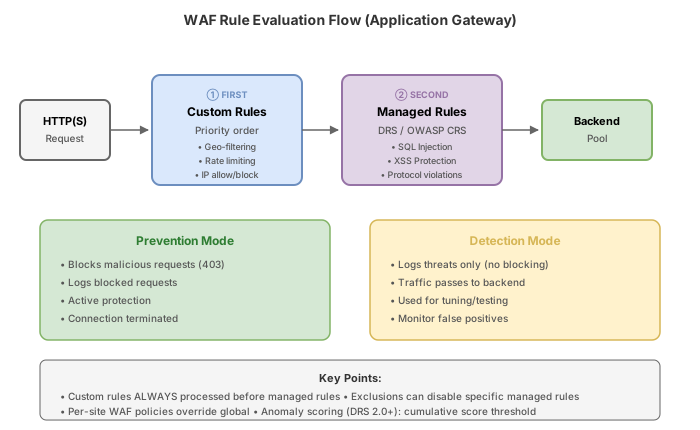
- Detection mode: Logs all rule matches but does NOT block requests. Use during initial deployment to identify false positives.
- Prevention mode: Actively blocks requests that match rules and returns a 403 Forbidden response. Only switch to Prevention after tuning exclusions.
Task 2: Configure the managed rule set (DRS 2.1)
The Microsoft Default Rule Set (DRS) 2.1 is the latest managed ruleset providing protection against SQL injection, XSS, local file inclusion, remote code execution, and more. It replaces the older OWASP CRS rulesets.
Azure CLI
# Add Microsoft Default Rule Set 2.1
az network application-gateway waf-policy managed-rule rule-set add \
  --policy-name $WAF_POLICY \
  --resource-group $RG \
  --type Microsoft_DefaultRuleSet \
  --version 2.1

# Add Bot Manager Rule Set (detects and blocks bad bots)
az network application-gateway waf-policy managed-rule rule-set add \
  --policy-name $WAF_POLICY \
  --resource-group $RG \
  --type Microsoft_BotManagerRuleSet \
  --version 1.1

# List configured managed rule sets
az network application-gateway waf-policy managed-rule rule-set list \
  --policy-name $WAF_POLICY \
  --resource-group $RG \
  -o table
Azure PowerShell
# Get the WAF policy
$wafPolicy = Get-AzApplicationGatewayFirewallPolicy `
  -ResourceGroupName $rg `
  -Name $wafPolicyName

# Create managed rule set for DRS 2.1
$drsRuleSet = New-AzApplicationGatewayFirewallPolicyManagedRuleSet `
  -RuleSetType "Microsoft_DefaultRuleSet" `
  -RuleSetVersion "2.1"

# Create Bot Manager rule set
$botRuleSet = New-AzApplicationGatewayFirewallPolicyManagedRuleSet `
  -RuleSetType "Microsoft_BotManagerRuleSet" `
  -RuleSetVersion "1.1"

# Apply managed rules to the policy
$managedRules = New-AzApplicationGatewayFirewallPolicyManagedRule `
  -ManagedRuleSet @($drsRuleSet, $botRuleSet)

$wafPolicy.ManagedRules = $managedRules
Set-AzApplicationGatewayFirewallPolicy -InputObject $wafPolicy
Azure portal
- Open waf-policy-tailwind, select Managed rules under Settings.
- Select Add and choose Microsoft_DefaultRuleSet version 2.1.
- Select Add again and choose Microsoft_BotManagerRuleSet version 1.1.
- Select Save.
Task 3: Create custom rules
Custom rules are evaluated BEFORE managed rules. They support two types:
- MatchRule: Evaluates match conditions and takes action (Allow, Block, Log).
- RateLimitRule: Counts requests matching conditions over a time window and blocks when threshold is exceeded.
Priority determines evaluation order among custom rules (lower number = evaluated first).
Azure CLI
# Custom rule 1: Block traffic from specific countries (geo-filter)
az network application-gateway waf-policy custom-rule create \
  --policy-name $WAF_POLICY \
  --resource-group $RG \
  --name BlockHighRiskGeo \
  --priority 10 \
  --rule-type MatchRule \
  --action Block

# Add match condition for geo-filtering
az network application-gateway waf-policy custom-rule match-condition add \
  --policy-name $WAF_POLICY \
  --resource-group $RG \
  --name BlockHighRiskGeo \
  --match-variables RemoteAddr \
  --operator GeoMatch \
  --values CN RU KP

# Custom rule 2: Rate limit by client IP (max 100 requests per minute)
az network application-gateway waf-policy custom-rule create \
  --policy-name $WAF_POLICY \
  --resource-group $RG \
  --name RateLimitByIP \
  --priority 20 \
  --rule-type RateLimitRule \
  --rate-limit-duration OneMin \
  --rate-limit-threshold 100 \
  --action Block \
  --group-by-user-session "[{group-by-variables:[{variable-name:ClientAddr}]}]"

# Add match condition (apply to all traffic)
az network application-gateway waf-policy custom-rule match-condition add \
  --policy-name $WAF_POLICY \
  --resource-group $RG \
  --name RateLimitByIP \
  --match-variables RemoteAddr \
  --operator IPMatch \
  --values "0.0.0.0/0"

# Custom rule 3: Block requests with suspicious User-Agent
az network application-gateway waf-policy custom-rule create \
  --policy-name $WAF_POLICY \
  --resource-group $RG \
  --name BlockBadBots \
  --priority 30 \
  --rule-type MatchRule \
  --action Block

az network application-gateway waf-policy custom-rule match-condition add \
  --policy-name $WAF_POLICY \
  --resource-group $RG \
  --name BlockBadBots \
  --match-variables "RequestHeaders.User-Agent" \
  --operator Contains \
  --values "sqlmap" "nikto" "masscan" "zgrab" \
  --transforms Lowercase
Azure PowerShell
# Custom rule 1: Geo-filter
$geoCondition = New-AzApplicationGatewayFirewallCondition `
  -MatchVariable (New-AzApplicationGatewayFirewallMatchVariable -VariableName RemoteAddr) `
  -Operator GeoMatch `
  -MatchValue @("CN", "RU", "KP")

$geoRule = New-AzApplicationGatewayFirewallCustomRule `
  -Name "BlockHighRiskGeo" `
  -Priority 10 `
  -RuleType MatchRule `
  -MatchCondition $geoCondition `
  -Action Block `
  -State Enabled

# Custom rule 2: Rate limit
$rateLimitCondition = New-AzApplicationGatewayFirewallCondition `
  -MatchVariable (New-AzApplicationGatewayFirewallMatchVariable -VariableName RemoteAddr) `
  -Operator IPMatch `
  -MatchValue @("0.0.0.0/0")

$groupByVariable = New-AzApplicationGatewayFirewallCustomRuleGroupByVariable `
  -VariableName ClientAddr

$groupByUserSession = New-AzApplicationGatewayFirewallCustomRuleGroupByUserSession `
  -GroupByVariable $groupByVariable

$rateLimitRule = New-AzApplicationGatewayFirewallCustomRule `
  -Name "RateLimitByIP" `
  -Priority 20 `
  -RuleType RateLimitRule `
  -MatchCondition $rateLimitCondition `
  -Action Block `
  -State Enabled `
  -RateLimitDuration OneMin `
  -RateLimitThreshold 100 `
  -GroupByUserSession $groupByUserSession

# Custom rule 3: Block bad bots
$botCondition = New-AzApplicationGatewayFirewallCondition `
  -MatchVariable (New-AzApplicationGatewayFirewallMatchVariable `
    -VariableName RequestHeaders `
    -Selector "User-Agent") `
  -Operator Contains `
  -MatchValue @("sqlmap", "nikto", "masscan", "zgrab") `
  -Transform Lowercase

$botRule = New-AzApplicationGatewayFirewallCustomRule `
  -Name "BlockBadBots" `
  -Priority 30 `
  -RuleType MatchRule `
  -MatchCondition $botCondition `
  -Action Block `
  -State Enabled

# Apply custom rules to policy
$wafPolicy = Get-AzApplicationGatewayFirewallPolicy `
  -ResourceGroupName $rg -Name $wafPolicyName
$wafPolicy.CustomRules = @($geoRule, $rateLimitRule, $botRule)
Set-AzApplicationGatewayFirewallPolicy -InputObject $wafPolicy
Task 4: Configure exclusions for false positives
Managed rules can trigger false positives on legitimate traffic. For example, an API endpoint that accepts JSON payloads may trigger SQL injection rules when the body contains SQL-like syntax. Exclusions tell the WAF to skip inspection of specific request components.
Azure CLI
# Exclude a specific request header that triggers false positives
az network application-gateway waf-policy managed-rule exclusion add \
  --policy-name $WAF_POLICY \
  --resource-group $RG \
  --match-variable RequestHeaderNames \
  --selector-match-operator Contains \
  --selector "X-Custom-Auth"

# Exclude request argument names that contain "query" (API search parameters)
az network application-gateway waf-policy managed-rule exclusion add \
  --policy-name $WAF_POLICY \
  --resource-group $RG \
  --match-variable RequestArgNames \
  --selector-match-operator StartsWith \
  --selector "filter"

# Exclude specific cookie that triggers rules
az network application-gateway waf-policy managed-rule exclusion add \
  --policy-name $WAF_POLICY \
  --resource-group $RG \
  --match-variable RequestCookieNames \
  --selector-match-operator Equals \
  --selector "session-data"

# List all configured exclusions
az network application-gateway waf-policy managed-rule exclusion list \
  --policy-name $WAF_POLICY \
  --resource-group $RG
Azure PowerShell
# Create exclusion entries
$exclusion1 = New-AzApplicationGatewayFirewallPolicyExclusion `
  -MatchVariable "RequestHeaderNames" `
  -SelectorMatchOperator "Contains" `
  -Selector "X-Custom-Auth"

$exclusion2 = New-AzApplicationGatewayFirewallPolicyExclusion `
  -MatchVariable "RequestArgNames" `
  -SelectorMatchOperator "StartsWith" `
  -Selector "filter"

$exclusion3 = New-AzApplicationGatewayFirewallPolicyExclusion `
  -MatchVariable "RequestCookieNames" `
  -SelectorMatchOperator "Equals" `
  -Selector "session-data"

# Apply exclusions to managed rules
$wafPolicy = Get-AzApplicationGatewayFirewallPolicy `
  -ResourceGroupName $rg -Name $wafPolicyName
$wafPolicy.ManagedRules.Exclusions = @($exclusion1, $exclusion2, $exclusion3)
Set-AzApplicationGatewayFirewallPolicy -InputObject $wafPolicy
Azure portal
- Open waf-policy-tailwind, select Managed rules.
- Select Add exclusions.
- Set Match variable to Request header names, Selector match operator to Contains, Selector to X-Custom-Auth.
- Repeat for additional exclusions.
- Select Save.
Available match variables for exclusions:
RequestHeaderNames/RequestHeaderKeys/RequestHeaderValuesRequestCookieNames/RequestCookieKeys/RequestCookieValuesRequestArgNames/RequestArgKeys/RequestArgValues
Selector match operators: Equals, Contains, StartsWith, EndsWith, EqualsAny
Task 5: Associate WAF policy with Application Gateway
A WAF policy can be associated at three levels:
- Global (entire Application Gateway)
- Per-listener (overrides global for specific listener)
- Per-path rule (overrides listener policy for specific URL paths)
Azure CLI
# Create VNet and subnet for Application Gateway
az network vnet create \
  --resource-group $RG \
  --name vnet-appgw \
  --location $LOCATION \
  --address-prefixes 10.50.0.0/16 \
  --subnet-name snet-appgw \
  --subnet-prefixes 10.50.1.0/24

# Create public IP for Application Gateway
az network public-ip create \
  --resource-group $RG \
  --name pip-appgw \
  --location $LOCATION \
  --sku Standard \
  --allocation-method Static

# Get WAF policy ID
WAF_POLICY_ID=$(az network application-gateway waf-policy show \
  --name $WAF_POLICY \
  --resource-group $RG \
  --query id -o tsv)

# Create Application Gateway WAF_v2 with the WAF policy
az network application-gateway create \
  --resource-group $RG \
  --name appgw-tailwind \
  --location $LOCATION \
  --sku WAF_v2 \
  --capacity 2 \
  --vnet-name vnet-appgw \
  --subnet snet-appgw \
  --public-ip-address pip-appgw \
  --waf-policy $WAF_POLICY_ID \
  --priority 100 \
  --http-settings-port 80 \
  --http-settings-protocol Http \
  --frontend-port 80
Azure PowerShell
# Create VNet for Application Gateway
$subnet = New-AzVirtualNetworkSubnetConfig -Name "snet-appgw" -AddressPrefix "10.50.1.0/24"
$vnet = New-AzVirtualNetwork `
-ResourceGroupName $rg `
-Name "vnet-appgw" `
-Location $location `
-AddressPrefix "10.50.0.0/16" `
-Subnet $subnet
# Create public IP
$pip = New-AzPublicIpAddress `
-ResourceGroupName $rg `
-Name "pip-appgw" `
-Location $location `
-Sku Standard `
-AllocationMethod Static
# Get WAF policy
$wafPolicy = Get-AzApplicationGatewayFirewallPolicy `
-ResourceGroupName $rg -Name $wafPolicyName
# Create Application Gateway with WAF policy association
$subnetRef = Get-AzVirtualNetworkSubnetConfig -Name "snet-appgw" -VirtualNetwork $vnet
$ipConfig = New-AzApplicationGatewayIPConfiguration `
-Name "appgw-ipconfig" -Subnet $subnetRef
$fipConfig = New-AzApplicationGatewayFrontendIPConfig `
-Name "appgw-frontend-ip" -PublicIPAddress $pip
$fPort = New-AzApplicationGatewayFrontendPort -Name "port80" -Port 80
$listener = New-AzApplicationGatewayHttpListener `
-Name "listener-http" `
-Protocol Http `
-FrontendIPConfiguration $fipConfig `
-FrontendPort $fPort `
-FirewallPolicy $wafPolicy
$backendPool = New-AzApplicationGatewayBackendAddressPool -Name "backend-pool"
$backendSettings = New-AzApplicationGatewayBackendHttpSetting `
-Name "http-settings" -Port 80 -Protocol Http -RequestTimeout 30
$rule = New-AzApplicationGatewayRequestRoutingRule `
-Name "rule-basic" `
-RuleType Basic `
-Priority 100 `
-HttpListener $listener `
-BackendAddressPool $backendPool `
-BackendHttpSettings $backendSettings
New-AzApplicationGateway `
-ResourceGroupName $rg `
-Name "appgw-tailwind" `
-Location $location `
-Sku (New-AzApplicationGatewaySku -Name WAF_v2 -Tier WAF_v2 -Capacity 2) `
-GatewayIPConfigurations $ipConfig `
-FrontendIPConfigurations $fipConfig `
-FrontendPorts $fPort `
-HttpListeners $listener `
-BackendAddressPools $backendPool `
-BackendHttpSettingsCollection $backendSettings `
-RequestRoutingRules $rule `
-FirewallPolicy $wafPolicy
### Azure PowerShell
```powershell
# Create Log Analytics workspace
$law = New-AzOperationalInsightsWorkspace `
-ResourceGroupName $rg `
-Name "law-tailwind-waf" `
-Location $location
# Enable diagnostic settings
$appgw = Get-AzApplicationGateway -ResourceGroupName $rg -Name "appgw-tailwind"
$logs = @(
New-AzDiagnosticSettingLogSettingsObject -Category "ApplicationGatewayFirewallLog" -Enabled $true
New-AzDiagnosticSettingLogSettingsObject -Category "ApplicationGatewayAccessLog" -Enabled $true
)
New-AzDiagnosticSetting `
-ResourceId $appgw.Id `
-Name "waf-diagnostics" `
-WorkspaceId $law.ResourceId `
-Log $logs `
-Metric (New-AzDiagnosticSettingMetricSettingsObject -Category "AllMetrics" -Enabled $true)
Break & fix
These exercises simulate common WAF misconfigurations.
Scenario 1: WAF blocking legitimate API calls (false positive)
Symptom: After enabling Prevention mode, your REST API endpoint /api/search?filter=SELECT * FROM products returns 403 Forbidden. The WAF log shows rule 942100 (SQL injection) was triggered by the query parameter.
Root cause: The managed SQL injection rule (942100 in the SQLI group) correctly identifies SQL-like syntax in the filter query parameter. However, this is legitimate application behavior for the search API.
Fix: Add an exclusion for the specific request argument:
az network application-gateway waf-policy managed-rule exclusion add \
  --policy-name $WAF_POLICY \
  --resource-group $RG \
  --match-variable RequestArgNames \
  --selector-match-operator Equals \
  --selector "filter"
Alternatively, disable the specific rule only for that parameter using per-rule exclusions:
az network application-gateway waf-policy managed-rule exclusion add \
  --policy-name $WAF_POLICY \
  --resource-group $RG \
  --match-variable RequestArgNames \
  --selector-match-operator Equals \
  --selector "filter" \
  --rule-sets "[{ruleSetType:Microsoft_DefaultRuleSet,ruleSetVersion:2.1,ruleGroups:[{ruleGroupName:SQLI,rules:[{ruleId:942100}]}]}]"
Scenario 2: Custom rule priority causes unexpected behavior
Symptom: You created a custom rule to allow traffic from your monitoring service (priority 50, action Allow) and a geo-blocking rule (priority 10, action Block). Your monitoring service, located in a blocked country, is being denied access.
Root cause: Custom rules are evaluated in priority order (lowest number first). The geo-block rule at priority 10 executes before the allow rule at priority 50. Since the geo-block matches first and the action is Block, the request never reaches the allow rule.
Fix: Set the monitoring allow rule to a lower priority number than the geo-block rule:
az network application-gateway waf-policy custom-rule update \
  --policy-name $WAF_POLICY \
  --resource-group $RG \
  --name AllowMonitoring \
  --priority 5
Scenario 3: Detection mode not blocking attacks
Symptom: WAF logs show SQL injection attempts being detected (rule matches appear in logs), but the attacks are not being blocked. Malicious requests still reach the backend.
Root cause: The WAF policy is in Detection mode, which only logs rule matches without taking enforcement action.
Fix: Switch to Prevention mode:
az network application-gateway waf-policy policy-setting update \
  --policy-name $WAF_POLICY \
  --resource-group $RG \
  --mode Prevention \
  --state Enabled
Knowledge check
1. In what order are WAF rules evaluated on Application Gateway?
2. What is the difference between Detection and Prevention mode in a WAF policy?
3. Which managed rule set type represents the latest Microsoft-maintained ruleset for Application Gateway WAF?
4. A custom rule has priority 100 and another has priority 50. Which evaluates first?
5. Which WAF exclusion match variable would you use to exempt a specific query string parameter from rule inspection?
6. You associate a WAF policy at the Application Gateway level and a different policy at a specific listener. Which policy applies to requests on that listener?
Cleanup
Remove all resources created in this challenge to stop incurring charges.
Azure CLI
# Delete the entire resource group
az group delete --name rg-tailwind-waf --yes --no-wait
Azure PowerShell
# Delete the entire resource group
Remove-AzResourceGroup -Name "rg-tailwind-waf" -Force -AsJob
az group show --name rg-tailwind-waf 2>&1 | grep -q "not found" && echo "Deleted" || echo "Still exists"
The Application Gateway WAF_v2 SKU charges approximately $0.36/hour as a fixed cost. Delete resources promptly after completing the exercises.