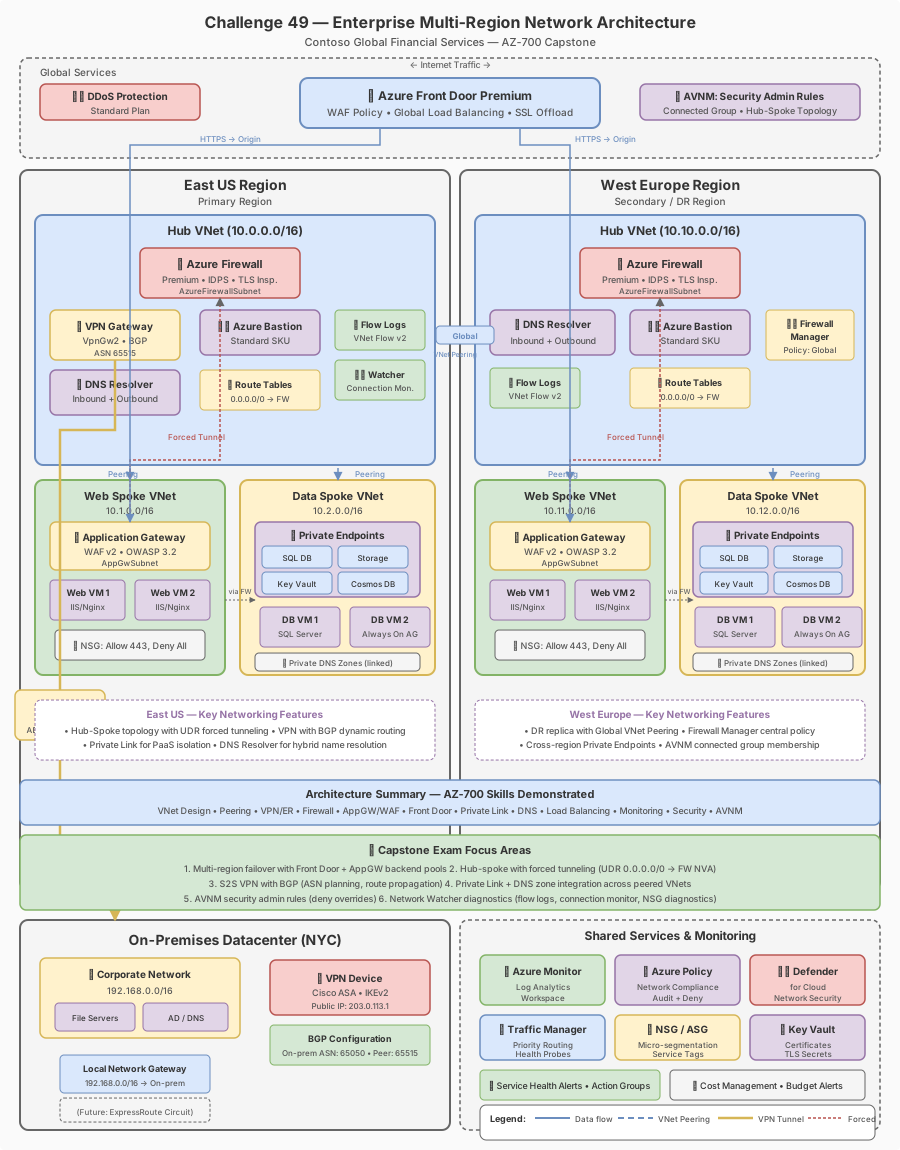
Challenge 49: Enterprise multi-region network (CAPSTONE)
180-240 minutes | ~$4.50/h (VPN Gateways, Firewalls, AppGW, Front Door) | Exam weight: All domains
This lab deploys multiple expensive resources including VPN Gateways ($0.57/h each for VpnGw2AZ), Azure Firewalls ($1.25/h each), Application Gateways (~$0.25/h each), and Front Door Premium. Total estimated cost: $4-5/hour. Complete the cleanup section immediately after finishing. Do not leave these resources running overnight.
Scenario
Contoso Global Financial Services is deploying a new trading platform across two Azure regions (East US and West Europe). As the senior network architect, you must design and implement the complete network infrastructure spanning all five AZ-700 exam domains. This capstone challenge validates your ability to integrate hub-spoke topologies, hybrid connectivity, centralized security, application delivery, private access, DNS resolution, DDoS protection, and network monitoring into a cohesive enterprise architecture.
Architecture requirements
| Component | East US | West Europe |
|---|---|---|
| Hub VNet | 10.10.0.0/16 | 10.20.0.0/16 |
| Web spoke VNet | 10.11.0.0/16 | 10.21.0.0/16 |
| Data spoke VNet | 10.12.0.0/16 | 10.22.0.0/16 |
| On-premises (NYC) | 192.168.0.0/16 | N/A |
Exam skills covered
| Domain | Skills |
|---|---|
| Design and implement core networking | VNet design, peering, routing |
| Design and implement routing | UDR, BGP, forced tunneling |
| Secure and monitor networks | Azure Firewall, DDoS, NSG, flow logs |
| Design and implement private access | Private Endpoints, Private Link, DNS |
| Design and implement load balancing | Application Gateway, Front Door, WAF |
Prerequisites
- Azure subscription with Contributor + Network Contributor roles
- Azure CLI 2.60+ or Azure PowerShell Az 12.0+
- Completion of Challenges 1-48 (or equivalent experience across all five domains)
- Understanding of BGP, IPsec, DNS forwarding, and WAF concepts
Task 1: Foundation -- Multi-region hub-spoke topology
Create the hub and spoke VNets in both regions with all required subnets, then establish peering relationships.
Azure CLI
# Variables
RG="rg-contoso-capstone"
LOCATION_EAST="eastus"
LOCATION_WEST="westeurope"

# Create resource group
az group create --name $RG --location $LOCATION_EAST

# ============================================================
# EAST US - Hub VNet
# ============================================================
az network vnet create \
  --resource-group $RG \
  --name vnet-hub-eastus \
  --location $LOCATION_EAST \
  --address-prefixes 10.10.0.0/16 \
  --subnet-name AzureFirewallSubnet \
  --subnet-prefixes 10.10.0.0/26

az network vnet subnet create \
  --resource-group $RG \
  --vnet-name vnet-hub-eastus \
  --name GatewaySubnet \
  --address-prefixes 10.10.1.0/27

az network vnet subnet create \
  --resource-group $RG \
  --vnet-name vnet-hub-eastus \
  --name AzureBastionSubnet \
  --address-prefixes 10.10.2.0/26

az network vnet subnet create \
  --resource-group $RG \
  --vnet-name vnet-hub-eastus \
  --name snet-nva \
  --address-prefixes 10.10.3.0/24

az network vnet subnet create \
  --resource-group $RG \
  --vnet-name vnet-hub-eastus \
  --name snet-shared \
  --address-prefixes 10.10.4.0/24

az network vnet subnet create \
  --resource-group $RG \
  --vnet-name vnet-hub-eastus \
  --name snet-dns-inbound \
  --address-prefixes 10.10.5.0/28 \
  --delegations "Microsoft.Network/dnsResolvers"

az network vnet subnet create \
  --resource-group $RG \
  --vnet-name vnet-hub-eastus \
  --name snet-dns-outbound \
  --address-prefixes 10.10.5.16/28 \
  --delegations "Microsoft.Network/dnsResolvers"

# EAST US - Web Spoke
az network vnet create \
  --resource-group $RG \
  --name vnet-spoke-web-eastus \
  --location $LOCATION_EAST \
  --address-prefixes 10.11.0.0/16 \
  --subnet-name snet-appgw \
  --subnet-prefixes 10.11.0.0/24

az network vnet subnet create \
  --resource-group $RG \
  --vnet-name vnet-spoke-web-eastus \
  --name snet-web \
  --address-prefixes 10.11.1.0/24

# EAST US - Data Spoke
az network vnet create \
  --resource-group $RG \
  --name vnet-spoke-data-eastus \
  --location $LOCATION_EAST \
  --address-prefixes 10.12.0.0/16 \
  --subnet-name snet-data \
  --subnet-prefixes 10.12.0.0/24

az network vnet subnet create \
  --resource-group $RG \
  --vnet-name vnet-spoke-data-eastus \
  --name snet-pe \
  --address-prefixes 10.12.1.0/24

# ============================================================
# WEST EUROPE - Hub VNet
# ============================================================
az network vnet create \
  --resource-group $RG \
  --name vnet-hub-westeurope \
  --location $LOCATION_WEST \
  --address-prefixes 10.20.0.0/16 \
  --subnet-name AzureFirewallSubnet \
  --subnet-prefixes 10.20.0.0/26

az network vnet subnet create \
  --resource-group $RG \
  --vnet-name vnet-hub-westeurope \
  --name GatewaySubnet \
  --address-prefixes 10.20.1.0/27

az network vnet subnet create \
  --resource-group $RG \
  --vnet-name vnet-hub-westeurope \
  --name AzureBastionSubnet \
  --address-prefixes 10.20.2.0/26

az network vnet subnet create \
  --resource-group $RG \
  --vnet-name vnet-hub-westeurope \
  --name snet-nva \
  --address-prefixes 10.20.3.0/24

az network vnet subnet create \
  --resource-group $RG \
  --vnet-name vnet-hub-westeurope \
  --name snet-shared \
  --address-prefixes 10.20.4.0/24

# WEST EUROPE - Web Spoke
az network vnet create \
  --resource-group $RG \
  --name vnet-spoke-web-westeurope \
  --location $LOCATION_WEST \
  --address-prefixes 10.21.0.0/16 \
  --subnet-name snet-appgw \
  --subnet-prefixes 10.21.0.0/24

az network vnet subnet create \
  --resource-group $RG \
  --vnet-name vnet-spoke-web-westeurope \
  --name snet-web \
  --address-prefixes 10.21.1.0/24

# WEST EUROPE - Data Spoke
az network vnet create \
  --resource-group $RG \
  --name vnet-spoke-data-westeurope \
  --location $LOCATION_WEST \
  --address-prefixes 10.22.0.0/16 \
  --subnet-name snet-data \
  --subnet-prefixes 10.22.0.0/24

az network vnet subnet create \
  --resource-group $RG \
  --vnet-name vnet-spoke-data-westeurope \
  --name snet-pe \
  --address-prefixes 10.22.1.0/24

# ============================================================
# PEERING - Hub to Spokes (East US)
# NOTE: --use-remote-gateways on spoke peerings requires the VPN Gateway
# to be deployed first (see Task 2). Initially create without this flag,
# then update peerings after gateway deployment in Task 2.
# ============================================================
az network vnet peering create \
  --resource-group $RG \
  --name hub-to-web-eastus \
  --vnet-name vnet-hub-eastus \
  --remote-vnet vnet-spoke-web-eastus \
  --allow-vnet-access \
  --allow-forwarded-traffic \
  --allow-gateway-transit

az network vnet peering create \
  --resource-group $RG \
  --name web-to-hub-eastus \
  --vnet-name vnet-spoke-web-eastus \
  --remote-vnet vnet-hub-eastus \
  --allow-vnet-access \
  --allow-forwarded-traffic

az network vnet peering create \
  --resource-group $RG \
  --name hub-to-data-eastus \
  --vnet-name vnet-hub-eastus \
  --remote-vnet vnet-spoke-data-eastus \
  --allow-vnet-access \
  --allow-forwarded-traffic \
  --allow-gateway-transit

az network vnet peering create \
  --resource-group $RG \
  --name data-to-hub-eastus \
  --vnet-name vnet-spoke-data-eastus \
  --remote-vnet vnet-hub-eastus \
  --allow-vnet-access \
  --allow-forwarded-traffic

# PEERING - Hub to Spokes (West Europe)
az network vnet peering create \
  --resource-group $RG \
  --name hub-to-web-westeurope \
  --vnet-name vnet-hub-westeurope \
  --remote-vnet vnet-spoke-web-westeurope \
  --allow-vnet-access \
  --allow-forwarded-traffic \
  --allow-gateway-transit

az network vnet peering create \
  --resource-group $RG \
  --name web-to-hub-westeurope \
  --vnet-name vnet-spoke-web-westeurope \
  --remote-vnet vnet-hub-westeurope \
  --allow-vnet-access \
  --allow-forwarded-traffic

az network vnet peering create \
  --resource-group $RG \
  --name hub-to-data-westeurope \
  --vnet-name vnet-hub-westeurope \
  --remote-vnet vnet-spoke-data-westeurope \
  --allow-vnet-access \
  --allow-forwarded-traffic \
  --allow-gateway-transit

az network vnet peering create \
  --resource-group $RG \
  --name data-to-hub-westeurope \
  --vnet-name vnet-spoke-data-westeurope \
  --remote-vnet vnet-hub-westeurope \
  --allow-vnet-access \
  --allow-forwarded-traffic

# GLOBAL PEERING - Hub to Hub
az network vnet peering create \
  --resource-group $RG \
  --name hub-eastus-to-hub-westeurope \
  --vnet-name vnet-hub-eastus \
  --remote-vnet vnet-hub-westeurope \
  --allow-vnet-access \
  --allow-forwarded-traffic \
  --allow-gateway-transit

az network vnet peering create \
  --resource-group $RG \
  --name hub-westeurope-to-hub-eastus \
  --vnet-name vnet-hub-westeurope \
  --remote-vnet vnet-hub-eastus \
  --allow-vnet-access \
  --allow-forwarded-traffic \
  --allow-gateway-transit
Azure PowerShell
# Variables
$RG = "rg-contoso-capstone"
$LocationEast = "eastus"
$LocationWest = "westeurope"

# Create resource group
New-AzResourceGroup -Name $RG -Location $LocationEast

# East US Hub VNet
$fwSubnet = New-AzVirtualNetworkSubnetConfig -Name "AzureFirewallSubnet" -AddressPrefix "10.10.0.0/26"
$gwSubnet = New-AzVirtualNetworkSubnetConfig -Name "GatewaySubnet" -AddressPrefix "10.10.1.0/27"
$bastionSubnet = New-AzVirtualNetworkSubnetConfig -Name "AzureBastionSubnet" -AddressPrefix "10.10.2.0/26"
$nvaSubnet = New-AzVirtualNetworkSubnetConfig -Name "snet-nva" -AddressPrefix "10.10.3.0/24"
$sharedSubnet = New-AzVirtualNetworkSubnetConfig -Name "snet-shared" -AddressPrefix "10.10.4.0/24"

$hubEast = New-AzVirtualNetwork `
  -Name "vnet-hub-eastus" `
  -ResourceGroupName $RG `
  -Location $LocationEast `
  -AddressPrefix "10.10.0.0/16" `
  -Subnet $fwSubnet, $gwSubnet, $bastionSubnet, $nvaSubnet, $sharedSubnet

# East US Web Spoke
$appgwSubnet = New-AzVirtualNetworkSubnetConfig -Name "snet-appgw" -AddressPrefix "10.11.0.0/24"
$webSubnet = New-AzVirtualNetworkSubnetConfig -Name "snet-web" -AddressPrefix "10.11.1.0/24"

$spokeWebEast = New-AzVirtualNetwork `
  -Name "vnet-spoke-web-eastus" `
  -ResourceGroupName $RG `
  -Location $LocationEast `
  -AddressPrefix "10.11.0.0/16" `
  -Subnet $appgwSubnet, $webSubnet

# Create hub-to-spoke peering (East US)
Add-AzVirtualNetworkPeering `
  -Name "hub-to-web-eastus" `
  -VirtualNetwork $hubEast `
  -RemoteVirtualNetworkId $spokeWebEast.Id `
  -AllowForwardedTraffic `
  -AllowGatewayTransit

Add-AzVirtualNetworkPeering `
  -Name "web-to-hub-eastus" `
  -VirtualNetwork $spokeWebEast `
  -RemoteVirtualNetworkId $hubEast.Id `
  -AllowForwardedTraffic
Portal steps
- Navigate to Virtual networks and create
vnet-hub-eastusin East US with address space 10.10.0.0/16 - Add subnets: AzureFirewallSubnet (/26), GatewaySubnet (/27), AzureBastionSubnet (/26), snet-nva (/24), snet-shared (/24)
- Repeat for West Europe hub and all spoke VNets
- Navigate to each hub VNet, select Peerings, and create peerings to each spoke with "Allow gateway transit" enabled on the hub side (note: enable "Use remote gateways" on the spoke side only after deploying the VPN Gateway in Task 2)
- Create global peering between the two hubs with "Allow forwarded traffic" and "Allow gateway transit" enabled on both sides
The --use-remote-gateways flag on spoke peerings will fail until a gateway is actually deployed in the hub. You can create these peerings without that flag first, then update them after Task 2.
Task 2: Hybrid connectivity -- Site-to-site VPN with BGP
Deploy an active-active VPN Gateway in East US hub with BGP enabled and establish connectivity to the on-premises NYC datacenter.
Azure CLI
# Create two public IPs for active-active gateway (zone-redundant)
az network public-ip create \
  --resource-group $RG \
  --name pip-vpngw-eastus-1 \
  --location $LOCATION_EAST \
  --sku Standard \
  --allocation-method Static \
  --zone 1 2 3

az network public-ip create \
  --resource-group $RG \
  --name pip-vpngw-eastus-2 \
  --location $LOCATION_EAST \
  --sku Standard \
  --allocation-method Static \
  --zone 1 2 3

# Create VPN Gateway (active-active, zone-redundant, BGP enabled)
# Note: This takes 30-45 minutes to deploy
az network vnet-gateway create \
  --name vpngw-hub-eastus \
  --resource-group $RG \
  --vnet vnet-hub-eastus \
  --gateway-type Vpn \
  --vpn-type RouteBased \
  --sku VpnGw2AZ \
  --vpn-gateway-generation Generation2 \
  --public-ip-addresses pip-vpngw-eastus-1 pip-vpngw-eastus-2 \
  --asn 65010 \
  --no-wait

# Create Local Network Gateway for NYC datacenter
az network local-gateway create \
  --resource-group $RG \
  --name lgw-nyc-datacenter \
  --location $LOCATION_EAST \
  --gateway-ip-address 203.0.113.1 \
  --local-address-prefixes 192.168.0.0/16 \
  --asn 65001 \
  --bgp-peering-address 192.168.1.1

# Create S2S VPN connection with custom IPsec policy
az network vpn-connection create \
  --resource-group $RG \
  --name conn-eastus-to-nyc \
  --vnet-gateway1 vpngw-hub-eastus \
  --local-gateway2 lgw-nyc-datacenter \
  --location $LOCATION_EAST \
  --shared-key "C0nt0s0!SecureKey2024" \
  --enable-bgp

# Apply custom IPsec policy (IKEv2, AES256, SHA256, PFS2048)
az network vpn-connection ipsec-policy add \
  --resource-group $RG \
  --connection-name conn-eastus-to-nyc \
  --ike-encryption AES256 \
  --ike-integrity SHA256 \
  --dh-group DHGroup14 \
  --ipsec-encryption AES256 \
  --ipsec-integrity SHA256 \
  --pfs-group PFS2048 \
  --sa-lifetime 14400 \
  --sa-max-size 102400000
Azure PowerShell
# Create public IPs for active-active VPN gateway
$pip1 = New-AzPublicIpAddress `
  -Name "pip-vpngw-eastus-1" `
  -ResourceGroupName $RG `
  -Location $LocationEast `
  -Sku Standard `
  -AllocationMethod Static `
  -Zone 1, 2, 3

$pip2 = New-AzPublicIpAddress `
  -Name "pip-vpngw-eastus-2" `
  -ResourceGroupName $RG `
  -Location $LocationEast `
  -Sku Standard `
  -AllocationMethod Static `
  -Zone 1, 2, 3

# Get GatewaySubnet
$hubVnet = Get-AzVirtualNetwork -Name "vnet-hub-eastus" -ResourceGroupName $RG
$gwSubnet = Get-AzVirtualNetworkSubnetConfig -Name "GatewaySubnet" -VirtualNetwork $hubVnet

# Create IP configurations for active-active
$ipconfig1 = New-AzVirtualNetworkGatewayIpConfig -Name "gwipconfig1" -SubnetId $gwSubnet.Id -PublicIpAddressId $pip1.Id
$ipconfig2 = New-AzVirtualNetworkGatewayIpConfig -Name "gwipconfig2" -SubnetId $gwSubnet.Id -PublicIpAddressId $pip2.Id

# Create VPN Gateway (active-active with BGP)
New-AzVirtualNetworkGateway `
  -Name "vpngw-hub-eastus" `
  -ResourceGroupName $RG `
  -Location $LocationEast `
  -IpConfigurations $ipconfig1, $ipconfig2 `
  -GatewayType Vpn `
  -VpnType RouteBased `
  -GatewaySku VpnGw2AZ `
  -VpnGatewayGeneration Generation2 `
  -EnableActiveActiveFeature `
  -EnableBgp $true `
  -Asn 65010

# Create Local Network Gateway
New-AzLocalNetworkGateway `
  -Name "lgw-nyc-datacenter" `
  -ResourceGroupName $RG `
  -Location $LocationEast `
  -GatewayIpAddress "203.0.113.1" `
  -AddressPrefix "192.168.0.0/16" `
  -Asn 65001 `
  -BgpPeeringAddress "192.168.1.1"

# Create custom IPsec policy
$ipsecPolicy = New-AzIpsecPolicy `
  -IkeEncryption AES256 `
  -IkeIntegrity SHA256 `
  -DhGroup DHGroup14 `
  -IpsecEncryption AES256 `
  -IpsecIntegrity SHA256 `
  -PfsGroup PFS2048 `
  -SALifeTimeSeconds 14400 `
  -SADataSizeKilobytes 102400000

# Create VPN Connection with custom IPsec policy
$gateway = Get-AzVirtualNetworkGateway -Name "vpngw-hub-eastus" -ResourceGroupName $RG
$localGw = Get-AzLocalNetworkGateway -Name "lgw-nyc-datacenter" -ResourceGroupName $RG

New-AzVirtualNetworkGatewayConnection `
  -Name "conn-eastus-to-nyc" `
  -ResourceGroupName $RG `
  -Location $LocationEast `
  -VirtualNetworkGateway1 $gateway `
  -LocalNetworkGateway2 $localGw `
  -ConnectionType IPsec `
  -SharedKey "C0nt0s0!SecureKey2024" `
  -EnableBgp $true `
  -IpsecPolicies $ipsecPolicy

# Update spoke peerings to use gateway transit (now that gateway exists)
$hubVnet = Get-AzVirtualNetwork -Name "vnet-hub-eastus" -ResourceGroupName $RG
$spokeWeb = Get-AzVirtualNetwork -Name "vnet-spoke-web-eastus" -ResourceGroupName $RG
$spokeData = Get-AzVirtualNetwork -Name "vnet-spoke-data-eastus" -ResourceGroupName $RG

# Update spoke-to-hub peerings
$peerWebToHub = Get-AzVirtualNetworkPeering -VirtualNetworkName "vnet-spoke-web-eastus" -ResourceGroupName $RG -Name "web-to-hub-eastus"
$peerWebToHub.UseRemoteGateways = $true
Set-AzVirtualNetworkPeering -VirtualNetworkPeering $peerWebToHub

$peerDataToHub = Get-AzVirtualNetworkPeering -VirtualNetworkName "vnet-spoke-data-eastus" -ResourceGroupName $RG -Name "data-to-hub-eastus"
$peerDataToHub.UseRemoteGateways = $true
Set-AzVirtualNetworkPeering -VirtualNetworkPeering $peerDataToHub
Portal steps
- Navigate to Virtual network gateways and create with: VNet = vnet-hub-eastus, SKU = VpnGw2AZ, Generation = Generation2, Active-active = Enabled, Configure BGP = Yes, ASN = 65010
- Create a Local network gateway with the NYC datacenter public IP and on-premises address space
- Create a Connection of type Site-to-site, enable BGP, and configure custom IPsec/IKE policy
Post-gateway: Enable use-remote-gateways on spoke peerings
After the VPN Gateway is provisioned, update spoke peerings to use the hub gateway:
# Enable use-remote-gateways on spoke peerings (East US)
az network vnet peering update \
--resource-group $RG \
--name web-to-hub-eastus \
--vnet-name vnet-spoke-web-eastus \
--set useRemoteGateways=true
az network vnet peering update \
--resource-group $RG \
--name data-to-hub-eastus \
--vnet-name vnet-spoke-data-eastus \
--set useRemoteGateways=true
# Note: West Europe spokes do NOT set useRemoteGateways because no gateway exists
# in the West Europe hub. West Europe spokes reach on-premises via UDR through
# West Europe Firewall → global peering → East US hub → VPN Gateway.
# Gateway transit is only configured on East US spokes.
### Azure PowerShell
```powershell
# Create parent firewall policy
$parentPolicy = New-AzFirewallPolicy `
-Name "fwpolicy-parent-baseline" `
-ResourceGroupName $RG `
-Location $LocationEast
# Create child policy inheriting from parent
$childPolicyEast = New-AzFirewallPolicy `
-Name "fwpolicy-child-eastus" `
-ResourceGroupName $RG `
-Location $LocationEast `
-BasePolicy $parentPolicy.Id
# Create Azure Firewall
$pip = New-AzPublicIpAddress `
-Name "pip-azfw-eastus" `
-ResourceGroupName $RG `
-Location $LocationEast `
-Sku Standard `
-AllocationMethod Static
$hubVnet = Get-AzVirtualNetwork -Name "vnet-hub-eastus" -ResourceGroupName $RG
$azfw = New-AzFirewall `
-Name "azfw-hub-eastus" `
-ResourceGroupName $RG `
-Location $LocationEast `
-VirtualNetwork $hubVnet `
-PublicIpAddress $pip `
-FirewallPolicyId $childPolicyEast.Id
# Create UDR
$fwPrivateIp = $azfw.IpConfigurations[0].PrivateIpAddress
$route = New-AzRouteConfig -Name "default-to-firewall" `
-AddressPrefix "0.0.0.0/0" `
-NextHopType VirtualAppliance `
-NextHopIpAddress $fwPrivateIp
$routeTable = New-AzRouteTable `
-Name "rt-spoke-eastus" `
-ResourceGroupName $RG `
-Location $LocationEast `
-Route $route
Task 4: Web application delivery -- Application Gateway with WAF
Deploy Application Gateway WAF_v2 in each region with multi-site listeners and path-based routing.
Azure CLI
# Create WAF policy for East US Application Gateway
az network application-gateway waf-policy create \
  --resource-group $RG \
  --name wafpolicy-appgw-eastus \
  --location $LOCATION_EAST \
  --type OWASP \
  --version 3.2

# Create custom WAF rule for rate limiting
az network application-gateway waf-policy custom-rule create \
  --policy-name wafpolicy-appgw-eastus \
  --resource-group $RG \
  --action Block \
  --name RateLimitByClientIP \
  --priority 90 \
  --rule-type RateLimitRule \
  --rate-limit-threshold 100 \
  --group-by-user-session '[{"groupByVariables":[{"variableName":"ClientAddr"}]}]'

az network application-gateway waf-policy custom-rule match-condition add \
  --policy-name wafpolicy-appgw-eastus \
  --resource-group $RG \
  --name RateLimitByClientIP \
  --match-variables RemoteAddr \
  --operator IPMatch \
  --values "255.255.255.255/32" \
  --negate true

# Create custom WAF rule for geo-blocking
az network application-gateway waf-policy custom-rule create \
  --policy-name wafpolicy-appgw-eastus \
  --resource-group $RG \
  --action Block \
  --name GeoBlockRule \
  --priority 95 \
  --rule-type MatchRule

az network application-gateway waf-policy custom-rule match-condition add \
  --policy-name wafpolicy-appgw-eastus \
  --resource-group $RG \
  --name GeoBlockRule \
  --match-variables RemoteAddr \
  --operator GeoMatch \
  --values "CN" "RU" "KP"

# Create public IP for Application Gateway
az network public-ip create \
  --resource-group $RG \
  --name pip-appgw-eastus \
  --location $LOCATION_EAST \
  --sku Standard \
  --allocation-method Static

# Create Application Gateway WAF_v2
az network application-gateway create \
  --resource-group $RG \
  --name appgw-web-eastus \
  --location $LOCATION_EAST \
  --vnet-name vnet-spoke-web-eastus \
  --subnet snet-appgw \
  --sku WAF_v2 \
  --capacity 2 \
  --public-ip-address pip-appgw-eastus \
  --http-settings-cookie-based-affinity Disabled \
  --frontend-port 80 \
  --http-settings-port 80 \
  --http-settings-protocol Http \
  --waf-policy wafpolicy-appgw-eastus \
  --priority 100

# Add backend pools for path-based routing
az network application-gateway address-pool create \
  --resource-group $RG \
  --gateway-name appgw-web-eastus \
  --name pool-api \
  --servers 10.11.1.4 10.11.1.5

az network application-gateway address-pool create \
  --resource-group $RG \
  --gateway-name appgw-web-eastus \
  --name pool-web \
  --servers 10.11.1.6 10.11.1.7

# Create URL path map for path-based routing
az network application-gateway url-path-map create \
  --resource-group $RG \
  --gateway-name appgw-web-eastus \
  --name pathmap-contoso \
  --paths "/api/*" \
  --address-pool pool-api \
  --http-settings appGatewayBackendHttpSettings \
  --default-address-pool pool-web \
  --default-http-settings appGatewayBackendHttpSettings

# Create path-based routing rule
az network application-gateway rule create \
  --resource-group $RG \
  --gateway-name appgw-web-eastus \
  --name rule-pathbased \
  --priority 200 \
  --http-listener appGatewayHttpListener \
  --rule-type PathBasedRouting \
  --url-path-map pathmap-contoso \
  --address-pool pool-web
Azure PowerShell
# Create WAF policy
$policySetting = New-AzApplicationGatewayFirewallPolicySetting `
  -Mode Prevention `
  -State Enabled `
  -MaxRequestBodySizeInKb 128 `
  -MaxFileUploadInMb 100

$managedRuleSet = New-AzApplicationGatewayFirewallPolicyManagedRuleSet `
  -RuleSetType "OWASP" `
  -RuleSetVersion "3.2"

$managedRules = New-AzApplicationGatewayFirewallPolicyManagedRule `
  -ManagedRuleSet $managedRuleSet

$wafPolicy = New-AzApplicationGatewayFirewallPolicy `
  -Name "wafpolicy-appgw-eastus" `
  -ResourceGroupName $RG `
  -Location $LocationEast `
  -PolicySetting $policySetting `
  -ManagedRule $managedRules

# Create Application Gateway with WAF_v2 SKU
$sku = New-AzApplicationGatewaySku -Name WAF_v2 -Tier WAF_v2 -Capacity 2

$pip = New-AzPublicIpAddress `
  -Name "pip-appgw-eastus" `
  -ResourceGroupName $RG `
  -Location $LocationEast `
  -Sku Standard `
  -AllocationMethod Static
Portal steps
- Create a WAF policy with OWASP 3.2 managed rules in Prevention mode
- Add custom rules for rate limiting (RateLimitRule type, threshold 100/min) and geo-blocking
- Create Application Gateway with WAF_v2 SKU in the web spoke subnet
- Configure multi-site listeners for api.contoso.com and app.contoso.com
- Set up path-based routing: /api/* to API backend pool, /* to web backend pool
Task 5: Global load balancing -- Azure Front Door Premium
Create Azure Front Door Premium for global traffic distribution with health probes and failover.
Azure CLI
# Create Azure Front Door Premium profile
az afd profile create \
  --resource-group $RG \
  --profile-name afd-contoso-global \
  --sku Premium_AzureFrontDoor

# Create endpoint
az afd endpoint create \
  --resource-group $RG \
  --profile-name afd-contoso-global \
  --endpoint-name contoso-trading

# Create origin group with health probes
az afd origin-group create \
  --resource-group $RG \
  --origin-group-name og-appgw-global \
  --profile-name afd-contoso-global \
  --probe-request-type GET \
  --probe-protocol Https \
  --probe-interval-in-seconds 30 \
  --probe-path /health \
  --sample-size 4 \
  --successful-samples-required 3 \
  --additional-latency-in-milliseconds 50

# Add East US origin (primary, priority 1)
az afd origin create \
  --resource-group $RG \
  --origin-group-name og-appgw-global \
  --profile-name afd-contoso-global \
  --origin-name origin-eastus \
  --host-name appgw-eastus.contoso.com \
  --origin-host-header appgw-eastus.contoso.com \
  --http-port 80 \
  --https-port 443 \
  --priority 1 \
  --weight 1000 \
  --enabled-state Enabled

# Add West Europe origin (secondary, priority 2)
az afd origin create \
  --resource-group $RG \
  --origin-group-name og-appgw-global \
  --profile-name afd-contoso-global \
  --origin-name origin-westeurope \
  --host-name appgw-westeurope.contoso.com \
  --origin-host-header appgw-westeurope.contoso.com \
  --http-port 80 \
  --https-port 443 \
  --priority 2 \
  --weight 1000 \
  --enabled-state Enabled

# Create route
az afd route create \
  --resource-group $RG \
  --profile-name afd-contoso-global \
  --endpoint-name contoso-trading \
  --route-name route-default \
  --origin-group og-appgw-global \
  --supported-protocols Http Https \
  --https-redirect Enabled \
  --forwarding-protocol MatchRequest \
  --link-to-default-domain Enabled

# Enable caching for static content
az afd route update \
  --resource-group $RG \
  --profile-name afd-contoso-global \
  --endpoint-name contoso-trading \
  --route-name route-default \
  --enable-caching true \
  --query-string-caching-behavior IgnoreQueryString
Azure PowerShell
# Create Front Door Premium profile
New-AzFrontDoorCdnProfile `
  -ResourceGroupName $RG `
  -ProfileName "afd-contoso-global" `
  -SkuName "Premium_AzureFrontDoor" `
  -Location "Global"

# Create endpoint
New-AzFrontDoorCdnEndpoint `
  -ResourceGroupName $RG `
  -ProfileName "afd-contoso-global" `
  -EndpointName "contoso-trading" `
  -Location "Global"

# Create origin group with health probes
$healthProbe = New-AzFrontDoorCdnOriginGroupHealthProbeSettingObject `
  -ProbeIntervalInSecond 30 `
  -ProbePath "/health" `
  -ProbeProtocol Https `
  -ProbeRequestType GET

$loadBalancing = New-AzFrontDoorCdnOriginGroupLoadBalancingSettingObject `
  -AdditionalLatencyInMillisecond 50 `
  -SampleSize 4 `
  -SuccessfulSamplesRequired 3

New-AzFrontDoorCdnOriginGroup `
  -ResourceGroupName $RG `
  -ProfileName "afd-contoso-global" `
  -OriginGroupName "og-appgw-global" `
  -HealthProbeSetting $healthProbe `
  -LoadBalancingSetting $loadBalancing
Portal steps
- Create Front Door and CDN profiles with Premium tier
- Add an endpoint named "contoso-trading"
- Create an origin group with health probe path /health (HTTPS, 30s interval)
- Add East US origin with priority 1 and West Europe origin with priority 2
- Create a route linking the endpoint to the origin group with HTTPS redirect and caching enabled
Task 6: Private access -- Private Endpoints for PaaS services
Create Private Endpoints for Azure SQL, Storage, and Key Vault with proper DNS integration.
Azure CLI
# Create PaaS resources (simplified for lab)
az sql server create \
  --resource-group $RG \
  --name sql-contoso-eastus-001 \
  --location $LOCATION_EAST \
  --admin-user sqladmin \
  --admin-password "P@ssw0rd2024!Secure"

az storage account create \
  --resource-group $RG \
  --name stcontosoeastus001 \
  --location $LOCATION_EAST \
  --sku Standard_LRS

az keyvault create \
  --resource-group $RG \
  --name kv-contoso-eastus-001 \
  --location $LOCATION_EAST

# Create Private DNS Zones
az network private-dns zone create \
  --resource-group $RG \
  --name "privatelink.database.windows.net"

az network private-dns zone create \
  --resource-group $RG \
  --name "privatelink.blob.core.windows.net"

az network private-dns zone create \
  --resource-group $RG \
  --name "privatelink.file.core.windows.net"

az network private-dns zone create \
  --resource-group $RG \
  --name "privatelink.vaultcore.azure.net"

# Link DNS zones to ALL VNets
for VNET in vnet-hub-eastus vnet-spoke-web-eastus vnet-spoke-data-eastus \
            vnet-hub-westeurope vnet-spoke-web-westeurope vnet-spoke-data-westeurope; do
  for ZONE in "privatelink.database.windows.net" "privatelink.blob.core.windows.net" \
              "privatelink.file.core.windows.net" "privatelink.vaultcore.azure.net"; do
    LINK_NAME="${VNET}-${ZONE//\./-}"
    az network private-dns link vnet create \
      --resource-group $RG \
      --zone-name "$ZONE" \
      --name "$LINK_NAME" \
      --virtual-network "$VNET" \
      --registration-enabled false
  done
done

# Create Private Endpoint for SQL Server
SQL_ID=$(az sql server show \
  --resource-group $RG \
  --name sql-contoso-eastus-001 \
  --query id -o tsv)

az network private-endpoint create \
  --resource-group $RG \
  --name pe-sql-eastus \
  --location $LOCATION_EAST \
  --vnet-name vnet-spoke-data-eastus \
  --subnet snet-pe \
  --private-connection-resource-id $SQL_ID \
  --group-id sqlServer \
  --connection-name pec-sql-eastus

az network private-endpoint dns-zone-group create \
  --resource-group $RG \
  --endpoint-name pe-sql-eastus \
  --name sqlZoneGroup \
  --private-dns-zone "privatelink.database.windows.net" \
  --zone-name sql

# Create Private Endpoint for Storage (Blob)
STORAGE_ID=$(az storage account show \
  --resource-group $RG \
  --name stcontosoeastus001 \
  --query id -o tsv)

az network private-endpoint create \
  --resource-group $RG \
  --name pe-blob-eastus \
  --location $LOCATION_EAST \
  --vnet-name vnet-spoke-data-eastus \
  --subnet snet-pe \
  --private-connection-resource-id $STORAGE_ID \
  --group-id blob \
  --connection-name pec-blob-eastus

az network private-endpoint dns-zone-group create \
  --resource-group $RG \
  --endpoint-name pe-blob-eastus \
  --name blobZoneGroup \
  --private-dns-zone "privatelink.blob.core.windows.net" \
  --zone-name blob

# Create Private Endpoint for Key Vault
KV_ID=$(az keyvault show \
  --resource-group $RG \
  --name kv-contoso-eastus-001 \
  --query id -o tsv)

az network private-endpoint create \
  --resource-group $RG \
  --name pe-kv-eastus \
  --location $LOCATION_EAST \
  --vnet-name vnet-spoke-data-eastus \
  --subnet snet-pe \
  --private-connection-resource-id $KV_ID \
  --group-id vault \
  --connection-name pec-kv-eastus

az network private-endpoint dns-zone-group create \
  --resource-group $RG \
  --endpoint-name pe-kv-eastus \
  --name kvZoneGroup \
  --private-dns-zone "privatelink.vaultcore.azure.net" \
  --zone-name vault
Azure PowerShell
# Create Private DNS Zone and link
$zone = New-AzPrivateDnsZone `
  -ResourceGroupName $RG `
  -Name "privatelink.database.windows.net"

$hubVnet = Get-AzVirtualNetwork -Name "vnet-hub-eastus" -ResourceGroupName $RG

New-AzPrivateDnsVirtualNetworkLink `
  -ResourceGroupName $RG `
  -ZoneName "privatelink.database.windows.net" `
  -Name "link-hub-eastus" `
  -VirtualNetworkId $hubVnet.Id `
  -EnableRegistration $false

# Create Private Endpoint for SQL
$sqlServer = Get-AzSqlServer -ResourceGroupName $RG -ServerName "sql-contoso-eastus-001"
$dataVnet = Get-AzVirtualNetwork -Name "vnet-spoke-data-eastus" -ResourceGroupName $RG
$peSubnet = Get-AzVirtualNetworkSubnetConfig -Name "snet-pe" -VirtualNetwork $dataVnet

$peLinkConfig = New-AzPrivateLinkServiceConnection `
  -Name "pec-sql-eastus" `
  -PrivateLinkServiceId $sqlServer.ResourceId `
  -GroupId "sqlServer"

$pe = New-AzPrivateEndpoint `
  -Name "pe-sql-eastus" `
  -ResourceGroupName $RG `
  -Location $LocationEast `
  -Subnet $peSubnet `
  -PrivateLinkServiceConnection $peLinkConfig

# Create DNS zone group
$dnsZone = Get-AzPrivateDnsZone -ResourceGroupName $RG -Name "privatelink.database.windows.net"
$config = New-AzPrivateDnsZoneConfig -Name "sql" -PrivateDnsZoneId $dnsZone.ResourceId

New-AzPrivateDnsZoneGroup `
  -ResourceGroupName $RG `
  -PrivateEndpointName "pe-sql-eastus" `
  -Name "sqlZoneGroup" `
  -PrivateDnsZoneConfig $config
Portal steps
- Create Private DNS zones for each service (database.windows.net, blob.core.windows.net, vaultcore.azure.net)
- Link each DNS zone to ALL VNets in both regions
- Create Private Endpoints in the data spoke subnet, selecting the appropriate sub-resource (sqlServer, blob, vault)
- Verify DNS zone groups are automatically created
Every VNet that needs to resolve Private Endpoint FQDNs must have the corresponding private DNS zone linked to it. Missing links are the most common cause of resolution failures.
Task 7: Hybrid DNS -- Azure DNS Private Resolver
Deploy a DNS Private Resolver in East US hub for bidirectional DNS resolution between Azure and on-premises.
Azure CLI
# Create DNS Private Resolver
az dns-resolver create \
  --name resolver-hub-eastus \
  --resource-group $RG \
  --location $LOCATION_EAST \
  --id "/subscriptions/$(az account show --query id -o tsv)/resourceGroups/$RG/providers/Microsoft.Network/virtualNetworks/vnet-hub-eastus"

# Create inbound endpoint (on-premises queries Azure DNS)
az dns-resolver inbound-endpoint create \
  --name endpoint-inbound \
  --dns-resolver-name resolver-hub-eastus \
  --resource-group $RG \
  --location $LOCATION_EAST \
  --ip-configurations "[{\"private-ip-allocation-method\":\"Dynamic\",\"id\":\"/subscriptions/$(az account show --query id -o tsv)/resourceGroups/$RG/providers/Microsoft.Network/virtualNetworks/vnet-hub-eastus/subnets/snet-dns-inbound\"}]"

# Create outbound endpoint (Azure forwards to on-premises DNS)
az dns-resolver outbound-endpoint create \
  --name endpoint-outbound \
  --dns-resolver-name resolver-hub-eastus \
  --resource-group $RG \
  --location $LOCATION_EAST \
  --id "/subscriptions/$(az account show --query id -o tsv)/resourceGroups/$RG/providers/Microsoft.Network/virtualNetworks/vnet-hub-eastus/subnets/snet-dns-outbound"

# Create forwarding ruleset
az dns-resolver forwarding-ruleset create \
  --name ruleset-to-onprem \
  --resource-group $RG \
  --location $LOCATION_EAST \
  --outbound-endpoints "[{\"id\":\"/subscriptions/$(az account show --query id -o tsv)/resourceGroups/$RG/providers/Microsoft.Network/dnsResolvers/resolver-hub-eastus/outboundEndpoints/endpoint-outbound\"}]"

# Create forwarding rule for on-premises domain
az dns-resolver forwarding-rule create \
  --name rule-contoso-onprem \
  --ruleset-name ruleset-to-onprem \
  --resource-group $RG \
  --domain-name "corp.contoso.com." \
  --forwarding-rule-state Enabled \
  --target-dns-servers "[{\"ip-address\":\"192.168.1.10\",\"port\":53},{\"ip-address\":\"192.168.1.11\",\"port\":53}]"

# Link forwarding ruleset to hub VNet
az dns-resolver vnet-link create \
  --name link-hub-eastus \
  --ruleset-name ruleset-to-onprem \
  --resource-group $RG \
  --id "/subscriptions/$(az account show --query id -o tsv)/resourceGroups/$RG/providers/Microsoft.Network/virtualNetworks/vnet-hub-eastus"
Azure PowerShell
# Create DNS Resolver
$hubVnet = Get-AzVirtualNetwork -Name "vnet-hub-eastus" -ResourceGroupName $RG

New-AzDnsResolver `
  -Name "resolver-hub-eastus" `
  -ResourceGroupName $RG `
  -Location $LocationEast `
  -VirtualNetworkId $hubVnet.Id

# Create inbound endpoint
$inboundSubnet = Get-AzVirtualNetworkSubnetConfig -Name "snet-dns-inbound" -VirtualNetwork $hubVnet
$ipconfig = New-AzDnsResolverIPConfigurationObject `
  -PrivateIPAllocationMethod Dynamic `
  -SubnetId $inboundSubnet.Id

New-AzDnsResolverInboundEndpoint `
  -DnsResolverName "resolver-hub-eastus" `
  -Name "endpoint-inbound" `
  -ResourceGroupName $RG `
  -Location $LocationEast `
  -IpConfiguration $ipconfig

# Create outbound endpoint
$outboundSubnet = Get-AzVirtualNetworkSubnetConfig -Name "snet-dns-outbound" -VirtualNetwork $hubVnet

New-AzDnsResolverOutboundEndpoint `
  -DnsResolverName "resolver-hub-eastus" `
  -Name "endpoint-outbound" `
  -ResourceGroupName $RG `
  -Location $LocationEast `
  -SubnetId $outboundSubnet.Id

# Create forwarding ruleset
$outboundEp = Get-AzDnsResolverOutboundEndpoint `
  -DnsResolverName "resolver-hub-eastus" `
  -Name "endpoint-outbound" `
  -ResourceGroupName $RG

New-AzDnsForwardingRuleset `
  -Name "ruleset-to-onprem" `
  -ResourceGroupName $RG `
  -Location $LocationEast `
  -DnsResolverOutboundEndpoint @(@{Id = $outboundEp.Id})

# Create forwarding rules
$targetDns1 = New-AzDnsResolverTargetDnsServerObject -IPAddress "192.168.1.10" -Port 53
$targetDns2 = New-AzDnsResolverTargetDnsServerObject -IPAddress "192.168.1.11" -Port 53

New-AzDnsForwardingRulesetForwardingRule `
  -ResourceGroupName $RG `
  -DnsForwardingRulesetName "ruleset-to-onprem" `
  -Name "rule-contoso-onprem" `
  -DomainName "corp.contoso.com." `
  -ForwardingRuleState "Enabled" `
  -TargetDnsServer @($targetDns1, $targetDns2)
Portal steps
- Navigate to DNS Private Resolvers and create in vnet-hub-eastus
- Add an inbound endpoint in snet-dns-inbound (note the assigned IP for on-premises DNS forwarding)
- Add an outbound endpoint in snet-dns-outbound
- Create a DNS forwarding ruleset linked to the outbound endpoint
- Add a forwarding rule for "corp.contoso.com." pointing to on-premises DNS servers (192.168.1.10, 192.168.1.11)
- Link the ruleset to the hub VNet
- On-premises to Azure: Configure on-prem DNS to forward Azure private zones to the inbound endpoint IP
- Azure to on-premises: The forwarding ruleset directs corp.contoso.com queries to on-prem DNS via the outbound endpoint
Task 8: DDoS Protection
Enable DDoS IP Protection on public-facing resources for cost-effective lab protection.
Azure CLI
# Create public IP for Application Gateway (West Europe) if not already created
az network public-ip create \
  --resource-group $RG \
  --name pip-appgw-westeurope \
  --location $LOCATION_WEST \
  --sku Standard \
  --allocation-method Static

# Enable DDoS IP Protection on Application Gateway public IP (East US)
az network public-ip update \
  --resource-group $RG \
  --name pip-appgw-eastus \
  --ddos-protection-mode Enabled

# Enable DDoS IP Protection on Application Gateway public IP (West Europe)
az network public-ip update \
  --resource-group $RG \
  --name pip-appgw-westeurope \
  --ddos-protection-mode Enabled

# Verify DDoS protection status
az network public-ip show \
  --resource-group $RG \
  --name pip-appgw-eastus \
  --query "{name:name, ddosProtectionMode:ddosSettings.protectionMode}" -o table
Azure PowerShell
# Enable DDoS IP Protection on existing public IP
$pip = Get-AzPublicIpAddress -Name "pip-appgw-eastus" -ResourceGroupName $RG
$pip.DdosSettings.ProtectionMode = "Enabled"
Set-AzPublicIpAddress -PublicIpAddress $pip

# Create a new public IP with DDoS IP Protection enabled
New-AzPublicIpAddress `
  -Name "pip-appgw-westeurope" `
  -ResourceGroupName $RG `
  -Location $LocationWest `
  -Sku Standard `
  -AllocationMethod Static `
  -DdosProtectionMode Enabled
Portal steps
- Navigate to the public IP resource for Application Gateway
- Under Properties, set DDoS protection mode to IP Protection enabled
- Repeat for all public-facing IPs
DDoS IP Protection costs ~$199/month per protected IP. DDoS Network Protection costs ~$2,944/month for the plan (covers all IPs in linked VNets). For lab purposes, IP Protection is significantly more cost-effective when protecting only a few IPs.
Task 9: Monitoring and governance
Enable VNet Flow Logs, Traffic Analytics, and deploy Azure Virtual Network Manager for centralized governance.
Azure CLI
# Create Log Analytics workspace for Traffic Analytics
az monitor log-analytics workspace create \
  --resource-group $RG \
  --workspace-name law-contoso-networking \
  --location $LOCATION_EAST

# Create storage account for flow logs
az storage account create \
  --resource-group $RG \
  --name stflowlogscontoso001 \
  --location $LOCATION_EAST \
  --sku Standard_LRS

# Create VNet Flow Log for East US hub
az network watcher flow-log create \
  --location $LOCATION_EAST \
  --name flowlog-hub-eastus \
  --resource-group $RG \
  --vnet vnet-hub-eastus \
  --storage-account stflowlogscontoso001 \
  --traffic-analytics true \
  --workspace law-contoso-networking \
  --interval 10

# Create VNet Flow Log for East US web spoke
az network watcher flow-log create \
  --location $LOCATION_EAST \
  --name flowlog-spoke-web-eastus \
  --resource-group $RG \
  --vnet vnet-spoke-web-eastus \
  --storage-account stflowlogscontoso001 \
  --traffic-analytics true \
  --workspace law-contoso-networking \
  --interval 10

# ============================================================
# Azure Virtual Network Manager (AVNM)
# ============================================================
SUB_ID=$(az account show --query id -o tsv)

# Create AVNM instance
az network manager create \
  --location $LOCATION_EAST \
  --name avnm-contoso-global \
  --resource-group $RG \
  --scope-accesses "Connectivity" "SecurityAdmin" \
  --network-manager-scopes subscriptions="/subscriptions/$SUB_ID"

# Create network group with dynamic membership (tag-based)
az network manager group create \
  --name ng-all-spokes \
  --network-manager-name avnm-contoso-global \
  --resource-group $RG \
  --description "All spoke VNets tagged with role=spoke"

# Add static members (dynamic membership requires Azure Policy configuration)
for VNET in vnet-spoke-web-eastus vnet-spoke-data-eastus vnet-spoke-web-westeurope vnet-spoke-data-westeurope; do
  az network manager group static-member create \
    --network-group-name ng-all-spokes \
    --network-manager-name avnm-contoso-global \
    --resource-group $RG \
    --static-member-name "member-$VNET" \
    --resource-id "/subscriptions/$SUB_ID/resourceGroups/$RG/providers/Microsoft.Network/virtualNetworks/$VNET"
done

# Create security admin configuration
az network manager security-admin-config create \
  --configuration-name secadmin-deny-direct-access \
  --network-manager-name avnm-contoso-global \
  --resource-group $RG

# Create rule collection
az network manager security-admin-config rule-collection create \
  --configuration-name secadmin-deny-direct-access \
  --network-manager-name avnm-contoso-global \
  --resource-group $RG \
  --rule-collection-name rc-deny-rdp-ssh \
  --applies-to-groups network-group-id="/subscriptions/$SUB_ID/resourceGroups/$RG/providers/Microsoft.Network/networkManagers/avnm-contoso-global/networkGroups/ng-all-spokes"

# Create security admin rule to deny direct RDP
az network manager security-admin-config rule-collection rule create \
  --configuration-name secadmin-deny-direct-access \
  --network-manager-name avnm-contoso-global \
  --resource-group $RG \
  --rule-collection-name rc-deny-rdp-ssh \
  --rule-name deny-rdp-from-internet \
  --kind Custom \
  --protocol Tcp \
  --access Deny \
  --priority 100 \
  --direction Inbound \
  --sources "[{\"addressPrefix\":\"Internet\",\"addressPrefixType\":\"ServiceTag\"}]" \
  --destinations "[{\"addressPrefix\":\"*\",\"addressPrefixType\":\"IPPrefix\"}]" \
  --dest-port-ranges 3389

# Create security admin rule to deny direct SSH
az network manager security-admin-config rule-collection rule create \
  --configuration-name secadmin-deny-direct-access \
  --network-manager-name avnm-contoso-global \
  --resource-group $RG \
  --rule-collection-name rc-deny-rdp-ssh \
  --rule-name deny-ssh-from-internet \
  --kind Custom \
  --protocol Tcp \
  --access Deny \
  --priority 110 \
  --direction Inbound \
  --sources "[{\"addressPrefix\":\"Internet\",\"addressPrefixType\":\"ServiceTag\"}]" \
  --destinations "[{\"addressPrefix\":\"*\",\"addressPrefixType\":\"IPPrefix\"}]" \
  --dest-port-ranges 22

# Deploy the security admin configuration
SUB_ID=$(az account show --query id -o tsv)

az network manager post-commit \
  --network-manager-name avnm-contoso-global \
  --resource-group $RG \
  --commit-type SecurityAdmin \
  --target-locations $LOCATION_EAST $LOCATION_WEST \
  --configuration-ids "/subscriptions/$SUB_ID/resourceGroups/$RG/providers/Microsoft.Network/networkManagers/avnm-contoso-global/securityAdminConfigurations/secadmin-deny-direct-access"
Azure PowerShell
# Create Log Analytics workspace
$workspace = New-AzOperationalInsightsWorkspace `
  -Name "law-contoso-networking" `
  -ResourceGroupName $RG `
  -Location $LocationEast

# Create storage account for flow logs
$sa = New-AzStorageAccount `
  -Name "stflowlogscontoso001" `
  -ResourceGroupName $RG `
  -Location $LocationEast `
  -SkuName Standard_LRS

# Create VNet Flow Log with Traffic Analytics
$vnet = Get-AzVirtualNetwork -Name "vnet-hub-eastus" -ResourceGroupName $RG

New-AzNetworkWatcherFlowLog `
  -Enabled $true `
  -Name "flowlog-hub-eastus" `
  -NetworkWatcherName "NetworkWatcher_eastus" `
  -ResourceGroupName "NetworkWatcherRG" `
  -StorageId $sa.Id `
  -TargetResourceId $vnet.Id `
  -FormatVersion 2 `
  -EnableTrafficAnalytics `
  -TrafficAnalyticsWorkspaceId $workspace.ResourceId `
  -TrafficAnalyticsInterval 10
Portal steps
- Navigate to Network Watcher > Flow logs and create VNet flow logs for each VNet
- Enable Traffic Analytics with 10-minute processing interval
- Navigate to Network Manager and create an instance with Connectivity + SecurityAdmin scope
- Create a network group with dynamic membership using conditional statements (tag: role=spoke)
- Create a security admin configuration with rules denying inbound RDP (3389) and SSH (22) from Internet
Task 10: Validation and troubleshooting
Verify end-to-end connectivity across all components using Network Watcher tools.
Azure CLI
# Verify VNet peering status
az network vnet peering list \
  --resource-group $RG \
  --vnet-name vnet-hub-eastus \
  --query "[].{Name:name, State:peeringState}" -o table

# Use IP Flow Verify (requires a VM in the spoke)
az network watcher test-ip-flow \
  --resource-group $RG \
  --vm vm-web-eastus \
  --direction Outbound \
  --protocol TCP \
  --local 10.11.1.4:* \
  --remote 8.8.8.8:443

# Check next hop from spoke VM
az network watcher show-next-hop \
  --resource-group $RG \
  --vm vm-web-eastus \
  --source-ip 10.11.1.4 \
  --dest-ip 8.8.8.8

# Connection troubleshoot (spoke to spoke through firewall)
az network watcher test-connectivity \
  --resource-group $RG \
  --source-resource vm-web-eastus \
  --dest-resource vm-data-eastus \
  --dest-port 1433

# Verify DNS resolution for Private Endpoints
az network private-endpoint dns-zone-group show \
  --resource-group $RG \
  --endpoint-name pe-sql-eastus \
  --name sqlZoneGroup

# Check Private DNS zone records
az network private-dns record-set list \
  --resource-group $RG \
  --zone-name "privatelink.database.windows.net" \
  --query "[].{Name:name, Type:type, Records:aRecords[0].ipv4Address}" -o table

# Verify Front Door health
az afd origin show \
  --resource-group $RG \
  --profile-name afd-contoso-global \
  --origin-group-name og-appgw-global \
  --origin-name origin-eastus \
  --query "{name:name, enabledState:enabledState}" -o table

# List effective routes on spoke VM NIC
az network nic show-effective-route-table \
  --resource-group $RG \
  --name nic-vm-web-eastus -o table
Azure PowerShell
# Verify peering state
Get-AzVirtualNetworkPeering `
  -ResourceGroupName $RG `
  -VirtualNetworkName "vnet-hub-eastus" | `
  Select-Object Name, PeeringState, AllowForwardedTraffic, AllowGatewayTransit

# Test IP flow
Test-AzNetworkWatcherIPFlow `
  -NetworkWatcher (Get-AzNetworkWatcher -Name "NetworkWatcher_eastus" -ResourceGroupName "NetworkWatcherRG") `
  -TargetVirtualMachineId (Get-AzVM -Name "vm-web-eastus" -ResourceGroupName $RG).Id `
  -Direction Outbound `
  -Protocol TCP `
  -RemoteIPAddress "8.8.8.8" `
  -RemotePort 443 `
  -LocalIPAddress "10.11.1.4" `
  -LocalPort "*"

# Get next hop
Get-AzNetworkWatcherNextHop `
  -NetworkWatcher (Get-AzNetworkWatcher -Name "NetworkWatcher_eastus" -ResourceGroupName "NetworkWatcherRG") `
  -TargetVirtualMachineId (Get-AzVM -Name "vm-web-eastus" -ResourceGroupName $RG).Id `
  -SourceIPAddress "10.11.1.4" `
  -DestinationIPAddress "8.8.8.8"
Validation checklist
| Test | Expected result | Tool |
|---|---|---|
| Spoke VM to internet | Traffic routes through Azure Firewall | Next Hop |
| Spoke-to-spoke (same region) | Traffic routes through Azure Firewall | Connection Troubleshoot |
| Spoke-to-spoke (cross-region) | Traffic routes through both firewalls via global peering | Connection Troubleshoot |
| SQL Private Endpoint DNS | Resolves to 10.12.1.x (private IP) | nslookup / DNS zone records |
| On-prem to Azure private | Resolves via Private Resolver inbound endpoint | nslookup from on-prem |
| WAF SQL injection block | Returns 403 Forbidden | curl with SQL injection payload |
| Front Door failover | Traffic shifts to West Europe when East US is unhealthy | Stop East US AppGW, check Front Door |
Break & fix
Scenario 1: Spoke VMs cannot reach the internet
Symptom: VMs in the web spoke cannot access external URLs. Outbound connections time out.
Root cause: The UDR on the spoke subnet is missing the default route (0.0.0.0/0) pointing to the Azure Firewall private IP.
Diagnosis:
# Check effective routes on the VM NIC
az network nic show-effective-route-table \
  --resource-group $RG \
  --name nic-vm-web-eastus -o table

# Check next hop -- should show VirtualAppliance, not Internet
az network watcher show-next-hop \
  --resource-group $RG \
  --vm vm-web-eastus \
  --source-ip 10.11.1.4 \
  --dest-ip 8.8.8.8
Fix:
az network route-table route create \
  --resource-group $RG \
  --route-table-name rt-spoke-eastus \
  --name default-to-firewall \
  --address-prefix 0.0.0.0/0 \
  --next-hop-type VirtualAppliance \
  --next-hop-ip-address $AZFW_EAST_IP
Scenario 2: Private Endpoint DNS not resolving from spoke VNet
Symptom: nslookup sql-contoso-eastus-001.database.windows.net from a spoke VM returns the public IP instead of the private IP.
Root cause: The privatelink.database.windows.net DNS zone is not linked to the spoke VNet.
Diagnosis:
# List DNS zone links -- spoke VNet should be listed
az network private-dns link vnet list \
  --resource-group $RG \
  --zone-name "privatelink.database.windows.net" \
  --query "[].{Name:name, VNet:virtualNetwork.id}" -o table
Fix:
az network private-dns link vnet create \
  --resource-group $RG \
  --zone-name "privatelink.database.windows.net" \
  --name link-spoke-web-eastus \
  --virtual-network vnet-spoke-web-eastus \
  --registration-enabled false
Scenario 3: On-premises cannot resolve Azure private resources
Symptom: From on-premises, nslookup sql-contoso-eastus-001.privatelink.database.windows.net fails with NXDOMAIN.
Root cause: The on-premises DNS server is not configured to forward Azure private DNS zones (privatelink.*) to the DNS Private Resolver inbound endpoint IP.
Diagnosis:
# Get the inbound endpoint IP address
az dns-resolver inbound-endpoint list \
  --dns-resolver-name resolver-hub-eastus \
  --resource-group $RG \
  --query "[].ipConfigurations[0].privateIpAddress" -o tsv
Fix: Configure the on-premises DNS server (e.g., Windows DNS or BIND) to add a conditional forwarder for privatelink.database.windows.net (and other privatelink zones) pointing to the inbound endpoint IP address.
Scenario 4: Cross-region spoke-to-spoke traffic failing
Symptom: A VM in the East US web spoke cannot reach a VM in the West Europe data spoke.
Root cause: Two issues -- (1) global peering does not have "Allow forwarded traffic" enabled, and (2) the firewall is missing a network rule to allow cross-region traffic.
Diagnosis:
# Check peering settings
az network vnet peering show \
  --resource-group $RG \
  --vnet-name vnet-hub-eastus \
  --name hub-eastus-to-hub-westeurope \
  --query "{allowForwardedTraffic:allowForwardedTraffic, allowGatewayTransit:allowGatewayTransit}"
Fix:
# Fix peering
az network vnet peering update \
  --resource-group $RG \
  --vnet-name vnet-hub-eastus \
  --name hub-eastus-to-hub-westeurope \
  --set allowForwardedTraffic=true

# Add firewall rule for cross-region traffic
az network firewall policy rule-collection-group collection add-filter-collection \
  --resource-group $RG \
  --policy-name fwpolicy-parent-baseline \
  --rule-collection-group-name DefaultNetworkRuleCollectionGroup \
  --name allow-cross-region \
  --collection-priority 120 \
  --action Allow \
  --rule-type NetworkRule \
  --rule-name allow-east-west \
  --source-addresses "10.10.0.0/16" "10.11.0.0/16" "10.12.0.0/16" \
  --destination-addresses "10.20.0.0/16" "10.21.0.0/16" "10.22.0.0/16" \
  --ip-protocols Any \
  --destination-ports "*"
Scenario 5: Front Door health probe failing
Symptom: Front Door shows the East US origin as unhealthy. Direct access to the Application Gateway public IP works fine from other sources.
Root cause: An NSG on the Application Gateway subnet (snet-appgw) is blocking inbound traffic from Azure Front Door. The NSG does not have a rule allowing the AzureFrontDoor.Backend service tag, so health probes are dropped before reaching the Application Gateway.
Diagnosis:
# Check Front Door origin health status
az afd origin show \
  --resource-group $RG \
  --profile-name afd-contoso-global \
  --origin-group-name og-appgw-global \
  --origin-name origin-eastus

# Check the NSG rules on the AppGW subnet
az network nsg rule list \
  --resource-group $RG \
  --nsg-name nsg-appgw-eastus \
  --query "[].{Name:name, Priority:priority, Access:access, Source:sourceAddressPrefix, DestPort:destinationPortRange}" -o table
Fix:
# Allow Front Door backend traffic to the Application Gateway subnet
az network nsg rule create \
  --resource-group $RG \
  --nsg-name nsg-appgw-eastus \
  --name Allow-FrontDoor-Inbound \
  --priority 110 \
  --direction Inbound \
  --access Allow \
  --protocol Tcp \
  --source-address-prefixes AzureFrontDoor.Backend \
  --source-port-ranges "*" \
  --destination-address-prefixes "*" \
  --destination-port-ranges 80 443
Knowledge check
1. In a hub-spoke topology, which peering setting must be enabled on the hub side to allow spoke VNets to use the hub's VPN Gateway for on-premises connectivity?
2. When creating an active-active VPN Gateway (Generation 2) with BGP, what is the minimum SKU that supports availability zones?
3. In Azure Firewall policy hierarchy, what happens to rules defined in the parent policy when a child policy is applied to a firewall?
4. A Private Endpoint for Azure SQL is created in a spoke VNet, but VMs in a different spoke cannot resolve the FQDN to the private IP. What is the most likely cause?
5. What is the role of the inbound endpoint in Azure DNS Private Resolver?
6. When configuring a custom IPsec/IKE policy for a site-to-site VPN connection, which combination provides the strongest security?
7. Azure Front Door is configured with priority-based routing (East US = priority 1, West Europe = priority 2). When does traffic route to West Europe?
8. What is the cost difference between DDoS IP Protection and DDoS Network Protection for protecting 3 public IPs?
9. In Azure Virtual Network Manager, what advantage do security admin rules have over NSG rules?
10. VNet Flow Logs with Traffic Analytics are enabled. Which resource provides the storage for raw flow log data?
Cleanup
This lab costs approximately $4-5/hour. Delete all resources as soon as you finish validation.
Azure CLI
# Delete the entire resource group (removes all resources)
az group delete --name rg-contoso-capstone --yes --no-wait

# If resources were created across multiple resource groups, also clean up:
# Network Watcher flow logs persist in NetworkWatcherRG
az network watcher flow-log delete \
  --location eastus \
  --name flowlog-hub-eastus

az network watcher flow-log delete \
  --location eastus \
  --name flowlog-spoke-web-eastus
Azure PowerShell
# Delete the entire resource group
Remove-AzResourceGroup -Name "rg-contoso-capstone" -Force -AsJob

# Clean up flow logs in NetworkWatcherRG
Remove-AzNetworkWatcherFlowLog `
  -Name "flowlog-hub-eastus" `
  -NetworkWatcherName "NetworkWatcher_eastus" `
  -ResourceGroupName "NetworkWatcherRG" `
  -Confirm:$false
Deletion order (if deleting individually)
If you need to delete resources individually (for example, if the resource group delete fails), follow this order to avoid dependency errors:
- VNet Flow Logs
- Azure Virtual Network Manager deployments, then configurations, then network groups, then AVNM instance
- Azure Front Door profile (endpoint, routes, origins, origin groups)
- Application Gateways and WAF policies
- Azure Firewalls and firewall policies
- Private Endpoints and Private DNS zones
- DNS Private Resolver (forwarding rules, ruleset, endpoints, resolver)
- VPN Connection, then VPN Gateway (wait ~30 min for deletion), then Local Network Gateway
- VNet peerings
- Virtual networks
- Public IPs, route tables, storage accounts, Log Analytics workspace
- Resource group