Challenge 34: Private endpoints & DNS integration
45-60 minutes | ~$0.01/h | Exam weight: 10-15%
Scenario
MedSecure Health, a healthcare company, is migrating their PaaS services to private access to comply with data residency and security requirements. Their compliance team mandates that no patient data should traverse the public internet. You have been tasked with configuring private endpoints for their Azure Storage account (blob endpoint) and ensuring proper DNS resolution so that applications within the virtual network resolve the storage account FQDN to a private IP address rather than a public one.
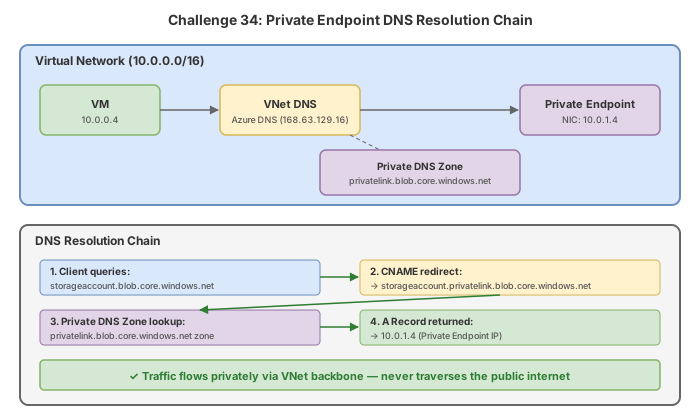
Architecture:
Learning objectives
After completing this challenge you will be able to:
- Create a private endpoint for an Azure Storage blob sub-resource
- Create and configure a privatelink DNS zone for automatic name resolution
- Link a private DNS zone to a virtual network
- Use DNS zone groups for automatic DNS record management
- Enable network policies on a private endpoint subnet to allow NSG enforcement
- Verify DNS resolution returns the private IP address
- Understand private endpoint connection states (Pending, Approved, Rejected)
Prerequisites
- An Azure subscription with Contributor access
- Azure CLI installed and authenticated (
az login) - PowerShell with Az module installed (
Install-Module Az -Force)
Key concepts for AZ-700
| Concept | Detail |
|---|---|
| Private endpoint | A network interface with a private IP that connects you privately to a service powered by Azure Private Link |
| Privatelink DNS zone | A private DNS zone (e.g., privatelink.blob.core.windows.net) used to override public DNS resolution with private IPs |
| DNS zone group | Associates a private endpoint with a private DNS zone for automatic A-record lifecycle management |
| Virtual network link | Connects a private DNS zone to a VNet so VMs in that VNet can resolve records from the zone |
| Network policies | By default, NSGs and UDRs are disabled on PE subnets; must be explicitly enabled via subnet configuration |
| Connection states | Pending (awaiting approval), Approved (active), Rejected (denied by service owner), Disconnected |
| Sub-resource (group-id) | Identifies which part of a multi-endpoint service to connect to (e.g., blob, file, table, queue) |
DNS resolution chain for private endpoints
When a client in a linked VNet resolves stmedsecure.blob.core.windows.net:
- Azure DNS receives the query
- Public DNS returns a CNAME to
stmedsecure.privatelink.blob.core.windows.net - Azure DNS checks linked private DNS zones
- The privatelink zone returns the A record pointing to the private IP (e.g., 10.0.2.4)
Without the private DNS zone linked to the VNet, the resolution falls through to the public IP.
The exam frequently tests the DNS resolution chain. Remember that the public DNS always returns a CNAME to the privatelink subdomain. It is the private DNS zone (linked to the VNet) that resolves this CNAME to the private IP. If the zone is not linked, the query resolves to the public IP.
Task 1: Create the resource group and virtual network
Azure CLI
# Create resource group
az group create \
    --name rg-pe-lab \
    --location eastus2

# Create VNet with workload subnet
az network vnet create \
    --resource-group rg-pe-lab \
    --name vnet-medsecure \
    --location eastus2 \
    --address-prefixes 10.0.0.0/16 \
    --subnet-name snet-workloads \
    --subnet-prefixes 10.0.1.0/24

# Create dedicated subnet for private endpoints
az network vnet subnet create \
    --resource-group rg-pe-lab \
    --vnet-name vnet-medsecure \
    --name snet-pe \
    --address-prefixes 10.0.2.0/24
Azure PowerShell
# Create resource group
New-AzResourceGroup -Name "rg-pe-lab" -Location "eastus2"

# Create subnet configurations
$snetWorkloads = New-AzVirtualNetworkSubnetConfig `
    -Name "snet-workloads" `
    -AddressPrefix "10.0.1.0/24"

$snetPe = New-AzVirtualNetworkSubnetConfig `
    -Name "snet-pe" `
    -AddressPrefix "10.0.2.0/24"

# Create VNet
New-AzVirtualNetwork `
    -ResourceGroupName "rg-pe-lab" `
    -Name "vnet-medsecure" `
    -Location "eastus2" `
    -AddressPrefix "10.0.0.0/16" `
    -Subnet $snetWorkloads, $snetPe
Task 2: Create the storage account
Azure CLI
# Create storage account (must be globally unique name)
az storage account create \
    --resource-group rg-pe-lab \
    --name stmedsecurelab01 \
    --location eastus2 \
    --sku Standard_LRS \
    --kind StorageV2
Azure PowerShell
# Create storage account
$storageAccount = New-AzStorageAccount `
    -ResourceGroupName "rg-pe-lab" `
    -Name "stmedsecurelab01" `
    -Location "eastus2" `
    -SkuName "Standard_LRS" `
    -Kind "StorageV2"
Task 3: Create the private endpoint for blob storage
Azure CLI
# Get the storage account resource ID
STORAGE_ID=$(az storage account show \
    --resource-group rg-pe-lab \
    --name stmedsecurelab01 \
    --query "id" \
    --output tsv)

# Create private endpoint for blob sub-resource
az network private-endpoint create \
    --resource-group rg-pe-lab \
    --name pe-storage-blob \
    --vnet-name vnet-medsecure \
    --subnet snet-pe \
    --private-connection-resource-id $STORAGE_ID \
    --group-id blob \
    --connection-name pec-storage-blob \
    --location eastus2
Azure PowerShell
# Get storage account and VNet references
$storageAccount = Get-AzStorageAccount `
    -ResourceGroupName "rg-pe-lab" `
    -Name "stmedsecurelab01"

$vnet = Get-AzVirtualNetwork `
    -ResourceGroupName "rg-pe-lab" `
    -Name "vnet-medsecure"

$subnet = $vnet | Select-Object -ExpandProperty Subnets | `
    Where-Object { $_.Name -eq "snet-pe" }

# Create private link service connection
$plsConnection = New-AzPrivateLinkServiceConnection `
    -Name "pec-storage-blob" `
    -PrivateLinkServiceId $storageAccount.Id `
    -GroupId "blob"

# Create private endpoint
New-AzPrivateEndpoint `
    -ResourceGroupName "rg-pe-lab" `
    -Name "pe-storage-blob" `
    -Location "eastus2" `
    -Subnet $subnet `
    -PrivateLinkServiceConnection $plsConnection
Portal steps
- Search for Private endpoints and select Create
- In Basics: select resource group
rg-pe-lab, name itpe-storage-blob, regionEast US 2 - In Resource: resource type
Microsoft.Storage/storageAccounts, select your storage account, target sub-resourceblob - In Virtual Network: select
vnet-medsecure, subnetsnet-pe - In DNS: configure in the next task
- Select Review + create, then Create
When creating a PE to a resource in your own subscription, the connection is auto-approved (state: Approved). When connecting to a resource in another subscription or to a Private Link Service, the state starts as Pending until the resource owner approves it.
Task 4: Configure private DNS zone and link to VNet
Azure CLI
# Create the privatelink DNS zone for blob storage
az network private-dns zone create \
    --resource-group rg-pe-lab \
    --name "privatelink.blob.core.windows.net"

# Link the DNS zone to the VNet
az network private-dns link vnet create \
    --resource-group rg-pe-lab \
    --zone-name "privatelink.blob.core.windows.net" \
    --name link-vnet-medsecure \
    --virtual-network vnet-medsecure \
    --registration-enabled false

# Create DNS zone group to auto-manage A records
az network private-endpoint dns-zone-group create \
    --resource-group rg-pe-lab \
    --endpoint-name pe-storage-blob \
    --name zone-group-blob \
    --private-dns-zone "privatelink.blob.core.windows.net" \
    --zone-name blob
Azure PowerShell
# Create private DNS zone
$dnsZone = New-AzPrivateDnsZone `
-ResourceGroupName "rg-pe-lab" `
-Name "privatelink.blob.core.windows.net"
# Link DNS zone to VNet
$vnet = Get-AzVirtualNetwork -ResourceGroupName "rg-pe-lab" -Name "vnet-medsecure"
New-AzPrivateDnsVirtualNetworkLink `
-ResourceGroupName "rg-pe-lab" `
-ZoneName "privatelink.blob.core.windows.net" `
-Name "link-vnet-medsecure" `
-VirtualNetworkId $vnet.Id `
-EnableRegistration $false
# Create DNS zone group for automatic record management
$dnsZoneConfig = New-AzPrivateDnsZoneConfig `
-Name "blob" `
-PrivateDnsZoneId $dnsZone.ResourceId
New-AzPrivateDnsZoneGroup `
-ResourceGroupName "rg-pe-lab" `
-PrivateEndpointName "pe-storage-blob" `
-Name "zone-group-blob" `
-PrivateDnsZoneConfig $dnsZoneConfig
### From a VM inside the VNet
```bash
# Run nslookup from a VM connected to vnet-medsecure
nslookup stmedsecurelab01.blob.core.windows.net
# Expected output (private IP resolution):
# Server: UnKnown
# Address: 168.63.129.16
#
# Non-authoritative answer:
# Name: stmedsecurelab01.privatelink.blob.core.windows.net
# Address: 10.0.2.4
# Aliases: stmedsecurelab01.blob.core.windows.net
Task 6: Enable network policies on the PE subnet
By default, network policies (NSGs and UDRs) are disabled on subnets containing private endpoints. To enforce NSG rules on traffic to/from your private endpoint, you must explicitly enable network policies.
Azure CLI
# Enable network policies on the PE subnet
# NOTE: --disable-private-endpoint-network-policies false means policies ARE ENABLED
# This is a confusing double-negative in the CLI parameter name
az network vnet subnet update \
    --resource-group rg-pe-lab \
    --vnet-name vnet-medsecure \
    --name snet-pe \
    --disable-private-endpoint-network-policies false
Azure PowerShell
# Enable network policies on the PE subnet
$vnet = Get-AzVirtualNetwork -ResourceGroupName "rg-pe-lab" -Name "vnet-medsecure"

# PrivateEndpointNetworkPoliciesFlag values:
# "Enabled" = NSGs and UDRs apply to private endpoints
# "Disabled" = NSGs and UDRs are bypassed (default)
Set-AzVirtualNetworkSubnetConfig `
    -Name "snet-pe" `
    -VirtualNetwork $vnet `
    -AddressPrefix "10.0.2.0/24" `
    -PrivateEndpointNetworkPoliciesFlag "Enabled"

$vnet | Set-AzVirtualNetwork
The Azure CLI parameter --disable-private-endpoint-network-policies uses a double negative:
--disable-private-endpoint-network-policies true= policies are DISABLED (default, NSGs do NOT apply)--disable-private-endpoint-network-policies false= policies are ENABLED (NSGs DO apply)
The PowerShell equivalent is clearer: -PrivateEndpointNetworkPoliciesFlag "Enabled" or "Disabled".
Create an NSG rule for the PE subnet
# Create NSG
az network nsg create \
    --resource-group rg-pe-lab \
    --name nsg-snet-pe

# Allow HTTPS from workload subnet to PE subnet
az network nsg rule create \
    --resource-group rg-pe-lab \
    --nsg-name nsg-snet-pe \
    --name Allow-HTTPS-From-Workloads \
    --priority 100 \
    --direction Inbound \
    --source-address-prefixes 10.0.1.0/24 \
    --destination-address-prefixes 10.0.2.0/24 \
    --destination-port-ranges 443 \
    --protocol Tcp \
    --access Allow

# Deny all other inbound
az network nsg rule create \
    --resource-group rg-pe-lab \
    --nsg-name nsg-snet-pe \
    --name Deny-All-Inbound \
    --priority 4096 \
    --direction Inbound \
    --source-address-prefixes "*" \
    --destination-address-prefixes "*" \
    --destination-port-ranges "*" \
    --protocol "*" \
    --access Deny

# Associate NSG with PE subnet
az network vnet subnet update \
    --resource-group rg-pe-lab \
    --vnet-name vnet-medsecure \
    --name snet-pe \
    --network-security-group nsg-snet-pe
Break & fix
Scenario 1: DNS not resolving to private IP
Symptom: nslookup stmedsecurelab01.blob.core.windows.net returns the public IP address instead of 10.0.2.4.
Diagnosis:
# Check if the DNS zone exists
az network private-dns zone show \
    --resource-group rg-pe-lab \
    --name "privatelink.blob.core.windows.net" \
    --query "name" \
    --output tsv

# Check if the VNet link exists
az network private-dns link vnet list \
    --resource-group rg-pe-lab \
    --zone-name "privatelink.blob.core.windows.net" \
    --output table
Root cause: The private DNS zone is not linked to the VNet where the client VM resides.
Fix:
az network private-dns link vnet create \
    --resource-group rg-pe-lab \
    --zone-name "privatelink.blob.core.windows.net" \
    --name link-vnet-medsecure \
    --virtual-network vnet-medsecure \
    --registration-enabled false
Scenario 2: NSG blocking traffic to private endpoint
Symptom: Application in snet-workloads cannot connect to storage via PE, but DNS resolves correctly to private IP.
Diagnosis:
# Check if network policies are enabled on the PE subnet
az network vnet subnet show \
    --resource-group rg-pe-lab \
    --vnet-name vnet-medsecure \
    --name snet-pe \
    --query "privateEndpointNetworkPolicies" \
    --output tsv
Root cause: Network policies were enabled on the subnet and an NSG was associated, but the NSG lacks an Allow rule for the required traffic. When policies are enabled, all standard NSG rules apply to PE traffic.
Fix: Either add an Allow rule for port 443 from the source subnet, or disable network policies if NSG enforcement is not required:
# Option A: Disable network policies (NSG rules will not apply to PE)
az network vnet subnet update \
    --resource-group rg-pe-lab \
    --vnet-name vnet-medsecure \
    --name snet-pe \
    --disable-private-endpoint-network-policies true

# Option B: Add allow rule (if policies should remain enabled)
az network nsg rule create \
    --resource-group rg-pe-lab \
    --nsg-name nsg-snet-pe \
    --name Allow-Storage-HTTPS \
    --priority 100 \
    --direction Inbound \
    --source-address-prefixes 10.0.1.0/24 \
    --destination-address-prefixes 10.0.2.0/24 \
    --destination-port-ranges 443 \
    --protocol Tcp \
    --access Allow
Scenario 3: Private endpoint stuck in Pending state
Symptom: The private endpoint connection shows state Pending and traffic does not flow.
Diagnosis:
# Check connection state
az network private-endpoint show \
    --resource-group rg-pe-lab \
    --name pe-storage-blob \
    --query "privateLinkServiceConnections[0].privateLinkServiceConnectionState.status" \
    --output tsv
Root cause: The PE was created with --manual-request true or the target resource is in a different subscription, requiring manual approval from the resource owner.
Fix:
# Approve the pending connection (run from the storage account owner's context)
az network private-endpoint-connection approve \
    --resource-group rg-pe-lab \
    --name <connection-name> \
    --resource-name stmedsecurelab01 \
    --type Microsoft.Storage/storageAccounts \
    --description "Approved for MedSecure VNet access"
Knowledge check
1. A VM inside a VNet resolves stmedsecure.blob.core.windows.net to a public IP despite a private endpoint existing. What is the most likely cause?
2. What does the Azure CLI parameter --disable-private-endpoint-network-policies false accomplish?
3. A private endpoint connection to a storage account in another subscription shows state 'Pending'. What must happen for traffic to flow?
4. Which group-id value is used when creating a private endpoint for Azure Storage blob access?
5. What is the purpose of a DNS zone group on a private endpoint?
6. In the DNS resolution chain for a private endpoint, what does public DNS return for stmedsecure.blob.core.windows.net?
Cleanup
Remove all resources created in this challenge to stop billing:
az group delete --name rg-pe-lab --yes --no-wait
Remove-AzResourceGroup -Name "rg-pe-lab" -Force -AsJob
Private endpoints incur charges of approximately $0.01/hour per endpoint. While minimal, ensure you clean up after completing the lab to avoid unnecessary costs. The storage account also incurs charges for stored data.