Challenge 38: Service endpoints & policies
45-60 minutes | ~$0.01 (no additional charge for service endpoints) | Exam weight: 10-15%
Scenario
Fourth Coffee is a financial services company concerned about data exfiltration. Development teams have Azure VMs that access Azure Storage accounts, but the security team discovered that developers could potentially copy data to unauthorized storage accounts. The company wants to use service endpoint policies to restrict outbound access from their subnets to only approved storage accounts, while also understanding when Private Endpoints might be a better fit.
Your task is to enable service endpoints, create policies that restrict access to specific storage accounts, and validate that unauthorized storage accounts are blocked. You will also compare service endpoints with Private Endpoints to recommend the best approach for different scenarios.
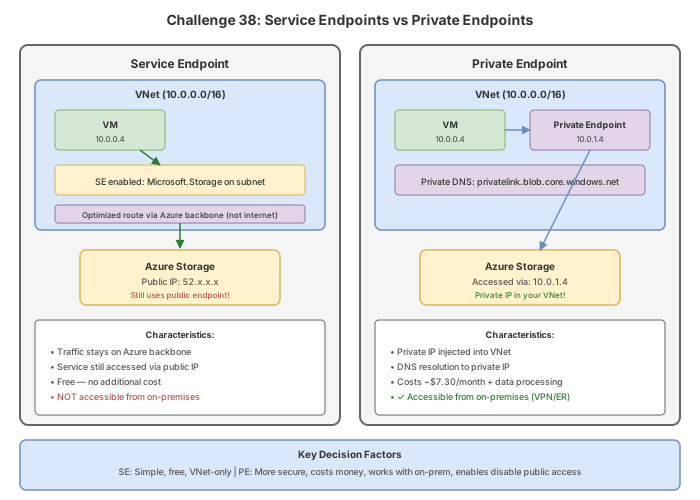
Service endpoints vs Private Endpoints
| Feature | Service Endpoints | Private Endpoints |
|---|---|---|
| Traffic path | Optimized route over Azure backbone, still uses public IP of PaaS | Traffic goes to a private IP in your VNet |
| DNS | No DNS changes needed | Requires Private DNS zone or custom DNS |
| On-premises access | Not accessible from on-prem via SE alone | Accessible from on-prem (with DNS config) |
| Cost | Free | ~$0.01/h per endpoint + data processing |
| Data exfiltration protection | Requires SE policies (limited to Storage) | Inherent -- traffic stays private |
| IP seen by PaaS | VNet subnet IP (source NAT changes) | Private IP from VNet |
| Granularity | Subnet level | Per-resource |
| Service support for policies | Only Azure Storage | N/A (inherently restricted) |
Task 1: Create storage accounts and a VNet with service endpoints
Azure CLI
# Variables
RG="rg-challenge38"
LOCATION="eastus"
VNET_NAME="vnet-workload"
SUBNET_NAME="snet-app"
ALLOWED_STORAGE="stallowedc38$(shuf -i 1000-9999 -n 1)"
BLOCKED_STORAGE="stblockedc38$(shuf -i 1000-9999 -n 1)"

# Create resource group
az group create --name $RG --location $LOCATION

# Create two storage accounts (one allowed, one to be blocked)
az storage account create \
  --resource-group $RG \
  --name $ALLOWED_STORAGE \
  --location $LOCATION \
  --sku Standard_LRS \
  --kind StorageV2

az storage account create \
  --resource-group $RG \
  --name $BLOCKED_STORAGE \
  --location $LOCATION \
  --sku Standard_LRS \
  --kind StorageV2

# Create VNet and subnet with Microsoft.Storage service endpoint enabled
az network vnet create \
  --resource-group $RG \
  --name $VNET_NAME \
  --location $LOCATION \
  --address-prefixes "10.1.0.0/16" \
  --subnet-name $SUBNET_NAME \
  --subnet-prefixes "10.1.0.0/24"

# Enable service endpoint on the subnet
az network vnet subnet update \
  --resource-group $RG \
  --vnet-name $VNET_NAME \
  --name $SUBNET_NAME \
  --service-endpoints Microsoft.Storage
Azure PowerShell
# Variables
$rg = "rg-challenge38"
$location = "eastus"
$vnetName = "vnet-workload"
$subnetName = "snet-app"
$allowedStorage = "stallowedc38$(Get-Random -Minimum 1000 -Maximum 9999)"
$blockedStorage = "stblockedc38$(Get-Random -Minimum 1000 -Maximum 9999)"

# Create resource group
New-AzResourceGroup -Name $rg -Location $location

# Create storage accounts
New-AzStorageAccount -ResourceGroupName $rg -Name $allowedStorage `
  -Location $location -SkuName Standard_LRS -Kind StorageV2

New-AzStorageAccount -ResourceGroupName $rg -Name $blockedStorage `
  -Location $location -SkuName Standard_LRS -Kind StorageV2

# Create VNet
$subnet = New-AzVirtualNetworkSubnetConfig `
  -Name $subnetName `
  -AddressPrefix "10.1.0.0/24" `
  -ServiceEndpoint "Microsoft.Storage"

New-AzVirtualNetwork `
  -ResourceGroupName $rg `
  -Name $vnetName `
  -Location $location `
  -AddressPrefix "10.1.0.0/16" `
  -Subnet $subnet
Portal
- Create a resource group
rg-challenge38in East US. - Create two storage accounts: one named with "allowed" and one with "blocked" in their names.
- Create a VNet
vnet-workloadwith address space10.1.0.0/16. - Add subnet
snet-appwith prefix10.1.0.0/24. - In the subnet settings, under Service endpoints, add
Microsoft.Storage.
Task 2: Create a service endpoint policy
Service endpoint policies restrict which Azure Storage accounts can be accessed from a subnet via service endpoints.
Azure CLI
# Get the allowed storage account resource ID
ALLOWED_STORAGE_ID=$(az storage account show \
  --name $ALLOWED_STORAGE \
  --resource-group $RG \
  --query id --output tsv)

# Create a service endpoint policy
az network service-endpoint policy create \
  --resource-group $RG \
  --name "sep-allowed-storage" \
  --location $LOCATION

# Add a policy definition restricting to the allowed storage account
az network service-endpoint policy-definition create \
  --resource-group $RG \
  --policy-name "sep-allowed-storage" \
  --name "allow-specific-storage" \
  --service "Microsoft.Storage" \
  --service-resources $ALLOWED_STORAGE_ID
Azure PowerShell
# Get the allowed storage account resource ID
$storageAccount = Get-AzStorageAccount -ResourceGroupName $rg -Name $allowedStorage
$resourceId = $storageAccount.Id

# Create the policy definition
$policyDefinition = New-AzServiceEndpointPolicyDefinition `
  -Name "allow-specific-storage" `
  -Description "Allow only approved storage account" `
  -Service "Microsoft.Storage" `
  -ServiceResource $resourceId

# Create the service endpoint policy
$sepolicy = New-AzServiceEndpointPolicy `
  -ResourceGroupName $rg `
  -Name "sep-allowed-storage" `
  -Location $location `
  -ServiceEndpointPolicyDefinition $policyDefinition
Portal
- Search for Service endpoint policies and select + Create.
- Set resource group to
rg-challenge38, name tosep-allowed-storage, region to East US. - Select Next: Policy definitions.
- Select + Add a resource:
- Service:
Microsoft.Storage - Scope: Single account
- Select the allowed storage account.
- Service:
- Select Add, then Review + create, then Create.
Task 3: Associate the policy with the subnet
Azure CLI
# Associate the service endpoint policy to the subnet
az network vnet subnet update \
  --resource-group $RG \
  --vnet-name $VNET_NAME \
  --name $SUBNET_NAME \
  --service-endpoints Microsoft.Storage \
  --service-endpoint-policy "sep-allowed-storage"
Azure PowerShell
$virtualNetwork = Get-AzVirtualNetwork -ResourceGroupName $rg -Name $vnetName

Set-AzVirtualNetworkSubnetConfig `
  -VirtualNetwork $virtualNetwork `
  -Name $subnetName `
  -AddressPrefix "10.1.0.0/24" `
  -ServiceEndpoint "Microsoft.Storage" `
  -ServiceEndpointPolicy $sepolicy

$virtualNetwork | Set-AzVirtualNetwork
Portal
- Navigate to the service endpoint policy
sep-allowed-storage. - Expand Settings and select Associated subnets.
- Select + Edit subnet association.
- Select VNet
vnet-workloadand subnetsnet-app. - Select Apply.
Once a service endpoint policy is applied to a subnet, all storage access via the service endpoint is restricted to only the accounts listed in the policy. Ensure all necessary storage accounts are included before applying the policy.
Task 4: Configure storage account firewall with VNet rules
Azure CLI
# Set default action to Deny on the allowed storage account
az storage account update \
  --resource-group $RG \
  --name $ALLOWED_STORAGE \
  --default-action Deny

# Add a VNet rule allowing access from the subnet
az storage account network-rule add \
  --resource-group $RG \
  --account-name $ALLOWED_STORAGE \
  --vnet-name $VNET_NAME \
  --subnet $SUBNET_NAME
Azure PowerShell
# Set default action to Deny
Update-AzStorageAccountNetworkRuleSet `
  -ResourceGroupName $rg `
  -Name $allowedStorage `
  -DefaultAction Deny

# Add VNet rule
$subnet = Get-AzVirtualNetwork -ResourceGroupName $rg -Name $vnetName | `
  Get-AzVirtualNetworkSubnetConfig -Name $subnetName

Add-AzStorageAccountNetworkRule `
  -ResourceGroupName $rg `
  -Name $allowedStorage `
  -VirtualNetworkResourceId $subnet.Id
Portal
- Navigate to the allowed storage account.
- Under Security + networking, select Networking.
- Set Public network access to Enabled from selected virtual networks and IP addresses.
- Under Virtual networks, select + Add existing virtual network.
- Select VNet
vnet-workloadand subnetsnet-app. - Select Add, then Save.
Task 5: Validate the service endpoint policy
Deploy a test VM in the subnet and verify that only the allowed storage account is accessible.
# Create a test VM in the subnet
az vm create \
  --resource-group $RG \
  --name "vm-test" \
  --image Ubuntu2204 \
  --vnet-name $VNET_NAME \
  --subnet $SUBNET_NAME \
  --admin-username azureuser \
  --generate-ssh-keys \
  --size Standard_B1s \
  --no-wait

# After VM is running, SSH in and test connectivity
# This should SUCCEED (allowed storage account)
curl -s -o /dev/null -w "%{http_code}" \
  "https://$ALLOWED_STORAGE.blob.core.windows.net/?comp=list"
# Expected: 403 (auth required, but connection works)

# This should FAIL (blocked storage account - connection refused by SE policy)
curl -s -o /dev/null -w "%{http_code}" \
  "https://$BLOCKED_STORAGE.blob.core.windows.net/?comp=list"
# Expected: connection timeout or drop (SE policy blocks it)
Break & fix
Scenario 1: Service endpoint policy blocking all storage access
Symptom: After applying the service endpoint policy, no storage accounts are accessible from the subnet -- even the "allowed" ones return connection failures.
Root cause: The --service-resources value in the policy definition uses an incorrect resource ID format. The resource ID must be the full ARM resource ID of the storage account.
Fix:
# Verify the policy definition has the correct resource ID
az network service-endpoint policy-definition show \
--resource-group $RG \
--policy-name "sep-allowed-storage" \
--name "allow-specific-storage" \
--query "serviceResources" -o tsv
# If incorrect, delete and recreate with the proper resource ID
az network service-endpoint policy-definition delete \
--resource-group $RG \
--policy-name "sep-allowed-storage" \
--name "allow-specific-storage"
CORRECT_ID=$(az storage account show --name $ALLOWED_STORAGE --resource-group $RG --query id -o tsv)
az network service-endpoint policy-definition create \
--resource-group $RG \
--policy-name "sep-allowed-storage" \
--name "allow-specific-storage" \
--service "Microsoft.Storage" \
--service-resources $CORRECT_ID
**Key insight**: Service endpoints and VNet rules work together. The service endpoint on the subnet optimizes the route, and the VNet rule on the storage account grants access. Both must be in place.
---
### Scenario 3: App Service access restriction using SE but internet traffic still works
**Symptom**: An App Service has a service endpoint-based access restriction configured, but internet-based clients can still reach the application.
**Root cause**: The access restriction rules have a higher-priority "Allow All" rule, or the deny-all rule is missing. App Service processes rules in priority order and stops at the first match.
**Fix**:
Check the access restriction rules and ensure a deny-all rule exists with the lowest priority:
```bash
# List current access restrictions
az webapp config access-restriction show \
--resource-group $RG \
--name "app-name" \
--query "ipSecurityRestrictions[].{priority:priority, name:name, action:action, ip:ipAddress, vnetSubnetResourceId:vnetSubnetResourceId}" -o table
# Add a deny-all rule with lowest priority (highest number)
az webapp config access-restriction add \
--resource-group $RG \
--name "app-name" \
--priority 999 \
--action Deny \
--ip-address "0.0.0.0/0" \
--rule-name "DenyAll"
Key insight: App Service access restrictions are processed top-down by priority number (lowest number = highest priority). There is an implicit "Allow All" at the end unless you explicitly deny. Always add a deny-all catch rule.
Knowledge check
1. What is the primary advantage of service endpoint policies over service endpoints alone?
2. Which Azure service currently supports service endpoint policies for data exfiltration protection?
3. How does traffic routing change when a service endpoint is enabled on a subnet?
4. A company needs on-premises clients to access Azure Storage privately. Which approach should they use?
5. What happens if you associate a service endpoint policy with a subnet but forget to include a required storage account in the policy?
6. Which statement about service endpoints and Private Endpoints is correct?
Cleanup
# Delete all resources
az group delete --name rg-challenge38 --yes --no-wait
# PowerShell cleanup
Remove-AzResourceGroup -Name "rg-challenge38" -Force -AsJob
Service endpoints and service endpoint policies have no additional cost. However, the test VM and storage accounts do incur minimal charges. Delete the resource group after completing this challenge.
Summary
In this challenge, you configured service endpoints with policies to prevent data exfiltration to unauthorized storage accounts. You learned how service endpoint policies restrict outbound access at the subnet level, how VNet rules on storage accounts grant inbound access, and the important distinctions between service endpoints and Private Endpoints. Understanding when to use each approach -- and their limitations -- is a key topic on the AZ-700 exam.