Challenge 36: Private Link service (provider side)
60-75 minutes | ~$0.05/h | Exam weight: 10-15%
Scenario
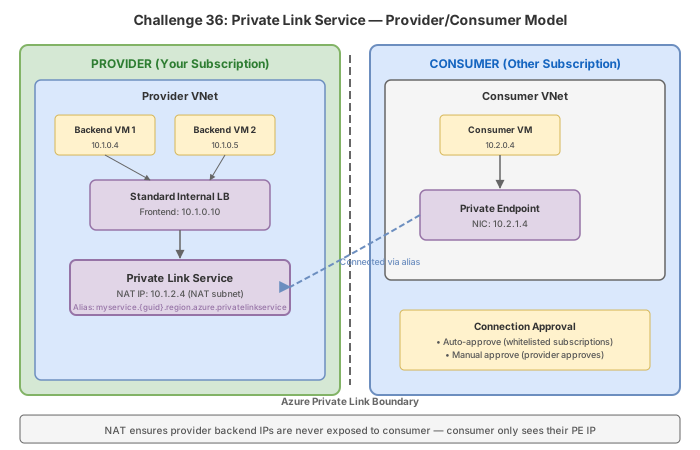
NovaTech Solutions, an ISV company, has built an internal API platform behind an Azure Standard Load Balancer. They want to offer this API service to external customers (consumers) using Azure Private Link, so consumers can access NovaTech's service through a private endpoint in their own virtual networks without any exposure to the public internet. You are the network engineer responsible for configuring the provider-side Private Link Service, managing NAT IP addresses, configuring visibility and auto-approval policies, and handling consumer connection approvals.
Architecture:
Learning objectives
After completing this challenge you will be able to:
- Create a Private Link Service (PLS) attached to a Standard Load Balancer
- Configure NAT IP addresses for source NAT of incoming consumer traffic
- Disable network policies on the PLS subnet (required for PLS deployment)
- Set visibility restrictions to control which subscriptions can discover the service
- Configure auto-approval for trusted consumer subscriptions
- Retrieve the PLS alias for sharing with consumers
- Approve or reject consumer private endpoint connections
- Understand the provider vs consumer workflow and responsibilities
Prerequisites
- An Azure subscription with Contributor access
- Azure CLI installed and authenticated (
az login) - PowerShell with Az module installed (
Install-Module Az -Force) - Understanding of Azure Standard Load Balancer (internal)
Key concepts for AZ-700
| Concept | Detail |
|---|---|
| Private Link Service (PLS) | Provider-side resource that exposes a service behind a Standard LB via Private Link |
| NAT IP configuration | PLS performs SNAT; the NAT IP is the source IP seen by the backend for consumer traffic |
| Standard Load Balancer | PLS requires Standard SKU (Basic LB is not supported) |
| Alias | A globally unique, anonymized identifier for the PLS that consumers use to create their PE |
| Visibility | Controls which subscriptions can discover and connect to the PLS (empty = all, specified = restricted) |
| Auto-approval | Subscriptions in this list have connections automatically approved (subset of visibility) |
| Connection states | Pending (awaiting approval), Approved (active), Rejected (denied), Removed (deleted) |
| Network policies | Must be disabled on the PLS subnet (privateLinkServiceNetworkPolicies = Disabled) |
Provider vs consumer responsibilities
| Step | Provider (service owner) | Consumer (customer) |
|---|---|---|
| 1 | Deploys Standard LB with backend pool | - |
| 2 | Creates PLS linked to LB frontend | - |
| 3 | Shares alias or resource ID with consumer | Receives alias |
| 4 | - | Creates PE targeting the alias |
| 5 | Approves the PE connection (or auto-approved) | Waits for approval |
| 6 | Traffic flows: consumer PE -> PLS NAT -> LB -> backend | Accesses service via private IP |
The exam tests the distinction between Private Link Service (provider creates, linked to LB) and Private Endpoint (consumer creates, gets private IP in their VNet). Remember that PLS requires a Standard LB -- this is a common trap question.
Task 1: Create the provider infrastructure
Azure CLI
# Create resource group
az group create \
    --name rg-pls-provider \
    --location eastus2

# Create provider VNet
az network vnet create \
    --resource-group rg-pls-provider \
    --name vnet-provider \
    --location eastus2 \
    --address-prefixes 10.0.0.0/16 \
    --subnet-name snet-backend \
    --subnet-prefixes 10.0.1.0/24

# Create PLS subnet (will host the Private Link Service)
az network vnet subnet create \
    --resource-group rg-pls-provider \
    --vnet-name vnet-provider \
    --name snet-pls \
    --address-prefixes 10.0.2.0/24
Azure PowerShell
New-AzResourceGroup -Name "rg-pls-provider" -Location "eastus2"

$snetBackend = New-AzVirtualNetworkSubnetConfig `
    -Name "snet-backend" `
    -AddressPrefix "10.0.1.0/24"

$snetPls = New-AzVirtualNetworkSubnetConfig `
    -Name "snet-pls" `
    -AddressPrefix "10.0.2.0/24"

New-AzVirtualNetwork `
    -ResourceGroupName "rg-pls-provider" `
    -Name "vnet-provider" `
    -Location "eastus2" `
    -AddressPrefix "10.0.0.0/16" `
    -Subnet $snetBackend, $snetPls
Task 2: Deploy the Standard internal load balancer
Azure CLI
# Create Standard internal LB
az network lb create \
    --resource-group rg-pls-provider \
    --name lb-api-internal \
    --sku Standard \
    --vnet-name vnet-provider \
    --subnet snet-backend \
    --frontend-ip-name frontend-api \
    --backend-pool-name backend-pool

# Create health probe
az network lb probe create \
    --resource-group rg-pls-provider \
    --lb-name lb-api-internal \
    --name probe-http \
    --protocol Tcp \
    --port 80

# Create load balancer rule
az network lb rule create \
    --resource-group rg-pls-provider \
    --lb-name lb-api-internal \
    --name rule-http \
    --protocol Tcp \
    --frontend-port 80 \
    --backend-port 80 \
    --frontend-ip-name frontend-api \
    --backend-pool-name backend-pool \
    --probe-name probe-http \
    --idle-timeout 15 \
    --enable-tcp-reset true
Azure PowerShell
$vnet = Get-AzVirtualNetwork -ResourceGroupName "rg-pls-provider" -Name "vnet-provider"
$backendSubnet = $vnet.Subnets | Where-Object { $_.Name -eq "snet-backend" }

# Create frontend IP configuration (internal)
$feIp = New-AzLoadBalancerFrontendIpConfig `
    -Name "frontend-api" `
    -SubnetId $backendSubnet.Id

# Create backend pool
$bePool = New-AzLoadBalancerBackendAddressPoolConfig -Name "backend-pool"

# Create probe
$probe = New-AzLoadBalancerProbeConfig `
    -Name "probe-http" `
    -Protocol Tcp `
    -Port 80 `
    -IntervalInSeconds 15 `
    -ProbeCount 2

# Create rule
$rule = New-AzLoadBalancerRuleConfig `
    -Name "rule-http" `
    -FrontendIpConfigurationId $feIp.Id `
    -BackendAddressPoolId $bePool.Id `
    -ProbeId $probe.Id `
    -Protocol Tcp `
    -FrontendPort 80 `
    -BackendPort 80 `
    -IdleTimeoutInMinutes 15 `
    -EnableTcpReset

# Create the Standard ILB
New-AzLoadBalancer `
    -ResourceGroupName "rg-pls-provider" `
    -Name "lb-api-internal" `
    -Location "eastus2" `
    -Sku "Standard" `
    -FrontendIpConfiguration $feIp `
    -BackendAddressPool $bePool `
    -Probe $probe `
    -LoadBalancingRule $rule
Task 3: Disable network policies on PLS subnet
Private Link Service requires network policies to be disabled on the subnet where it is deployed. This is a different setting from the private endpoint network policies.
Azure CLI
# Disable private link service network policies on the PLS subnet
az network vnet subnet update \
    --resource-group rg-pls-provider \
    --vnet-name vnet-provider \
    --name snet-pls \
    --private-link-service-network-policies Disabled
Azure PowerShell
$vnet = Get-AzVirtualNetwork -ResourceGroupName "rg-pls-provider" -Name "vnet-provider"

Set-AzVirtualNetworkSubnetConfig `
    -Name "snet-pls" `
    -VirtualNetwork $vnet `
    -AddressPrefix "10.0.2.0/24" `
    -PrivateLinkServiceNetworkPoliciesFlag "Disabled"

$vnet | Set-AzVirtualNetwork
Unlike private endpoint network policies (which disable NSG enforcement on PE traffic), the PLS subnet policy controls whether a Private Link Service can be deployed in the subnet at all. Without disabling this policy, PLS creation will fail. This is a different CLI parameter: --private-link-service-network-policies (not --disable-private-endpoint-network-policies).
Task 4: Create the Private Link Service
Azure CLI
# Create Private Link Service linked to the LB frontend
az network private-link-service create \
    --resource-group rg-pls-provider \
    --name pls-novatech-api \
    --vnet-name vnet-provider \
    --subnet snet-pls \
    --lb-name lb-api-internal \
    --lb-frontend-ip-configs frontend-api \
    --location eastus2

# Retrieve the PLS alias (share this with consumers)
az network private-link-service show \
    --resource-group rg-pls-provider \
    --name pls-novatech-api \
    --query "alias" \
    --output tsv
Azure PowerShell
$vnet = Get-AzVirtualNetwork -ResourceGroupName "rg-pls-provider" -Name "vnet-provider"
$plsSubnet = $vnet.Subnets | Where-Object { $_.Name -eq "snet-pls" }

$lb = Get-AzLoadBalancer -ResourceGroupName "rg-pls-provider" -Name "lb-api-internal"
$feConfig = $lb.FrontendIpConfigurations | Where-Object { $_.Name -eq "frontend-api" }

# Create NAT IP configuration for PLS
$natIpConfig = New-AzPrivateLinkServiceIpConfig `
    -Name "nat-ip-config" `
    -Subnet $plsSubnet `
    -PrivateIpAddressVersion "IPv4" `
    -Primary

# Create the Private Link Service
$pls = New-AzPrivateLinkService `
    -ResourceGroupName "rg-pls-provider" `
    -Name "pls-novatech-api" `
    -Location "eastus2" `
    -IpConfiguration $natIpConfig `
    -LoadBalancerFrontendIpConfiguration $feConfig

# Get the alias
$pls.Alias
Task 5: Configure visibility and auto-approval
Azure CLI
# Set visibility to specific consumer subscriptions
# Only these subscriptions can discover and connect to the PLS
az network private-link-service update \
    --resource-group rg-pls-provider \
    --name pls-novatech-api \
    --visibility "xxxxxxxx-xxxx-xxxx-xxxx-xxxxxxxxxxxx" "yyyyyyyy-yyyy-yyyy-yyyy-yyyyyyyyyyyy"

# Set auto-approval for trusted consumer subscriptions
# Connections from these subscriptions are approved automatically
az network private-link-service update \
    --resource-group rg-pls-provider \
    --name pls-novatech-api \
    --auto-approval "xxxxxxxx-xxxx-xxxx-xxxx-xxxxxxxxxxxx"
Azure PowerShell
$pls = Get-AzPrivateLinkService `
    -ResourceGroupName "rg-pls-provider" `
    -Name "pls-novatech-api"

# Update visibility (subscriptions that can see and connect)
$pls.Visibility = @{
    Subscriptions = @(
        "xxxxxxxx-xxxx-xxxx-xxxx-xxxxxxxxxxxx",
        "yyyyyyyy-yyyy-yyyy-yyyy-yyyyyyyyyyyy"
    )
}

# Update auto-approval (subset of visibility)
$pls.AutoApproval = @{
    Subscriptions = @(
        "xxxxxxxx-xxxx-xxxx-xxxx-xxxxxxxxxxxx"
    )
}

Set-AzPrivateLinkService -InputObject $pls
- Visibility controls which subscriptions can discover the PLS and create a PE connection to it. If empty, all subscriptions can connect. If specified, only listed subscriptions can connect.
- Auto-approval is always a subset of visibility. Listed subscriptions have their connections automatically approved without provider intervention.
- A subscription in visibility but NOT in auto-approval will have its connection in Pending state until manually approved.
Task 6: Consumer creates a private endpoint (simulated)
This simulates the consumer side. In production, the consumer would be in a different subscription.
Azure CLI
# Create consumer resource group and VNet
az group create --name rg-pls-consumer --location eastus2

az network vnet create \
    --resource-group rg-pls-consumer \
    --name vnet-consumer \
    --location eastus2 \
    --address-prefixes 10.1.0.0/16 \
    --subnet-name snet-consumer \
    --subnet-prefixes 10.1.1.0/24

# Get the PLS resource ID
PLS_ID=$(az network private-link-service show \
    --resource-group rg-pls-provider \
    --name pls-novatech-api \
    --query id \
    --output tsv)

# Consumer creates PE targeting the PLS
az network private-endpoint create \
    --resource-group rg-pls-consumer \
    --name pe-to-novatech \
    --vnet-name vnet-consumer \
    --subnet snet-consumer \
    --private-connection-resource-id $PLS_ID \
    --connection-name connection-novatech \
    --location eastus2
Azure PowerShell
New-AzResourceGroup -Name "rg-pls-consumer" -Location "eastus2"

$snet = New-AzVirtualNetworkSubnetConfig -Name "snet-consumer" -AddressPrefix "10.1.1.0/24"
$vnet = New-AzVirtualNetwork `
    -ResourceGroupName "rg-pls-consumer" `
    -Name "vnet-consumer" `
    -Location "eastus2" `
    -AddressPrefix "10.1.0.0/16" `
    -Subnet $snet

$pls = Get-AzPrivateLinkService `
    -ResourceGroupName "rg-pls-provider" `
    -Name "pls-novatech-api"

$plsConnection = New-AzPrivateLinkServiceConnection `
    -Name "connection-novatech" `
    -PrivateLinkServiceId $pls.Id `
    -RequestMessage "Please approve access for CustomerCo"

$subnet = $vnet.Subnets | Where-Object { $_.Name -eq "snet-consumer" }

New-AzPrivateEndpoint `
    -ResourceGroupName "rg-pls-consumer" `
    -Name "pe-to-novatech" `
    -Location "eastus2" `
    -Subnet $subnet `
    -PrivateLinkServiceConnection $plsConnection
Task 7: Provider approves the connection
Azure CLI
# List pending connections on the PLS
az network private-link-service connection list \
    --resource-group rg-pls-provider \
    --service-name pls-novatech-api \
    --output table

# Approve the pending connection
az network private-link-service connection update \
    --resource-group rg-pls-provider \
    --service-name pls-novatech-api \
    --name connection-novatech \
    --connection-status Approved \
    --description "Approved for CustomerCo production access"
Azure PowerShell
# Get the PLS and list connections
$pls = Get-AzPrivateLinkService `
    -ResourceGroupName "rg-pls-provider" `
    -Name "pls-novatech-api"

$pls.PrivateEndpointConnections | Format-Table Name, PrivateLinkServiceConnectionState

# Approve the connection
Approve-AzPrivateEndpointConnection `
    -ResourceGroupName "rg-pls-provider" `
    -ServiceName "pls-novatech-api" `
    -Name $pls.PrivateEndpointConnections[0].Name `
    -PrivateLinkResourceType "Microsoft.Network/privateLinkServices" `
    -Description "Approved for CustomerCo"
Portal steps
- Navigate to Private Link in the portal
- Select Private link services and choose
pls-novatech-api - Go to Private endpoint connections
- Select the pending connection and click Approve
- Provide a description and confirm
Break & fix
Scenario 1: PLS creation fails - Basic SKU load balancer
Symptom: az network private-link-service create returns an error indicating the load balancer is not compatible.
Diagnosis:
# Check the LB SKU
az network lb show \
    --resource-group rg-pls-provider \
    --name lb-api-internal \
    --query "sku.name" \
    --output tsv
Root cause: Private Link Service requires a Standard SKU Load Balancer. Basic LB is not supported.
Fix: Recreate the load balancer with Standard SKU:
# Delete the Basic LB
az network lb delete \
    --resource-group rg-pls-provider \
    --name lb-api-internal

# Recreate with Standard SKU
az network lb create \
    --resource-group rg-pls-provider \
    --name lb-api-internal \
    --sku Standard \
    --vnet-name vnet-provider \
    --subnet snet-backend \
    --frontend-ip-name frontend-api \
    --backend-pool-name backend-pool
Scenario 2: Consumer PE rejected - subscription not in visibility list
Symptom: Consumer creates a PE but the connection immediately shows state Rejected or the creation fails with an access error.
Diagnosis:
# Check PLS visibility settings (provider side)
az network private-link-service show \
    --resource-group rg-pls-provider \
    --name pls-novatech-api \
    --query "visibility.subscriptions" \
    --output tsv

# Check consumer's subscription ID
az account show --query "id" --output tsv
Root cause: The PLS has a visibility list configured, and the consumer's subscription is not in it.
Fix (provider side):
# Add the consumer's subscription to the visibility list
az network private-link-service update \
    --resource-group rg-pls-provider \
    --name pls-novatech-api \
    --visibility "existing-sub-id" "new-consumer-sub-id"
Scenario 3: NAT IP exhaustion
Symptom: New consumer connections succeed but report intermittent connectivity failures. Existing connections may drop under load.
Diagnosis:
# Check current NAT IP configurations
az network private-link-service show \
    --resource-group rg-pls-provider \
    --name pls-novatech-api \
    --query "ipConfigurations" \
    --output table

# Check number of active connections
az network private-link-service connection list \
    --resource-group rg-pls-provider \
    --service-name pls-novatech-api \
    --query "length(@)"
Root cause: Each NAT IP supports approximately 64,000 concurrent connections (port exhaustion). With many consumers or high connection counts, a single NAT IP may be insufficient.
Fix: Add additional NAT IP configurations:
# Add a secondary NAT IP to the PLS
az network private-link-service update \
    --resource-group rg-pls-provider \
    --name pls-novatech-api \
    --ip-configs name=nat-ip-secondary subnet=snet-pls private-ip-address="" private-ip-address-version=IPv4
$pls = Get-AzPrivateLinkService `
    -ResourceGroupName "rg-pls-provider" `
    -Name "pls-novatech-api"

$vnet = Get-AzVirtualNetwork -ResourceGroupName "rg-pls-provider" -Name "vnet-provider"
$plsSubnet = $vnet.Subnets | Where-Object { $_.Name -eq "snet-pls" }

$newNatIp = New-AzPrivateLinkServiceIpConfig `
    -Name "nat-ip-secondary" `
    -Subnet $plsSubnet `
    -PrivateIpAddressVersion "IPv4"

$pls.IpConfigurations += $newNatIp
Set-AzPrivateLinkService -InputObject $pls
Scenario 4: Network policies not disabled on PLS subnet
Symptom: PLS creation fails with an error about network policies.
Diagnosis:
az network vnet subnet show \
    --resource-group rg-pls-provider \
    --vnet-name vnet-provider \
    --name snet-pls \
    --query "privateLinkServiceNetworkPolicies" \
    --output tsv
Root cause: The subnet still has privateLinkServiceNetworkPolicies set to Enabled.
Fix:
az network vnet subnet update \
--resource-group rg-pls-provider \
--vnet-name vnet-provider \
--name snet-pls \
--private-link-service-network-policies Disabled
```powershell
Remove-AzResourceGroup -Name "rg-pls-provider" -Force -AsJob
Remove-AzResourceGroup -Name "rg-pls-consumer" -Force -AsJob
This challenge deploys a Standard Load Balancer ($0.025/h) and a Private Link Service ($0.01/h). If you also deployed backend VMs for testing, those incur additional charges. Delete both resource groups promptly after completing the lab. Total estimated cost is approximately $0.05/h without VMs.