Challenge 39: Migrate service endpoints to private endpoints
60-90 minutes | ~$0.05/h (Private Endpoint + DNS zone) | Exam weight: 10-15%
Scenario
Woodgrove Bank has been using service endpoints to secure access to Azure Storage and Azure SQL Database from their VNet subnets. As part of a security modernization initiative, the networking team must migrate all service endpoints to Private Endpoints. This provides stronger isolation (private IPs in the VNet), enables on-premises access via VPN, and eliminates the data exfiltration risks that service endpoints alone cannot fully address.
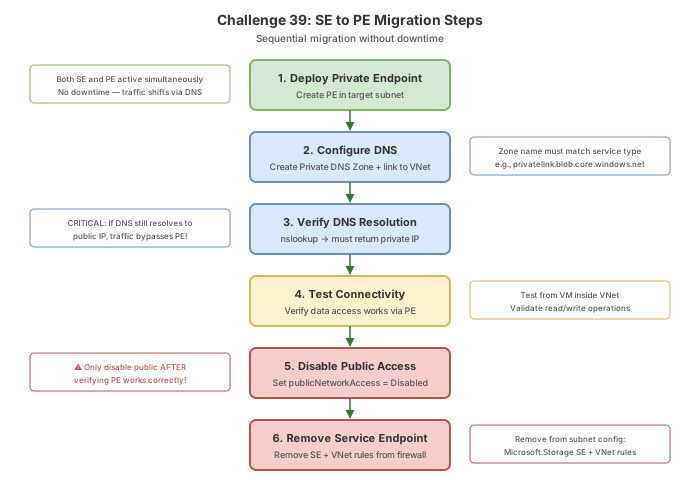
The migration must be performed with zero downtime. Both service endpoints and Private Endpoints can coexist during the transition period. The critical path is:
- Deploy Private Endpoints alongside existing service endpoints (coexistence).
- Configure DNS to resolve to private IPs.
- Validate connectivity through the Private Endpoint.
- Remove VNet rules from the storage account firewall.
- Disable public network access.
- Remove service endpoints from the subnet.
Migration order (critical)
[Current State]
Subnet -> Service Endpoint -> Storage (public IP, VNet rule)
[Step 1: Deploy PE alongside SE - coexistence]
Subnet -> Service Endpoint -> Storage (public IP, VNet rule)
Subnet -> Private Endpoint -> Storage (private IP)
[Step 2: DNS cutover]
storageaccount.blob.core.windows.net -> private IP (via Private DNS zone)
[Step 3: Validate]
Confirm all clients resolve to private IP and connectivity works
[Step 4: Remove SE infrastructure]
Remove VNet rules -> Disable public access -> Remove SE from subnet
[Final State]
Subnet -> Private Endpoint -> Storage (private IP only)
### Azure PowerShell
```powershell
# Variables
$rg = "rg-challenge39"
$location = "eastus"
$vnetName = "vnet-production"
$subnetName = "snet-app"
$storageName = "stwoodgrovec39$(Get-Random -Minimum 1000 -Maximum 9999)"
# Create the lab environment
New-AzResourceGroup -Name $rg -Location $location
New-AzStorageAccount -ResourceGroupName $rg -Name $storageName `
-Location $location -SkuName Standard_LRS -Kind StorageV2
$subnet = New-AzVirtualNetworkSubnetConfig -Name $subnetName `
-AddressPrefix "10.2.0.0/24" -ServiceEndpoint "Microsoft.Storage"
$vnet = New-AzVirtualNetwork -ResourceGroupName $rg -Name $vnetName `
-Location $location -AddressPrefix "10.2.0.0/16" -Subnet $subnet
# Add VNet rule to storage
Update-AzStorageAccountNetworkRuleSet -ResourceGroupName $rg `
-Name $storageName -DefaultAction Deny
$subnetObj = Get-AzVirtualNetwork -ResourceGroupName $rg -Name $vnetName | `
Get-AzVirtualNetworkSubnetConfig -Name $subnetName
Add-AzStorageAccountNetworkRule -ResourceGroupName $rg `
-Name $storageName -VirtualNetworkResourceId $subnetObj.Id
# Document current state
Write-Output "=== Current Subnet Configuration ==="
$subnetObj.ServiceEndpoints | Format-Table
Write-Output "=== Current Storage VNet Rules ==="
(Get-AzStorageAccountNetworkRuleSet -ResourceGroupName $rg -AccountName $storageName).VirtualNetworkRules
Task 2: Deploy Private Endpoint alongside existing service endpoint
During this phase, both SE and PE coexist. Existing traffic continues to flow via the service endpoint until DNS is updated.
Azure CLI
# Create a subnet for Private Endpoints
az network vnet subnet create \
  --resource-group $RG \
  --vnet-name $VNET_NAME \
  --name "snet-private-endpoints" \
  --address-prefixes "10.2.1.0/24"

# Get the storage account resource ID
STORAGE_ID=$(az storage account show \
  --name $STORAGE_NAME \
  --resource-group $RG \
  --query id -o tsv)

# Create the Private Endpoint for blob storage
az network private-endpoint create \
  --resource-group $RG \
  --name "pe-${STORAGE_NAME}-blob" \
  --vnet-name $VNET_NAME \
  --subnet "snet-private-endpoints" \
  --private-connection-resource-id $STORAGE_ID \
  --group-id "blob" \
  --connection-name "pec-${STORAGE_NAME}-blob" \
  --location $LOCATION

# Verify the Private Endpoint was created
az network private-endpoint show \
  --resource-group $RG \
  --name "pe-${STORAGE_NAME}-blob" \
  --query "{name:name, provisioningState:provisioningState, privateIP:customDnsConfigs[0].ipAddresses[0]}" -o table
Azure PowerShell
# Create PE subnet
$vnet = Get-AzVirtualNetwork -ResourceGroupName $rg -Name $vnetName
Add-AzVirtualNetworkSubnetConfig -Name "snet-private-endpoints" `
  -VirtualNetwork $vnet -AddressPrefix "10.2.1.0/24"
$vnet | Set-AzVirtualNetwork

# Create Private Endpoint
$storageAccount = Get-AzStorageAccount -ResourceGroupName $rg -Name $storageName
$peSubnet = Get-AzVirtualNetwork -ResourceGroupName $rg -Name $vnetName | `
  Get-AzVirtualNetworkSubnetConfig -Name "snet-private-endpoints"

$peLinkConfig = New-AzPrivateLinkServiceConnection `
  -Name "pec-$storageName-blob" `
  -PrivateLinkServiceId $storageAccount.Id `
  -GroupId "blob"

New-AzPrivateEndpoint `
  -ResourceGroupName $rg `
  -Name "pe-$storageName-blob" `
  -Location $location `
  -Subnet $peSubnet `
  -PrivateLinkServiceConnection $peLinkConfig
Portal
- Navigate to Private endpoints and select + Create.
- Set resource group, name to
pe-storagename-blob, region to East US. - Under Resource, select the storage account and sub-resource
blob. - Under Virtual Network, select
vnet-productionand subnetsnet-private-endpoints. - Select Review + create, then Create.
Task 3: Configure Private DNS zone and link
For DNS to resolve the storage FQDN to the private IP, a Private DNS zone is required.
Azure CLI
# Create Private DNS zone for blob storage
az network private-dns zone create \
  --resource-group $RG \
  --name "privatelink.blob.core.windows.net"

# Link the DNS zone to the VNet (enable auto-registration is not needed here)
az network private-dns link vnet create \
  --resource-group $RG \
  --zone-name "privatelink.blob.core.windows.net" \
  --name "link-vnet-production" \
  --virtual-network $VNET_NAME \
  --registration-enabled false

# Create DNS zone group to auto-register PE records
az network private-endpoint dns-zone-group create \
  --resource-group $RG \
  --endpoint-name "pe-${STORAGE_NAME}-blob" \
  --name "default" \
  --private-dns-zone "privatelink.blob.core.windows.net" \
  --zone-name "blob"
Azure PowerShell
# Create Private DNS Zone
$dnsZone = New-AzPrivateDnsZone -ResourceGroupName $rg `
  -Name "privatelink.blob.core.windows.net"

# Link DNS zone to VNet
$vnet = Get-AzVirtualNetwork -ResourceGroupName $rg -Name $vnetName
New-AzPrivateDnsVirtualNetworkLink -ResourceGroupName $rg `
  -ZoneName "privatelink.blob.core.windows.net" `
  -Name "link-vnet-production" `
  -VirtualNetworkId $vnet.Id

# Create DNS zone group for automatic record registration
$dnsZoneConfig = New-AzPrivateDnsZoneConfig `
  -Name "privatelink.blob.core.windows.net" `
  -PrivateDnsZoneId $dnsZone.ResourceId

New-AzPrivateDnsZoneGroup -ResourceGroupName $rg `
  -PrivateEndpointName "pe-$storageName-blob" `
  -Name "default" `
  -PrivateDnsZoneConfig $dnsZoneConfig
Portal
- Search for Private DNS zones and select + Create.
- Name:
privatelink.blob.core.windows.net, resource group:rg-challenge39. - After creation, go to Virtual network links and add a link to
vnet-production. - Go back to the Private Endpoint, select DNS configuration, and add a DNS zone group linking to the zone.
Task 4: Validate Private Endpoint connectivity
This is the critical step before removing service endpoints. Confirm DNS resolves to the private IP.
Azure CLI
# Get the expected private IP of the PE
PE_IP=$(az network private-endpoint show \
  --resource-group $RG \
  --name "pe-${STORAGE_NAME}-blob" \
  --query "customDnsConfigs[0].ipAddresses[0]" -o tsv)
echo "Expected Private IP: $PE_IP"

# From a VM in the VNet, verify DNS resolution
# (Run nslookup from the VM)
# nslookup <storagename>.blob.core.windows.net
# Expected output:
#   <storagename>.blob.core.windows.net
#   canonical name = <storagename>.privatelink.blob.core.windows.net
#   Address: 10.2.1.4 (the PE private IP)

# Verify the A record exists in the Private DNS zone
az network private-dns record-set a list \
  --resource-group $RG \
  --zone-name "privatelink.blob.core.windows.net" \
  --query "[].{name:name, ip:aRecords[0].ipv4Address}" -o table
PowerShell (from a VM in the VNet)
# Test DNS resolution
Resolve-DnsName -Name "$storageName.blob.core.windows.net"

# Expected output should show:
# Name: storagename.privatelink.blob.core.windows.net
# Type: A
# IPAddress: 10.2.1.4

# Test connectivity to blob endpoint via private IP
Test-NetConnection -ComputerName "$storageName.blob.core.windows.net" -Port 443
Before proceeding to removal of service endpoints, confirm:
nslookupresolves to a private IP (10.x.x.x), not a public IP.- The CNAME chain includes
privatelink.blob.core.windows.net. - Application connectivity tests pass successfully.
- On-premises clients (if applicable) also resolve to the private IP.
Task 5: Remove service endpoint infrastructure
After validation confirms Private Endpoint is working, remove the service endpoint configuration in the correct order.
Azure CLI
# Step 1: Remove VNet rule from storage account firewall
az storage account network-rule remove \
  --resource-group $RG \
  --account-name $STORAGE_NAME \
  --vnet-name $VNET_NAME \
  --subnet $SUBNET_NAME

# Step 2: Disable public network access entirely
az storage account update \
  --resource-group $RG \
  --name $STORAGE_NAME \
  --public-network-access Disabled

# Step 3: Remove service endpoint from the subnet
az network vnet subnet update \
  --resource-group $RG \
  --vnet-name $VNET_NAME \
  --name $SUBNET_NAME \
  --remove serviceEndpoints

# Verify final state
echo "=== Storage Public Access ==="
az storage account show \
  --resource-group $RG \
  --name $STORAGE_NAME \
  --query "{publicAccess:publicNetworkAccess, defaultAction:networkRuleSet.defaultAction}" -o table

echo "=== Subnet Service Endpoints ==="
az network vnet subnet show \
  --resource-group $RG \
  --vnet-name $VNET_NAME \
  --name $SUBNET_NAME \
  --query "serviceEndpoints" -o table
Azure PowerShell
# Step 1: Remove VNet rule from storage account
$subnet = Get-AzVirtualNetwork -ResourceGroupName $rg -Name $vnetName | `
  Get-AzVirtualNetworkSubnetConfig -Name $subnetName

Remove-AzStorageAccountNetworkRule -ResourceGroupName $rg `
  -Name $storageName -VirtualNetworkResourceId $subnet.Id

# Step 2: Disable public network access
Set-AzStorageAccount -ResourceGroupName $rg `
  -Name $storageName -PublicNetworkAccess Disabled

# Step 3: Remove service endpoint from subnet
$vnet = Get-AzVirtualNetwork -ResourceGroupName $rg -Name $vnetName
Set-AzVirtualNetworkSubnetConfig -VirtualNetwork $vnet `
  -Name $subnetName -AddressPrefix "10.2.0.0/24" `
  -ServiceEndpoint @()
$vnet | Set-AzVirtualNetwork

# Verify
Get-AzStorageAccount -ResourceGroupName $rg -Name $storageName | `
  Select-Object StorageAccountName, PublicNetworkAccess
Portal
- Navigate to the storage account > Networking.
- Under Virtual networks, remove the VNet rule for
snet-app. - Set Public network access to Disabled.
- Save.
- Navigate to VNet > subnet
snet-app> Service endpoints. - Remove
Microsoft.Storagefrom the list. - Save.
Task 6: Verify post-migration connectivity
# From a VM inside the VNet, confirm blob access still works via PE
# nslookup should still return private IP
nslookup $STORAGE_NAME.blob.core.windows.net

# Test data access (using Azure CLI with storage key or managed identity)
az storage container list \
  --account-name $STORAGE_NAME \
  --auth-mode login

# Verify public access is truly disabled
# From outside the VNet (your local machine), this should fail:
curl -s -o /dev/null -w "%{http_code}" \
  "https://$STORAGE_NAME.blob.core.windows.net/?comp=list"
# Expected: 403 or connection refused
Break & fix
Scenario 1: Removing service endpoint before PE DNS is working
Symptom: After removing the service endpoint and VNet rules, applications lose connectivity to the storage account. DNS still resolves to the public IP, and public access is now denied.
Root cause: The Private DNS zone was either not created, not linked to the VNet, or the DNS zone group was not configured on the Private Endpoint. Without proper DNS, the FQDN still resolves to the public IP.
Fix (rollback):
# Re-enable public network access temporarily
az storage account update \
  --resource-group $RG \
  --name $STORAGE_NAME \
  --public-network-access Enabled

# Re-add the service endpoint and VNet rule (restore previous state)
az network vnet subnet update \
  --resource-group $RG \
  --vnet-name $VNET_NAME \
  --name $SUBNET_NAME \
  --service-endpoints Microsoft.Storage

az storage account network-rule add \
  --resource-group $RG \
  --account-name $STORAGE_NAME \
  --vnet-name $VNET_NAME \
  --subnet $SUBNET_NAME

# Now fix the DNS issue - verify DNS zone exists and is linked
az network private-dns zone show \
  --resource-group $RG \
  --name "privatelink.blob.core.windows.net" 2>/dev/null || \
  echo "DNS ZONE MISSING - must create it"

az network private-dns link vnet list \
  --resource-group $RG \
  --zone-name "privatelink.blob.core.windows.net" \
  --query "[].{name:name, vnet:virtualNetwork.id}" -o table
Key insight: Always validate DNS resolution before removing service endpoints. The rollback order is the reverse: restore public access, re-enable SE, re-add VNet rules.
Scenario 2: DNS cache not refreshed after migration
Symptom: Some clients still connect via the public path even though the Private DNS zone is correctly configured. Intermittent failures occur as some requests hit the public IP (now denied) while others reach the private IP.
Root cause: DNS caching at the client OS level, application level, or in intermediate DNS resolvers. The old public IP DNS record has a TTL that has not yet expired.
Fix:
# On Windows clients, flush DNS cache
ipconfig /flushdns

# On Linux clients
sudo systemd-resolve --flush-caches
# or
sudo resolvectl flush-caches

# Verify resolution after flush
nslookup storageaccount.blob.core.windows.net

# For persistent issues, check if the VM is using custom DNS servers
# that may not have the Private DNS zone linked
az network vnet show \
  --resource-group $RG \
  --name $VNET_NAME \
  --query "dhcpOptions.dnsServers" -o tsv
Key insight: Plan for DNS TTL propagation time. Azure DNS records typically have short TTLs (10-60 seconds), but client-side caching can persist longer. Allow adequate time between DNS cutover and SE removal. If custom DNS servers are configured on the VNet, ensure those servers can forward to Azure DNS (168.63.129.16) or have the Private DNS zone linked.
Scenario 3: On-premises clients broken after disabling public access
Symptom: On-premises clients that access the storage account via VPN lose connectivity after public network access is disabled. They were previously accessing via the public endpoint with IP-based firewall rules.
Root cause: On-premises DNS was not updated to resolve the storage FQDN to the Private Endpoint IP. Without DNS forwarding to an Azure DNS Private Resolver or conditional forwarder, on-premises clients still resolve to the public IP (which is now blocked).
Fix:
# Option 1: Configure DNS forwarding from on-prem (see Challenge 37)
# On-prem DNS -> conditional forwarder -> Private Resolver inbound endpoint

# Option 2: Add a DNS host record on the on-prem DNS server
# Add A record: storageaccount.privatelink.blob.core.windows.net -> PE private IP
# Add CNAME: storageaccount.blob.core.windows.net -> storageaccount.privatelink.blob.core.windows.net

# Option 3: Temporary workaround - re-enable public access with IP rules
az storage account update \
  --resource-group $RG \
  --name $STORAGE_NAME \
  --public-network-access Enabled

# Add on-prem public IP to storage firewall (temporary)
az storage account network-rule add \
  --resource-group $RG \
  --account-name $STORAGE_NAME \
  --ip-address "203.0.113.0/24"
Key insight: Private Endpoints only work if DNS resolves the FQDN to the private IP. On-premises clients need DNS forwarding infrastructure (DNS Private Resolver, conditional forwarders, or host file entries) to resolve Azure Private DNS zones. Plan this before disabling public access.
Knowledge check
1. During a migration from service endpoints to Private Endpoints, what is the correct order of operations?
2. Can service endpoints and Private Endpoints coexist on the same storage account simultaneously?
3. After deploying a Private Endpoint, what determines whether traffic flows via the SE or PE path?
4. What is the risk of disabling public network access on a storage account before verifying on-premises DNS configuration?
5. If you need to roll back a failed PE migration, what is the correct rollback sequence?
6. After migration is complete and public access is disabled, which clients can still access the storage account?
Cleanup
# Delete all resources
az group delete --name rg-challenge39 --yes --no-wait
# PowerShell cleanup
Remove-AzResourceGroup -Name "rg-challenge39" -Force -AsJob
Private Endpoints cost approximately $0.01/hour per endpoint plus data processing charges. The test VM and storage account also incur minimal charges. Delete the resource group promptly after completing this challenge.
Summary
In this challenge, you performed a zero-downtime migration from service endpoints to Private Endpoints. You learned the critical importance of migration order -- deploying PE alongside SE, validating DNS resolution before removing SE infrastructure, and the common pitfalls that cause outages (premature SE removal, DNS caching, missing on-premises DNS configuration). This migration pattern is a frequent exam topic and a common real-world task as organizations adopt Private Endpoints for improved security posture.