Challenge 14: Site-to-site VPN gateway
60-90 minutes | ~$0.19/h (VpnGw1 SKU) | Exam weight: 20-25%
VPN Gateway provisioning takes 30-45 minutes. Use --no-wait and continue with other tasks while the gateway deploys.
Scenario
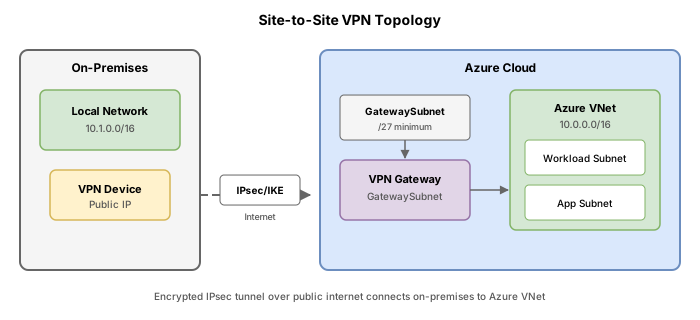
Contoso has a hub virtual network in Azure (vnet-hub, 10.1.0.0/16) and an on-premises datacenter with the address space 192.168.0.0/16. The on-premises VPN device has a public IP of 203.0.113.50. The networking team must establish a site-to-site IPsec VPN tunnel between the Azure hub VNet and the on-premises datacenter to enable hybrid connectivity for workloads that cannot yet migrate to Azure.
Architecture:
Learning objectives
After completing this challenge you will be able to:
- Design and implement a site-to-site VPN connection
- Create and configure a local network gateway representing on-premises
- Create and configure a virtual network gateway (VPN type)
- Identify when to use a policy-based VPN versus a route-based VPN connection
- Verify VPN connection status and troubleshoot connectivity issues
Prerequisites
- An Azure subscription with Contributor access
- Azure CLI installed and authenticated (
az login) - PowerShell with Az module installed (
Install-Module Az -Force) - A resource group and VNet already created (or create them in Task 1)
Key concepts for AZ-700
| Concept | Detail |
|---|---|
| GatewaySubnet | Dedicated subnet for the VPN gateway; must be named exactly GatewaySubnet; recommended size /27 or larger |
| Virtual Network Gateway | Azure-managed VPN endpoint; supports route-based (dynamic) or policy-based (static) |
| Local Network Gateway | Logical representation of the on-premises VPN device (public IP + address prefixes) |
| VPN Connection | The IPsec/IKE tunnel linking the virtual network gateway to the local network gateway |
| Route-based VPN | Uses route tables for traffic selection; supports multiple tunnels, P2S, VNet-to-VNet, coexistence with ExpressRoute |
| Policy-based VPN | Uses traffic selectors (ACLs); limited to a single S2S tunnel; required for legacy devices |
| Shared key (PSK) | Pre-shared key that must match on both sides of the tunnel |
Policy-based vs route-based VPN
| Feature | Policy-based | Route-based |
|---|---|---|
| IKE version | IKEv1 only | IKEv1 and IKEv2 |
| Max S2S tunnels | 1 | 30 (VpnGw1) to 100 (VpnGw4/5) |
| Point-to-Site | Not supported | Supported |
| BGP support | Not supported | Supported |
| VNet-to-VNet | Not supported | Supported |
| Coexist with ExpressRoute | Not supported | Supported |
| Gateway SKU | Basic only | VpnGw1-5, VpnGw1AZ-5AZ |
| Use case | Legacy on-prem devices requiring IKEv1 policy match | All modern deployments |
The exam frequently tests when policy-based is required versus route-based. The answer is almost always route-based unless the question explicitly states a legacy device that only supports IKEv1 with policy-based traffic selectors. Route-based gateways are the default recommendation.
Task 1: Create the hub VNet and GatewaySubnet
Azure CLI
# Create resource group
az group create \
    --name rg-vpn-lab \
    --location eastus

# Create hub VNet
az network vnet create \
    --resource-group rg-vpn-lab \
    --name vnet-hub \
    --location eastus \
    --address-prefixes 10.1.0.0/16 \
    --subnet-name snet-workloads \
    --subnet-prefixes 10.1.1.0/24

# Create the GatewaySubnet (must be named exactly "GatewaySubnet")
az network vnet subnet create \
    --resource-group rg-vpn-lab \
    --vnet-name vnet-hub \
    --name GatewaySubnet \
    --address-prefixes 10.1.255.0/27
Azure PowerShell
# Create resource group
New-AzResourceGroup -Name "rg-vpn-lab" -Location "eastus"

# Create hub VNet with subnets
$workloadsSubnet = New-AzVirtualNetworkSubnetConfig `
    -Name "snet-workloads" `
    -AddressPrefix "10.1.1.0/24"

$gatewaySubnet = New-AzVirtualNetworkSubnetConfig `
    -Name "GatewaySubnet" `
    -AddressPrefix "10.1.255.0/27"

New-AzVirtualNetwork `
    -ResourceGroupName "rg-vpn-lab" `
    -Name "vnet-hub" `
    -Location "eastus" `
    -AddressPrefix "10.1.0.0/16" `
    -Subnet $workloadsSubnet, $gatewaySubnet
- The name must be
GatewaySubnet(case-sensitive, no other names work) - Minimum recommended size is /27 (32 addresses) to allow for future growth and active-active configurations
- /28 is the absolute minimum but limits future expandability
- Do not associate an NSG or route table with the GatewaySubnet (it can disrupt gateway operation)
Task 2: Deploy the VPN gateway
Step 1: Create a public IP for the gateway
az network public-ip create \
    --resource-group rg-vpn-lab \
    --name pip-vgw-hub \
    --location eastus \
    --allocation-method Static \
    --sku Standard
Step 2: Create the virtual network gateway
az network vnet-gateway create \
    --resource-group rg-vpn-lab \
    --name vgw-hub \
    --vnet vnet-hub \
    --gateway-type Vpn \
    --vpn-type RouteBased \
    --sku VpnGw1 \
    --vpn-gateway-generation Generation1 \
    --public-ip-addresses pip-vgw-hub \
    --no-wait
Azure PowerShell
# Create public IP
$pip = New-AzPublicIpAddress `
    -ResourceGroupName "rg-vpn-lab" `
    -Name "pip-vgw-hub" `
    -Location "eastus" `
    -AllocationMethod Static `
    -Sku Standard

# Get subnet reference
$vnet = Get-AzVirtualNetwork -ResourceGroupName "rg-vpn-lab" -Name "vnet-hub"
$gwSubnet = Get-AzVirtualNetworkSubnetConfig -Name "GatewaySubnet" -VirtualNetwork $vnet

# Create IP configuration
$ipConfig = New-AzVirtualNetworkGatewayIpConfig `
    -Name "gwIpConfig" `
    -SubnetId $gwSubnet.Id `
    -PublicIpAddressId $pip.Id

# Create the VPN gateway (takes 30-45 minutes)
New-AzVirtualNetworkGateway `
    -ResourceGroupName "rg-vpn-lab" `
    -Name "vgw-hub" `
    -Location "eastus" `
    -IpConfigurations $ipConfig `
    -GatewayType Vpn `
    -VpnType RouteBased `
    -GatewaySku VpnGw1 `
    -AsJob
Step 3: Monitor deployment progress
# Check provisioning state (repeat until "Succeeded")
az network vnet-gateway show \
    --resource-group rg-vpn-lab \
    --name vgw-hub \
    --query "provisioningState" \
    --output tsv
Task 3: Create the local network gateway
The local network gateway represents the on-premises VPN device in Azure. It stores the public IP of the on-prem device and the address prefixes of the on-prem network.
Azure CLI
az network local-gateway create \
    --resource-group rg-vpn-lab \
    --name lgw-onprem-datacenter \
    --gateway-ip-address 203.0.113.50 \
    --local-address-prefixes 192.168.0.0/16 \
    --location eastus
Azure PowerShell
New-AzLocalNetworkGateway `
    -ResourceGroupName "rg-vpn-lab" `
    -Name "lgw-onprem-datacenter" `
    -Location "eastus" `
    -GatewayIpAddress "203.0.113.50" `
    -AddressPrefix "192.168.0.0/16"
Multiple on-premises subnets
If the on-premises network has multiple non-contiguous subnets, list them all:
az network local-gateway create \
    --resource-group rg-vpn-lab \
    --name lgw-onprem-datacenter \
    --gateway-ip-address 203.0.113.50 \
    --local-address-prefixes 192.168.1.0/24 192.168.2.0/24 10.50.0.0/16 \
    --location eastus
Task 4: Create the VPN connection
Once the VPN gateway has finished provisioning, create the IPsec connection.
Azure CLI
az network vpn-connection create \
    --resource-group rg-vpn-lab \
    --name conn-hub-to-onprem \
    --vnet-gateway1 vgw-hub \
    --local-gateway2 lgw-onprem-datacenter \
    --shared-key "Contoso!VPN#2024secure"
Azure PowerShell
$vgw = Get-AzVirtualNetworkGateway -ResourceGroupName "rg-vpn-lab" -Name "vgw-hub"
$lgw = Get-AzLocalNetworkGateway -ResourceGroupName "rg-vpn-lab" -Name "lgw-onprem-datacenter"

New-AzVirtualNetworkGatewayConnection `
    -ResourceGroupName "rg-vpn-lab" `
    -Name "conn-hub-to-onprem" `
    -Location "eastus" `
    -VirtualNetworkGateway1 $vgw `
    -LocalNetworkGateway2 $lgw `
    -ConnectionType IPsec `
    -SharedKey "Contoso!VPN#2024secure"
- The shared key must be identical on both sides (Azure and on-premises device)
- Maximum 128 characters
- Supports alphanumeric characters and special characters
- Use a strong, randomly generated key in production
Task 5: Verify connection status
Azure CLI
# Check connection status
az network vpn-connection show \
    --resource-group rg-vpn-lab \
    --name conn-hub-to-onprem \
    --query "{status:connectionStatus, inBytes:ingressBytesTransferred, outBytes:egressBytesTransferred}" \
    --output table
Azure PowerShell
Get-AzVirtualNetworkGatewayConnection `
    -ResourceGroupName "rg-vpn-lab" `
    -Name "conn-hub-to-onprem" | `
    Select-Object Name, ConnectionStatus, IngressBytesTransferred, EgressBytesTransferred
Connection status values
| Status | Meaning |
|---|---|
| Connected | Tunnel is established and passing traffic |
| Connecting | Azure side is ready but waiting for the on-prem device to respond |
| NotConnected | Connection object exists but the tunnel has not been initiated |
| Unknown | Cannot determine state (check gateway health) |
In a lab without a real on-premises device, the connection will remain in Connecting state. This is expected. To simulate a fully connected tunnel, deploy a second VPN gateway in another VNet and create a VNet-to-VNet connection (both sides are under your control).
Task 6: Test connectivity (lab simulation with second VNet)
To verify end-to-end connectivity in a lab, create a second VNet simulating the on-premises network:
# Create simulated on-prem VNet
az network vnet create \
    --resource-group rg-vpn-lab \
    --name vnet-onprem-sim \
    --location eastus \
    --address-prefixes 192.168.0.0/16 \
    --subnet-name snet-servers \
    --subnet-prefixes 192.168.1.0/24

az network vnet subnet create \
    --resource-group rg-vpn-lab \
    --vnet-name vnet-onprem-sim \
    --name GatewaySubnet \
    --address-prefixes 192.168.255.0/27

# Create second public IP and gateway
az network public-ip create \
    --resource-group rg-vpn-lab \
    --name pip-vgw-onprem \
    --location eastus \
    --allocation-method Static \
    --sku Standard

az network vnet-gateway create \
    --resource-group rg-vpn-lab \
    --name vgw-onprem-sim \
    --vnet vnet-onprem-sim \
    --gateway-type Vpn \
    --vpn-type RouteBased \
    --sku VpnGw1 \
    --vpn-gateway-generation Generation1 \
    --public-ip-addresses pip-vgw-onprem \
    --no-wait
After both gateways are provisioned, create connections in both directions:
# Update local gateway with actual public IP of simulated on-prem gateway
ONPREM_GW_IP=$(az network public-ip show \
    --resource-group rg-vpn-lab \
    --name pip-vgw-onprem \
    --query "ipAddress" \
    --output tsv)

az network local-gateway update \
    --resource-group rg-vpn-lab \
    --name lgw-onprem-datacenter \
    --gateway-ip-address "$ONPREM_GW_IP"

# Create the reverse local gateway (representing Azure hub from on-prem perspective)
HUB_GW_IP=$(az network public-ip show \
    --resource-group rg-vpn-lab \
    --name pip-vgw-hub \
    --query "ipAddress" \
    --output tsv)

az network local-gateway create \
    --resource-group rg-vpn-lab \
    --name lgw-azure-hub \
    --gateway-ip-address "$HUB_GW_IP" \
    --local-address-prefixes 10.1.0.0/16 \
    --location eastus

# Create reverse connection (on-prem to hub) with same shared key
az network vpn-connection create \
    --resource-group rg-vpn-lab \
    --name conn-onprem-to-hub \
    --vnet-gateway1 vgw-onprem-sim \
    --local-gateway2 lgw-azure-hub \
    --shared-key "Contoso!VPN#2024secure"
Break & fix
Scenario 1: Shared key mismatch
Symptom: Connection status remains Connecting indefinitely.
Root cause: The shared key on the Azure connection does not match the key configured on the on-premises device.
Diagnostic command:
az network vpn-connection show \
    --resource-group rg-vpn-lab \
    --name conn-hub-to-onprem \
    --query "connectionStatus" \
    --output tsv
# Returns: Connecting
Fix: Update the shared key to match both sides:
az network vpn-connection update \
    --resource-group rg-vpn-lab \
    --name conn-hub-to-onprem \
    --shared-key "CorrectMatchingKey2024!"
Scenario 2: Missing GatewaySubnet
Symptom: Gateway creation fails with an error about missing subnet.
Root cause: The VNet does not have a subnet named exactly GatewaySubnet.
Fix: Create the subnet with the exact required name:
az network vnet subnet create \
    --resource-group rg-vpn-lab \
    --vnet-name vnet-hub \
    --name GatewaySubnet \
    --address-prefixes 10.1.255.0/27
Scenario 3: Wrong local address prefixes
Symptom: VPN tunnel is Connected but traffic to certain on-premises subnets is not routed through the tunnel.
Root cause: The local network gateway is missing address prefixes for some on-premises subnets.
Diagnostic command:
az network local-gateway show \
    --resource-group rg-vpn-lab \
    --name lgw-onprem-datacenter \
    --query "localNetworkAddressSpace.addressPrefixes" \
    --output tsv
Fix: Update the local gateway with all on-premises prefixes:
az network local-gateway update \
--resource-group rg-vpn-lab \
--name lgw-onprem-datacenter \
--local-address-prefixes 192.168.0.0/16 10.50.0.0/16
```powershell
Remove-AzResourceGroup -Name "rg-vpn-lab" -Force -AsJob