Challenge 20: ExpressRoute advanced features
This challenge is simulation-based. ExpressRoute requires a physical connectivity provider and costs $55--$10,000+/month. You will learn the CLI commands, configuration patterns, and expected outputs without deploying actual resources.
45--60 minutes | No cost (simulation) | Exam weight: 20--25%
Objectives
After completing this challenge you will be able to:
- Design and implement ExpressRoute Global Reach
- Enable FastPath on an ExpressRoute connection
- Configure Bidirectional Forwarding Detection (BFD) over ExpressRoute
- Design geo-redundant ExpressRoute for disaster recovery
- Explain when ExpressRoute Direct is appropriate
Scenario
Contoso has expanded globally. They now have:
- US East office connected via ExpressRoute through Equinix in Washington DC
- Europe office connected via ExpressRoute through Interxion in Amsterdam
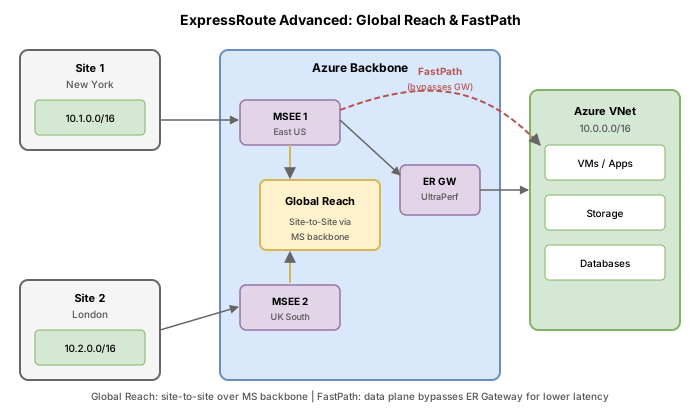
Currently, traffic between the two offices hairpins through Azure (US office goes into Azure, traverses the Microsoft backbone, exits to Europe office). They need ExpressRoute Global Reach to route inter-office traffic directly through the Microsoft backbone without entering Azure VNets.
Additionally, their latency-sensitive financial trading application requires FastPath to bypass the ExpressRoute gateway in the data path. They also want BFD for sub-second failover detection.
Task 1: Configure ExpressRoute Global Reach
Global Reach enables two ExpressRoute circuits to exchange routes between their private peerings. Traffic flows directly through the Microsoft backbone network, bypassing Azure VNets entirely.
Prerequisites for Global Reach
- Both circuits must have Azure private peering configured
- Both circuits must be in supported regions (not all regions support Global Reach)
- Circuits must be at different peering locations (you cannot Global Reach two circuits at the same peering location)
- Premium SKU is required if circuits are in different geopolitical regions
Step 1: Identify both circuits
# Circuit 1: US East
az network express-route show \
--resource-group rg-contoso-network \
--name er-circuit-contoso-dc \
--query "{Name:name, PeeringLocation:serviceProviderProperties.peeringLocation, Peerings:peerings[].name}" \
--output json
```bash
# Circuit 2: Europe
az network express-route show \
--resource-group rg-contoso-network-eu \
--name er-circuit-contoso-ams \
--query "{Name:name, PeeringLocation:serviceProviderProperties.peeringLocation, Peerings:peerings[].name}" \
--output json
Expected output:
{
  "Name": "er-circuit-contoso-ams",
  "PeeringLocation": "Amsterdam",
  "Peerings": ["AzurePrivatePeering"]
}
Step 2: Create the Global Reach connection
The az network express-route peering connection create command establishes Global Reach between two circuits. It operates on the private peering of the initiating circuit and references the peer circuit.
az network express-route peering connection create \
  --resource-group rg-contoso-network \
  --circuit-name er-circuit-contoso-dc \
  --peering-name AzurePrivatePeering \
  --name globalreach-us-to-eu \
  --peer-circuit "/subscriptions/aaaa0000-bb11-2222-33cc-444444dddddd/resourceGroups/rg-contoso-network-eu/providers/Microsoft.Network/expressRouteCircuits/er-circuit-contoso-ams/peerings/AzurePrivatePeering" \
  --address-prefix 172.16.100.0/29
Parameter details:
| Parameter | Purpose |
|---|---|
--circuit-name | The initiating circuit (local) |
--peering-name | Must be AzurePrivatePeering (Global Reach only works over private peering) |
--peer-circuit | Full resource ID of the remote circuit's private peering |
--address-prefix | A /29 subnet used for the Global Reach tunnel (not from your existing address space) |
Expected output:
{
  "addressPrefix": "172.16.100.0/29",
  "circuitConnectionStatus": "Connected",
  "id": "/subscriptions/.../peerings/AzurePrivatePeering/connections/globalreach-us-to-eu",
  "name": "globalreach-us-to-eu",
  "peerExpressRouteCircuitPeering": {
    "id": "/subscriptions/.../er-circuit-contoso-ams/peerings/AzurePrivatePeering"
  },
  "provisioningState": "Succeeded"
}
Step 3: Verify Global Reach connectivity
az network express-route peering connection list \
  --resource-group rg-contoso-network \
  --circuit-name er-circuit-contoso-dc \
  --peering-name AzurePrivatePeering \
  --output table
Expected output:
Name                  CircuitConnectionStatus  AddressPrefix     ProvisioningState
--------------------  -----------------------  ----------------  -----------------
globalreach-us-to-eu  Connected                172.16.100.0/29   Succeeded
Cross-subscription Global Reach
If the peer circuit is in a different subscription, you need an authorization key:
# On the peer circuit's subscription, create an authorization
az network express-route auth create \
  --resource-group rg-contoso-network-eu \
  --circuit-name er-circuit-contoso-ams \
  --name auth-for-globalreach

# Use the authorization key when creating the connection
az network express-route peering connection create \
  --resource-group rg-contoso-network \
  --circuit-name er-circuit-contoso-dc \
  --peering-name AzurePrivatePeering \
  --name globalreach-us-to-eu \
  --peer-circuit "/subscriptions/bbbb1111-cc22-3333-44dd-555555eeeeee/resourceGroups/rg-contoso-network-eu/providers/Microsoft.Network/expressRouteCircuits/er-circuit-contoso-ams/peerings/AzurePrivatePeering" \
  --address-prefix 172.16.100.0/29 \
  --authorization-key "a1b2c3d4-e5f6-7890-abcd-ef1234567890"
Task 2: Enable FastPath
FastPath improves data path performance by sending network traffic directly to VMs in the virtual network, bypassing the ExpressRoute gateway. The gateway is still required for control plane operations (route exchange), but data packets take a shortcut.
FastPath requirements
| Requirement | Detail |
|---|---|
| Gateway SKU | Ultra Performance, ErGw3AZ, or ErGwScale (min 10 scale units) |
| Circuit type | Any ExpressRoute circuit |
| Private peering | Must be configured |
FastPath is not supported with ErGw1AZ (Standard) or ErGw2AZ (High Performance) gateway SKUs.
Enable FastPath on a new connection
az network vpn-connection create \
  --resource-group rg-contoso-network \
  --name conn-er-hub-fastpath \
  --vnet-gateway1 gw-expressroute-hub \
  --express-route-circuit2 er-circuit-contoso-dc \
  --express-route-gateway-bypass true
Expected output:
{
  "connectionType": "ExpressRoute",
  "expressRouteGatewayBypass": true,
  "id": "/subscriptions/.../connections/conn-er-hub-fastpath",
  "name": "conn-er-hub-fastpath",
  "provisioningState": "Succeeded",
  "virtualNetworkGateway1": {
    "id": "/subscriptions/.../virtualNetworkGateways/gw-expressroute-hub"
  }
}
Enable FastPath on an existing connection
az network vpn-connection update \
  --resource-group rg-contoso-network \
  --name conn-er-hub \
  --express-route-gateway-bypass true
Expected output:
{
  "connectionType": "ExpressRoute",
  "expressRouteGatewayBypass": true,
  "name": "conn-er-hub",
  "provisioningState": "Succeeded"
}
FastPath limitations to understand for the exam
- FastPath does not support VNet peering UDRs on the GatewaySubnet (without ExpressRoute Direct)
- FastPath with Private Link is only supported on ExpressRoute Direct circuits (10 Gbps or 100 Gbps)
- VNet peering support with FastPath requires ExpressRoute Direct connections
- The gateway remains required for control plane (BGP route exchange)
Task 3: Configure Bidirectional Forwarding Detection (BFD)
BFD provides sub-second link failure detection between the Microsoft Enterprise edge (MSEE) routers and your on-premises CE/PE routers. Without BFD, BGP hold timers can take up to 180 seconds to detect a failure.
How BFD works with ExpressRoute
- BFD is enabled by default on all newly created ExpressRoute private and Microsoft peering interfaces on the MSEE side
- You only need to configure BFD on your CE/PE router to complete the BFD session
- BFD interval on the MSEE is set to 300 milliseconds
- There is no Azure CLI command to enable BFD on the MSEE; it is automatic
BFD configuration on customer router (Cisco IOS XE example)
interface TenGigabitEthernet2/0/0.200
  description ExpressRoute private peering to Azure
  encapsulation dot1Q 200
  ip vrf forwarding AZURE
  ip address 172.16.0.1 255.255.255.252
  bfd interval 300 min_rx 300 multiplier 3

router bgp 65020
  address-family ipv4 vrf AZURE
    neighbor 172.16.0.2 remote-as 12076
    neighbor 172.16.0.2 fall-over bfd
    neighbor 172.16.0.2 activate
  exit-address-family
Key BFD parameters:
| Parameter | Value | Meaning |
|---|---|---|
interval | 300 ms | Transmit interval for BFD packets |
min_rx | 300 ms | Minimum receive interval |
multiplier | 3 | Miss 3 packets before declaring link down |
| Detection time | 900 ms | 300 ms * 3 = sub-second detection |
BFD timer negotiation
Between BFD peers, the slower of the two determines the actual transmission rate. The MSEE BFD intervals are set to 300 milliseconds. You can configure higher values on your side (forcing slower detection) but you cannot make them lower than 300 ms.
Enabling BFD on existing peerings
For circuits configured with private peering before August 2018, or Microsoft peering before January 2020, you must reset the peering to enable BFD on the MSEE side:
# Reset the peering to enable BFD (for legacy peerings only)
az network express-route peering delete \
  --resource-group rg-contoso-network \
  --circuit-name er-circuit-contoso-dc \
  --name AzurePrivatePeering

# Recreate the peering (BFD will be enabled automatically)
az network express-route peering create \
  --resource-group rg-contoso-network \
  --circuit-name er-circuit-contoso-dc \
  --peering-type AzurePrivatePeering \
  --peer-asn 65020 \
  --primary-peer-subnet 172.16.0.0/30 \
  --secondary-peer-subnet 172.16.0.4/30 \
  --vlan-id 200
Task 4: Design geo-redundant ExpressRoute
For disaster recovery, Microsoft recommends deploying ExpressRoute circuits in at least two different peering locations. This ensures connectivity survives a single location failure.
Redundancy design pattern
                    +-----------------------+
                    |   Azure Region        |
                    |  (e.g., East US 2)    |
                    |                       |
                    |   ER Gateway          |
                    |   (ErGw2AZ, zone-     |
                    |    redundant)         |
                    +---+---------------+---+
                        |               |
              Connection 1      Connection 2
                        |               |
              +---------+---+   +---+---------+
              | Circuit A   |   | Circuit B   |
              | Washington  |   | New York    |
              | DC          |   |             |
              | (Equinix)   |   | (Megaport)  |
              +------+------+   +------+------+
                     |                  |
              +------+------+   +------+------+
              | On-Prem     |   | On-Prem     |
              | Router A    |   | Router B    |
              +-------------+   +-------------+
Create the second circuit for redundancy
az network express-route create \
  --resource-group rg-contoso-network \
  --name er-circuit-contoso-ny \
  --bandwidth 200 \
  --peering-location "New York" \
  --provider "Megaport" \
  --sku-family MeteredData \
  --sku-tier Standard \
  --location eastus2
Connect both circuits to the same gateway
# Connection to primary circuit (Washington DC)
az network vpn-connection create \
  --resource-group rg-contoso-network \
  --name conn-er-primary-dc \
  --vnet-gateway1 gw-expressroute-hub \
  --express-route-circuit2 er-circuit-contoso-dc \
  --routing-weight 10

# Connection to secondary circuit (New York)
az network vpn-connection create \
  --resource-group rg-contoso-network \
  --name conn-er-secondary-ny \
  --vnet-gateway1 gw-expressroute-hub \
  --express-route-circuit2 er-circuit-contoso-ny \
  --routing-weight 5
The --routing-weight parameter influences path preference when both circuits advertise the same routes. Higher weight is preferred.
Task 5: ExpressRoute Direct
ExpressRoute Direct provides dedicated 10 Gbps or 100 Gbps physical ports directly into the Microsoft edge. It is distinct from standard ExpressRoute where you connect through a provider.
When to use ExpressRoute Direct
| Scenario | Why Direct |
|---|---|
| Massive data ingestion (multi-terabyte) | Need 10+ Gbps sustained bandwidth |
| MACsec encryption requirement | Only available on Direct ports |
| Strict physical isolation | Your own dedicated port pair |
| Multiple circuits on same port | Carve out multiple logical circuits from one port |
| Regulatory compliance | Data does not traverse shared provider infrastructure |
Create an ExpressRoute Direct resource
# List available peering locations for ExpressRoute Direct
az network express-route port location list --output table
Expected output:
Name                   AvailableBandwidths    Address
---------------------  --------------------   --------
Equinix-Ashburn-DC2    100 Gbps, 10 Gbps     21715 Filigree Ct, Ashburn, VA
Equinix-Dallas-DA3     100 Gbps, 10 Gbps     1950 N Stemmons Fwy, Dallas, TX
Interxion-Amsterdam    100 Gbps, 10 Gbps     Science Park 505, Amsterdam
# Create the ExpressRoute Direct port
az network express-route port create \
  --resource-group rg-contoso-network \
  --name er-direct-contoso \
  --bandwidth 100 gbps \
  --encapsulation Dot1Q \
  --peering-location "Equinix-Ashburn-DC2" \
  --location eastus
Expected output:
{
  "bandwidthInGbps": 100,
  "encapsulation": "Dot1Q",
  "etherType": "0x8100",
  "id": "/subscriptions/.../expressRoutePorts/er-direct-contoso",
  "links": [
    {
      "adminState": "Disabled",
      "connectorType": "LC",
      "interfaceName": "Ethernet 2/2/1",
      "name": "link1",
      "patchPanelId": "PP:0001:111111",
      "provisioningState": "Succeeded",
      "rackId": "YOURDC:YOURROW:YOURRACK"
    },
    {
      "adminState": "Disabled",
      "connectorType": "LC",
      "interfaceName": "Ethernet 2/2/2",
      "name": "link2",
      "patchPanelId": "PP:0001:111112",
      "provisioningState": "Succeeded",
      "rackId": "YOURDC:YOURROW:YOURRACK"
    }
  ],
  "location": "eastus",
  "mtu": "1500",
  "name": "er-direct-contoso",
  "peeringLocation": "Equinix-Ashburn-DC2",
  "provisionedBandwidthInGbps": 0.0,
  "provisioningState": "Succeeded"
}
Create a circuit on the Direct port
az network express-route create \
  --resource-group rg-contoso-network \
  --name er-circuit-direct-01 \
  --bandwidth-in-gbps 10 \
  --express-route-port "/subscriptions/.../expressRoutePorts/er-direct-contoso" \
  --sku-family MeteredData \
  --sku-tier Premium \
  --location eastus
Note that when using ExpressRoute Direct, you do not specify --provider or --peering-location because you are connecting directly to Microsoft (you are effectively your own provider).
Break & fix
Scenario A: Global Reach between circuits at the same peering location
Symptom: az network express-route peering connection create fails with an error.
Error message:
(GlobalReachSamePeeringLocation) The two circuits are at the same peering location.
Global Reach requires circuits at different peering locations.
Root cause: Both circuits use the same peering location (e.g., both in "Washington DC"). Global Reach requires the circuits to be at different peering locations so traffic traverses the Microsoft backbone.
Resolution: Use circuits in different peering locations, or use VNet peering with gateways for circuits at the same location.
Scenario B: FastPath with unsupported gateway SKU
Symptom: Connection is created with --express-route-gateway-bypass true but traffic still traverses the gateway.
Root cause: The gateway uses ErGw1AZ (Standard) or ErGw2AZ (High Performance), which do not support FastPath.
Resolution: Upgrade the gateway to ErGw3AZ or Ultra Performance:
# Note: Gateway SKU upgrade requires recreation in most cases
az network vnet-gateway update \
  --resource-group rg-contoso-network \
  --name gw-expressroute-hub \
  --sku ErGw3AZ
Scenario C: BFD not detecting failure quickly
Symptom: Link failure takes 60+ seconds to detect despite BFD being configured on the CE router.
Root cause: Possible issues:
- BFD is configured on the interface but not linked to the BGP session (
fall-over bfdmissing) - The multiplier is set too high (e.g., multiplier 20 with 300 ms interval = 6 second detection)
- The peering was configured before August 2018 and BFD is not enabled on the MSEE
Resolution:
- Verify the BGP session references BFD:
neighbor x.x.x.x fall-over bfd - Set appropriate timer:
bfd interval 300 min_rx 300 multiplier 3 - If legacy peering, reset and recreate it to enable BFD on the MSEE side
Knowledge check
1. What is the CLI command to establish ExpressRoute Global Reach between two circuits?
2. Which ExpressRoute gateway SKUs support FastPath? (Select the best answer)
3. BFD on ExpressRoute MSEE routers uses a transmit interval of 300 ms with what effect on failure detection?
4. What subnet size is required for the address-prefix parameter when configuring Global Reach?
5. Which feature is ONLY available with ExpressRoute Direct and not with provider-based ExpressRoute?