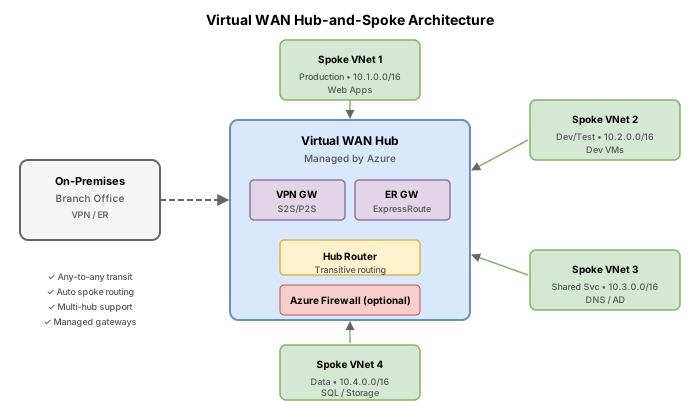
Challenge 22: Virtual WAN hub-spoke
90–120 minutes | ~$0.36/h (Virtual WAN Standard + VPN Gateway) | Exam weight: 20–25%
Scenario
Contoso is migrating from a manually configured hub-spoke topology (VNet peering with user-defined routes) to Azure Virtual WAN for simplified branch and spoke connectivity management. They operate in two Azure regions -- East US and West Europe -- and need automated spoke-to-spoke connectivity, integrated VPN gateways for branch offices, and centralized routing without maintaining UDR tables manually.
Their current architecture requires dozens of peering relationships and route tables. The network team wants to consolidate this into a Virtual WAN Standard deployment that supports transit routing between spokes, site-to-site VPN for on-premises branches, and future ExpressRoute integration.
Exam skills measured
| Skill | Description |
|---|---|
| Select a Virtual WAN SKU | Choose between Basic and Standard based on connectivity requirements |
| Design a Virtual WAN architecture | Select types and services including hub placement and gateway types |
| Create a virtual hub in Virtual WAN | Deploy hubs with correct address prefixes and SKU settings |
| Choose an appropriate scale unit | Size gateway scale units for throughput and connection requirements |
| Deploy a gateway into a virtual hub | Provision VPN gateways within the virtual hub infrastructure |
Architecture overview
Key concepts
Virtual WAN SKU comparison
| Feature | Basic | Standard |
|---|---|---|
| Site-to-site VPN | Yes | Yes |
| Point-to-site VPN | No | Yes |
| ExpressRoute | No | Yes |
| VNet-to-VNet transit through hub | No | Yes |
| Hub-to-hub connectivity | No | Yes |
| Azure Firewall in hub | No | Yes |
| NVA in hub | No | Yes |
Scale units
Each VPN gateway scale unit provides approximately 500 Mbps of aggregate throughput. Common configurations:
| Scale units | Aggregate throughput | Max S2S connections |
|---|---|---|
| 1 | 500 Mbps | 500 |
| 2 | 1 Gbps | 500 |
| 20 | 10 Gbps | 1000 |
| 40 | 20 Gbps | 2000 |
Task 1: Create the Virtual WAN resource
Provision a Virtual WAN resource with the Standard SKU to support transit routing, multiple gateway types, and hub-to-hub communication.
Azure CLI
# Define variables
RG="rg-vwan-challenge22"
LOCATION="eastus"
VWAN_NAME="vwan-contoso"

# Create resource group
az group create \
  --name $RG \
  --location $LOCATION

# Create Virtual WAN with Standard SKU
az network vwan create \
  --name $VWAN_NAME \
  --resource-group $RG \
  --location $LOCATION \
  --type Standard \
  --branch-to-branch-traffic true
Azure PowerShell
# Define variables
$RG = "rg-vwan-challenge22"
$Location = "eastus"
$VwanName = "vwan-contoso"

# Create resource group
New-AzResourceGroup -Name $RG -Location $Location

# Create Virtual WAN with Standard SKU
New-AzVirtualWan `
  -ResourceGroupName $RG `
  -Name $VwanName `
  -Location $Location `
  -VirtualWANType Standard `
  -AllowBranchToBranchTraffic
The Basic SKU only supports site-to-site VPN. It does not support spoke-to-spoke transit, ExpressRoute, point-to-site, Azure Firewall, or hub-to-hub connectivity. For most enterprise deployments, Standard is required.
Task 2: Create a virtual hub in the primary region
Deploy a virtual hub in East US with a dedicated address prefix. The hub address space must not overlap with any connected spoke VNets.
Azure CLI
# Create virtual hub in East US
az network vhub create \
  --name "hub-eastus" \
  --resource-group $RG \
  --vwan $VWAN_NAME \
  --address-prefix "10.1.0.0/24" \
  --location "eastus" \
  --sku Standard
Azure PowerShell
# Get the Virtual WAN object
$vwan = Get-AzVirtualWan -ResourceGroupName $RG -Name $VwanName

# Create virtual hub in East US
New-AzVirtualHub `
  -ResourceGroupName $RG `
  -Name "hub-eastus" `
  -VirtualWan $vwan `
  -AddressPrefix "10.1.0.0/24" `
  -Location "eastus" `
  -HubRoutingPreference "VpnGateway"
Virtual hub creation takes 20-30 minutes. The hub must reach Succeeded provisioning state before you can connect spokes or deploy gateways. Monitor the status with:
az network vhub show --name "hub-eastus" --resource-group $RG --query "provisioningState"
Task 3: Create spoke VNets and connect them to the hub
Create spoke VNets and establish connections to the virtual hub. Virtual WAN automatically handles routing between connected spokes.
Azure CLI
# Create spoke VNets
az network vnet create \
  --name "vnet-spoke1" \
  --resource-group $RG \
  --location "eastus" \
  --address-prefixes "10.10.0.0/16" \
  --subnet-name "workload" \
  --subnet-prefixes "10.10.1.0/24"

az network vnet create \
  --name "vnet-spoke2" \
  --resource-group $RG \
  --location "eastus" \
  --address-prefixes "10.20.0.0/16" \
  --subnet-name "workload" \
  --subnet-prefixes "10.20.1.0/24"

# Connect spoke1 to the virtual hub
az network vhub connection create \
  --name "conn-spoke1" \
  --resource-group $RG \
  --vhub-name "hub-eastus" \
  --remote-vnet "vnet-spoke1" \
  --internet-security true

# Connect spoke2 to the virtual hub
az network vhub connection create \
  --name "conn-spoke2" \
  --resource-group $RG \
  --vhub-name "hub-eastus" \
  --remote-vnet "vnet-spoke2" \
  --internet-security true
Azure PowerShell
# Create spoke VNets
$spoke1 = New-AzVirtualNetwork `
  -ResourceGroupName $RG `
  -Name "vnet-spoke1" `
  -Location "eastus" `
  -AddressPrefix "10.10.0.0/16"

Add-AzVirtualNetworkSubnetConfig `
  -Name "workload" `
  -VirtualNetwork $spoke1 `
  -AddressPrefix "10.10.1.0/24"
$spoke1 | Set-AzVirtualNetwork

$spoke2 = New-AzVirtualNetwork `
  -ResourceGroupName $RG `
  -Name "vnet-spoke2" `
  -Location "eastus" `
  -AddressPrefix "10.20.0.0/16"

Add-AzVirtualNetworkSubnetConfig `
  -Name "workload" `
  -VirtualNetwork $spoke2 `
  -AddressPrefix "10.20.1.0/24"
$spoke2 | Set-AzVirtualNetwork

# Get hub object
$hub = Get-AzVirtualHub -ResourceGroupName $RG -Name "hub-eastus"

# Connect spoke1
$spoke1Ref = Get-AzVirtualNetwork -ResourceGroupName $RG -Name "vnet-spoke1"
New-AzVirtualHubVnetConnection `
  -ResourceGroupName $RG `
  -VirtualHubName "hub-eastus" `
  -Name "conn-spoke1" `
  -RemoteVirtualNetwork $spoke1Ref `
  -EnableInternetSecurity $true

# Connect spoke2
$spoke2Ref = Get-AzVirtualNetwork -ResourceGroupName $RG -Name "vnet-spoke2"
New-AzVirtualHubVnetConnection `
  -ResourceGroupName $RG `
  -VirtualHubName "hub-eastus" `
  -Name "conn-spoke2" `
  -RemoteVirtualNetwork $spoke2Ref `
  -EnableInternetSecurity $true
Task 4: Deploy a VPN gateway in the virtual hub
Deploy a site-to-site VPN gateway within the hub. Select scale units based on required throughput -- Contoso needs 1 Gbps aggregate bandwidth.
Azure CLI
# Deploy VPN gateway in the hub (scale unit 2 = ~1 Gbps)
az network vpn-gateway create \
  --name "vpngw-hub-eastus" \
  --resource-group $RG \
  --vhub "hub-eastus" \
  --location "eastus" \
  --scale-unit 2 \
  --no-wait
Azure PowerShell
# Deploy VPN gateway in the hub (scale unit 2 = ~1 Gbps)
New-AzVpnGateway `
  -ResourceGroupName $RG `
  -Name "vpngw-hub-eastus" `
  -VirtualHub $hub `
  -VpnGatewayScaleUnit 2
VPN gateway creation inside a virtual hub takes 25-45 minutes. Do not proceed to creating connections until the gateway reaches Succeeded state:
az network vpn-gateway show \
  --name "vpngw-hub-eastus" \
  --resource-group $RG \
  --query "provisioningState"
Task 5: Create a VPN site and connection
Define the on-premises branch as a VPN site and create the S2S connection through the Virtual WAN VPN gateway.
Azure CLI
# Create a VPN site representing the on-premises branch
az network vpn-site create \
  --name "site-branch-nyc" \
  --resource-group $RG \
  --location "eastus" \
  --ip-address "203.0.113.10" \
  --address-prefixes "192.168.0.0/16" \
  --virtual-wan $VWAN_NAME \
  --device-vendor "Cisco" \
  --device-model "ISR4321" \
  --link-speed 100

# Create the VPN gateway connection to the site
az network vpn-gateway connection create \
  --name "conn-branch-nyc" \
  --resource-group $RG \
  --gateway-name "vpngw-hub-eastus" \
  --remote-vpn-site "site-branch-nyc"
Azure PowerShell
# Create a VPN site representing the on-premises branch
$vpnSite = New-AzVpnSite `
  -ResourceGroupName $RG `
  -Name "site-branch-nyc" `
  -Location "eastus" `
  -IpAddress "203.0.113.10" `
  -AddressSpace @("192.168.0.0/16") `
  -VirtualWanResourceGroupName $RG `
  -VirtualWanName $VwanName `
  -DeviceModel "ISR4321" `
  -DeviceVendor "Cisco" `
  -LinkSpeedInMbps 100

# Create VPN gateway connection
$vpnSiteObj = Get-AzVpnSite -ResourceGroupName $RG -Name "site-branch-nyc"
$vpnGw = Get-AzVpnGateway -ResourceGroupName $RG -Name "vpngw-hub-eastus"

New-AzVpnConnection `
  -ResourceGroupName $RG `
  -ParentResourceName "vpngw-hub-eastus" `
  -Name "conn-branch-nyc" `
  -VpnSite $vpnSiteObj
Task 6: Verify spoke-to-spoke connectivity
With Standard SKU, spoke-to-spoke transit routing is automatic through the hub. Verify by checking the effective routes on spoke connections.
Azure CLI
# Check effective routes for the virtual hub
az network vhub get-effective-routes \
  --name "hub-eastus" \
  --resource-group $RG

# Verify hub connection status
az network vhub connection show \
  --name "conn-spoke1" \
  --resource-group $RG \
  --vhub-name "hub-eastus" \
  --query "{name:name, status:provisioningState, routingConfig:routingConfiguration}"

# List all connections on the hub
az network vhub connection list \
  --resource-group $RG \
  --vhub-name "hub-eastus" \
  --output table
Azure PowerShell
# Get hub connection details
Get-AzVirtualHubVnetConnection `
  -ResourceGroupName $RG `
  -VirtualHubName "hub-eastus" |
  Select-Object Name, ProvisioningState, RoutingConfiguration

# Verify hub effective routes
Get-AzVirtualHubEffectiveRoute `
  -ResourceGroupName $RG `
  -VirtualHubName "hub-eastus"
Break & fix
Scenario 1: Basic SKU with VPN gateway fails
Symptom: Attempting to deploy a VPN gateway fails with an error about unsupported features.
Root cause: The Virtual WAN was created with --type Basic but gateways other than basic S2S VPN require Standard SKU. Additionally, Basic does not support spoke-to-spoke transit.
Fix:
# Upgrade from Basic to Standard
az network vwan update \
  --name $VWAN_NAME \
  --resource-group $RG \
  --type Standard
Upgrading from Basic to Standard is a non-disruptive operation. However, downgrading from Standard to Basic is not supported.
Scenario 2: Spoke connectivity not working after hub connection
Symptom: VMs in spoke VNets cannot reach each other even though connections show Succeeded status.
Root cause: The virtual hub has not fully provisioned its routing infrastructure. The hub routing state must be Provisioned (not just the connection).
Diagnosis:
# Check hub routing state
az network vhub show \
  --name "hub-eastus" \
  --resource-group $RG \
  --query "{routingState:routingState, provisioningState:provisioningState}"
Fix: Wait for routingState to show Provisioned. If stuck, remove and recreate the connection:
az network vhub connection delete \
  --name "conn-spoke1" \
  --resource-group $RG \
  --vhub-name "hub-eastus" \
  --yes

# Wait 2 minutes, then recreate
az network vhub connection create \
  --name "conn-spoke1" \
  --resource-group $RG \
  --vhub-name "hub-eastus" \
  --remote-vnet "vnet-spoke1"
Scenario 3: Insufficient throughput from VPN gateway
Symptom: Branch office reports slow connectivity. Monitoring shows the VPN gateway is saturated at 500 Mbps.
Root cause: The gateway was deployed with scale unit 1, providing only 500 Mbps aggregate throughput.
Fix:
# Update the VPN gateway scale unit
az network vpn-gateway update \
  --name "vpngw-hub-eastus" \
  --resource-group $RG \
  --scale-unit 4
Cleanup
# Delete the entire resource group and all resources
az group delete --name $RG --yes --no-wait
# PowerShell cleanup
Remove-AzResourceGroup -Name "rg-vwan-challenge22" -Force -AsJob