Challenge 23: Virtual WAN routing and NVA integration
60–90 minutes | ~$0.36/h (Virtual WAN Standard + gateways) | Exam weight: 20–25%
Scenario
Contoso has deployed Azure Virtual WAN with a Standard hub and multiple connected spokes (from Challenge 22). Now they need advanced routing: isolating development spoke VNets from production spokes, routing all internet-bound traffic through a centralized Network Virtual Appliance (NVA) for inspection, and controlling which spokes can communicate with each other.
Their requirements:
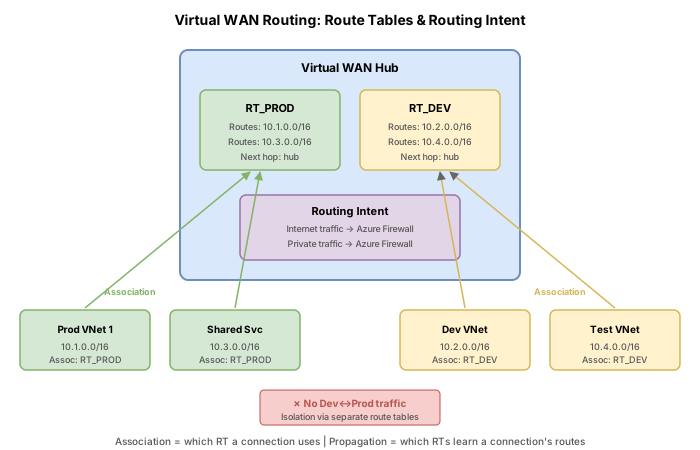
- Production spokes (vnet-prod-1, vnet-prod-2) must communicate with each other and shared services
- Development spokes (vnet-dev-1, vnet-dev-2) must be isolated from production
- All internet traffic from both environments must route through a centralized firewall/NVA
- The NVA is deployed as a managed application from the Azure Marketplace within the virtual hub
Exam skills measured
| Skill | Description |
|---|---|
| Configure virtual hub routing | Create custom route tables, static routes, and routing associations |
| Integrate third-party NVA | Deploy and route traffic through NVAs in the virtual hub |
Architecture overview
Key concepts
Virtual WAN default routing behavior
When a VNet connection is created without explicit routing configuration:
- It is associated with the
defaultRouteTable - It propagates routes to the
defaultRouteTable - All spokes learn each other's routes (full mesh connectivity)
Custom route tables for isolation
To isolate groups of spokes, you create custom route tables and configure:
- Association: Which route table a connection uses to look up routes (determines where it sends traffic)
- Propagation: Which route tables learn the connection's routes (determines who can reach it)
Routing intent and routing policies
Routing intent simplifies routing configuration by allowing you to define:
- Internet traffic policy: Routes 0.0.0.0/0 to a next-hop resource (Azure Firewall or NVA)
- Private traffic policy: Routes RFC 1918 prefixes (10.0.0.0/8, 172.16.0.0/12, 192.168.0.0/16) to a next-hop resource
When routing intent is enabled, it takes precedence over individual static routes in the defaultRouteTable.
Task 1: Understand default routing
Before making changes, examine the default routing configuration to understand baseline behavior.
Azure CLI
# Define variables (assumes resources from Challenge 22 exist)
RG="rg-vwan-challenge22"
HUB_NAME="hub-eastus"

# List route tables in the hub
az network vhub route-table list \
  --resource-group $RG \
  --vhub-name $HUB_NAME \
  --output table

# Show the default route table
az network vhub route-table show \
  --name "defaultRouteTable" \
  --resource-group $RG \
  --vhub-name $HUB_NAME

# Check which route table a connection is associated with
az network vhub connection show \
  --name "conn-spoke1" \
  --resource-group $RG \
  --vhub-name $HUB_NAME \
  --query "routingConfiguration"
Azure PowerShell
$RG = "rg-vwan-challenge22"
$HubName = "hub-eastus"

# List route tables
Get-AzVHubRouteTable -ResourceGroupName $RG -VirtualHubName $HubName

# Get default route table details
Get-AzVHubRouteTable `
  -ResourceGroupName $RG `
  -VirtualHubName $HubName `
  -Name "defaultRouteTable"

# Check connection routing configuration
Get-AzVirtualHubVnetConnection `
  -ResourceGroupName $RG `
  -VirtualHubName $HubName `
  -Name "conn-spoke1" |
  Select-Object -ExpandProperty RoutingConfiguration
Task 2: Create custom route tables for isolation
Create separate route tables for production and development workloads. Labels allow you to reference groups of route tables during propagation configuration.
Azure CLI
# Create route table for production spokes
az network vhub route-table create \
  --name "RT_PROD" \
  --resource-group $RG \
  --vhub-name $HUB_NAME \
  --labels "prod"

# Create route table for development spokes
az network vhub route-table create \
  --name "RT_DEV" \
  --resource-group $RG \
  --vhub-name $HUB_NAME \
  --labels "dev"

# Verify route tables were created
az network vhub route-table list \
  --resource-group $RG \
  --vhub-name $HUB_NAME \
  --output table
Azure PowerShell
# Create route table for production
New-AzVHubRouteTable `
  -ResourceGroupName $RG `
  -VirtualHubName $HubName `
  -Name "RT_PROD" `
  -Label @("prod")

# Create route table for development
New-AzVHubRouteTable `
  -ResourceGroupName $RG `
  -VirtualHubName $HubName `
  -Name "RT_DEV" `
  -Label @("dev")
Task 3: Associate spoke connections with custom route tables
Update existing connections or create new ones with explicit routing configuration. Production spokes associate with RT_PROD and propagate only to RT_PROD. Development spokes associate with RT_DEV and propagate only to RT_DEV.
Azure CLI
# Create production spoke VNets
az network vnet create \
  --name "vnet-prod-1" \
  --resource-group $RG \
  --location "eastus" \
  --address-prefixes "10.30.0.0/16" \
  --subnet-name "workload" \
  --subnet-prefixes "10.30.1.0/24"

az network vnet create \
  --name "vnet-prod-2" \
  --resource-group $RG \
  --location "eastus" \
  --address-prefixes "10.40.0.0/16" \
  --subnet-name "workload" \
  --subnet-prefixes "10.40.1.0/24"

# Create dev spoke VNets
az network vnet create \
  --name "vnet-dev-1" \
  --resource-group $RG \
  --location "eastus" \
  --address-prefixes "10.50.0.0/16" \
  --subnet-name "workload" \
  --subnet-prefixes "10.50.1.0/24"

# Get the route table resource IDs
RT_PROD_ID=$(az network vhub route-table show \
  --name "RT_PROD" \
  --resource-group $RG \
  --vhub-name $HUB_NAME \
  --query "id" -o tsv)

RT_DEV_ID=$(az network vhub route-table show \
  --name "RT_DEV" \
  --resource-group $RG \
  --vhub-name $HUB_NAME \
  --query "id" -o tsv)

# Connect production spoke with routing configuration
az network vhub connection create \
  --name "conn-prod-1" \
  --resource-group $RG \
  --vhub-name $HUB_NAME \
  --remote-vnet "vnet-prod-1" \
  --associated-route-table $RT_PROD_ID \
  --propagated-route-tables $RT_PROD_ID \
  --labels "prod"

az network vhub connection create \
  --name "conn-prod-2" \
  --resource-group $RG \
  --vhub-name $HUB_NAME \
  --remote-vnet "vnet-prod-2" \
  --associated-route-table $RT_PROD_ID \
  --propagated-route-tables $RT_PROD_ID \
  --labels "prod"

# Connect development spoke with routing configuration
az network vhub connection create \
  --name "conn-dev-1" \
  --resource-group $RG \
  --vhub-name $HUB_NAME \
  --remote-vnet "vnet-dev-1" \
  --associated-route-table $RT_DEV_ID \
  --propagated-route-tables $RT_DEV_ID \
  --labels "dev"
Azure PowerShell
# Create production spoke VNet
$vnetProd1 = New-AzVirtualNetwork `
  -ResourceGroupName $RG `
  -Name "vnet-prod-1" `
  -Location "eastus" `
  -AddressPrefix "10.30.0.0/16"

Add-AzVirtualNetworkSubnetConfig `
  -Name "workload" `
  -VirtualNetwork $vnetProd1 `
  -AddressPrefix "10.30.1.0/24"
$vnetProd1 | Set-AzVirtualNetwork

# Get route table objects
$rtProd = Get-AzVHubRouteTable `
  -ResourceGroupName $RG `
  -VirtualHubName $HubName `
  -Name "RT_PROD"

$rtDev = Get-AzVHubRouteTable `
  -ResourceGroupName $RG `
  -VirtualHubName $HubName `
  -Name "RT_DEV"

# Create routing configuration for production
$routingConfig = New-AzRoutingConfiguration `
  -AssociatedRouteTable $rtProd.Id `
  -PropagatedRouteTable @($rtProd.Id) `
  -Label @("prod")

# Connect with routing config
$vnetRef = Get-AzVirtualNetwork -ResourceGroupName $RG -Name "vnet-prod-1"
New-AzVirtualHubVnetConnection `
  -ResourceGroupName $RG `
  -VirtualHubName $HubName `
  -Name "conn-prod-1" `
  -RemoteVirtualNetwork $vnetRef `
  -RoutingConfiguration $routingConfig
Task 4: Add static routes to a hub route table
Add a static route to force internet-bound traffic (0.0.0.0/0) through an NVA or Azure Firewall. The next hop is specified as a resource ID.
Azure CLI
# Add a default route pointing to an NVA/Firewall resource
# Replace <firewall-resource-id> with actual Azure Firewall or NVA resource ID
FIREWALL_ID="/subscriptions/<sub-id>/resourceGroups/$RG/providers/Microsoft.Network/azureFirewalls/fw-hub-eastus"

az network vhub route-table route add \
  --name "RT_PROD" \
  --resource-group $RG \
  --vhub-name $HUB_NAME \
  --route-name "default-to-firewall" \
  --destination-type CIDR \
  --destinations "0.0.0.0/0" \
  --next-hop-type ResourceId \
  --next-hop $FIREWALL_ID

# Verify routes in the table
az network vhub route-table route list \
  --name "RT_PROD" \
  --resource-group $RG \
  --vhub-name $HUB_NAME
Azure PowerShell
# Define the route
$route = New-AzVHubRoute `
-Name "default-to-firewall" `
-DestinationType "CIDR" `
-Destination @("0.0.0.0/0") `
-NextHopType "ResourceId" `
-NextHop $firewallId
# Update the route table with the new route
Update-AzVHubRouteTable `
-ResourceGroupName $RG `
-VirtualHubName $HubName `
-Name "RT_PROD" `
-Route @($route)
### Azure PowerShell
```powershell
# Create routing policies
$internetPolicy = New-AzRoutingPolicy `
-Name "InternetTraffic" `
-Destination @("Internet") `
-NextHop $firewallId
$privatePolicy = New-AzRoutingPolicy `
-Name "PrivateTrafficPolicy" `
-Destination @("PrivateTraffic") `
-NextHop $firewallId
# Create routing intent
New-AzRoutingIntent `
-ResourceGroupName $RG `
-VirtualHubName $HubName `
-Name "RoutingIntent-EastUS" `
-RoutingPolicy @($internetPolicy, $privatePolicy)
When routing intent is enabled on a hub:
- All connections to that hub will have their next hop for internet and/or private traffic set to the specified resource (Azure Firewall or NVA)
- You cannot configure static routes in the defaultRouteTable that conflict with routing intent
- Routing intent applies to all new and existing connections in the hub
- You must use a supported next-hop type: Azure Firewall or a managed NVA from the Marketplace
Task 6: NVA deployment in virtual hub (conceptual)
Third-party NVAs can be deployed directly into the virtual hub from the Azure Marketplace. This is different from deploying an NVA in a spoke VNet -- hub-integrated NVAs participate directly in the hub routing infrastructure.
Supported NVA partners (examples)
| Vendor | Product | Use case |
|---|---|---|
| Barracuda Networks | CloudGen WAN | SD-WAN, firewall |
| Cisco | Viptela SD-WAN | SD-WAN |
| Fortinet | FortiGate | Next-gen firewall |
| Palo Alto Networks | Cloud NGFW | Next-gen firewall |
| Versa Networks | SD-WAN | SD-WAN |
Deployment steps (portal-based)
NVA-in-hub deployment is managed through the Azure Marketplace and the partner's management plane:
- Navigate to the virtual hub in the Azure Portal
- Select Third-party security providers or Network Virtual Appliance
- Choose the NVA vendor from the Marketplace
- Select infrastructure units (analogous to scale units for throughput)
- Complete the vendor-specific configuration
- The NVA deploys as a managed application within the hub
Using NVA as next-hop in routing
Once deployed, the NVA resource ID can be used as a next-hop in route tables and routing intent:
# Reference the NVA in a static route
NVA_ID="/subscriptions/<sub-id>/resourceGroups/<managed-rg>/providers/Microsoft.Network/networkVirtualAppliances/nva-hub-eastus"

az network vhub route-table route add \
  --name "RT_PROD" \
  --resource-group $RG \
  --vhub-name $HUB_NAME \
  --route-name "inspect-traffic" \
  --destination-type CIDR \
  --destinations "10.0.0.0/8" \
  --next-hop-type ResourceId \
  --next-hop $NVA_ID
Break & fix
Scenario 1: Spoke in wrong route table
Symptom: A production VM (in vnet-prod-1) cannot reach shared services that are in the defaultRouteTable, but can reach other production spokes.
Root cause: The production connection is associated with RT_PROD and only propagates to RT_PROD. Shared services VNets propagate only to defaultRouteTable. There is no route exchange between RT_PROD and defaultRouteTable.
Diagnosis:
# Check what routes RT_PROD contains
az network vhub route-table route list \
  --name "RT_PROD" \
  --resource-group $RG \
  --vhub-name $HUB_NAME

# Check shared services connection propagation
az network vhub connection show \
  --name "conn-shared-services" \
  --resource-group $RG \
  --vhub-name $HUB_NAME \
  --query "routingConfiguration.propagatedRouteTables"
Fix: Ensure the shared services VNet propagates to both defaultRouteTable and RT_PROD:
# Update shared services to propagate to both route tables
DEFAULT_RT_ID=$(az network vhub route-table show \
  --name "defaultRouteTable" \
  --resource-group $RG \
  --vhub-name $HUB_NAME \
  --query "id" -o tsv)

az network vhub connection update \
  --name "conn-shared-services" \
  --resource-group $RG \
  --vhub-name $HUB_NAME \
  --propagated-route-tables $DEFAULT_RT_ID $RT_PROD_ID $RT_DEV_ID \
  --labels "default" "prod" "dev"
Scenario 2: Routing intent conflicts with static routes
Symptom: After enabling routing intent, manually configured static routes in the defaultRouteTable stop working. Traffic no longer follows the expected path.
Root cause: Routing intent takes precedence over static routes in the defaultRouteTable. When routing intent is configured for private traffic, it programs 10.0.0.0/8, 172.16.0.0/12, and 192.168.0.0/16 routes automatically. Manual 0.0.0.0/0 static routes become redundant.
Diagnosis:
# Check routing intent status
az network vhub routing-intent show \
  --name "RoutingIntent-EastUS" \
  --resource-group $RG \
  --vhub $HUB_NAME

# Check effective routes to see what is programmed
az network vhub get-effective-routes \
  --name $HUB_NAME \
  --resource-group $RG
Fix: Remove conflicting static routes from the defaultRouteTable. Use routing intent as the sole mechanism for traffic steering:
# Remove the conflicting static route (by index, starting at 1)
az network vhub route-table route remove \
  --name "defaultRouteTable" \
  --resource-group $RG \
  --vhub-name $HUB_NAME \
  --index 1
Scenario 3: NVA next-hop unreachable
Symptom: Traffic destined for the NVA is dropped. The route table shows the correct next-hop but connectivity fails.
Root cause: The NVA managed application has not completed provisioning or the NVA infrastructure units are set to 0 (effectively disabled).
Diagnosis:
# Check the NVA provisioning state
az network virtual-appliance show \
  --name "nva-hub-eastus" \
  --resource-group $RG \
  --query "{provisioningState:provisioningState, deploymentType:deploymentType}"
Fix: Verify the NVA is in a Succeeded state and has at least 2 infrastructure units configured. If the NVA is unhealthy, check the vendor management portal for appliance-level issues.
Cleanup
# If you created new resources beyond Challenge 22, delete them
# Or delete the entire resource group
az group delete --name $RG --yes --no-wait
Remove-AzResourceGroup -Name "rg-vwan-challenge22" -Force -AsJob
Knowledge check
1. In Virtual WAN, what does 'associating' a VNet connection with a custom route table accomplish?
2. Contoso wants development spokes to reach each other but not production spokes. Production spokes should reach each other but not dev. Both environments need internet access through a firewall. Which configuration achieves this?
3. What are valid destinations for a routing policy within a routing intent configuration?
4. After enabling routing intent with a private traffic policy, which of the following is true about the defaultRouteTable?
5. Which next-hop types are supported for routing intent policies in a Virtual WAN hub?