Challenge 21: ExpressRoute Microsoft peering and encryption
This challenge is simulation-based. ExpressRoute requires a physical connectivity provider and costs $55--$10,000+/month. You will learn the CLI commands, configuration patterns, and expected outputs without deploying actual resources.
45--60 minutes | No cost (simulation) | Exam weight: 20--25%
Objectives
After completing this challenge you will be able to:
- Configure Microsoft peering on an ExpressRoute circuit
- Create and configure route filters with BGP community values
- Associate route filters with Microsoft peering
- Recommend route advertisement configurations
- Configure MACsec encryption on ExpressRoute Direct
Scenario
Contoso uses Microsoft 365 and Azure PaaS services (Azure Storage, Azure SQL Database) extensively. They want to route traffic to these services over their existing ExpressRoute circuit rather than over the public internet, taking advantage of dedicated bandwidth and predictable latency.
They also have an ExpressRoute Direct connection that requires MACsec encryption for regulatory compliance -- all data traversing the physical link must be encrypted at Layer 2.
Task 1: Configure Microsoft peering
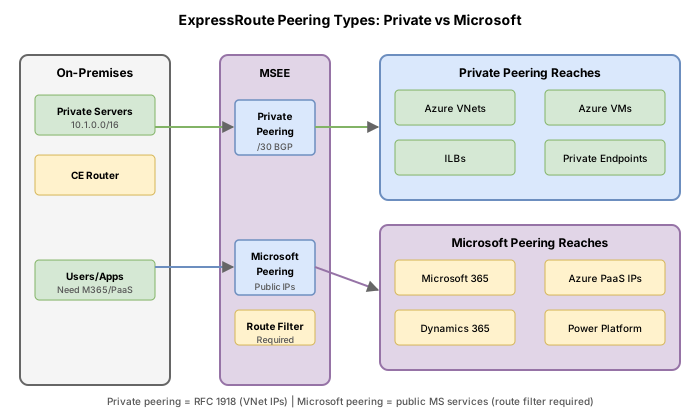
Microsoft peering provides connectivity to Microsoft online services (Microsoft 365, Dynamics 365) and Azure PaaS services (Azure Storage, Azure SQL Database, Azure Cosmos DB) through public IP addresses.
Microsoft peering requirements
| Requirement | Detail |
|---|---|
| Public IP prefixes | You must own public IPs registered in RIR/IRR |
| Primary subnet | /30 public IPv4 subnet for the primary BGP link |
| Secondary subnet | /30 public IPv4 subnet for the secondary BGP link |
| Customer ASN | Your public or private AS number |
| VLAN ID | Unique VLAN tag (different from private peering) |
| Routing registry | RIR where your prefixes/ASN are registered |
| Route filter | Required to receive any route advertisements |
Private peering vs Microsoft peering
| Aspect | Private peering | Microsoft peering |
|---|---|---|
| IP addressing | RFC 1918 private IPs | Public IPs (RIR-registered) |
| Services reached | Azure VNets (IaaS, PaaS via Private Endpoints) | Microsoft 365, Azure PaaS public endpoints |
| Route filter required | No | Yes (mandatory since August 2017) |
| Use case | Hybrid connectivity to VMs, internal apps | Direct access to Microsoft SaaS/PaaS |
Create Microsoft peering
az network express-route peering create \
--resource-group rg-contoso-network \
--circuit-name er-circuit-contoso-sv \
--peering-type MicrosoftPeering \
--peer-asn 65020 \
--primary-peer-subnet 203.0.113.0/30 \
--secondary-peer-subnet 203.0.113.4/30 \
--vlan-id 300 \
--advertised-public-prefixes 203.0.113.0/24 \
--customer-asn 65020 \
--routing-registry-name ARIN
**Important:** The `advertisedPublicPrefixesState` field shows `ValidationNeeded`. Microsoft validates that you own the advertised prefixes by checking against RIR/IRR records. This validation can take minutes to days depending on the registry.
---
## Task 2: Create and configure route filters
Since August 2017, Microsoft peering will not advertise any routes until a route filter is attached. Route filters use BGP community values to select which Microsoft service prefixes you want to receive.
### Understanding BGP communities for Microsoft services
BGP community values identify groups of prefixes belonging to specific Microsoft services:
| Service | BGP community value | Description |
|---|---|---|
| Exchange Online | 12076:5010 | Microsoft 365 Exchange prefixes |
| SharePoint Online | 12076:5020 | Microsoft 365 SharePoint prefixes |
| Skype for Business | 12076:5030 | Skype/Teams legacy prefixes |
| Microsoft Teams | 12076:5031 | Teams-specific prefixes |
| Dynamics 365 | 12076:5040 | Dynamics 365 prefixes |
| Azure Storage | 12076:52xx | Storage account prefixes (region-specific) |
| Azure SQL | 12076:51xx | SQL Database prefixes (region-specific) |
| Other Azure PaaS | 12076:51xx--52xx | Regional service prefixes |
### List available BGP communities
```bash
az network route-filter rule list-service-communities --output table
Expected output (truncated):
Name                        BgpCommunities                   Prefixes
--------------------------  -------------------------------- ----------------
Exchange Online             12076:5010                       13.107.6.152/31...
SharePoint Online           12076:5020                       13.107.136.0/22...
Skype For Business Online   12076:5030                       13.107.64.0/18...
Dynamics 365                12076:5040                       13.107.9.0/24...
Azure West US 2             12076:51026                      20.51.0.0/16...
Azure East US 2             12076:51014                      20.36.128.0/17...
Step 1: Create the route filter resource
az network route-filter create \
  --resource-group rg-contoso-network \
  --name rf-contoso-mspeering \
  --location westus2
Expected output:
{
  "id": "/subscriptions/.../routeFilters/rf-contoso-mspeering",
  "location": "westus2",
  "name": "rf-contoso-mspeering",
  "peerings": [],
  "provisioningState": "Succeeded",
  "rules": []
}
Step 2: Create a filter rule to allow specific services
A route filter can have only one rule, and the rule must be of type Allow. However, this single rule can contain multiple BGP community values.
az network route-filter rule create \
  --resource-group rg-contoso-network \
  --filter-name rf-contoso-mspeering \
  --name allow-azure-and-exchange \
  --access Allow \
  --communities 12076:5010 12076:5040 12076:51026
Parameter details:
| Parameter | Value | Purpose |
|---|---|---|
--filter-name | rf-contoso-mspeering | The route filter to add the rule to |
--access | Allow | Only Allow is supported (no Deny rules) |
--communities | Space-separated list | BGP community values for services to receive |
Expected output:
{
  "access": "Allow",
  "communities": [
    "12076:5010",
    "12076:5040",
    "12076:51026"
  ],
  "id": "/subscriptions/.../rules/allow-azure-and-exchange",
  "name": "allow-azure-and-exchange",
  "provisioningState": "Succeeded",
  "routeFilterRuleType": "Community"
}
Task 3: Associate route filter with Microsoft peering
The route filter must be attached to the Microsoft peering before any routes are advertised.
az network express-route peering update \
  --resource-group rg-contoso-network \
  --circuit-name er-circuit-contoso-sv \
  --name MicrosoftPeering \
  --route-filter rf-contoso-mspeering
Expected output:
{
  "name": "MicrosoftPeering",
  "peeringType": "MicrosoftPeering",
  "provisioningState": "Succeeded",
  "routeFilter": {
    "id": "/subscriptions/.../routeFilters/rf-contoso-mspeering"
  },
  "state": "Enabled"
}
Update the route filter to add more communities
If you need to add more services later, update the existing rule:
az network route-filter rule update \
  --resource-group rg-contoso-network \
  --filter-name rf-contoso-mspeering \
  --name allow-azure-and-exchange \
  --add communities "12076:5020"
Detach a route filter (stops all advertisements)
az network express-route peering update \
  --resource-group rg-contoso-network \
  --circuit-name er-circuit-contoso-sv \
  --name MicrosoftPeering \
  --remove routeFilter
Once detached, no prefixes are advertised through the BGP session for Microsoft peering.
Task 4: Route advertisement best practices
What you should advertise
- Only prefixes you own and that are registered in an RIR/IRR
- Specific /24 or longer prefixes for your public IP ranges
- Only subnets that need to communicate directly with Microsoft services
What you should NOT advertise
| Anti-pattern | Risk |
|---|---|
| 0.0.0.0/0 (default route) | Attracts all internet traffic into your network |
| RFC 1918 addresses | Not routable on Microsoft peering (public IPs only) |
| Prefixes you do not own | Fails validation; potential route hijacking |
| Very broad prefixes (e.g., /8) | Rejected by Microsoft's prefix filters |
Verify advertised and received routes
# View routes advertised from your side to Microsoft
az network express-route list-route-tables \
  --resource-group rg-contoso-network \
  --name er-circuit-contoso-sv \
  --path primary \
  --peering-name MicrosoftPeering
Expected output:
{
  "value": [
    {
      "locPrf": "",
      "network": "203.0.113.0/24",
      "nextHop": "203.0.113.1",
      "path": "65020",
      "weight": 0
    }
  ]
}
# View routes received from Microsoft
az network express-route list-route-tables \
  --resource-group rg-contoso-network \
  --name er-circuit-contoso-sv \
  --path primary \
  --peering-name MicrosoftPeering \
  --query "value[?starts_with(path, '12076')]"
Expected output (routes Microsoft advertises to you):
[
  {
    "locPrf": "",
    "network": "13.107.6.152/31",
    "nextHop": "203.0.113.2",
    "path": "12076",
    "weight": 0
  },
  {
    "locPrf": "",
    "network": "40.96.0.0/13",
    "nextHop": "203.0.113.2",
    "path": "12076",
    "weight": 0
  }
]
Task 5: Configure MACsec encryption on ExpressRoute Direct
MACsec (IEEE 802.1AE) provides point-to-point Layer 2 encryption between your network devices and the Microsoft edge routers. It is only available on ExpressRoute Direct connections.
MACsec prerequisites
| Requirement | Detail |
|---|---|
| Connection type | ExpressRoute Direct only |
| Key storage | Azure Key Vault (for CAK and CKN secrets) |
| Cipher suites | GcmAes128, GcmAes256, GcmAesXpn128, GcmAesXpn256 |
| SCI state | Can be enabled or disabled |
How MACsec keys work
MACsec uses two keys:
- CKN (Connectivity Key Name): Identifies the security association. Stored as a secret in Azure Key Vault.
- CAK (Connectivity Association Key): The encryption key itself. Also stored as a secret in Azure Key Vault.
Both must be stored in Azure Key Vault. The ExpressRoute Direct resource references the Key Vault secret identifiers.
Step 1: Store MACsec keys in Key Vault
# Create a Key Vault (if not already existing)
az keyvault create \
  --resource-group rg-contoso-network \
  --name kv-contoso-macsec \
  --location eastus

# Store the CKN secret
az keyvault secret set \
  --vault-name kv-contoso-macsec \
  --name macsec-ckn \
  --value "0123456789abcdef0123456789abcdef0123456789abcdef0123456789abcdef"

# Store the CAK secret
az keyvault secret set \
  --vault-name kv-contoso-macsec \
  --name macsec-cak \
  --value "fedcba9876543210fedcba9876543210"
Step 2: Grant the ExpressRoute service principal access to Key Vault
The ExpressRoute service needs access to read the secrets. The ExpressRoute service principal object ID varies by tenant.
# Grant GET permission on secrets to the ExpressRoute service
az keyvault set-policy \
  --vault-name kv-contoso-macsec \
  --object-id "your-expressroute-service-principal-object-id" \
  --secret-permissions get
Step 3: Enable MACsec on ExpressRoute Direct links
MACsec is configured per-link on the ExpressRoute Direct port. You must configure both links.
# Enable MACsec on link1
az network express-route port link update \
  --resource-group rg-contoso-network \
  --port-name er-direct-contoso \
  --name link1 \
  --macsec-ckn-secret-identifier "https://kv-contoso-macsec.vault.azure.net/secrets/macsec-ckn/abcdef1234567890" \
  --macsec-cak-secret-identifier "https://kv-contoso-macsec.vault.azure.net/secrets/macsec-cak/abcdef1234567890" \
  --macsec-cipher GcmAes256
Expected output:
{
  "adminState": "Enabled",
  "connectorType": "LC",
  "id": "/subscriptions/.../links/link1",
  "interfaceName": "Ethernet 2/2/1",
  "macSecConfig": {
    "cakSecretIdentifier": "https://kv-contoso-macsec.vault.azure.net/secrets/macsec-cak/abcdef1234567890",
    "cipher": "GcmAes256",
    "cknSecretIdentifier": "https://kv-contoso-macsec.vault.azure.net/secrets/macsec-ckn/abcdef1234567890",
    "sciState": "Disabled"
  },
  "name": "link1",
  "provisioningState": "Succeeded"
}
# Enable MACsec on link2
az network express-route port link update \
  --resource-group rg-contoso-network \
  --port-name er-direct-contoso \
  --name link2 \
  --macsec-ckn-secret-identifier "https://kv-contoso-macsec.vault.azure.net/secrets/macsec-ckn/abcdef1234567890" \
  --macsec-cak-secret-identifier "https://kv-contoso-macsec.vault.azure.net/secrets/macsec-cak/abcdef1234567890" \
  --macsec-cipher GcmAes256
Step 4: Enable SCI (optional)
Secure Channel Identifier (SCI) is used when there are multiple logical channels on a single physical link:
az network express-route port link update \
  --resource-group rg-contoso-network \
  --port-name er-direct-contoso \
  --name link1 \
  --macsec-sci-state Enabled
Available MACsec ciphers
| Cipher | Key length | XPN support | Use case |
|---|---|---|---|
| GcmAes128 | 128-bit | No | Standard encryption, lower overhead |
| GcmAes256 | 256-bit | No | Stronger encryption |
| GcmAesXpn128 | 128-bit | Yes | Long-lived sessions (extended packet numbering) |
| GcmAesXpn256 | 256-bit | Yes | Maximum security with long-lived sessions |
XPN (Extended Packet Numbering) prevents packet number exhaustion on high-throughput links. At 100 Gbps, standard 32-bit packet numbers can wrap in minutes. XPN uses 64-bit packet numbers.
Task 6: Verify the complete configuration
Check Microsoft peering status
az network express-route peering show \
  --resource-group rg-contoso-network \
  --circuit-name er-circuit-contoso-sv \
  --name MicrosoftPeering \
  --query "{PeeringType:peeringType, State:state, VlanId:vlanId, PeerAsn:peerASN, RouteFilter:routeFilter.id, AdvertisedPrefixes:microsoftPeeringConfig.advertisedPublicPrefixes, PrefixState:microsoftPeeringConfig.advertisedPublicPrefixesState}" \
  --output json
Expected output:
{
  "PeeringType": "MicrosoftPeering",
  "State": "Enabled",
  "VlanId": 300,
  "PeerAsn": 65020,
  "RouteFilter": "/subscriptions/.../routeFilters/rf-contoso-mspeering",
  "AdvertisedPrefixes": ["203.0.113.0/24"],
  "PrefixState": "Configured"
}
Verify MACsec configuration on Direct ports
az network express-route port link list \
  --resource-group rg-contoso-network \
  --port-name er-direct-contoso \
  --query "[].{Name:name, AdminState:adminState, MACsecCipher:macSecConfig.cipher, SCIState:macSecConfig.sciState}" \
  --output table
Expected output:
Name    AdminState  MACsecCipher  SCIState
------  ----------  ------------  --------
link1   Enabled     GcmAes256     Disabled
link2   Enabled     GcmAes256     Disabled
Break & fix
Scenario A: Microsoft peering without route filter (no routes received)
Symptom: Microsoft peering is configured and shows "Enabled" but you are not receiving any routes from Microsoft. The route table for the peering is empty.
Root cause: Since August 2017, Microsoft peering requires a route filter to be attached before any prefixes are advertised. Without a route filter, zero routes are sent.
Resolution:
# Create and attach a route filter
az network route-filter create \
  --resource-group rg-contoso-network \
  --name rf-contoso-mspeering \
  --location westus2

az network route-filter rule create \
  --resource-group rg-contoso-network \
  --filter-name rf-contoso-mspeering \
  --name allow-services \
  --access Allow \
  --communities 12076:5010 12076:5020

az network express-route peering update \
  --resource-group rg-contoso-network \
  --circuit-name er-circuit-contoso-sv \
  --name MicrosoftPeering \
  --route-filter rf-contoso-mspeering
Scenario B: Wrong BGP community values
Symptom: Route filter is attached but you only see some expected routes, not all the services you need.
Root cause: The community values in the route filter rule do not include the community for the missing service.
Resolution: List available communities and add the correct one:
# List communities to find the right value
az network route-filter rule list-service-communities \
  --query "[?contains(name, 'SharePoint')]" \
  --output table

# Add the missing community
az network route-filter rule update \
  --resource-group rg-contoso-network \
  --filter-name rf-contoso-mspeering \
  --name allow-services \
  --add communities "12076:5020"
Scenario C: MACsec cipher mismatch
Symptom: ExpressRoute Direct link shows adminState: Enabled but no traffic passes. The physical link LED is up but data frames are dropped.
Root cause: The MACsec cipher configured on the Azure side (e.g., GcmAes256) does not match the cipher configured on your CE router (e.g., GcmAes128). Both sides must use the same cipher suite and matching CKN/CAK values.
Resolution: Verify and align the cipher on both sides:
# Check current Azure-side configuration
az network express-route port link show \
  --resource-group rg-contoso-network \
  --port-name er-direct-contoso \
  --name link1 \
  --query "macSecConfig"
{
  "cakSecretIdentifier": "https://kv-contoso-macsec.vault.azure.net/secrets/macsec-cak/...",
  "cipher": "GcmAes256",
  "cknSecretIdentifier": "https://kv-contoso-macsec.vault.azure.net/secrets/macsec-ckn/...",
  "sciState": "Disabled"
}
Then verify your CE router uses the same cipher (GcmAes256) and matching key values. Update the Azure side if needed:
az network express-route port link update \
  --resource-group rg-contoso-network \
  --port-name er-direct-contoso \
  --name link1 \
  --macsec-cipher GcmAes128
Knowledge check
1. Why does Microsoft peering configured after August 2017 not receive any route advertisements by default?
2. Which command associates a route filter with a Microsoft peering on an ExpressRoute circuit?
3. MACsec encryption is available on which type of ExpressRoute connection?
4. What is the BGP community value for Exchange Online services in ExpressRoute Microsoft peering route filters?
5. Why would you choose GcmAesXpn256 over GcmAes256 for MACsec on a 100 Gbps ExpressRoute Direct link?