Challenge 19: ExpressRoute private peering
This challenge is simulation-based. ExpressRoute requires a physical connectivity provider and costs $55--$10,000+/month. You will learn the CLI commands, configuration patterns, and expected outputs without deploying actual resources.
45--60 minutes | No cost (simulation) | Exam weight: 20--25%
Objectives
After completing this challenge you will be able to:
- Select an ExpressRoute connectivity model
- Select an appropriate ExpressRoute SKU and tier
- Create an ExpressRoute circuit
- Choose between Azure private peering only, Microsoft peering only, or both
- Configure Azure private peering
- Create and configure an ExpressRoute gateway
- Connect a virtual network to an ExpressRoute circuit
Scenario
Contoso has decided that their hybrid workloads demand the dedicated bandwidth and reliability that only ExpressRoute can provide. Their on-premises datacenter in Silicon Valley connects to an Equinix colocation facility. They need to:
- Select the right connectivity model for their environment
- Create an ExpressRoute circuit with the correct SKU and bandwidth
- Deploy an ExpressRoute gateway in their hub VNet
- Configure Azure private peering for RFC 1918 connectivity
- Link the VNet to the circuit
Task 1: Understand ExpressRoute connectivity models
Before creating any resources, you must choose the connectivity model that matches your physical infrastructure.
| Connectivity model | Description | Use case |
|---|---|---|
| CloudExchange co-location | Your datacenter is in the same facility as a cloud exchange (e.g., Equinix, Megaport) | Most common for enterprises with colo presence |
| Point-to-point Ethernet | Dedicated fiber between your datacenter and Microsoft | High bandwidth, single-site connectivity |
| Any-to-any (IPVPN) | MPLS-based WAN that connects multiple branch offices | Multi-site enterprises using MPLS already |
| ExpressRoute Direct | Direct fiber to Microsoft edge (10 Gbps or 100 Gbps) | Massive data ingestion, strict isolation, MACsec |
For Contoso's scenario, CloudExchange co-location is appropriate because they are already present at Equinix.
List available service providers
az network express-route list-service-providers --output table
Expected output:
Name                  PeeringLocations                          BandwidthsOffered
--------------------  ----------------------------------------  ---------------------------
Equinix               Silicon Valley, Washington DC, Chicago    50Mbps, 100Mbps, 200Mbps,
                                                                500Mbps, 1Gbps, 2Gbps,
                                                                5Gbps, 10Gbps
AT&T Netbond          Silicon Valley, Chicago, Dallas           50Mbps, 100Mbps, 500Mbps,
                                                                1Gbps
Megaport              Silicon Valley, Sydney, London            50Mbps, 100Mbps, 200Mbps,
                                                                500Mbps, 1Gbps, 10Gbps
Task 2: Create the ExpressRoute circuit
Understanding SKU tiers and families
| SKU tier | Features |
|---|---|
| Local | Access only to regions in or near the same metro. No data egress charges. |
| Standard | Access to all regions within the same geopolitical boundary. 10 VNet links. |
| Premium | Global connectivity (cross-geopolitical). 100 VNet links. Higher route limits (10,000). |
| SKU family | Billing model |
|---|---|
| MeteredData | Pay per GB of egress. Lower monthly fee. |
| UnlimitedData | Flat monthly fee regardless of egress volume. |
Create the circuit
az network express-route create \
  --resource-group rg-contoso-network \
  --name er-circuit-contoso-sv \
  --bandwidth 200 \
  --peering-location "Silicon Valley" \
  --provider "Equinix" \
  --sku-family MeteredData \
  --sku-tier Standard \
  --location westus2
Expected output:
{
  "allowClassicOperations": false,
  "bandwidthInGbps": null,
  "bandwidthInMbps": 200,
  "circuitProvisioningState": "Enabled",
  "id": "/subscriptions/aaaa0000-bb11-2222-33cc-444444dddddd/resourceGroups/rg-contoso-network/providers/Microsoft.Network/expressRouteCircuits/er-circuit-contoso-sv",
  "location": "westus2",
  "name": "er-circuit-contoso-sv",
  "peerings": [],
  "provisioningState": "Succeeded",
  "serviceKey": "a1b2c3d4-e5f6-7890-abcd-ef1234567890",
  "serviceProviderNotes": null,
  "serviceProviderProperties": {
    "bandwidthInMbps": 200,
    "peeringLocation": "Silicon Valley",
    "serviceProviderName": "Equinix"
  },
  "serviceProviderProvisioningState": "NotProvisioned",
  "sku": {
    "family": "MeteredData",
    "name": "Standard_MeteredData",
    "tier": "Standard"
  },
  "stag": null,
  "tags": null,
  "type": "Microsoft.Network/expressRouteCircuits"
}
Key observations:
- The
serviceKeyis provided to your connectivity provider so they can provision the physical connection on their side. serviceProviderProvisioningStatestarts asNotProvisioneduntil the provider activates the link.circuitProvisioningStateisEnabled(Azure side is ready).
Verify circuit status
az network express-route show \
  --resource-group rg-contoso-network \
  --name er-circuit-contoso-sv \
  --query "{Name:name, Bandwidth:bandwidthInMbps, ProviderState:serviceProviderProvisioningState, CircuitState:circuitProvisioningState, SKU:sku.name}" \
  --output table
Expected output (after provider provisions):
Name                    Bandwidth  ProviderState  CircuitState  SKU
----------------------  ---------  -------------  ------------  --------------------
er-circuit-contoso-sv   200        Provisioned    Enabled       Standard_MeteredData
Task 3: Create the ExpressRoute gateway
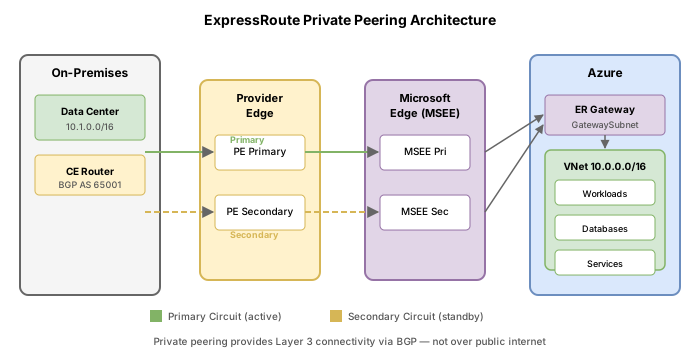
An ExpressRoute virtual network gateway connects your Azure VNet to the ExpressRoute circuit. It must be deployed into a subnet named GatewaySubnet.
ExpressRoute gateway SKUs
| SKU | Max connections | Max circuits | Throughput |
|---|---|---|---|
| Standard (ErGw1AZ) | 4 | 4 | 1 Gbps |
| High Performance (ErGw2AZ) | 8 | 8 | 2 Gbps |
| Ultra Performance (ErGw3AZ) | 16 | 16 | 10 Gbps |
| ErGwScale | 4--16 | 4--16 | 1--40 Gbps (scalable) |
The AZ suffix indicates zone-redundant deployment across availability zones.
Create the GatewaySubnet
az network vnet subnet create \
  --resource-group rg-contoso-network \
  --vnet-name vnet-hub-westus2 \
  --name GatewaySubnet \
  --address-prefixes 10.0.255.0/27
Create a public IP for the gateway
az network public-ip create \
  --resource-group rg-contoso-network \
  --name pip-er-gateway \
  --sku Standard \
  --allocation-method Static \
  --zone 1 2 3
Create the ExpressRoute gateway
az network vnet-gateway create \
--resource-group rg-contoso-network \
--name gw-expressroute-hub \
--vnet vnet-hub-westus2 \
--gateway-type ExpressRoute \
--sku ErGw1AZ \
--public-ip-addresses pip-er-gateway \
--no-wait
---
## Task 4: Configure Azure private peering
Azure private peering enables connectivity between your on-premises network and Azure VNets using RFC 1918 (private) IP addresses. This is the most common peering type.
### Peering requirements
- **Primary subnet**: A /30 IPv4 subnet for the primary BGP session link
- **Secondary subnet**: A /30 IPv4 subnet for the secondary BGP session link
- **VLAN ID**: A unique VLAN tag to isolate this peering on the physical link
- **Peer ASN**: Your on-premises BGP autonomous system number (cannot be 65515, which Azure reserves)
Each /30 subnet provides two usable IPs: you take the first, Microsoft takes the second.
### Configure private peering
```bash
az network express-route peering create \
--resource-group rg-contoso-network \
--circuit-name er-circuit-contoso-sv \
--peering-type AzurePrivatePeering \
--peer-asn 65020 \
--primary-peer-subnet 172.16.0.0/30 \
--secondary-peer-subnet 172.16.0.4/30 \
--vlan-id 200 \
--shared-key "ContosoSharedKey123"
Expected output:
{
  "azureASN": 12076,
  "gatewayManagerEtag": "",
  "id": "/subscriptions/.../peerings/AzurePrivatePeering",
  "ipv6PeeringConfig": null,
  "lastModifiedBy": "Customer",
  "microsoftPeeringConfig": null,
  "name": "AzurePrivatePeering",
  "peerASN": 65020,
  "peeringType": "AzurePrivatePeering",
  "primaryAzurePort": "",
  "primaryPeerAddressPrefix": "172.16.0.0/30",
  "provisioningState": "Succeeded",
  "secondaryAzurePort": "",
  "secondaryPeerAddressPrefix": "172.16.0.4/30",
  "sharedKey": "ContosoSharedKey123",
  "state": "Enabled",
  "vlanId": 200
}
Verify peering configuration
az network express-route peering show \
  --resource-group rg-contoso-network \
  --circuit-name er-circuit-contoso-sv \
  --name AzurePrivatePeering \
  --output table
Expected output:
Name                  PeeringType           PeerAsn  VlanId  State    ProvisioningState
--------------------  --------------------  -------  ------  -------  -----------------
AzurePrivatePeering   AzurePrivatePeering   65020    200     Enabled  Succeeded
Task 5: Connect the VNet to the ExpressRoute circuit
With the gateway deployed and peering configured, link them together using az network vpn-connection create with the --express-route-circuit2 parameter.
az network vpn-connection create \
  --resource-group rg-contoso-network \
  --name conn-er-hub \
  --vnet-gateway1 gw-expressroute-hub \
  --express-route-circuit2 er-circuit-contoso-sv
Expected output:
{
  "connectionType": "ExpressRoute",
  "enableBgp": false,
  "expressRouteCircuit2": {
    "id": "/subscriptions/.../expressRouteCircuits/er-circuit-contoso-sv"
  },
  "id": "/subscriptions/.../connections/conn-er-hub",
  "name": "conn-er-hub",
  "provisioningState": "Succeeded",
  "routingWeight": 0,
  "virtualNetworkGateway1": {
    "id": "/subscriptions/.../virtualNetworkGateways/gw-expressroute-hub"
  }
}
Verify the connection status
az network vpn-connection show \
  --resource-group rg-contoso-network \
  --name conn-er-hub \
  --query "{Name:name, Status:connectionStatus, Type:connectionType}" \
  --output table
Expected output:
Name          Status     Type
------------  ---------  ------------
conn-er-hub   Connected  ExpressRoute
Task 6: Verify circuit provisioning and route table
Check complete circuit health
az network express-route show \
  --resource-group rg-contoso-network \
  --name er-circuit-contoso-sv \
  --query "{Name:name, ServiceProviderState:serviceProviderProvisioningState, CircuitState:circuitProvisioningState, Peerings:peerings[].{Type:peeringType,State:state}}" \
  --output json
Expected output:
{
  "Name": "er-circuit-contoso-sv",
  "ServiceProviderState": "Provisioned",
  "CircuitState": "Enabled",
  "Peerings": [
    {
      "Type": "AzurePrivatePeering",
      "State": "Enabled"
    }
  ]
}
View the route table for the peering
az network express-route list-route-tables \
  --resource-group rg-contoso-network \
  --name er-circuit-contoso-sv \
  --path primary \
  --peering-name AzurePrivatePeering
Expected output:
{
  "value": [
    {
      "locPrf": "",
      "network": "10.0.0.0/16",
      "nextHop": "172.16.0.1",
      "path": "65020",
      "weight": 0
    },
    {
      "locPrf": "",
      "network": "192.168.1.0/24",
      "nextHop": "172.16.0.1",
      "path": "65020",
      "weight": 0
    }
  ]
}
This shows that the on-premises network (10.0.0.0/16 and 192.168.1.0/24) is being advertised from the customer router (ASN 65020) to the Microsoft edge.
Break & fix
Scenario A: Circuit stuck in NotProvisioned
Symptom: The circuit was created hours ago but serviceProviderProvisioningState still shows NotProvisioned.
Root cause: The connectivity provider has not yet provisioned the physical cross-connect using the service key.
Resolution:
- Confirm the service key was shared with your provider
- Contact the provider to verify they initiated provisioning
- Some providers require separate portal activation (e.g., Equinix Cloud Exchange portal)
# Check current state
az network express-route show \
  --resource-group rg-contoso-network \
  --name er-circuit-contoso-sv \
  --query "serviceProviderProvisioningState"
# Output: "NotProvisioned"
Scenario B: Wrong VLAN ID causes peering failure
Symptom: Private peering shows state: Disabled and BGP session does not establish.
Root cause: The VLAN ID configured in Azure does not match the VLAN tag configured on the CE/PE router.
Resolution: Update the VLAN ID to match your router configuration.
az network express-route peering update \
  --resource-group rg-contoso-network \
  --circuit-name er-circuit-contoso-sv \
  --name AzurePrivatePeering \
  --vlan-id 300
Scenario C: Peer ASN conflict
Symptom: Peering creation fails with an error about the ASN being invalid.
Root cause: ASN 65515 is reserved by Azure for VPN Gateway. You cannot use it as a peer ASN.
Resolution: Choose a private ASN in the range 64512--65514 or 65516--65534, or use a public ASN your organization owns.
Architecture summary
On-Premises DC            Equinix Colo          Microsoft Edge         Azure VNet
+-----------+          +-------------+        +-------------+       +------------+
|  Router   |---fiber--|  Exchange   |--xconn-|    MSEE     |--BGP--|  ER Gateway |
|  ASN 65020|          |  Provider   |        |  ASN 12076  |       |  ErGw1AZ   |
+-----------+          +-------------+        +-------------+       +------------+
     |                                              |                     |
  VLAN 200                                    Private Peering          vnet-hub
  172.16.0.1/30                               172.16.0.2/30         10.0.0.0/16
Knowledge check
1. Which command connects a virtual network gateway to an ExpressRoute circuit?
2. An ExpressRoute circuit shows serviceProviderProvisioningState as NotProvisioned. What must happen before you can configure peering?
3. Which ExpressRoute SKU tier provides cross-geopolitical boundary connectivity and supports up to 100 VNet links?
4. What is the minimum subnet size required for each BGP peering link in ExpressRoute private peering?
5. Which ASN value is reserved by Azure and cannot be used as a peer ASN for ExpressRoute private peering?