Challenge 16: VPN gateway SKU selection and custom IPsec policies
45-60 minutes | ~$0.19-1.17/h (varies by SKU) | Exam weight: 20-25%
Scenario
Contoso must connect to a financial services partner (Woodgrove Bank) whose compliance requirements mandate specific cryptographic algorithms for the VPN tunnel: AES256 for IKE encryption, SHA384 for IKE integrity, DHGroup14 for key exchange, and GCMAES256 for IPsec data encryption. The default Azure VPN policies use different algorithms that do not meet these requirements. Additionally, the team needs to right-size their VPN gateway SKU to handle the expected 2 Gbps throughput with BGP support and 50 concurrent S2S tunnels.
Architecture:
Learning objectives
After completing this challenge you will be able to:
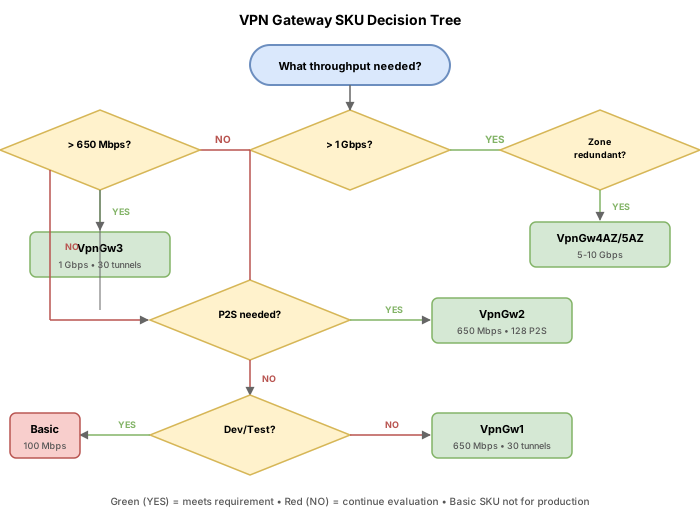
- Select an appropriate VPN Gateway SKU based on throughput, tunnel count, and feature requirements
- Create and configure a custom IPsec/IKE policy on a VPN connection
- Configure IKE Phase 1 (Main Mode) parameters
- Configure IKE Phase 2 / IPsec (Quick Mode) parameters
- Differentiate between policy-based and route-based VPN gateway behavior with custom policies
- Troubleshoot IPsec negotiation failures caused by mismatched parameters
Prerequisites
- Completion of Challenge 14 (basic S2S VPN understanding)
- An Azure subscription with Contributor access
- Azure CLI installed and authenticated (
az login) - PowerShell with Az module installed
Key concepts for AZ-700
VPN gateway SKU comparison
| SKU | Max S2S tunnels | Max P2S (IKEv2/OpenVPN) | Aggregate throughput | BGP | Generation |
|---|---|---|---|---|---|
| Basic | 10 | Not supported | 100 Mbps | No | Gen1 |
| VpnGw1 | 30 | 250 | 650 Mbps | Yes | Gen1/Gen2 |
| VpnGw2 | 30 | 500 | 1 Gbps (Gen1) / 1.25 Gbps (Gen2) | Yes | Gen1/Gen2 |
| VpnGw3 | 30 | 1000 | 1.25 Gbps (Gen1) / 2.5 Gbps (Gen2) | Yes | Gen1/Gen2 |
| VpnGw4 | 100 | 5000 | 5 Gbps | Yes | Gen2 |
| VpnGw5 | 100 | 10000 | 10 Gbps | Yes | Gen2 |
Zone-redundant variants (VpnGw1AZ through VpnGw5AZ) have identical performance but deploy across availability zones.
IKE Phase 1 (Main Mode) parameters
| Parameter | Purpose | Common values |
|---|---|---|
| IKE Encryption | Encrypts IKE negotiation messages | AES256, AES128, GCMAES256, GCMAES128 |
| IKE Integrity | Authenticates IKE messages | SHA384, SHA256, SHA1, GCMAES256, GCMAES128 |
| DH Group | Key exchange algorithm strength | DHGroup14, DHGroup24, ECP256, ECP384 |
| SA Lifetime | How long before Phase 1 renegotiation | Seconds (default: 28800 = 8 hours) |
IKE Phase 2 / IPsec (Quick Mode) parameters
| Parameter | Purpose | Common values |
|---|---|---|
| IPsec Encryption | Encrypts data traffic | GCMAES256, GCMAES128, AES256, AES128 |
| IPsec Integrity | Authenticates data packets | GCMAES256, GCMAES128, SHA256, SHA1 |
| PFS Group | Perfect Forward Secrecy group | PFS24, PFS14, ECP256, ECP384, None |
| SA Lifetime | Time before Phase 2 renegotiation | Seconds (default: 3600 = 1 hour) |
| SA Data Size | Data volume before renegotiation | Kilobytes (default: 102400000 KB) |
Valid parameter values reference
IKE Encryption (--ike-encryption):
DES, DES3, AES128, AES192, AES256, GCMAES128, GCMAES256
IKE Integrity (--ike-integrity):
MD5, SHA1, SHA256, SHA384, GCMAES128, GCMAES256
DH Group (--dh-group):
None, DHGroup1, DHGroup2, DHGroup14, DHGroup2048, DHGroup24, ECP256, ECP384
IPsec Encryption (--ipsec-encryption):
None, DES, DES3, AES128, AES192, AES256, GCMAES128, GCMAES256
IPsec Integrity (--ipsec-integrity):
MD5, SHA1, SHA256, GCMAES128, GCMAES256
PFS Group (--pfs-group):
None, PFS1, PFS2, PFS2048, PFS14, PFS24, ECP256, ECP384, PFSMM
- When using GCMAES for IKE encryption, you must use the matching GCMAES value for IKE integrity (e.g., GCMAES256 encryption requires GCMAES256 integrity)
- When using GCMAES for IPsec encryption, you must use the matching GCMAES value for IPsec integrity
- DES and MD5 are deprecated and should only be used for backward compatibility testing
- Both sides of the VPN tunnel must use identical IPsec/IKE parameters
Task 1: Select the appropriate VPN gateway SKU
Based on Contoso's requirements (2 Gbps throughput, BGP support, 50 S2S tunnels), evaluate the SKU options:
| Requirement | VpnGw1 | VpnGw2 | VpnGw3 (Gen2) | VpnGw4 | Decision |
|---|---|---|---|---|---|
| 2 Gbps throughput | 650 Mbps (insufficient) | 1.25 Gbps (insufficient) | 2.5 Gbps (meets) | 5 Gbps (exceeds) | VpnGw3 minimum |
| BGP support | Yes | Yes | Yes | Yes | All qualify |
| 50 S2S tunnels | 30 (insufficient) | 30 (insufficient) | 30 (insufficient) | 100 (meets) | VpnGw4 minimum |
Conclusion: VpnGw4 (Generation 2) is the minimum SKU that satisfies all requirements (5 Gbps throughput, 100 S2S tunnels, BGP support).
Deploy the correctly sized gateway
az group create \
    --name rg-vpn-ipsec-lab \
    --location eastus

az network vnet create \
    --resource-group rg-vpn-ipsec-lab \
    --name vnet-hub \
    --location eastus \
    --address-prefixes 10.1.0.0/16 \
    --subnet-name snet-workloads \
    --subnet-prefixes 10.1.1.0/24

az network vnet subnet create \
    --resource-group rg-vpn-ipsec-lab \
    --vnet-name vnet-hub \
    --name GatewaySubnet \
    --address-prefixes 10.1.255.0/27

az network public-ip create \
    --resource-group rg-vpn-ipsec-lab \
    --name pip-vgw-hub \
    --location eastus \
    --allocation-method Static \
    --sku Standard

az network vnet-gateway create \
    --resource-group rg-vpn-ipsec-lab \
    --name vgw-hub \
    --vnet vnet-hub \
    --gateway-type Vpn \
    --vpn-type RouteBased \
    --sku VpnGw4 \
    --vpn-gateway-generation Generation2 \
    --public-ip-addresses pip-vgw-hub \
    --no-wait
- Basic: Legacy only, no BGP, no custom IPsec, max 10 tunnels
- VpnGw1: Small workloads, up to 30 tunnels, 650 Mbps
- VpnGw2: Medium workloads, up to 30 tunnels, 1-1.25 Gbps
- VpnGw3: Large workloads, up to 30 tunnels, 1.25-2.5 Gbps
- VpnGw4: Enterprise with many sites, up to 100 tunnels, 5 Gbps
- VpnGw5: Maximum performance, up to 100 tunnels, 10 Gbps
- Add "AZ" suffix for zone-redundancy (same performance, higher availability)
Task 2: Create a custom IPsec/IKE policy
Step 1: Create the local network gateway for the partner
az network local-gateway create \
    --resource-group rg-vpn-ipsec-lab \
    --name lgw-woodgrove \
    --gateway-ip-address 198.51.100.100 \
    --local-address-prefixes 172.16.0.0/12 \
    --location eastus
Step 2: Create the VPN connection (wait for gateway to be provisioned)
az network vpn-connection create \
    --resource-group rg-vpn-ipsec-lab \
    --name conn-to-woodgrove \
    --vnet-gateway1 vgw-hub \
    --local-gateway2 lgw-woodgrove \
    --shared-key "W00dgrove!Secure#2024"
Step 3: Add the custom IPsec/IKE policy
az network vpn-connection ipsec-policy add \
    --resource-group rg-vpn-ipsec-lab \
    --connection-name conn-to-woodgrove \
    --ike-encryption AES256 \
    --ike-integrity SHA384 \
    --dh-group DHGroup14 \
    --ipsec-encryption GCMAES256 \
    --ipsec-integrity GCMAES256 \
    --pfs-group PFS14 \
    --sa-lifetime 3600 \
    --sa-data-size 102400000
Azure PowerShell
# Create the custom IPsec policy object
$ipsecPolicy = New-AzIpsecPolicy `
    -IkeEncryption AES256 `
    -IkeIntegrity SHA384 `
    -DhGroup DHGroup14 `
    -IpsecEncryption GCMAES256 `
    -IpsecIntegrity GCMAES256 `
    -PfsGroup PFS14 `
    -SALifeTimeSeconds 3600 `
    -SADataSizeKilobytes 102400000

# Create local gateway
$lgw = New-AzLocalNetworkGateway `
    -ResourceGroupName "rg-vpn-ipsec-lab" `
    -Name "lgw-woodgrove" `
    -Location "eastus" `
    -GatewayIpAddress "198.51.100.100" `
    -AddressPrefix "172.16.0.0/12"

# Get VPN gateway
$vgw = Get-AzVirtualNetworkGateway `
    -ResourceGroupName "rg-vpn-ipsec-lab" `
    -Name "vgw-hub"

# Create connection with custom IPsec policy
New-AzVirtualNetworkGatewayConnection `
    -ResourceGroupName "rg-vpn-ipsec-lab" `
    -Name "conn-to-woodgrove" `
    -Location "eastus" `
    -VirtualNetworkGateway1 $vgw `
    -LocalNetworkGateway2 $lgw `
    -ConnectionType IPsec `
    -SharedKey "W00dgrove!Secure#2024" `
    -IpsecPolicies $ipsecPolicy
Task 3: Understand IKE Phase 1 parameters
IKE Phase 1 (Main Mode) establishes the secure channel used to negotiate the IPsec tunnel. Both sides must agree on the same parameters.
Parameter breakdown for the exam
| Parameter | Contoso value | Purpose |
|---|---|---|
--ike-encryption AES256 | AES256 | Encrypts IKE control messages during negotiation |
--ike-integrity SHA384 | SHA384 | HMAC for authenticating IKE messages (prevents tampering) |
--dh-group DHGroup14 | DHGroup14 (2048-bit MODP) | Diffie-Hellman group for secure key exchange |
--sa-lifetime 3600 | 3600 seconds (1 hour) | Time before Phase 1 SA expires and must be renegotiated |
DH group strength comparison
| DH Group | Key size | Security level | Recommendation |
|---|---|---|---|
| DHGroup1 | 768-bit | Weak | Do not use |
| DHGroup2 | 1024-bit | Weak | Do not use |
| DHGroup14 | 2048-bit | Acceptable | Minimum recommended |
| DHGroup24 | 2048-bit MODP | Strong | Good for most use cases |
| ECP256 | 256-bit EC | Strong | Elliptic curve, modern |
| ECP384 | 384-bit EC | Very strong | High-security requirements |
Task 4: Understand IKE Phase 2 / IPsec parameters
IKE Phase 2 (Quick Mode) negotiates the IPsec Security Associations that protect actual data traffic.
Parameter breakdown
| Parameter | Contoso value | Purpose |
|---|---|---|
--ipsec-encryption GCMAES256 | GCMAES256 | Encrypts data packets in the tunnel |
--ipsec-integrity GCMAES256 | GCMAES256 | Authenticates data packets (GCM provides both) |
--pfs-group PFS14 | PFS14 (2048-bit) | Perfect Forward Secrecy for each new SA |
--sa-lifetime 3600 | 3600 seconds | Time before IPsec SA renegotiation |
--sa-data-size 102400000 | ~100 GB | Data volume before SA renegotiation |
When using GCMAES (Galois/Counter Mode with AES) for IPsec encryption, it provides both encryption and authentication in a single operation (AEAD cipher). The --ipsec-integrity value must match the encryption value (GCMAES256 encryption requires GCMAES256 integrity). This is more efficient than separate encrypt-then-MAC approaches.
Task 5: Verify and list IPsec policies
Azure CLI
# List IPsec policies on a connection
az network vpn-connection ipsec-policy list \
    --resource-group rg-vpn-ipsec-lab \
    --connection-name conn-to-woodgrove \
    --output table

# Show full connection details including policy
az network vpn-connection show \
    --resource-group rg-vpn-ipsec-lab \
    --name conn-to-woodgrove \
    --query "{status:connectionStatus, usePolicyBased:usePolicyBasedTrafficSelectors, ipsecPolicies:ipsecPolicies}" \
    --output json
Azure PowerShell
$conn = Get-AzVirtualNetworkGatewayConnection `
    -ResourceGroupName "rg-vpn-ipsec-lab" `
    -Name "conn-to-woodgrove"

$conn.IpsecPolicies | Format-List
Clear/remove IPsec policies (revert to default)
az network vpn-connection ipsec-policy clear \
    --resource-group rg-vpn-ipsec-lab \
    --connection-name conn-to-woodgrove
Task 6: Policy-based vs route-based with custom IPsec
Understanding when a route-based gateway can behave like policy-based is important for the exam.
Route-based gateway with policy-based traffic selectors
For connections to on-premises policy-based devices, a route-based gateway can use policy-based traffic selectors on a per-connection basis:
az network vpn-connection create \
    --resource-group rg-vpn-ipsec-lab \
    --name conn-to-legacy-device \
    --vnet-gateway1 vgw-hub \
    --local-gateway2 lgw-woodgrove \
    --shared-key "LegacyDevice!2024" \
    --use-policy-based-traffic-selectors true
New-AzVirtualNetworkGatewayConnection `
    -ResourceGroupName "rg-vpn-ipsec-lab" `
    -Name "conn-to-legacy-device" `
    -Location "eastus" `
    -VirtualNetworkGateway1 $vgw `
    -LocalNetworkGateway2 $lgw `
    -ConnectionType IPsec `
    -SharedKey "LegacyDevice!2024" `
    -UsePolicyBasedTrafficSelectors $true
When to use each approach
| Scenario | Solution |
|---|---|
| Modern devices, multiple tunnels needed | Route-based gateway, default routing |
| Partner requires specific crypto algorithms | Route-based gateway + custom IPsec policy |
| Legacy device needs IKEv1 + policy selectors | Route-based gateway + --use-policy-based-traffic-selectors true |
| Single tunnel to very old IKEv1-only device | Policy-based gateway (Basic SKU) as last resort |
The exam may present a scenario where you need to connect a route-based VPN gateway to a partner's policy-based device. The correct answer is to enable usePolicyBasedTrafficSelectors on the specific connection, not to change the gateway type to policy-based. This allows you to maintain route-based benefits (multiple tunnels, BGP, P2S) while accommodating one legacy peer.
Break & fix
Scenario 1: Mismatched crypto parameters
Symptom: Connection status is Connecting. IKE negotiation fails because the partner uses AES128 while Azure is configured for AES256.
Root cause: The custom IPsec policy on the Azure side specifies different algorithms than what the partner device is configured with.
Diagnostic command:
az network vpn-connection ipsec-policy list \
    --resource-group rg-vpn-ipsec-lab \
    --connection-name conn-to-woodgrove \
    --output table
Fix: Update the policy to match the partner's configuration:
# Clear existing policy
az network vpn-connection ipsec-policy clear \
    --resource-group rg-vpn-ipsec-lab \
    --connection-name conn-to-woodgrove

# Add corrected policy matching partner
az network vpn-connection ipsec-policy add \
    --resource-group rg-vpn-ipsec-lab \
    --connection-name conn-to-woodgrove \
    --ike-encryption AES128 \
    --ike-integrity SHA256 \
    --dh-group DHGroup14 \
    --ipsec-encryption AES128 \
    --ipsec-integrity SHA256 \
    --pfs-group PFS14 \
    --sa-lifetime 3600 \
    --sa-data-size 102400000
Scenario 2: SA lifetime too short
Symptom: Tunnel establishes but drops every few minutes. Frequent renegotiation causes packet loss.
Root cause: --sa-lifetime was set to 60 seconds instead of 3600 seconds.
Fix: Clear and re-add with correct lifetime:
az network vpn-connection ipsec-policy clear \
    --resource-group rg-vpn-ipsec-lab \
    --connection-name conn-to-woodgrove

az network vpn-connection ipsec-policy add \
    --resource-group rg-vpn-ipsec-lab \
    --connection-name conn-to-woodgrove \
    --ike-encryption AES256 \
    --ike-integrity SHA384 \
    --dh-group DHGroup14 \
    --ipsec-encryption GCMAES256 \
    --ipsec-integrity GCMAES256 \
    --pfs-group PFS14 \
    --sa-lifetime 3600 \
    --sa-data-size 102400000
Scenario 3: Partner rejects DES (weak cipher)
Symptom: Connection fails during IKE Phase 1 because Azure side uses DES encryption, which the partner's compliance policy rejects.
Root cause: DES was accidentally specified as IKE encryption. Modern compliance frameworks (PCI-DSS, HIPAA) prohibit DES.
Diagnostic command:
az network vpn-connection ipsec-policy list \
    --resource-group rg-vpn-ipsec-lab \
    --connection-name conn-to-woodgrove \
    --query "[].ikeEncryption" \
    --output tsv
# Returns: DES
Fix: Replace with a strong cipher:
az network vpn-connection ipsec-policy clear \
--resource-group rg-vpn-ipsec-lab \
--connection-name conn-to-woodgrove
az network vpn-connection ipsec-policy add \
--resource-group rg-vpn-ipsec-lab \
--connection-name conn-to-woodgrove \
--ike-encryption AES256 \
--ike-integrity SHA384 \
--dh-group DHGroup14 \
--ipsec-encryption GCMAES256 \
--ipsec-integrity GCMAES256 \
--pfs-group PFS14 \
--sa-lifetime 3600 \
--sa-data-size 102400000
```powershell
Remove-AzResourceGroup -Name "rg-vpn-ipsec-lab" -Force -AsJob