Challenge 33: Multi-tier global load balancing
90-120 minutes | ~$0.50/h combined (all load balancing services) | Exam weight: 15-20%
Scenario
Fabrikam Corporation is migrating a three-tier application from on-premises to Azure. The architecture has:
- Web tier (public-facing): Global HTTP traffic serving users in North America, Europe, and Asia-Pacific. Requires content caching, SSL offload, and traffic acceleration.
- API tier (regional): RESTful APIs behind path-based routing rules. Multiple microservices share a single entry point per region. Requires URL path routing, autoscaling backends, and WAF protection.
- Data tier (internal): Database replicas and cache clusters accessible only from within the virtual network. Requires high-availability with L4 load balancing and no public exposure.
- Non-HTTP services: SMTP relay and custom TCP services that need DNS-based global failover but do not use HTTP/HTTPS.
This is a design exercise that synthesizes all Domain 3 load balancing concepts into a single architecture. You will select the appropriate Azure load balancing service for each tier, implement the solution, and verify end-to-end traffic flow.
Exam skills covered
| Skill | Weight |
|---|---|
| Identify and recommend a load balancing solution (decision criteria) | High |
| Combine multiple load balancing services in a multi-tier design | High |
| Configure Azure Front Door for global HTTP acceleration | High |
| Configure Application Gateway for regional L7 routing | High |
| Configure Internal Load Balancer for private L4 balancing | High |
| Configure Traffic Manager for non-HTTP global failover | Medium |
Prerequisites
- Azure subscription with Contributor role
- Azure CLI 2.60+ or Azure PowerShell Az 12.0+
- Completion of Challenges 25-32 (or equivalent knowledge of all LB services)
- Understanding of hub-spoke network topology
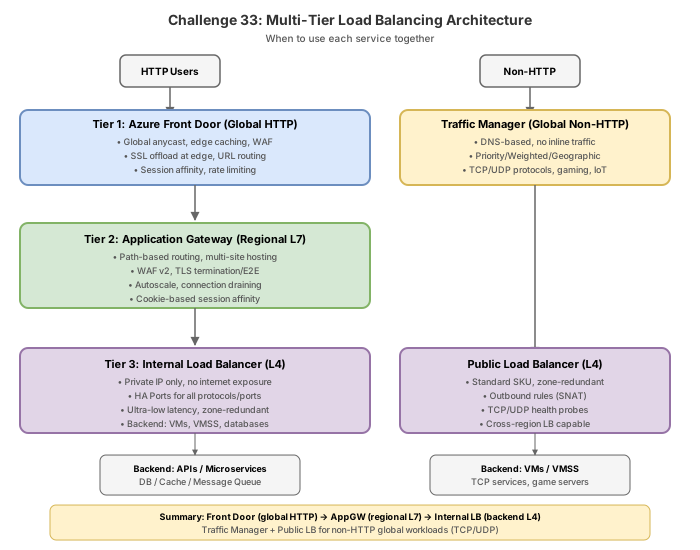
The load balancing decision framework
Before implementing, you must select the correct service for each tier. Azure provides five load balancing services, each optimized for different scenarios.
| Criteria | Front Door | Traffic Manager | Application Gateway | Load Balancer | Gateway LB |
|---|---|---|---|---|---|
| Scope | Global | Global | Regional | Regional | Regional |
| Protocol | HTTP/HTTPS (L7) | DNS-based (any) | HTTP/HTTPS (L7) | TCP/UDP (L4) | TCP/UDP (L4) |
| Deployment | Edge (anycast) | DNS only | In-VNet | In-VNet | Inline NVA |
| Caching | Yes | No | No | No | No |
| WAF | Yes (Premium) | No | Yes | No | No |
| Path routing | Via rules engine | No | Yes (native) | No | No |
| Private backend | Premium PL | No | Yes (native) | Yes (native) | Yes |
| SSL offload | Yes | No | Yes | No | No |
| Session affinity | Cookie-based | No | Cookie-based | Tuple-based | N/A |
| Health probes | HTTP/HTTPS | HTTP/HTTPS/TCP | HTTP/HTTPS | TCP/HTTP/HTTPS | TCP/HTTP/HTTPS |
Decision matrix for Fabrikam
| Tier | Requirement | Selected service | Rationale |
|---|---|---|---|
| Web (global HTTP) | Global HTTP acceleration, caching, edge WAF | Azure Front Door | Only service that provides anycast-based global HTTP acceleration with edge caching |
| API (regional L7) | Path-based routing, WAF, autoscaling | Application Gateway v2 | Native URL path routing, integrated WAF, and auto-scaling within a region |
| Data (internal L4) | Private L4 HA, no public exposure | Internal Load Balancer | L4 balancing within VNet; no public IP needed |
| Non-HTTP (global) | DNS failover for TCP/SMTP services | Traffic Manager | DNS-based distribution works with any protocol; only global option for non-HTTP |
| NVA chaining | Transparent insertion of firewall appliances | Gateway Load Balancer | Chains NVAs inline without modifying application traffic path |
- Global + HTTP = Front Door
- Global + non-HTTP = Traffic Manager
- Regional + HTTP + path routing = Application Gateway
- Regional + TCP/UDP = Load Balancer (public or internal)
- Transparent NVA insertion = Gateway Load Balancer
Task 1: Implement Azure Front Door for the global web tier
Front Door provides the global entry point, accelerating HTTP traffic to users worldwide and caching static content at edge locations.
Azure CLI
# Set variables
RG="rg-fabrikam-multitier"
LOCATION_PRIMARY="eastus2"
LOCATION_SECONDARY="westeurope"

# Create resource group
az group create --name $RG --location $LOCATION_PRIMARY

# Create Front Door Premium profile
az afd profile create \
  --resource-group $RG \
  --profile-name fd-fabrikam-web \
  --sku Premium_AzureFrontDoor

# Create endpoint
az afd endpoint create \
  --resource-group $RG \
  --profile-name fd-fabrikam-web \
  --endpoint-name ep-fabrikam-global \
  --enabled-state Enabled

# Create origin group for web tier backends
az afd origin-group create \
  --resource-group $RG \
  --profile-name fd-fabrikam-web \
  --origin-group-name og-web-appgw \
  --probe-request-type GET \
  --probe-protocol Https \
  --probe-interval-in-seconds 30 \
  --probe-path "/health" \
  --sample-size 4 \
  --successful-samples-required 3 \
  --additional-latency-in-milliseconds 50

# Add Application Gateway in East US 2 as primary origin
az afd origin create \
  --resource-group $RG \
  --profile-name fd-fabrikam-web \
  --origin-group-name og-web-appgw \
  --origin-name origin-appgw-eastus2 \
  --host-name appgw-fabrikam-eastus2.eastus2.cloudapp.azure.com \
  --origin-host-header appgw-fabrikam-eastus2.eastus2.cloudapp.azure.com \
  --http-port 80 \
  --https-port 443 \
  --priority 1 \
  --weight 1000 \
  --enabled-state Enabled

# Add Application Gateway in West Europe as secondary origin
az afd origin create \
  --resource-group $RG \
  --profile-name fd-fabrikam-web \
  --origin-group-name og-web-appgw \
  --origin-name origin-appgw-westeurope \
  --host-name appgw-fabrikam-westeurope.westeurope.cloudapp.azure.com \
  --origin-host-header appgw-fabrikam-westeurope.westeurope.cloudapp.azure.com \
  --http-port 80 \
  --https-port 443 \
  --priority 2 \
  --weight 1000 \
  --enabled-state Enabled

# Create route with caching for static content
az afd route create \
  --resource-group $RG \
  --profile-name fd-fabrikam-web \
  --endpoint-name ep-fabrikam-global \
  --route-name route-web \
  --origin-group og-web-appgw \
  --patterns-to-match "/*" \
  --supported-protocols Http Https \
  --https-redirect Enabled \
  --forwarding-protocol HttpsOnly \
  --link-to-default-domain Enabled \
  --enable-caching true \
  --enable-compression true \
  --query-string-caching-behavior UseQueryString
Azure PowerShell
# Set variables
$rg = "rg-fabrikam-multitier"
$locationPrimary = "eastus2"
$locationSecondary = "westeurope"

# Create resource group
New-AzResourceGroup -Name $rg -Location $locationPrimary

# Create Front Door Premium
New-AzFrontDoorCdnProfile `
  -ResourceGroupName $rg `
  -ProfileName "fd-fabrikam-web" `
  -SkuName "Premium_AzureFrontDoor"

# Create endpoint
New-AzFrontDoorCdnEndpoint `
  -ResourceGroupName $rg `
  -ProfileName "fd-fabrikam-web" `
  -EndpointName "ep-fabrikam-global" `
  -Location "Global" `
  -EnabledState "Enabled"
Task 2: Implement Application Gateway for the regional API tier
Application Gateway provides L7 load balancing within each region, with URL path-based routing to direct traffic to different microservice backends.
Azure CLI
# Create VNet and subnets for Application Gateway
az network vnet create \
  --resource-group $RG \
  --name vnet-fabrikam-eastus2 \
  --location $LOCATION_PRIMARY \
  --address-prefixes 10.1.0.0/16 \
  --subnet-name snet-appgw \
  --subnet-prefixes 10.1.0.0/24

az network vnet subnet create \
  --resource-group $RG \
  --vnet-name vnet-fabrikam-eastus2 \
  --name snet-api \
  --address-prefixes 10.1.1.0/24

az network vnet subnet create \
  --resource-group $RG \
  --vnet-name vnet-fabrikam-eastus2 \
  --name snet-data \
  --address-prefixes 10.1.2.0/24

# Create public IP for Application Gateway
az network public-ip create \
  --resource-group $RG \
  --name pip-appgw-eastus2 \
  --location $LOCATION_PRIMARY \
  --sku Standard \
  --allocation-method Static \
  --zone 1 2 3

# Create Application Gateway WAF v2 with path-based routing
az network application-gateway create \
  --resource-group $RG \
  --name appgw-fabrikam-eastus2 \
  --location $LOCATION_PRIMARY \
  --sku WAF_v2 \
  --capacity 2 \
  --vnet-name vnet-fabrikam-eastus2 \
  --subnet snet-appgw \
  --public-ip-address pip-appgw-eastus2 \
  --http-settings-port 443 \
  --http-settings-protocol Https \
  --frontend-port 443 \
  --priority 100

# Create backend pools for different microservices
az network application-gateway address-pool create \
  --resource-group $RG \
  --gateway-name appgw-fabrikam-eastus2 \
  --name pool-orders-api \
  --servers 10.1.1.10 10.1.1.11

az network application-gateway address-pool create \
  --resource-group $RG \
  --gateway-name appgw-fabrikam-eastus2 \
  --name pool-inventory-api \
  --servers 10.1.1.20 10.1.1.21

# Create URL path map for routing
az network application-gateway url-path-map create \
  --resource-group $RG \
  --gateway-name appgw-fabrikam-eastus2 \
  --name pathmap-api \
  --default-address-pool pool-orders-api \
  --default-http-settings appGatewayBackendHttpSettings \
  --paths "/api/orders/*" \
  --address-pool pool-orders-api \
  --http-settings appGatewayBackendHttpSettings \
  --path-map-rule-name rule-orders

az network application-gateway url-path-map rule create \
  --resource-group $RG \
  --gateway-name appgw-fabrikam-eastus2 \
  --name rule-inventory \
  --path-map-name pathmap-api \
  --paths "/api/inventory/*" \
  --address-pool pool-inventory-api \
  --http-settings appGatewayBackendHttpSettings
Azure PowerShell
# Create VNet
$appgwSubnet = New-AzVirtualNetworkSubnetConfig -Name "snet-appgw" -AddressPrefix "10.1.0.0/24"
$apiSubnet = New-AzVirtualNetworkSubnetConfig -Name "snet-api" -AddressPrefix "10.1.1.0/24"
$dataSubnet = New-AzVirtualNetworkSubnetConfig -Name "snet-data" -AddressPrefix "10.1.2.0/24"
New-AzVirtualNetwork `
-ResourceGroupName $rg `
-Name "vnet-fabrikam-eastus2" `
-Location $locationPrimary `
-AddressPrefix "10.1.0.0/16" `
-Subnet $appgwSubnet, $apiSubnet, $dataSubnet
# Create public IP
$pip = New-AzPublicIpAddress `
-ResourceGroupName $rg `
-Name "pip-appgw-eastus2" `
-Location $locationPrimary `
-Sku "Standard" `
-AllocationMethod "Static" `
-Zone 1, 2, 3
# Application Gateway configuration (simplified for readability)
$vnet = Get-AzVirtualNetwork -ResourceGroupName $rg -Name "vnet-fabrikam-eastus2"
$subnet = Get-AzVirtualNetworkSubnetConfig -VirtualNetwork $vnet -Name "snet-appgw"
$gipConfig = New-AzApplicationGatewayIPConfiguration -Name "appGwIPConfig" -Subnet $subnet
$fipConfig = New-AzApplicationGatewayFrontendIPConfig -Name "appGwFrontendIP" -PublicIPAddress $pip
$frontendPort = New-AzApplicationGatewayFrontendPort -Name "port443" -Port 443
$poolOrders = New-AzApplicationGatewayBackendAddressPool -Name "pool-orders-api" `
-BackendIPAddresses "10.1.1.10","10.1.1.11"
$poolInventory = New-AzApplicationGatewayBackendAddressPool -Name "pool-inventory-api" `
-BackendIPAddresses "10.1.1.20","10.1.1.21"
### Azure PowerShell
```powershell
# Get subnet reference
$vnet = Get-AzVirtualNetwork -ResourceGroupName $rg -Name "vnet-fabrikam-eastus2"
$dataSubnet = Get-AzVirtualNetworkSubnetConfig -VirtualNetwork $vnet -Name "snet-data"
# Create frontend IP configuration (internal)
$feIpConfig = New-AzLoadBalancerFrontendIpConfig `
-Name "fe-data" `
-Subnet $dataSubnet `
-PrivateIpAddress "10.1.2.10"
# Create backend pool
$bePool = New-AzLoadBalancerBackendAddressPoolConfig -Name "pool-sql-replicas"
# Create health probe
$probe = New-AzLoadBalancerProbeConfig `
-Name "probe-sql" `
-Protocol "Tcp" `
-Port 1433 `
-IntervalInSeconds 15 `
-ProbeCount 2
# Create load balancing rule
$lbRule = New-AzLoadBalancerRuleConfig `
-Name "rule-sql" `
-FrontendIpConfiguration $feIpConfig `
-BackendAddressPool $bePool `
-Probe $probe `
-Protocol "Tcp" `
-FrontendPort 1433 `
-BackendPort 1433 `
-IdleTimeoutInMinutes 30 `
-EnableTcpReset
# Create the Internal Load Balancer
New-AzLoadBalancer `
-ResourceGroupName $rg `
-Name "ilb-fabrikam-data" `
-Location $locationPrimary `
-Sku "Standard" `
-FrontendIpConfiguration $feIpConfig `
-BackendAddressPool $bePool `
-Probe $probe `
-LoadBalancingRule $lbRule
Task 4: Implement Traffic Manager for non-HTTP global failover
Traffic Manager provides DNS-based global load balancing for the SMTP relay service that cannot use HTTP-based probing.
Azure CLI
# Create Traffic Manager profile with priority routing
az network traffic-manager profile create \
  --resource-group $RG \
  --name tm-fabrikam-smtp \
  --routing-method Priority \
  --unique-dns-name fabrikam-smtp-relay \
  --ttl 30 \
  --protocol TCP \
  --port 25 \
  --interval 30 \
  --timeout 10 \
  --max-failures 3

# Add primary endpoint (East US 2)
az network traffic-manager endpoint create \
  --resource-group $RG \
  --profile-name tm-fabrikam-smtp \
  --name ep-smtp-eastus2 \
  --type externalEndpoints \
  --target smtp-eastus2.fabrikam.com \
  --endpoint-status Enabled \
  --priority 1

# Add secondary endpoint (West Europe)
az network traffic-manager endpoint create \
  --resource-group $RG \
  --profile-name tm-fabrikam-smtp \
  --name ep-smtp-westeurope \
  --type externalEndpoints \
  --target smtp-westeurope.fabrikam.com \
  --endpoint-status Enabled \
  --priority 2

# Verify Traffic Manager DNS resolution
az network traffic-manager profile show \
  --resource-group $RG \
  --name tm-fabrikam-smtp \
  --query "{fqdn:dnsConfig.fqdn, routing:trafficRoutingMethod, monitorProtocol:monitorConfig.protocol}" \
  --output table
Azure PowerShell
# Create Traffic Manager profile
New-AzTrafficManagerProfile `
  -ResourceGroupName $rg `
  -Name "tm-fabrikam-smtp" `
  -TrafficRoutingMethod "Priority" `
  -RelativeDnsName "fabrikam-smtp-relay" `
  -Ttl 30 `
  -MonitorProtocol "TCP" `
  -MonitorPort 25 `
  -MonitorIntervalInSeconds 30 `
  -MonitorTimeoutInSeconds 10 `
  -MonitorToleratedNumberOfFailures 3

# Add primary endpoint
New-AzTrafficManagerEndpoint `
  -ResourceGroupName $rg `
  -ProfileName "tm-fabrikam-smtp" `
  -Name "ep-smtp-eastus2" `
  -Type "ExternalEndpoints" `
  -Target "smtp-eastus2.fabrikam.com" `
  -EndpointStatus "Enabled" `
  -Priority 1

# Add secondary endpoint
New-AzTrafficManagerEndpoint `
  -ResourceGroupName $rg `
  -ProfileName "tm-fabrikam-smtp" `
  -Name "ep-smtp-westeurope" `
  -Type "ExternalEndpoints" `
  -Target "smtp-westeurope.fabrikam.com" `
  -EndpointStatus "Enabled" `
  -Priority 2
Portal steps
- Navigate to Traffic Manager profiles > Create.
- Set Name to
tm-fabrikam-smtp, Routing method to Priority. - After creation, go to Endpoints > Add.
- Add external endpoints for each SMTP relay with appropriate priority values.
- Under Configuration, set Monitor protocol to TCP, port to 25.
Task 5: Configure NSGs to allow Front Door health probes
A critical integration point: Front Door health probes originate from the AzureFrontDoor.Backend service tag. If Application Gateway NSGs block this traffic, probes fail and Front Door marks the origin as unhealthy.
Azure CLI
# Create NSG for the Application Gateway subnet
az network nsg create \
  --resource-group $RG \
  --name nsg-appgw-subnet \
  --location $LOCATION_PRIMARY

# Allow Front Door health probes (service tag)
az network nsg rule create \
  --resource-group $RG \
  --nsg-name nsg-appgw-subnet \
  --name AllowFrontDoorProbes \
  --priority 100 \
  --direction Inbound \
  --access Allow \
  --protocol Tcp \
  --source-address-prefixes AzureFrontDoor.Backend \
  --destination-port-ranges 443 80 \
  --description "Allow Azure Front Door health probes"

# Allow Application Gateway v2 infrastructure (required)
az network nsg rule create \
  --resource-group $RG \
  --nsg-name nsg-appgw-subnet \
  --name AllowGatewayManager \
  --priority 110 \
  --direction Inbound \
  --access Allow \
  --protocol Tcp \
  --source-address-prefixes GatewayManager \
  --destination-port-ranges 65200-65535 \
  --description "Required for AppGW v2 infrastructure"

# Allow Azure Load Balancer probes (required for AppGW health)
az network nsg rule create \
  --resource-group $RG \
  --nsg-name nsg-appgw-subnet \
  --name AllowAzureLBProbes \
  --priority 120 \
  --direction Inbound \
  --access Allow \
  --protocol Tcp \
  --source-address-prefixes AzureLoadBalancer \
  --destination-port-ranges "*" \
  --description "Allow Azure LB health probes"

# Associate NSG with the Application Gateway subnet
az network vnet subnet update \
  --resource-group $RG \
  --vnet-name vnet-fabrikam-eastus2 \
  --name snet-appgw \
  --network-security-group nsg-appgw-subnet
Azure PowerShell
# Create NSG with Front Door rule
$ruleFD = New-AzNetworkSecurityRuleConfig `
  -Name "AllowFrontDoorProbes" `
  -Priority 100 `
  -Direction "Inbound" `
  -Access "Allow" `
  -Protocol "Tcp" `
  -SourceAddressPrefix "AzureFrontDoor.Backend" `
  -SourcePortRange "*" `
  -DestinationAddressPrefix "*" `
  -DestinationPortRange "443","80"

$ruleGwMgr = New-AzNetworkSecurityRuleConfig `
  -Name "AllowGatewayManager" `
  -Priority 110 `
  -Direction "Inbound" `
  -Access "Allow" `
  -Protocol "Tcp" `
  -SourceAddressPrefix "GatewayManager" `
  -SourcePortRange "*" `
  -DestinationAddressPrefix "*" `
  -DestinationPortRange "65200-65535"

$nsg = New-AzNetworkSecurityGroup `
  -ResourceGroupName $rg `
  -Name "nsg-appgw-subnet" `
  -Location $locationPrimary `
  -SecurityRules $ruleFD, $ruleGwMgr

# Associate with subnet
$vnet = Get-AzVirtualNetwork -ResourceGroupName $rg -Name "vnet-fabrikam-eastus2"
$subnet = Get-AzVirtualNetworkSubnetConfig -VirtualNetwork $vnet -Name "snet-appgw"
$subnet.NetworkSecurityGroup = $nsg
Set-AzVirtualNetwork -VirtualNetwork $vnet
Task 6: Verify end-to-end traffic flow
Validate the architecture by checking each component's health and connectivity.
Azure CLI
# Check Front Door endpoint health
az afd endpoint show \
  --resource-group $RG \
  --profile-name fd-fabrikam-web \
  --endpoint-name ep-fabrikam-global \
  --query "{hostname:hostName, state:enabledState}" \
  --output table

# Check origin health states
az afd origin list \
  --resource-group $RG \
  --profile-name fd-fabrikam-web \
  --origin-group-name og-web-appgw \
  --query "[].{name:name, enabled:enabledState, priority:priority}" \
  --output table

# Check Application Gateway backend health
az network application-gateway show-backend-health \
  --resource-group $RG \
  --name appgw-fabrikam-eastus2 \
  --query "backendAddressPools[].backendHttpSettingsCollection[].servers[].{address:address, health:health}" \
  --output table

# Check Internal Load Balancer backend health
az network lb show \
  --resource-group $RG \
  --name ilb-fabrikam-data \
  --query "backendAddressPools[].{name:name, count:loadBalancerBackendAddresses|length(@)}" \
  --output table

# Check Traffic Manager endpoint status
az network traffic-manager endpoint list \
  --resource-group $RG \
  --profile-name tm-fabrikam-smtp \
  --type externalEndpoints \
  --query "[].{name:name, status:endpointMonitorStatus, priority:priority}" \
  --output table
Architecture summary
Users (Global)
    |
    v
[Azure Front Door Premium]  <-- Global HTTP acceleration + caching + WAF
    |
    |--- East US 2 (Priority 1)
    |       |
    |       v
    |   [Application Gateway v2]  <-- Regional L7: path-based routing
    |       |
    |       |--- /api/orders/*  --> pool-orders-api (10.1.1.10, .11)
    |       |--- /api/inventory/* --> pool-inventory-api (10.1.1.20, .21)
    |       |
    |       v
    |   [Internal Load Balancer]  <-- L4 HA for data tier
    |       |--- SQL: port 1433 --> replicas
    |       |--- Redis: port 6380 --> cache nodes
    |
    |--- West Europe (Priority 2, failover)
            |
            v
        [Application Gateway v2]  <-- Same pattern, secondary region
            |
            v
        [Internal Load Balancer]

[Traffic Manager]  <-- DNS failover for non-HTTP (SMTP)
    |--- smtp-eastus2.fabrikam.com (Priority 1)
    |--- smtp-westeurope.fabrikam.com (Priority 2)
Break & fix
Scenario 1: Front Door health probes blocked by AppGW NSG
# Simulate: Remove the Front Door allow rule from the NSG
az network nsg rule delete \
  --resource-group $RG \
  --nsg-name nsg-appgw-subnet \
  --name AllowFrontDoorProbes
Symptom: Front Door marks the Application Gateway origin as unhealthy. The endpoint returns 503 to all users, even though Application Gateway itself is working fine and directly accessible.
Root cause: Front Door health probes originate from the AzureFrontDoor.Backend service tag IP ranges. Without an NSG rule allowing this traffic, probes are dropped at the subnet level and Front Door cannot verify backend health.
Fix: Re-add the NSG rule allowing Front Door probes:
az network nsg rule create \
  --resource-group $RG \
  --nsg-name nsg-appgw-subnet \
  --name AllowFrontDoorProbes \
  --priority 100 \
  --direction Inbound \
  --access Allow \
  --protocol Tcp \
  --source-address-prefixes AzureFrontDoor.Backend \
  --destination-port-ranges 443 80
Scenario 2: Internal LB health probe failing (wrong probe port)
# Misconfigure the SQL health probe to wrong port
az network lb probe update \
  --resource-group $RG \
  --lb-name ilb-fabrikam-data \
  --name probe-sql \
  --port 1434
Symptom: API tier receives connection timeouts when querying the database through the internal load balancer. The load balancer stops routing traffic to backend SQL instances.
Root cause: The health probe targets port 1434, but SQL Server listens on port 1433. All probe attempts fail, so the LB marks all backends as unhealthy and stops forwarding traffic.
Fix: Correct the probe port:
az network lb probe update \
  --resource-group $RG \
  --lb-name ilb-fabrikam-data \
  --name probe-sql \
  --port 1433
Scenario 3: Traffic Manager returning wrong endpoint
Symptom: Non-HTTP traffic always routes to the secondary SMTP relay even when the primary is healthy.
Diagnosis:
# Check endpoint monitoring status
az network traffic-manager endpoint show \
  --resource-group $RG \
  --profile-name tm-fabrikam-smtp \
  --name ep-smtp-eastus2 \
  --type externalEndpoints \
  --query "{name:name, status:endpointMonitorStatus, priority:priority}" \
  --output json
Root cause: The primary endpoint has endpointMonitorStatus: Degraded because the health monitor is configured with the wrong port or the SMTP service is not listening.
Fix: Verify the monitor configuration matches the service:
az network traffic-manager profile update \
  --resource-group $RG \
  --name tm-fabrikam-smtp \
  --protocol TCP \
  --port 25
Knowledge check
1. Fabrikam needs global load balancing for a TCP-based service on port 5672 (AMQP). Which Azure service should they use?
2. In a multi-tier architecture, Front Door routes traffic to Application Gateway. Front Door probes show the AppGW origin as unhealthy, but AppGW responds correctly to direct browser requests. What is the most likely cause?
3. Which combination correctly matches each service to its load balancing layer?
4. An Internal Load Balancer health probe is configured on port 1434, but the SQL Server backend listens on port 1433. What happens?
5. When should you use Gateway Load Balancer instead of a standard Load Balancer?
6. Front Door uses priority-based routing to Application Gateways in two regions. What determines when traffic shifts from priority 1 to priority 2?
Cleanup
Remove all resources created in this challenge.
Azure CLI
# Delete the entire resource group and all resources within it
az group delete --name rg-fabrikam-multitier --yes --no-wait
Azure PowerShell
# Delete the entire resource group and all resources within it
Remove-AzResourceGroup -Name "rg-fabrikam-multitier" -Force -AsJob
This challenge deploys multiple load balancing services. Approximate combined costs while running:
- Front Door Premium: ~$35/month base
- Application Gateway WAF v2 (2 instances):
$0.36/h ($260/month) - Internal Load Balancer (Standard): ~$0.025/h per rule
- Traffic Manager: ~$0.75/million queries
Delete all resources immediately after completing the challenge. The --no-wait flag returns control immediately while deletion proceeds in the background.
After a few minutes, confirm deletion:
az group show --name rg-fabrikam-multitier 2>&1 | grep -q "not found" && echo "Deleted" || echo "Still exists"