Challenge 27: Traffic Manager profiles and routing
45-60 minutes | ~$0.01 (DNS queries only, no compute) | Exam weight: 10-15%
Scenario
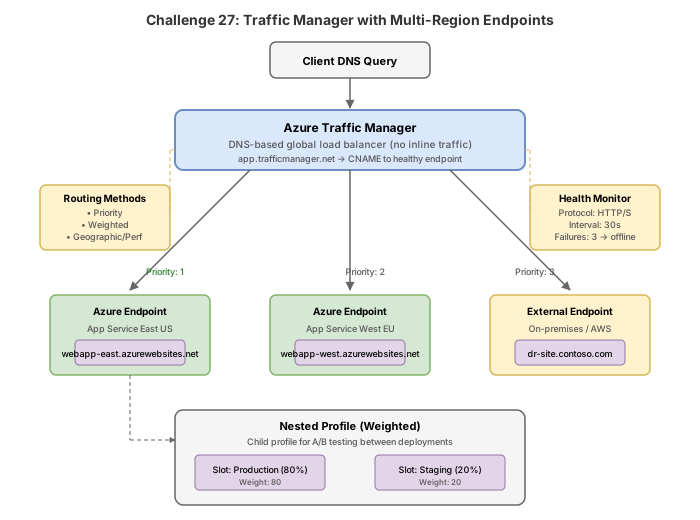
Woodgrove Bank is a multinational financial services company with operations in North America, Europe, and Asia-Pacific. They require DNS-based traffic routing to direct users to the nearest regional deployment for optimal performance. Within each region, a priority-based failover ensures high availability between primary and secondary endpoints. Compliance requirements mandate that users in the European Union must be routed exclusively to EU-hosted endpoints. The operations team needs fast failover detection with custom health checks.
Your job is to create Traffic Manager profiles using different routing methods, configure nested profiles for hierarchical routing, set up endpoint monitoring with custom paths and headers, and configure fast failover intervals.
Exam skills covered
| Skill | Weight |
|---|---|
| Configure Traffic Manager routing methods (Priority, Weighted, Performance, Geographic, MultiValue, Subnet) | High |
| Configure nested Traffic Manager profiles | High |
| Configure endpoint monitoring and health checks | Medium |
| Configure endpoint types (Azure, External, Nested) | Medium |
| Configure TTL and fast failover intervals | Medium |
Prerequisites
- Azure subscription with Contributor role
- Azure CLI 2.60+ or Azure PowerShell Az 12.0+
- Basic understanding of DNS resolution and TTL
- Web apps or public IPs deployed in multiple regions (or use the setup commands below)
Task 1: Create a performance routing profile
Deploy a Traffic Manager profile with Performance routing to direct users to the lowest-latency region.
Azure CLI
# Set variables
RG="rg-woodgrove-tm"
LOCATION="eastus"

# Create resource group
az group create --name $RG --location $LOCATION

# Create Traffic Manager profile with Performance routing
az network traffic-manager profile create \
  --resource-group $RG \
  --name tm-woodgrove-performance \
  --routing-method Performance \
  --unique-dns-name woodgrove-perf-demo \
  --ttl 30 \
  --protocol HTTPS \
  --port 443 \
  --path "/health" \
  --interval 10 \
  --timeout 5 \
  --max-failures 3

# Add Azure endpoint (East US web app)
az network traffic-manager endpoint create \
  --resource-group $RG \
  --profile-name tm-woodgrove-performance \
  --type azureEndpoints \
  --name ep-eastus \
  --target-resource-id /subscriptions/{sub-id}/resourceGroups/$RG/providers/Microsoft.Web/sites/app-woodgrove-eastus \
  --endpoint-status Enabled

# Add Azure endpoint (West Europe web app)
az network traffic-manager endpoint create \
  --resource-group $RG \
  --profile-name tm-woodgrove-performance \
  --type azureEndpoints \
  --name ep-westeurope \
  --target-resource-id /subscriptions/{sub-id}/resourceGroups/$RG/providers/Microsoft.Web/sites/app-woodgrove-westeurope \
  --endpoint-status Enabled

# Add external endpoint (Asia-Pacific third-party CDN)
az network traffic-manager endpoint create \
  --resource-group $RG \
  --profile-name tm-woodgrove-performance \
  --type externalEndpoints \
  --name ep-asiapacific \
  --target "app-woodgrove-apac.contoso.com" \
  --endpoint-location "Southeast Asia" \
  --endpoint-status Enabled
Azure PowerShell
# Set variables
$rg = "rg-woodgrove-tm"
$location = "eastus"

# Create resource group
New-AzResourceGroup -Name $rg -Location $location

# Create Traffic Manager profile with Performance routing
New-AzTrafficManagerProfile `
  -ResourceGroupName $rg `
  -Name "tm-woodgrove-performance" `
  -TrafficRoutingMethod Performance `
  -RelativeDnsName "woodgrove-perf-demo" `
  -Ttl 30 `
  -MonitorProtocol HTTPS `
  -MonitorPort 443 `
  -MonitorPath "/health" `
  -MonitorIntervalInSeconds 10 `
  -MonitorTimeoutInSeconds 5 `
  -MonitorToleratedNumberOfFailures 3

# Add Azure endpoint (East US)
$webAppEastUS = Get-AzWebApp -ResourceGroupName $rg -Name "app-woodgrove-eastus"
New-AzTrafficManagerEndpoint `
  -ResourceGroupName $rg `
  -ProfileName "tm-woodgrove-performance" `
  -Type AzureEndpoints `
  -Name "ep-eastus" `
  -TargetResourceId $webAppEastUS.Id `
  -EndpointStatus Enabled

# Add external endpoint (Asia-Pacific)
New-AzTrafficManagerEndpoint `
  -ResourceGroupName $rg `
  -ProfileName "tm-woodgrove-performance" `
  -Type ExternalEndpoints `
  -Name "ep-asiapacific" `
  -Target "app-woodgrove-apac.contoso.com" `
  -EndpointLocation "Southeast Asia" `
  -EndpointStatus Enabled
Portal steps
- Navigate to Traffic Manager profiles > Create.
- Name:
tm-woodgrove-performance, Routing method: Performance, DNS name:woodgrove-perf-demo. - Under Configuration: Protocol HTTPS, Port 443, Path
/health, Probing interval 10s, Tolerated failures 3, Probe timeout 5s, TTL 30s. - Under Endpoints > Add: Type Azure endpoint, Name
ep-eastus, Target resource: Web App in East US. - Add additional endpoints for each region.
Task 2: Create a geographic routing profile
Configure geographic routing to ensure EU users are exclusively routed to EU-hosted endpoints (GDPR compliance).
Azure CLI
# Create Traffic Manager profile with Geographic routing
az network traffic-manager profile create \
  --resource-group $RG \
  --name tm-woodgrove-geographic \
  --routing-method Geographic \
  --unique-dns-name woodgrove-geo-demo \
  --ttl 60 \
  --protocol HTTPS \
  --port 443 \
  --path "/health" \
  --interval 10 \
  --timeout 5 \
  --max-failures 3

# Add EU endpoint with geographic mapping for Europe
az network traffic-manager endpoint create \
  --resource-group $RG \
  --profile-name tm-woodgrove-geographic \
  --type azureEndpoints \
  --name ep-europe \
  --target-resource-id /subscriptions/{sub-id}/resourceGroups/$RG/providers/Microsoft.Web/sites/app-woodgrove-westeurope \
  --endpoint-status Enabled \
  --geo-mapping "GEO-EU"

# Add North America endpoint
az network traffic-manager endpoint create \
  --resource-group $RG \
  --profile-name tm-woodgrove-geographic \
  --type azureEndpoints \
  --name ep-northamerica \
  --target-resource-id /subscriptions/{sub-id}/resourceGroups/$RG/providers/Microsoft.Web/sites/app-woodgrove-eastus \
  --endpoint-status Enabled \
  --geo-mapping "GEO-NA"

# Add Asia-Pacific endpoint
az network traffic-manager endpoint create \
  --resource-group $RG \
  --profile-name tm-woodgrove-geographic \
  --type externalEndpoints \
  --name ep-apac \
  --target "app-woodgrove-apac.contoso.com" \
  --endpoint-location "Southeast Asia" \
  --endpoint-status Enabled \
  --geo-mapping "GEO-AP"

# Add a catch-all endpoint for WORLD (unmapped regions)
az network traffic-manager endpoint create \
  --resource-group $RG \
  --profile-name tm-woodgrove-geographic \
  --type azureEndpoints \
  --name ep-default \
  --target-resource-id /subscriptions/{sub-id}/resourceGroups/$RG/providers/Microsoft.Web/sites/app-woodgrove-eastus \
  --endpoint-status Enabled \
  --geo-mapping "WORLD"
Azure PowerShell
# Create Geographic routing profile
New-AzTrafficManagerProfile `
  -ResourceGroupName $rg `
  -Name "tm-woodgrove-geographic" `
  -TrafficRoutingMethod Geographic `
  -RelativeDnsName "woodgrove-geo-demo" `
  -Ttl 60 `
  -MonitorProtocol HTTPS `
  -MonitorPort 443 `
  -MonitorPath "/health" `
  -MonitorIntervalInSeconds 10 `
  -MonitorTimeoutInSeconds 5 `
  -MonitorToleratedNumberOfFailures 3

# Add endpoint for Europe with geo-mapping
New-AzTrafficManagerEndpoint `
  -ResourceGroupName $rg `
  -ProfileName "tm-woodgrove-geographic" `
  -Type AzureEndpoints `
  -Name "ep-europe" `
  -TargetResourceId "/subscriptions/{sub-id}/resourceGroups/$rg/providers/Microsoft.Web/sites/app-woodgrove-westeurope" `
  -EndpointStatus Enabled `
  -GeoMapping "GEO-EU"

# Add endpoint for North America
New-AzTrafficManagerEndpoint `
  -ResourceGroupName $rg `
  -ProfileName "tm-woodgrove-geographic" `
  -Type AzureEndpoints `
  -Name "ep-northamerica" `
  -TargetResourceId "/subscriptions/{sub-id}/resourceGroups/$rg/providers/Microsoft.Web/sites/app-woodgrove-eastus" `
  -EndpointStatus Enabled `
  -GeoMapping "GEO-NA"

# Add catch-all for unmapped regions
New-AzTrafficManagerEndpoint `
  -ResourceGroupName $rg `
  -ProfileName "tm-woodgrove-geographic" `
  -Type AzureEndpoints `
  -Name "ep-default" `
  -TargetResourceId "/subscriptions/{sub-id}/resourceGroups/$rg/providers/Microsoft.Web/sites/app-woodgrove-eastus" `
  -EndpointStatus Enabled `
  -GeoMapping "WORLD"
Portal steps
- Create a new Traffic Manager profile with Geographic routing method.
- Add endpoint
ep-europeand assign geographic mapping Europe. - Add endpoint
ep-northamericawith mapping North America. - Add endpoint
ep-defaultwith mapping World (catch-all for unmapped regions).
Every geographic region must be mapped to exactly one endpoint. If a region is not mapped to any endpoint, users from that region receive an NXDOMAIN (no answer). Always include a WORLD mapping as a catch-all.
Task 3: Create nested profiles for hierarchical routing
Configure nested Traffic Manager profiles: a parent using Geographic routing that delegates to child profiles using Priority routing within each region for failover.
Azure CLI
# --- Child profile: Europe (Priority routing for failover) ---
az network traffic-manager profile create \
  --resource-group $RG \
  --name tm-woodgrove-europe-priority \
  --routing-method Priority \
  --unique-dns-name woodgrove-eu-priority \
  --ttl 10 \
  --protocol HTTPS \
  --port 443 \
  --path "/health" \
  --interval 10 \
  --timeout 5 \
  --max-failures 2

# Primary endpoint (West Europe)
az network traffic-manager endpoint create \
  --resource-group $RG \
  --profile-name tm-woodgrove-europe-priority \
  --type azureEndpoints \
  --name ep-primary-westeurope \
  --target-resource-id /subscriptions/{sub-id}/resourceGroups/$RG/providers/Microsoft.Web/sites/app-woodgrove-westeurope \
  --priority 1 \
  --endpoint-status Enabled

# Secondary endpoint (North Europe)
az network traffic-manager endpoint create \
  --resource-group $RG \
  --profile-name tm-woodgrove-europe-priority \
  --type azureEndpoints \
  --name ep-secondary-northeurope \
  --target-resource-id /subscriptions/{sub-id}/resourceGroups/$RG/providers/Microsoft.Web/sites/app-woodgrove-northeurope \
  --priority 2 \
  --endpoint-status Enabled

# --- Child profile: North America (Priority routing) ---
az network traffic-manager profile create \
  --resource-group $RG \
  --name tm-woodgrove-na-priority \
  --routing-method Priority \
  --unique-dns-name woodgrove-na-priority \
  --ttl 10 \
  --protocol HTTPS \
  --port 443 \
  --path "/health" \
  --interval 10 \
  --timeout 5 \
  --max-failures 2

az network traffic-manager endpoint create \
  --resource-group $RG \
  --profile-name tm-woodgrove-na-priority \
  --type azureEndpoints \
  --name ep-primary-eastus \
  --target-resource-id /subscriptions/{sub-id}/resourceGroups/$RG/providers/Microsoft.Web/sites/app-woodgrove-eastus \
  --priority 1 \
  --endpoint-status Enabled

az network traffic-manager endpoint create \
  --resource-group $RG \
  --profile-name tm-woodgrove-na-priority \
  --type azureEndpoints \
  --name ep-secondary-westus \
  --target-resource-id /subscriptions/{sub-id}/resourceGroups/$RG/providers/Microsoft.Web/sites/app-woodgrove-westus \
  --priority 2 \
  --endpoint-status Enabled

# --- Parent profile: Geographic with Nested endpoints ---
az network traffic-manager profile create \
  --resource-group $RG \
  --name tm-woodgrove-parent-geo \
  --routing-method Geographic \
  --unique-dns-name woodgrove-global \
  --ttl 60 \
  --protocol HTTPS \
  --port 443 \
  --path "/health" \
  --interval 10 \
  --timeout 5 \
  --max-failures 3

# Add child Europe profile as nested endpoint
az network traffic-manager endpoint create \
  --resource-group $RG \
  --profile-name tm-woodgrove-parent-geo \
  --type nestedEndpoints \
  --name ep-nested-europe \
  --target-resource-id /subscriptions/{sub-id}/resourceGroups/$RG/providers/Microsoft.Network/trafficManagerProfiles/tm-woodgrove-europe-priority \
  --min-child-endpoints 1 \
  --min-child-ipv4 1 \
  --endpoint-status Enabled \
  --geo-mapping "GEO-EU"

# Add child North America profile as nested endpoint
az network traffic-manager endpoint create \
  --resource-group $RG \
  --profile-name tm-woodgrove-parent-geo \
  --type nestedEndpoints \
  --name ep-nested-na \
  --target-resource-id /subscriptions/{sub-id}/resourceGroups/$RG/providers/Microsoft.Network/trafficManagerProfiles/tm-woodgrove-na-priority \
  --min-child-endpoints 1 \
  --min-child-ipv4 1 \
  --endpoint-status Enabled \
  --geo-mapping "GEO-NA" "WORLD"
Azure PowerShell
# --- Child profile: Europe Priority ---
$tmEU = New-AzTrafficManagerProfile `
  -ResourceGroupName $rg `
  -Name "tm-woodgrove-europe-priority" `
  -TrafficRoutingMethod Priority `
  -RelativeDnsName "woodgrove-eu-priority" `
  -Ttl 10 `
  -MonitorProtocol HTTPS `
  -MonitorPort 443 `
  -MonitorPath "/health" `
  -MonitorIntervalInSeconds 10 `
  -MonitorTimeoutInSeconds 5 `
  -MonitorToleratedNumberOfFailures 2

New-AzTrafficManagerEndpoint `
  -ResourceGroupName $rg `
  -ProfileName "tm-woodgrove-europe-priority" `
  -Type AzureEndpoints `
  -Name "ep-primary-westeurope" `
  -TargetResourceId "/subscriptions/{sub-id}/resourceGroups/$rg/providers/Microsoft.Web/sites/app-woodgrove-westeurope" `
  -Priority 1 `
  -EndpointStatus Enabled

New-AzTrafficManagerEndpoint `
  -ResourceGroupName $rg `
  -ProfileName "tm-woodgrove-europe-priority" `
  -Type AzureEndpoints `
  -Name "ep-secondary-northeurope" `
  -TargetResourceId "/subscriptions/{sub-id}/resourceGroups/$rg/providers/Microsoft.Web/sites/app-woodgrove-northeurope" `
  -Priority 2 `
  -EndpointStatus Enabled

# --- Child profile: NA Priority ---
$tmNA = New-AzTrafficManagerProfile `
  -ResourceGroupName $rg `
  -Name "tm-woodgrove-na-priority" `
  -TrafficRoutingMethod Priority `
  -RelativeDnsName "woodgrove-na-priority" `
  -Ttl 10 `
  -MonitorProtocol HTTPS `
  -MonitorPort 443 `
  -MonitorPath "/health" `
  -MonitorIntervalInSeconds 10 `
  -MonitorTimeoutInSeconds 5 `
  -MonitorToleratedNumberOfFailures 2

New-AzTrafficManagerEndpoint `
  -ResourceGroupName $rg `
  -ProfileName "tm-woodgrove-na-priority" `
  -Type AzureEndpoints `
  -Name "ep-primary-eastus" `
  -TargetResourceId "/subscriptions/{sub-id}/resourceGroups/$rg/providers/Microsoft.Web/sites/app-woodgrove-eastus" `
  -Priority 1 `
  -EndpointStatus Enabled

New-AzTrafficManagerEndpoint `
  -ResourceGroupName $rg `
  -ProfileName "tm-woodgrove-na-priority" `
  -Type AzureEndpoints `
  -Name "ep-secondary-westus" `
  -TargetResourceId "/subscriptions/{sub-id}/resourceGroups/$rg/providers/Microsoft.Web/sites/app-woodgrove-westus" `
  -Priority 2 `
  -EndpointStatus Enabled

# --- Parent profile: Geographic with nested endpoints ---
$tmParent = New-AzTrafficManagerProfile `
  -ResourceGroupName $rg `
  -Name "tm-woodgrove-parent-geo" `
  -TrafficRoutingMethod Geographic `
  -RelativeDnsName "woodgrove-global" `
  -Ttl 60 `
  -MonitorProtocol HTTPS `
  -MonitorPort 443 `
  -MonitorPath "/health" `
  -MonitorIntervalInSeconds 10 `
  -MonitorTimeoutInSeconds 5 `
  -MonitorToleratedNumberOfFailures 3

# Add nested endpoint for Europe
New-AzTrafficManagerEndpoint `
  -ResourceGroupName $rg `
  -ProfileName "tm-woodgrove-parent-geo" `
  -Type NestedEndpoints `
  -Name "ep-nested-europe" `
  -TargetResourceId $tmEU.Id `
  -MinChildEndpoints 1 `
  -MinChildEndpointsIPv4 1 `
  -EndpointStatus Enabled `
  -GeoMapping "GEO-EU"

# Add nested endpoint for North America (with WORLD as catch-all)
New-AzTrafficManagerEndpoint `
  -ResourceGroupName $rg `
  -ProfileName "tm-woodgrove-parent-geo" `
  -Type NestedEndpoints `
  -Name "ep-nested-na" `
  -TargetResourceId $tmNA.Id `
  -MinChildEndpoints 1 `
  -MinChildEndpointsIPv4 1 `
  -EndpointStatus Enabled `
  -GeoMapping "GEO-NA", "WORLD"
Portal steps
- Create child profile
tm-woodgrove-europe-prioritywith Priority routing. - Add primary (priority 1) and secondary (priority 2) Azure endpoints.
- Create child profile
tm-woodgrove-na-prioritywith Priority routing and its endpoints. - Create parent profile
tm-woodgrove-parent-geowith Geographic routing. - Add nested endpoints pointing to child profiles, assign geographic mappings (Europe, North America + World).
- Set Minimum child endpoints to 1 for each nested endpoint.
Task 4: Configure weighted and multivalue routing
Deploy additional routing methods for A/B testing (Weighted) and multi-answer DNS responses (MultiValue).
Azure CLI
# --- Weighted routing for A/B testing (canary deployments) ---
az network traffic-manager profile create \
  --resource-group $RG \
  --name tm-woodgrove-weighted \
  --routing-method Weighted \
  --unique-dns-name woodgrove-weighted-demo \
  --ttl 10 \
  --protocol HTTPS \
  --port 443 \
  --path "/health" \
  --interval 10 \
  --timeout 5 \
  --max-failures 3

# Production endpoint (90% traffic)
az network traffic-manager endpoint create \
  --resource-group $RG \
  --profile-name tm-woodgrove-weighted \
  --type azureEndpoints \
  --name ep-production \
  --target-resource-id /subscriptions/{sub-id}/resourceGroups/$RG/providers/Microsoft.Web/sites/app-woodgrove-prod \
  --weight 90 \
  --endpoint-status Enabled

# Canary endpoint (10% traffic)
az network traffic-manager endpoint create \
  --resource-group $RG \
  --profile-name tm-woodgrove-weighted \
  --type azureEndpoints \
  --name ep-canary \
  --target-resource-id /subscriptions/{sub-id}/resourceGroups/$RG/providers/Microsoft.Web/sites/app-woodgrove-canary \
  --weight 10 \
  --endpoint-status Enabled

# --- MultiValue routing (returns multiple healthy IPs) ---
az network traffic-manager profile create \
  --resource-group $RG \
  --name tm-woodgrove-multivalue \
  --routing-method MultiValue \
  --unique-dns-name woodgrove-multi-demo \
  --ttl 10 \
  --protocol TCP \
  --port 443 \
  --max-return 3 \
  --interval 10 \
  --timeout 5 \
  --max-failures 3

# Add external endpoints with IP targets (MultiValue requires IP-based targets)
az network traffic-manager endpoint create \
  --resource-group $RG \
  --profile-name tm-woodgrove-multivalue \
  --type externalEndpoints \
  --name ep-ip-1 \
  --target "20.42.0.1" \
  --endpoint-status Enabled

az network traffic-manager endpoint create \
  --resource-group $RG \
  --profile-name tm-woodgrove-multivalue \
  --type externalEndpoints \
  --name ep-ip-2 \
  --target "20.42.0.2" \
  --endpoint-status Enabled

az network traffic-manager endpoint create \
  --resource-group $RG \
  --profile-name tm-woodgrove-multivalue \
  --type externalEndpoints \
  --name ep-ip-3 \
  --target "20.42.0.3" \
  --endpoint-status Enabled
Azure PowerShell
# Weighted routing profile
New-AzTrafficManagerProfile `
  -ResourceGroupName $rg `
  -Name "tm-woodgrove-weighted" `
  -TrafficRoutingMethod Weighted `
  -RelativeDnsName "woodgrove-weighted-demo" `
  -Ttl 10 `
  -MonitorProtocol HTTPS `
  -MonitorPort 443 `
  -MonitorPath "/health" `
  -MonitorIntervalInSeconds 10 `
  -MonitorTimeoutInSeconds 5 `
  -MonitorToleratedNumberOfFailures 3

# Production endpoint (weight 90)
New-AzTrafficManagerEndpoint `
  -ResourceGroupName $rg `
  -ProfileName "tm-woodgrove-weighted" `
  -Type AzureEndpoints `
  -Name "ep-production" `
  -TargetResourceId "/subscriptions/{sub-id}/resourceGroups/$rg/providers/Microsoft.Web/sites/app-woodgrove-prod" `
  -Weight 90 `
  -EndpointStatus Enabled

# Canary endpoint (weight 10)
New-AzTrafficManagerEndpoint `
  -ResourceGroupName $rg `
  -ProfileName "tm-woodgrove-weighted" `
  -Type AzureEndpoints `
  -Name "ep-canary" `
  -TargetResourceId "/subscriptions/{sub-id}/resourceGroups/$rg/providers/Microsoft.Web/sites/app-woodgrove-canary" `
  -Weight 10 `
  -EndpointStatus Enabled

# MultiValue routing profile
New-AzTrafficManagerProfile `
  -ResourceGroupName $rg `
  -Name "tm-woodgrove-multivalue" `
  -TrafficRoutingMethod MultiValue `
  -RelativeDnsName "woodgrove-multi-demo" `
  -Ttl 10 `
  -MonitorProtocol TCP `
  -MonitorPort 443 `
  -MaxReturn 3 `
  -MonitorIntervalInSeconds 10 `
  -MonitorTimeoutInSeconds 5 `
  -MonitorToleratedNumberOfFailures 3
Portal steps
- Create profile
tm-woodgrove-weightedwith Weighted routing. - Add endpoints with weights 90 (production) and 10 (canary).
- Create profile
tm-woodgrove-multivaluewith MultiValue routing. - Set Max return to 3 (number of IPs returned per DNS query).
- Add external endpoints with IP-based targets.
Task 5: Configure endpoint monitoring with custom headers and fast failover
Set up aggressive health monitoring for fast failover detection using custom headers and reduced intervals.
Azure CLI
# Update the performance profile for fast failover
az network traffic-manager profile update \
  --resource-group $RG \
  --name tm-woodgrove-performance \
  --interval 10 \
  --timeout 5 \
  --max-failures 2

# Add custom headers to endpoint monitoring
az network traffic-manager endpoint update \
  --resource-group $RG \
  --profile-name tm-woodgrove-performance \
  --type azureEndpoints \
  --name ep-eastus \
  --custom-headers host=app-woodgrove-eastus.azurewebsites.net

# Configure expected status code ranges (200-299 and 301)
az network traffic-manager profile update \
  --resource-group $RG \
  --name tm-woodgrove-performance \
  --status-code-ranges "200-299" "301-301"

# Verify endpoint monitoring status
az network traffic-manager endpoint show \
  --resource-group $RG \
  --profile-name tm-woodgrove-performance \
  --type azureEndpoints \
  --name ep-eastus \
  --query "{name:name, status:endpointStatus, monitorStatus:endpointMonitorStatus}"
Azure PowerShell
# Update profile for fast failover
$profile = Get-AzTrafficManagerProfile `
  -ResourceGroupName $rg `
  -Name "tm-woodgrove-performance"

$profile.MonitorIntervalInSeconds = 10
$profile.MonitorTimeoutInSeconds = 5
$profile.MonitorToleratedNumberOfFailures = 2
Set-AzTrafficManagerProfile -TrafficManagerProfile $profile

# Add custom headers to an endpoint
$endpoint = Get-AzTrafficManagerEndpoint `
  -ResourceGroupName $rg `
  -ProfileName "tm-woodgrove-performance" `
  -Type AzureEndpoints `
  -Name "ep-eastus"

$header = New-Object Microsoft.Azure.Commands.TrafficManager.Models.TrafficManagerCustomHeader
$header.Name = "host"
$header.Value = "app-woodgrove-eastus.azurewebsites.net"
$endpoint.CustomHeaders = @($header)
Set-AzTrafficManagerEndpoint -TrafficManagerEndpoint $endpoint

# Check endpoint health status
Get-AzTrafficManagerEndpoint `
  -ResourceGroupName $rg `
  -ProfileName "tm-woodgrove-performance" `
  -Type AzureEndpoints `
  -Name "ep-eastus" |
  Select-Object Name, EndpointStatus, EndpointMonitorStatus
Portal steps
- Open
tm-woodgrove-performance> Configuration. - Set Probing interval to 10 seconds (fast), Probe timeout to 5 seconds, Tolerated number of failures to 2.
- Under each endpoint settings, add custom header:
host: app-woodgrove-eastus.azurewebsites.net. - Under Configuration, set Expected status code ranges to
200-299, 301-301.
Failover time = (Probing interval x Tolerated failures) + Probe timeout. With interval 10s, failures 2, timeout 5s: failover occurs in approximately 25 seconds. Standard interval (30s) with 3 failures: approximately 95 seconds.
Task 6: Configure subnet routing
Deploy subnet-based routing to direct specific client IP ranges to designated endpoints (useful for internal testing or partner networks).
Azure CLI
# Create Subnet routing profile
az network traffic-manager profile create \
  --resource-group $RG \
  --name tm-woodgrove-subnet \
  --routing-method Subnet \
  --unique-dns-name woodgrove-subnet-demo \
  --ttl 30 \
  --protocol HTTPS \
  --port 443 \
  --path "/health" \
  --interval 30 \
  --timeout 10 \
  --max-failures 3

# Endpoint for corporate office IP range
az network traffic-manager endpoint create \
  --resource-group $RG \
  --profile-name tm-woodgrove-subnet \
  --type externalEndpoints \
  --name ep-corporate \
  --target "internal.woodgrove.com" \
  --subnets "10.0.0.0:24" \
  --endpoint-status Enabled

# Endpoint for partner network
az network traffic-manager endpoint create \
  --resource-group $RG \
  --profile-name tm-woodgrove-subnet \
  --type externalEndpoints \
  --name ep-partner \
  --target "partner.woodgrove.com" \
  --subnets "172.16.0.0:16" \
  --endpoint-status Enabled

# Default endpoint for all other traffic
az network traffic-manager endpoint create \
  --resource-group $RG \
  --profile-name tm-woodgrove-subnet \
  --type externalEndpoints \
  --name ep-public-default \
  --target "www.woodgrove.com" \
  --endpoint-status Enabled
Azure PowerShell
# Subnet routing profile
New-AzTrafficManagerProfile `
  -ResourceGroupName $rg `
  -Name "tm-woodgrove-subnet" `
  -TrafficRoutingMethod Subnet `
  -RelativeDnsName "woodgrove-subnet-demo" `
  -Ttl 30 `
  -MonitorProtocol HTTPS `
  -MonitorPort 443 `
  -MonitorPath "/health" `
  -MonitorIntervalInSeconds 30 `
  -MonitorTimeoutInSeconds 10 `
  -MonitorToleratedNumberOfFailures 3

# Add subnet-mapped endpoints
$subnet1 = New-Object Microsoft.Azure.Commands.TrafficManager.Models.TrafficManagerIpAddressRange
$subnet1.First = "10.0.0.0"
$subnet1.Scope = 24

New-AzTrafficManagerEndpoint `
  -ResourceGroupName $rg `
  -ProfileName "tm-woodgrove-subnet" `
  -Type ExternalEndpoints `
  -Name "ep-corporate" `
  -Target "internal.woodgrove.com" `
  -SubnetMapping $subnet1 `
  -EndpointStatus Enabled
Portal steps
- Create profile
tm-woodgrove-subnetwith Subnet routing. - Add endpoint
ep-corporateand assign subnet range10.0.0.0/24. - Add endpoint
ep-partnerwith subnet172.16.0.0/16. - Add default endpoint
ep-public-defaultwith no subnet mapping (catches unmatched traffic).
Break & fix
Scenario 1: Geographic routing missing region assignment
# Create a geographic profile without the WORLD catch-all
az network traffic-manager profile create \
  --resource-group $RG \
  --name tm-broken-geo \
  --routing-method Geographic \
  --unique-dns-name woodgrove-broken-geo \
  --ttl 60 \
  --protocol HTTPS \
  --port 443 \
  --path "/health"

# Only map Europe - all other regions get no answer
az network traffic-manager endpoint create \
  --resource-group $RG \
  --profile-name tm-broken-geo \
  --type externalEndpoints \
  --name ep-europe-only \
  --target "eu.woodgrove.com" \
  --endpoint-status Enabled \
  --geo-mapping "GEO-EU"
Symptom: Users outside Europe (North America, Asia, etc.) receive NXDOMAIN or no DNS answer when resolving the Traffic Manager FQDN.
Root cause: Geographic routing requires every possible source region to be mapped to an endpoint. Regions without a mapping return no DNS answer. There is no WORLD catch-all endpoint.
Fix: Add a catch-all endpoint with WORLD mapping:
az network traffic-manager endpoint create \
  --resource-group $RG \
  --profile-name tm-broken-geo \
  --type externalEndpoints \
  --name ep-catch-all \
  --target "www.woodgrove.com" \
  --endpoint-status Enabled \
  --geo-mapping "WORLD"
Scenario 2: Nested profile with wrong minimum child endpoints
# Create nested endpoint requiring 5 healthy children, but child has only 2
az network traffic-manager endpoint update \
  --resource-group $RG \
  --profile-name tm-woodgrove-parent-geo \
  --type nestedEndpoints \
  --name ep-nested-europe \
  --min-child-endpoints 5
Symptom: The nested endpoint is always marked as Degraded in the parent profile, even though both child endpoints are healthy. Traffic is not routed to the EU region.
Root cause: The min-child-endpoints value is set to 5, but the child profile only contains 2 endpoints. Since 2 < 5, the nested endpoint never meets the minimum threshold and is perpetually marked as degraded.
Fix: Set min-child-endpoints to a value within the actual number of child endpoints:
az network traffic-manager endpoint update \
  --resource-group $RG \
  --profile-name tm-woodgrove-parent-geo \
  --type nestedEndpoints \
  --name ep-nested-europe \
  --min-child-endpoints 1
Use nslookup or dig to verify DNS responses:
nslookup woodgrove-global.trafficmanager.net
dig woodgrove-global.trafficmanager.net +short
### Azure PowerShell
```powershell
# Delete the resource group
Remove-AzResourceGroup -Name "rg-woodgrove-tm" -Force -AsJob
Traffic Manager costs are minimal (approximately $0.54 per million DNS queries + $0.36 per month per health-checked endpoint). However, if you deployed App Services or VMs as endpoint targets during this lab, those resources incur their own compute charges. Delete everything when done.
az group show --name rg-woodgrove-tm 2>&1 | grep -q "not found" && echo "Deleted" || echo "Still exists"