Challenge 32: Azure Front Door rules & Private Link
60-90 minutes | ~$35/mo base (Front Door Premium required for Private Link) | Exam weight: 15-20%
Scenario
Northwind SaaS operates a multi-tenant application where each tenant accesses the platform via a path prefix (e.g., /tenant-alpha/, /tenant-beta/). The platform team needs to implement URL rewrite rules to strip tenant prefixes before forwarding to the backend, configure HTTP-to-HTTPS redirects, modify response headers for security, and connect to App Service backends via Private Link to eliminate public internet exposure. Custom domains with Azure-managed TLS certificates must also be configured for each tenant.
You will create rule sets with conditions and actions, configure Private Link origins, and set up custom domains with managed certificates.
Exam skills covered
| Skill | Weight |
|---|---|
| Create and configure rule sets (conditions and actions) | High |
| Configure URL rewrite and redirect actions | High |
| Configure request/response header modifications | Medium |
| Configure Private Link origins | High |
| Configure custom domains with managed certificates | High |
| Understand rule set evaluation order | Medium |
Prerequisites
- Azure subscription with Contributor role
- Azure CLI 2.60+ or Azure PowerShell Az 12.0+
- Existing Front Door Premium profile (from Challenge 31 or new)
- App Service plan with a web app deployed (for Private Link origin)
- A custom domain with DNS access (for custom domain task)
Task 1: Create a rule set
Rule sets contain delivery rules that modify requests and responses as they flow through Front Door. Each rule has conditions (when to apply) and actions (what to do).
Azure CLI
# Set variables
RG="rg-northwind-frontdoor"
LOCATION="eastus2"
FD_PROFILE="fd-northwind-saas"

# Create resource group and Front Door profile
az group create --name $RG --location $LOCATION

az afd profile create \
  --resource-group $RG \
  --profile-name $FD_PROFILE \
  --sku Premium_AzureFrontDoor

# Create the endpoint
az afd endpoint create \
  --resource-group $RG \
  --profile-name $FD_PROFILE \
  --endpoint-name ep-northwind-saas \
  --enabled-state Enabled

# Create origin group (needed before routes)
az afd origin-group create \
  --resource-group $RG \
  --profile-name $FD_PROFILE \
  --origin-group-name og-northwind-backend \
  --probe-request-type GET \
  --probe-protocol Https \
  --probe-interval-in-seconds 30 \
  --probe-path "/health" \
  --sample-size 4 \
  --successful-samples-required 3 \
  --additional-latency-in-milliseconds 50

# Create a rule set for tenant URL rewrites
az afd rule-set create \
  --resource-group $RG \
  --profile-name $FD_PROFILE \
  --rule-set-name RuleSetTenantRewrite

# Create a second rule set for security headers
az afd rule-set create \
  --resource-group $RG \
  --profile-name $FD_PROFILE \
  --rule-set-name RuleSetSecurityHeaders

# List rule sets
az afd rule-set list \
  --resource-group $RG \
  --profile-name $FD_PROFILE \
  --query "[].name" \
  --output tsv
Azure PowerShell
# Set variables
$rg = "rg-northwind-frontdoor"
$location = "eastus2"
$fdProfile = "fd-northwind-saas"

# Create resource group and Front Door profile
New-AzResourceGroup -Name $rg -Location $location

New-AzFrontDoorCdnProfile `
  -ResourceGroupName $rg `
  -ProfileName $fdProfile `
  -SkuName "Premium_AzureFrontDoor"

# Create endpoint
New-AzFrontDoorCdnEndpoint `
  -ResourceGroupName $rg `
  -ProfileName $fdProfile `
  -EndpointName "ep-northwind-saas" `
  -Location "Global" `
  -EnabledState "Enabled"

# Create rule set
New-AzFrontDoorCdnRuleSet `
  -ResourceGroupName $rg `
  -ProfileName $fdProfile `
  -RuleSetName "RuleSetTenantRewrite"

New-AzFrontDoorCdnRuleSet `
  -ResourceGroupName $rg `
  -ProfileName $fdProfile `
  -RuleSetName "RuleSetSecurityHeaders"
Task 2: Create rules with URL rewrite actions
Configure a rule that strips the tenant prefix from the URL path before forwarding to the backend. For example, /tenant-alpha/products/123 becomes /products/123 at the origin.
Azure CLI
# Rule 1: Rewrite tenant-alpha paths
# Match: RequestUri path starts with /tenant-alpha/
# Action: URL Rewrite to strip the prefix
az afd rule create \
  --resource-group $RG \
  --profile-name $FD_PROFILE \
  --rule-set-name RuleSetTenantRewrite \
  --rule-name RewriteTenantAlpha \
  --order 1 \
  --match-variable RequestUri \
  --operator Contains \
  --match-values "/tenant-alpha/" \
  --action-name UrlRewrite \
  --source-pattern "/tenant-alpha/" \
  --destination "/" \
  --preserve-unmatched-path true

# Rule 2: Rewrite tenant-beta paths
az afd rule create \
  --resource-group $RG \
  --profile-name $FD_PROFILE \
  --rule-set-name RuleSetTenantRewrite \
  --rule-name RewriteTenantBeta \
  --order 2 \
  --match-variable RequestUri \
  --operator Contains \
  --match-values "/tenant-beta/" \
  --action-name UrlRewrite \
  --source-pattern "/tenant-beta/" \
  --destination "/" \
  --preserve-unmatched-path true

# Rule 3: HTTP to HTTPS redirect (in security rule set)
az afd rule create \
  --resource-group $RG \
  --profile-name $FD_PROFILE \
  --rule-set-name RuleSetSecurityHeaders \
  --rule-name RedirectHttpToHttps \
  --order 1 \
  --match-variable RequestScheme \
  --operator Equal \
  --match-values "HTTP" \
  --action-name UrlRedirect \
  --redirect-type Moved \
  --redirect-protocol Https \
  --match-processing-behavior Stop
Azure PowerShell
# Create the URL rewrite rule for tenant-alpha
$condition = New-AzFrontDoorCdnRuleRequestUriConditionObject `
-Name "RequestUri" `
-ParameterOperator "Contains" `
-ParameterMatchValue "/tenant-alpha/"
$action = New-AzFrontDoorCdnRuleUrlRewriteActionObject `
-Name "UrlRewrite" `
-ParameterSourcePattern "/tenant-alpha/" `
-ParameterDestination "/" `
-ParameterPreserveUnmatchedPath $true
New-AzFrontDoorCdnRule `
-ResourceGroupName $rg `
-ProfileName $fdProfile `
-RuleSetName "RuleSetTenantRewrite" `
-RuleName "RewriteTenantAlpha" `
-Order 1 `
-Condition $condition `
-Action $action
### Azure PowerShell
```powershell
# Add HSTS header action
$hstsAction = New-AzFrontDoorCdnRuleResponseHeaderActionObject `
-Name "ModifyResponseHeader" `
-ParameterHeaderAction "Overwrite" `
-ParameterHeaderName "Strict-Transport-Security" `
-ParameterValue "max-age=31536000; includeSubDomains"
New-AzFrontDoorCdnRule `
-ResourceGroupName $rg `
-ProfileName $fdProfile `
-RuleSetName "RuleSetSecurityHeaders" `
-RuleName "AddHstsHeader" `
-Order 2 `
-Action $hstsAction
Task 4: Configure a Private Link origin
Private Link origins allow Front Door Premium to connect to your backend over the Microsoft backbone network without exposing the backend to the public internet.
Private Link origins are only available with the Front Door Premium SKU. Standard SKU profiles do not support this feature.
Azure CLI
# First, create the App Service that will serve as our Private Link origin
APP_SERVICE_PLAN="asp-northwind-backend"
WEB_APP="app-northwind-api-eastus2"

az appservice plan create \
  --resource-group $RG \
  --name $APP_SERVICE_PLAN \
  --location $LOCATION \
  --sku P1V3 \
  --is-linux

az webapp create \
  --resource-group $RG \
  --plan $APP_SERVICE_PLAN \
  --name $WEB_APP \
  --runtime "NODE:20-lts"

# Get the App Service resource ID
APP_SERVICE_ID=$(az webapp show \
  --resource-group $RG \
  --name $WEB_APP \
  --query "id" \
  --output tsv)

# Create origin with Private Link enabled
az afd origin create \
  --resource-group $RG \
  --profile-name $FD_PROFILE \
  --origin-group-name og-northwind-backend \
  --origin-name origin-privatelink-api \
  --host-name "${WEB_APP}.azurewebsites.net" \
  --origin-host-header "${WEB_APP}.azurewebsites.net" \
  --http-port 80 \
  --https-port 443 \
  --priority 1 \
  --weight 1000 \
  --enabled-state Enabled \
  --enable-private-link true \
  --private-link-resource $APP_SERVICE_ID \
  --private-link-location $LOCATION \
  --private-link-request-message "Front Door Private Link connection" \
  --private-link-sub-resource-type "sites"

# Check the private link connection state (will be Pending until approved)
az afd origin show \
  --resource-group $RG \
  --profile-name $FD_PROFILE \
  --origin-group-name og-northwind-backend \
  --origin-name origin-privatelink-api \
  --query "sharedPrivateLinkResource.status" \
  --output tsv
Approve the Private Link connection
After creating the Private Link origin, you must approve the pending connection on the App Service side:
# List pending Private Endpoint connections on the App Service
az network private-endpoint-connection list \
  --id $APP_SERVICE_ID \
  --query "[?properties.privateLinkServiceConnectionState.status=='Pending'].{id:id, status:properties.privateLinkServiceConnectionState.status}" \
  --output table

# Approve the pending connection
PE_CONN_ID=$(az network private-endpoint-connection list \
  --id $APP_SERVICE_ID \
  --query "[?properties.privateLinkServiceConnectionState.status=='Pending'].id" \
  --output tsv)

az network private-endpoint-connection approve \
  --id $PE_CONN_ID \
  --description "Approved for Front Door"
Azure PowerShell
# Create App Service
New-AzAppServicePlan `
  -ResourceGroupName $rg `
  -Name "asp-northwind-backend" `
  -Location $location `
  -Tier "PremiumV3" `
  -WorkerSize "Small" `
  -Linux

New-AzWebApp `
  -ResourceGroupName $rg `
  -AppServicePlan "asp-northwind-backend" `
  -Name "app-northwind-api-eastus2" `
  -Location $location

# Get resource ID
$appId = (Get-AzWebApp -ResourceGroupName $rg -Name "app-northwind-api-eastus2").Id

# Create Private Link origin
New-AzFrontDoorCdnOrigin `
  -ResourceGroupName $rg `
  -ProfileName $fdProfile `
  -OriginGroupName "og-northwind-backend" `
  -OriginName "origin-privatelink-api" `
  -HostName "app-northwind-api-eastus2.azurewebsites.net" `
  -OriginHostHeader "app-northwind-api-eastus2.azurewebsites.net" `
  -HttpPort 80 `
  -HttpsPort 443 `
  -Priority 1 `
  -Weight 1000 `
  -EnabledState "Enabled" `
  -SharedPrivateLinkResourcePrivateLinkLocation $location `
  -SharedPrivateLinkResourceRequestMessage "Front Door Private Link" `
  -SharedPrivateLinkResourcePrivateLink $appId `
  -SharedPrivateLinkResourceGroupId "sites"

# Approve the private endpoint connection
$peConnections = Get-AzPrivateEndpointConnection -PrivateLinkResourceId $appId |
  Where-Object { $_.PrivateLinkServiceConnectionState.Status -eq "Pending" }

$peConnections | ForEach-Object {
  Approve-AzPrivateEndpointConnection -ResourceId $_.Id -Description "Approved for Front Door"
}
After approving the Private Link connection, restrict the App Service to accept traffic only from the private endpoint:
az webapp update \
  --resource-group $RG \
  --name $WEB_APP \
  --set publicNetworkAccess=Disabled
This ensures all traffic to the backend flows through Front Door via Private Link.
Task 5: Configure a custom domain with managed certificate
Custom domains allow you to use your own domain name (e.g., app.northwindtraders.com) instead of the Front Door-generated hostname.
Azure CLI
# Create custom domain with managed certificate
az afd custom-domain create \
  --resource-group $RG \
  --profile-name $FD_PROFILE \
  --custom-domain-name cd-northwind-app \
  --host-name "app.northwindtraders.com" \
  --minimum-tls-version TLS12 \
  --certificate-type ManagedCertificate

# Show the validation token (needed for DNS TXT record)
az afd custom-domain show \
  --resource-group $RG \
  --profile-name $FD_PROFILE \
  --custom-domain-name cd-northwind-app \
  --query "{hostname:hostName, validationState:domainValidationState, validationToken:validationProperties.validationToken}" \
  --output json
Before the managed certificate is issued, you must create DNS records:
- CNAME record: Point
app.northwindtraders.comto the Front Door endpoint hostname - TXT record: Create
_dnsauth.app.northwindtraders.comwith the validation token value
# After DNS records are created, associate the custom domain with the route
az afd route update \
  --resource-group $RG \
  --profile-name $FD_PROFILE \
  --endpoint-name ep-northwind-saas \
  --route-name route-default \
  --custom-domains cd-northwind-app

# Check domain validation state (wait for DomainValidationState: Approved)
az afd custom-domain show \
  --resource-group $RG \
  --profile-name $FD_PROFILE \
  --custom-domain-name cd-northwind-app \
  --query "domainValidationState" \
  --output tsv
Azure PowerShell
# Create custom domain with managed certificate
New-AzFrontDoorCdnCustomDomain `
  -ResourceGroupName $rg `
  -ProfileName $fdProfile `
  -CustomDomainName "cd-northwind-app" `
  -HostName "app.northwindtraders.com" `
  -TlsSettingMinimumTlsVersion "TLS12" `
  -TlsSettingCertificateType "ManagedCertificate"

# Get validation token
$domain = Get-AzFrontDoorCdnCustomDomain `
  -ResourceGroupName $rg `
  -ProfileName $fdProfile `
  -CustomDomainName "cd-northwind-app"

Write-Host "Validation token: $($domain.ValidationPropertyValidationToken)"
Write-Host "Add TXT record _dnsauth.app.northwindtraders.com with this value"
Portal steps
- In the Front Door profile, go to Domains > + Add.
- Select DNS management: Other (non-Azure DNS).
- Enter hostname
app.northwindtraders.com. - Select Certificate type: AFD Managed.
- Set minimum TLS version to TLS 1.2.
- Click Add and note the validation token shown.
- Create the required DNS records at your DNS provider.
- Return to Domains and associate it with your route.
Task 6: Associate rule sets with a route
Rule sets must be explicitly associated with routes to take effect.
Azure CLI
# Create a route and associate both rule sets
az afd route create \
  --resource-group $RG \
  --profile-name $FD_PROFILE \
  --endpoint-name ep-northwind-saas \
  --route-name route-default \
  --origin-group og-northwind-backend \
  --patterns-to-match "/*" \
  --supported-protocols Http Https \
  --https-redirect Enabled \
  --forwarding-protocol HttpsOnly \
  --link-to-default-domain Enabled \
  --rule-sets RuleSetTenantRewrite RuleSetSecurityHeaders
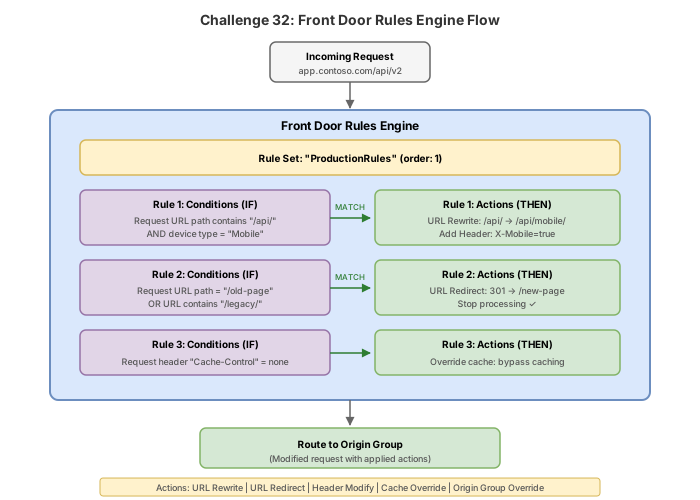
Rule sets execute in the order they are listed in the --rule-sets parameter. In this example, tenant URL rewrites happen first, then security headers are added. This order matters: if the security redirect rule fires first (with --match-processing-behavior Stop), subsequent rules in other rule sets would not execute for that request.
Break & fix
Scenario 1: Rule set not evaluating (order/condition mismatch)
# Create a rule with conflicting conditions
az afd rule create \
  --resource-group $RG \
  --profile-name $FD_PROFILE \
  --rule-set-name RuleSetTenantRewrite \
  --rule-name BrokenRule \
  --order 0 \
  --match-variable RequestScheme \
  --operator Equal \
  --match-values "HTTP" \
  --action-name UrlRewrite \
  --source-pattern "/tenant-alpha/" \
  --destination "/" \
  --preserve-unmatched-path true \
  --match-processing-behavior Stop
Symptom: Tenant URL rewrites stop working. Requests to /tenant-alpha/products arrive at the origin unchanged.
Root cause: The rule at order 0 executes before the rewrite rules (order 1, 2). It matches HTTP requests and sets --match-processing-behavior Stop, preventing subsequent rules from executing. Since HTTPS redirect also happens, the rewrite rules never fire.
Fix: Delete the broken rule or change its order and behavior:
az afd rule delete \
  --resource-group $RG \
  --profile-name $FD_PROFILE \
  --rule-set-name RuleSetTenantRewrite \
  --rule-name BrokenRule \
  --yes
Scenario 2: Private Link not approved (pending state)
Symptom: After creating a Private Link origin, the origin shows as unhealthy and requests timeout or return 503.
Root cause: The Private Link connection is still in Pending state. Until the resource owner approves the connection, no traffic flows through it.
Diagnosis:
# Check Private Link status on the origin
az afd origin show \
  --resource-group $RG \
  --profile-name $FD_PROFILE \
  --origin-group-name og-northwind-backend \
  --origin-name origin-privatelink-api \
  --query "sharedPrivateLinkResource.status" \
  --output tsv
# Expected output: "Pending" (when not yet approved)
Fix: Approve the connection on the target resource:
PE_CONN_ID=$(az network private-endpoint-connection list \
  --id $APP_SERVICE_ID \
  --query "[?properties.privateLinkServiceConnectionState.status=='Pending'].id" \
  --output tsv)

az network private-endpoint-connection approve \
  --id $PE_CONN_ID \
  --description "Approved for Front Door"
Scenario 3: Custom domain CNAME validation failing
Symptom: Custom domain remains in Pending validation state. The managed certificate is not issued.
Root cause: The DNS CNAME record points to the wrong target, or the TXT validation record is missing or incorrect.
Diagnosis:
# Check what validation expects
az afd custom-domain show \
  --resource-group $RG \
  --profile-name $FD_PROFILE \
  --custom-domain-name cd-northwind-app \
  --query "{state:domainValidationState, token:validationProperties.validationToken, expiresOn:validationProperties.expirationDate}" \
  --output json

# Verify DNS from command line
nslookup -type=TXT _dnsauth.app.northwindtraders.com
nslookup -type=CNAME app.northwindtraders.com
Fix: Ensure the DNS records are correct:
- CNAME:
app.northwindtraders.compointing toep-northwind-saas-xxxxxx.z01.azurefd.net - TXT:
_dnsauth.app.northwindtraders.comwith the exact validation token value
If the token has expired, regenerate it:
az afd custom-domain regenerate-validation-token \
  --resource-group $RG \
  --profile-name $FD_PROFILE \
  --custom-domain-name cd-northwind-app
Knowledge check
1. In which order do rule sets execute when multiple are associated with a single route?
2. After creating a Private Link origin in Front Door Premium, the origin status shows as 'Pending'. What must happen next?
3. You configure a managed certificate for custom domain 'app.contoso.com'. Which DNS records must you create for validation?
4. A rule has --match-processing-behavior set to 'Stop'. What happens when this rule matches a request?
5. Which Front Door SKU supports Private Link origins?
6. You create a URL rewrite rule with source-pattern '/api/v1/' and destination '/api/v2/' with preserve-unmatched-path set to true. A request arrives for '/api/v1/users/123'. What path reaches the origin?
Cleanup
Remove all resources created in this challenge.
Azure CLI
# Delete the entire resource group and all resources within it
az group delete --name rg-northwind-frontdoor --yes --no-wait
Azure PowerShell
# Delete the entire resource group and all resources within it
Remove-AzResourceGroup -Name "rg-northwind-frontdoor" -Force -AsJob
Azure Front Door Premium costs approximately $35/month base plus per-request charges. The App Service on P1V3 adds approximately $100/month. Delete all resources promptly after completing this challenge to avoid unnecessary billing.
After a few minutes, confirm deletion:
az group show --name rg-northwind-frontdoor 2>&1 | grep -q "not found" && echo "Deleted" || echo "Still exists"