Challenge 29: Application Gateway TLS and rewrites
60-90 minutes | ~$0.27/h (WAF_v2 SKU) | Exam weight: 15-20%
Application Gateway v2 is billed per hour even when idle. The WAF_v2 SKU costs approximately $0.443/gateway-hour plus $0.0144/capacity-unit-hour. Delete the gateway immediately after completing this challenge to avoid unexpected charges.
Scenario
You are the security engineer for Woodgrove Financial Services. The company has strict requirements for securing traffic through their Application Gateway:
- Public-facing apps must use TLS termination at the gateway with certificates stored in Azure Key Vault
- Partner API endpoints require mutual TLS (mTLS) where both the gateway and the connecting client present certificates for authentication
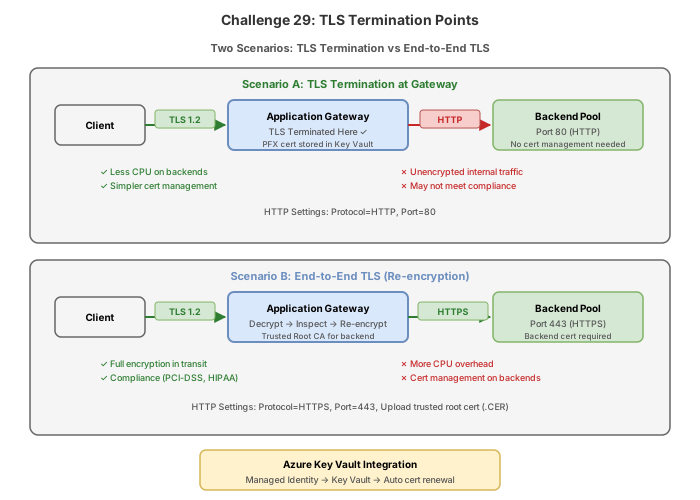
- End-to-end TLS is required for the payment processing backend to maintain encryption between the gateway and backend servers
- Legacy URL migration requires rewrite rules to redirect old URL patterns to the new API structure without breaking existing integrations
- HTTP-to-HTTPS redirection must be enforced globally
Your task is to configure TLS policies, upload certificates, enable mTLS, create rewrite rules for header and URL manipulation, and set up redirections.
Architecture overview
Internet
   |
   v
[Client w/ cert] --mTLS--> [AppGW] --E2E TLS--> [Partner API Pool]
[Browser]        --TLS----> [AppGW] --HTTP-----> [Web Pool]
[Legacy client]  --HTTP---> [AppGW] --301------> HTTPS listener
Prerequisites
- Completed Challenge 28 (Application Gateway deployed)
- Self-signed certificates for testing (PFX format)
- OpenSSL or PowerShell for certificate generation
Task 1: Generate test certificates
These self-signed certificates are for lab purposes only. Production environments must use certificates from a trusted Certificate Authority.
Bash (OpenSSL)
# Generate CA certificate (used for mTLS client verification)
openssl req -x509 -sha256 -nodes -days 365 \
  -newkey rsa:2048 \
  -keyout ca.key \
  -out ca.crt \
  -subj "/CN=Woodgrove-CA/O=Woodgrove Financial"

# Generate server certificate for TLS termination
openssl req -x509 -sha256 -nodes -days 365 \
  -newkey rsa:2048 \
  -keyout server.key \
  -out server.crt \
  -subj "/CN=*.woodgrove.com/O=Woodgrove Financial"

# Package server cert as PFX for Application Gateway
openssl pkcs12 -export \
  -out server.pfx \
  -inkey server.key \
  -in server.crt \
  -password pass:AppGwP@ss123

# Generate client certificate signed by CA (for mTLS testing)
openssl req -new -nodes \
  -newkey rsa:2048 \
  -keyout client.key \
  -out client.csr \
  -subj "/CN=partner-client/O=Partner Corp"

openssl x509 -req -days 365 \
  -in client.csr \
  -CA ca.crt \
  -CAkey ca.key \
  -CAcreateserial \
  -out client.crt

# Generate backend certificate for E2E TLS
openssl req -x509 -sha256 -nodes -days 365 \
  -newkey rsa:2048 \
  -keyout backend.key \
  -out backend.crt \
  -subj "/CN=backend.woodgrove.internal/O=Woodgrove Financial"

# Export backend public key (CER format for auth-cert)
openssl x509 -in backend.crt -outform der -out backend.cer
PowerShell
# Generate self-signed server certificate
$serverCert = New-SelfSignedCertificate `
  -CertStoreLocation "cert:\LocalMachine\My" `
  -DnsName "*.woodgrove.com" `
  -KeyLength 2048

# Export as PFX
$pwd = ConvertTo-SecureString -String "AppGwP@ss123" -Force -AsPlainText
Export-PfxCertificate `
  -Cert "cert:\LocalMachine\My\$($serverCert.Thumbprint)" `
  -FilePath ".\server.pfx" `
  -Password $pwd

# Generate CA certificate for mTLS
$caCert = New-SelfSignedCertificate `
  -CertStoreLocation "cert:\LocalMachine\My" `
  -Subject "CN=Woodgrove-CA" `
  -KeyUsage CertSign `
  -KeyLength 2048

# Export CA public cert
Export-Certificate `
  -Cert "cert:\LocalMachine\My\$($caCert.Thumbprint)" `
  -FilePath ".\ca.cer" `
  -Type CERT
Task 2: Configure TLS termination
TLS termination decrypts traffic at the Application Gateway. The gateway handles the SSL handshake, reducing CPU load on backend servers.
Azure CLI
# Upload PFX certificate to Application Gateway
az network application-gateway ssl-cert create \
  --resource-group rg-appgw-lab \
  --gateway-name appgw-multisite \
  --name cert-woodgrove \
  --cert-file ./server.pfx \
  --cert-password "AppGwP@ss123"

# Create HTTPS frontend port
az network application-gateway frontend-port create \
  --resource-group rg-appgw-lab \
  --gateway-name appgw-multisite \
  --name port443 \
  --port 443

# Create HTTPS listener with SSL certificate
az network application-gateway http-listener create \
  --resource-group rg-appgw-lab \
  --gateway-name appgw-multisite \
  --name listener-https-woodgrove \
  --frontend-port port443 \
  --ssl-cert cert-woodgrove \
  --host-name "app.woodgrove.com"
Azure PowerShell
$appgw = Get-AzApplicationGateway -ResourceGroupName "rg-appgw-lab" -Name "appgw-multisite"

# Add SSL certificate
$password = ConvertTo-SecureString -String "AppGwP@ss123" -AsPlainText -Force
$appgw = Add-AzApplicationGatewaySslCertificate `
  -ApplicationGateway $appgw `
  -Name "cert-woodgrove" `
  -CertificateFile ".\server.pfx" `
  -Password $password

# Add HTTPS frontend port
$appgw = Add-AzApplicationGatewayFrontendPort `
  -ApplicationGateway $appgw `
  -Name "port443" `
  -Port 443

# Get references
$fipconfig = Get-AzApplicationGatewayFrontendIPConfig -ApplicationGateway $appgw -Name "appGwFrontendIP"
$fp443 = Get-AzApplicationGatewayFrontendPort -ApplicationGateway $appgw -Name "port443"
$sslCert = Get-AzApplicationGatewaySslCertificate -ApplicationGateway $appgw -Name "cert-woodgrove"

# Add HTTPS listener
$appgw = Add-AzApplicationGatewayHttpListener `
  -ApplicationGateway $appgw `
  -Name "listener-https-woodgrove" `
  -Protocol Https `
  -FrontendIPConfiguration $fipconfig `
  -FrontendPort $fp443 `
  -SslCertificate $sslCert `
  -HostName "app.woodgrove.com"

$appgw = Set-AzApplicationGateway -ApplicationGateway $appgw
Task 3: Set TLS policy
TLS policies control which protocol versions and cipher suites are acceptable. Application Gateway supports Predefined, Custom, and CustomV2 policy types.
Azure CLI
# Set predefined TLS policy (recommended: AppGwSslPolicy20220101S for strictest)
az network application-gateway ssl-policy set \
  --resource-group rg-appgw-lab \
  --gateway-name appgw-multisite \
  --policy-type Predefined \
  --name AppGwSslPolicy20220101S

# Alternatively, set a custom policy with specific minimum version
az network application-gateway ssl-policy set \
  --resource-group rg-appgw-lab \
  --gateway-name appgw-multisite \
  --policy-type Custom \
  --min-protocol-version TLSv1_2 \
  --cipher-suites TLS_ECDHE_RSA_WITH_AES_256_GCM_SHA384 TLS_ECDHE_RSA_WITH_AES_128_GCM_SHA256
Azure PowerShell
$appgw = Get-AzApplicationGateway -ResourceGroupName "rg-appgw-lab" -Name "appgw-multisite"

# Set predefined policy
Set-AzApplicationGatewaySslPolicy `
  -ApplicationGateway $appgw `
  -PolicyType Predefined `
  -PolicyName "AppGwSslPolicy20220101S"

# Or set custom policy
Set-AzApplicationGatewaySslPolicy `
  -ApplicationGateway $appgw `
  -PolicyType Custom `
  -MinProtocolVersion TLSv1_2 `
  -CipherSuite "TLS_ECDHE_RSA_WITH_AES_256_GCM_SHA384", "TLS_ECDHE_RSA_WITH_AES_128_GCM_SHA256"

$appgw = Set-AzApplicationGateway -ApplicationGateway $appgw
Task 4: Configure end-to-end TLS
End-to-end TLS maintains encryption between the Application Gateway and backend servers. For v2 SKU, you upload the trusted root CA certificate that signed the backend server certificate.
Azure CLI
# Upload trusted root certificate for backend verification (v2 uses root-cert)
az network application-gateway root-cert create \
  --resource-group rg-appgw-lab \
  --gateway-name appgw-multisite \
  --name backend-root-cert \
  --cert-file ./ca.crt

# Create HTTPS backend settings with the trusted root cert
az network application-gateway http-settings create \
  --resource-group rg-appgw-lab \
  --gateway-name appgw-multisite \
  --name settings-e2e-tls \
  --port 443 \
  --protocol Https \
  --cookie-based-affinity Disabled \
  --timeout 60 \
  --host-name-from-backend-pool false \
  --root-certs backend-root-cert
Azure PowerShell
$appgw = Get-AzApplicationGateway -ResourceGroupName "rg-appgw-lab" -Name "appgw-multisite"

# Add trusted root certificate
$appgw = Add-AzApplicationGatewayTrustedRootCertificate `
  -ApplicationGateway $appgw `
  -Name "backend-root-cert" `
  -CertificateFile ".\ca.crt"

$rootCert = Get-AzApplicationGatewayTrustedRootCertificate -ApplicationGateway $appgw -Name "backend-root-cert"

# Add HTTPS backend settings
$appgw = Add-AzApplicationGatewayBackendHttpSetting `
  -ApplicationGateway $appgw `
  -Name "settings-e2e-tls" `
  -Port 443 `
  -Protocol Https `
  -CookieBasedAffinity Disabled `
  -RequestTimeout 60 `
  -TrustedRootCertificate $rootCert

$appgw = Set-AzApplicationGateway -ApplicationGateway $appgw
Task 5: Configure mutual TLS (mTLS)
Mutual TLS requires the client to present a certificate that is validated against a trusted client CA. In Application Gateway v2, mTLS is configured through SSL profiles and trusted client certificates.
Azure CLI
# Upload trusted client CA certificate
az network application-gateway client-cert add \
  --resource-group rg-appgw-lab \
  --gateway-name appgw-multisite \
  --name trusted-client-ca \
  --data @ca.crt

# Create SSL profile with mTLS enabled
az network application-gateway ssl-profile add \
  --resource-group rg-appgw-lab \
  --gateway-name appgw-multisite \
  --name profile-mtls \
  --client-auth-configuration true \
  --trusted-client-cert trusted-client-ca \
  --policy-type Predefined \
  --policy-name AppGwSslPolicy20220101S

# Associate SSL profile with a listener
az network application-gateway http-listener update \
  --resource-group rg-appgw-lab \
  --gateway-name appgw-multisite \
  --name listener-https-woodgrove \
  --ssl-profile-id "/subscriptions/{sub-id}/resourceGroups/rg-appgw-lab/providers/Microsoft.Network/applicationGateways/appgw-multisite/sslProfiles/profile-mtls"
Azure PowerShell
$appgw = Get-AzApplicationGateway -ResourceGroupName "rg-appgw-lab" -Name "appgw-multisite"

# Add trusted client certificate
$appgw = Add-AzApplicationGatewayTrustedClientCertificate `
  -ApplicationGateway $appgw `
  -Name "trusted-client-ca" `
  -CertificateFile ".\ca.cer"

$clientCert = Get-AzApplicationGatewayTrustedClientCertificate -ApplicationGateway $appgw -Name "trusted-client-ca"

# Add SSL profile with client authentication
$appgw = Add-AzApplicationGatewaySslProfile `
  -ApplicationGateway $appgw `
  -Name "profile-mtls" `
  -TrustedClientCertificate $clientCert `
  -PolicyType Predefined `
  -PolicyName "AppGwSslPolicy20220101S"

# Update the SSL profile to enable client auth verification
# The client-auth-configuration flag enables certificate verification

$appgw = Set-AzApplicationGateway -ApplicationGateway $appgw
Task 6: Create rewrite rules
Rewrite rules modify HTTP request and response headers, and can rewrite URL paths and query strings. They are evaluated after routing rules are processed.
Azure CLI
# Create a rewrite rule set
az network application-gateway rewrite-rule set create \
  --resource-group rg-appgw-lab \
  --gateway-name appgw-multisite \
  --name rewrite-set-headers

# Create rewrite rule to add security headers to responses
az network application-gateway rewrite-rule create \
  --resource-group rg-appgw-lab \
  --gateway-name appgw-multisite \
  --rule-set-name rewrite-set-headers \
  --name add-security-headers \
  --sequence 100 \
  --response-headers "Strict-Transport-Security=max-age=31536000; includeSubDomains" "X-Content-Type-Options=nosniff"

# Create rewrite rule for URL rewrite (legacy migration)
az network application-gateway rewrite-rule create \
  --resource-group rg-appgw-lab \
  --gateway-name appgw-multisite \
  --rule-set-name rewrite-set-headers \
  --name rewrite-legacy-url \
  --sequence 200 \
  --modified-path "/v2/api/{var_uri_path_1}" \
  --conditions "[{\"variable\":\"var_uri_path\",\"pattern\":\"/v1/api/(.*)\",\"ignore-case\":true,\"negate\":false}]"

# Create rewrite rule to strip server header from response
az network application-gateway rewrite-rule create \
  --resource-group rg-appgw-lab \
  --gateway-name appgw-multisite \
  --rule-set-name rewrite-set-headers \
  --name strip-server-header \
  --sequence 300 \
  --response-headers "Server="
Azure PowerShell
$appgw = Get-AzApplicationGateway -ResourceGroupName "rg-appgw-lab" -Name "appgw-multisite"

# Create response header action (add HSTS)
$responseHeaderAction = New-AzApplicationGatewayRewriteRuleHeaderConfiguration `
  -HeaderName "Strict-Transport-Security" `
  -HeaderValue "max-age=31536000; includeSubDomains"

$responseHeaderAction2 = New-AzApplicationGatewayRewriteRuleHeaderConfiguration `
  -HeaderName "X-Content-Type-Options" `
  -HeaderValue "nosniff"

# Create the action set
$actionSet = New-AzApplicationGatewayRewriteRuleActionSet `
  -ResponseHeaderConfiguration $responseHeaderAction, $responseHeaderAction2

# Create the rewrite rule
$rewriteRule = New-AzApplicationGatewayRewriteRule `
  -Name "add-security-headers" `
  -ActionSet $actionSet `
  -RuleSequence 100

# Create URL rewrite condition for legacy migration
$condition = New-AzApplicationGatewayRewriteRuleCondition `
  -Variable "var_uri_path" `
  -Pattern "/v1/api/(.*)" `
  -IgnoreCase

$urlAction = New-AzApplicationGatewayRewriteRuleUrlConfiguration `
  -ModifiedPath "/v2/api/{var_uri_path_1}"

$urlActionSet = New-AzApplicationGatewayRewriteRuleActionSet `
  -UrlConfiguration $urlAction

$urlRewriteRule = New-AzApplicationGatewayRewriteRule `
  -Name "rewrite-legacy-url" `
  -ActionSet $urlActionSet `
  -RuleSequence 200 `
  -Condition $condition

# Create the rewrite rule set
$appgw = Add-AzApplicationGatewayRewriteRuleSet `
  -ApplicationGateway $appgw `
  -Name "rewrite-set-headers" `
  -RewriteRule $rewriteRule, $urlRewriteRule

$appgw = Set-AzApplicationGateway -ApplicationGateway $appgw
Task 7: Configure HTTP-to-HTTPS redirection
Azure CLI
# Create HTTP listener for redirection
az network application-gateway http-listener create \
  --resource-group rg-appgw-lab \
  --gateway-name appgw-multisite \
  --name listener-http-redirect \
  --frontend-port frontendPort80

# Create redirect configuration (301 Permanent)
az network application-gateway redirect-config create \
  --resource-group rg-appgw-lab \
  --gateway-name appgw-multisite \
  --name redirect-http-to-https \
  --type Permanent \
  --target-listener listener-https-woodgrove \
  --include-path true \
  --include-query-string true

# Create routing rule for the redirect
az network application-gateway rule create \
  --resource-group rg-appgw-lab \
  --gateway-name appgw-multisite \
  --name rule-http-redirect \
  --rule-type Basic \
  --priority 50 \
  --http-listener listener-http-redirect \
  --redirect-config redirect-http-to-https
Azure PowerShell
$appgw = Get-AzApplicationGateway -ResourceGroupName "rg-appgw-lab" -Name "appgw-multisite"

$httpsListener = Get-AzApplicationGatewayHttpListener -ApplicationGateway $appgw -Name "listener-https-woodgrove"

# Create redirect configuration
$appgw = Add-AzApplicationGatewayRedirectConfiguration `
  -ApplicationGateway $appgw `
  -Name "redirect-http-to-https" `
  -RedirectType Permanent `
  -TargetListener $httpsListener `
  -IncludePath $true `
  -IncludeQueryString $true

$appgw = Set-AzApplicationGateway -ApplicationGateway $appgw
Portal
- Navigate to your Application Gateway resource
- Select Listeners and create an HTTP listener on port 80
- Select Rules and create a new routing rule
- Set the rule type to Basic and select the HTTP listener
- Under Backend targets, select Redirection instead of Backend pool
- Choose target type Listener and select your HTTPS listener
- Check Include path and Include query string
- Set redirect type to Permanent (301)
Break & fix
Issue 1: Certificate chain incomplete (missing intermediate)
Symptom: Browsers show "NET::ERR_CERT_AUTHORITY_INVALID" when connecting to the HTTPS listener. The certificate appears valid when inspected directly but the chain cannot be verified.
Root cause: The PFX file uploaded to Application Gateway contains only the leaf certificate without the intermediate CA certificates. Browsers need the full chain to validate the certificate back to a trusted root.
Fix: Rebuild the PFX file with the complete certificate chain:
# Combine leaf + intermediate into chain
cat server.crt intermediate.crt > fullchain.crt
# Re-package with full chain
openssl pkcs12 -export \
-out server-fullchain.pfx \
-inkey server.key \
-in fullchain.crt \
-password pass:AppGwP@ss123
# Update the certificate
az network application-gateway ssl-cert update \
--resource-group rg-appgw-lab \
--gateway-name appgw-multisite \
--name cert-woodgrove \
--cert-file ./server-fullchain.pfx \
--cert-password "AppGwP@ss123"
Common server variables for rewrite conditions include: `var_uri_path`, `var_query_string`, `var_host`, `var_request_uri`, `var_server_name`, and HTTP headers accessed as `http_req_HeaderName`.
### Issue 3: Affinity cookie causing imbalance
**Symptom**: After enabling cookie-based affinity, one backend server receives 90% of traffic while the others remain idle. New sessions are not distributing evenly.
**Root cause**: Cookie-based affinity pins a client session to a specific backend server for its lifetime. If the initial session distribution was skewed (e.g., during a deployment when only one server was healthy), subsequent requests continue routing to that server via the affinity cookie.
**Fix**: Temporarily disable and re-enable affinity, or adjust the HTTP settings:
```bash
# Disable cookie-based affinity to reset distribution
az network application-gateway http-settings update \
--resource-group rg-appgw-lab \
--gateway-name appgw-multisite \
--name settings-web \
--cookie-based-affinity Disabled
# Re-enable with shorter cookie lifetime if needed
az network application-gateway http-settings update \
--resource-group rg-appgw-lab \
--gateway-name appgw-multisite \
--name settings-web \
--cookie-based-affinity Enabled
Knowledge check
1. What TLS policy type should you use to specify both a minimum protocol version and a custom list of cipher suites?
2. In mutual TLS (mTLS) on Application Gateway v2, where is the trusted client CA certificate configured?
3. Which redirect type sets a 301 HTTP status code?
4. What is the correct server variable format to access the URI path in a rewrite rule condition?
5. For end-to-end TLS with Application Gateway v2, what certificate type must be uploaded to verify the backend server?
6. A rewrite rule has --include-path set to true on a redirect configuration. What does this mean?
Cleanup
# Delete the entire resource group and all resources within it
az group delete --name rg-appgw-lab --yes --no-wait
Remove-AzResourceGroup -Name "rg-appgw-lab" -Force
Application Gateway v2 charges approximately $0.27/hour while deployed. Always delete your lab resources immediately after completing the exercises to avoid unnecessary costs.
Key takeaways
- TLS termination offloads SSL processing to the gateway; the backend receives unencrypted HTTP traffic
- End-to-end TLS maintains encryption between gateway and backend; requires a trusted root certificate on the gateway (v2 SKU)
- Mutual TLS (mTLS) is configured through SSL profiles that reference trusted client CA certificates
- TLS policy types: Predefined (named policy), Custom (choose versions and ciphers), CustomV2 (modern ciphers only)
- Rewrite rules use server variables with the
var_prefix (e.g.,var_uri_path,var_query_string) - Redirect types map to HTTP status codes: Permanent (301), Found (302), SeeOther (303), Temporary (307)
- The
--include-pathand--include-query-stringflags on redirects control whether the original URL components are preserved - Certificate chain issues are the most common cause of TLS errors; always include intermediate certificates in the PFX file