Challenge 26: Load Balancer advanced scenarios
60-90 minutes | ~$0.06/h (cross-region LB + regional LBs) | Exam weight: 10-15%
Scenario
Fabrikam Global Services operates in three regions (East US, West Europe, Southeast Asia) and needs cross-region load balancing for disaster recovery. When an entire region goes down, traffic must automatically shift to the remaining healthy regions. Additionally, Fabrikam deploys network virtual appliances (NVAs) for packet inspection and requires Gateway Load Balancer to transparently chain NVAs into the data path. The security team also requires explicit control over outbound SNAT to prevent port exhaustion during peak traffic periods.
Your job is to deploy a cross-region (global tier) load balancer, configure a Gateway Load Balancer for NVA chaining, set up outbound rules with allocated SNAT ports, and configure an HA ports rule for an internal load balancer.
Exam skills covered
| Skill | Weight |
|---|---|
| Configure a cross-region (global) load balancer | Medium |
| Configure Gateway Load Balancer for NVA chaining | Medium |
| Configure outbound rules and SNAT port allocation | High |
| Configure HA ports rules | Medium |
| Understand SNAT exhaustion and mitigation strategies | High |
Prerequisites
- Azure subscription with Contributor role
- Azure CLI 2.60+ or Azure PowerShell Az 12.0+
- Familiarity with Challenge 25 (Standard Load Balancer basics)
- Understanding of NVA concepts and network traffic flows
Task 1: Create regional load balancers as backends
Before creating the cross-region LB, deploy two regional Standard Load Balancers that will serve as its backends.
Azure CLI
# Set variables
RG="rg-fabrikam-global-lb"
LOCATION1="eastus"
LOCATION2="westeurope"

# Create resource group
az group create --name $RG --location $LOCATION1

# --- Regional LB: East US ---
az network public-ip create \
  --resource-group $RG \
  --name pip-lb-eastus \
  --sku Standard \
  --allocation-method Static \
  --location $LOCATION1 \
  --zone 1 2 3

az network lb create \
  --resource-group $RG \
  --name lb-regional-eastus \
  --sku Standard \
  --location $LOCATION1 \
  --frontend-ip-name fe-eastus \
  --public-ip-address pip-lb-eastus \
  --backend-pool-name bp-eastus

az network lb probe create \
  --resource-group $RG \
  --lb-name lb-regional-eastus \
  --name probe-http \
  --protocol Http \
  --port 80 \
  --path "/health" \
  --interval 5 \
  --probe-threshold 2

az network lb rule create \
  --resource-group $RG \
  --lb-name lb-regional-eastus \
  --name rule-http \
  --protocol Tcp \
  --frontend-port 80 \
  --backend-port 80 \
  --frontend-ip-name fe-eastus \
  --backend-pool-name bp-eastus \
  --probe-name probe-http \
  --enable-tcp-reset true

# --- Regional LB: West Europe ---
az network public-ip create \
  --resource-group $RG \
  --name pip-lb-westeurope \
  --sku Standard \
  --allocation-method Static \
  --location $LOCATION2 \
  --zone 1 2 3

az network lb create \
  --resource-group $RG \
  --name lb-regional-westeurope \
  --sku Standard \
  --location $LOCATION2 \
  --frontend-ip-name fe-westeurope \
  --public-ip-address pip-lb-westeurope \
  --backend-pool-name bp-westeurope

az network lb probe create \
  --resource-group $RG \
  --lb-name lb-regional-westeurope \
  --name probe-http \
  --protocol Http \
  --port 80 \
  --path "/health" \
  --interval 5 \
  --probe-threshold 2

az network lb rule create \
  --resource-group $RG \
  --lb-name lb-regional-westeurope \
  --name rule-http \
  --protocol Tcp \
  --frontend-port 80 \
  --backend-port 80 \
  --frontend-ip-name fe-westeurope \
  --backend-pool-name bp-westeurope \
  --probe-name probe-http \
  --enable-tcp-reset true
Azure PowerShell
# Set variables
$rg = "rg-fabrikam-global-lb"
$location1 = "eastus"
$location2 = "westeurope"

# Create resource group
New-AzResourceGroup -Name $rg -Location $location1

# --- Regional LB: East US ---
$pipEastUS = New-AzPublicIpAddress `
  -ResourceGroupName $rg `
  -Name "pip-lb-eastus" `
  -Location $location1 `
  -Sku Standard `
  -AllocationMethod Static `
  -Zone 1, 2, 3

$feEastUS = New-AzLoadBalancerFrontendIpConfig `
  -Name "fe-eastus" `
  -PublicIpAddress $pipEastUS

$beEastUS = New-AzLoadBalancerBackendAddressPoolConfig `
  -Name "bp-eastus"

$probeEastUS = New-AzLoadBalancerProbeConfig `
  -Name "probe-http" `
  -Protocol Http `
  -Port 80 `
  -RequestPath "/health" `
  -IntervalInSeconds 5 `
  -ProbeCount 2

$ruleEastUS = New-AzLoadBalancerRuleConfig `
  -Name "rule-http" `
  -Protocol Tcp `
  -FrontendPort 80 `
  -BackendPort 80 `
  -FrontendIpConfiguration $feEastUS `
  -BackendAddressPool $beEastUS `
  -Probe $probeEastUS `
  -EnableTcpReset

New-AzLoadBalancer `
  -ResourceGroupName $rg `
  -Name "lb-regional-eastus" `
  -Location $location1 `
  -Sku Standard `
  -FrontendIpConfiguration $feEastUS `
  -BackendAddressPool $beEastUS `
  -Probe $probeEastUS `
  -LoadBalancingRule $ruleEastUS

# --- Regional LB: West Europe (same pattern) ---
$pipWestEU = New-AzPublicIpAddress `
  -ResourceGroupName $rg `
  -Name "pip-lb-westeurope" `
  -Location $location2 `
  -Sku Standard `
  -AllocationMethod Static `
  -Zone 1, 2, 3

$feWestEU = New-AzLoadBalancerFrontendIpConfig `
  -Name "fe-westeurope" `
  -PublicIpAddress $pipWestEU

$beWestEU = New-AzLoadBalancerBackendAddressPoolConfig `
  -Name "bp-westeurope"

$probeWestEU = New-AzLoadBalancerProbeConfig `
  -Name "probe-http" `
  -Protocol Http `
  -Port 80 `
  -RequestPath "/health" `
  -IntervalInSeconds 5 `
  -ProbeCount 2

$ruleWestEU = New-AzLoadBalancerRuleConfig `
  -Name "rule-http" `
  -Protocol Tcp `
  -FrontendPort 80 `
  -BackendPort 80 `
  -FrontendIpConfiguration $feWestEU `
  -BackendAddressPool $beWestEU `
  -Probe $probeWestEU `
  -EnableTcpReset

New-AzLoadBalancer `
  -ResourceGroupName $rg `
  -Name "lb-regional-westeurope" `
  -Location $location2 `
  -Sku Standard `
  -FrontendIpConfiguration $feWestEU `
  -BackendAddressPool $beWestEU `
  -Probe $probeWestEU `
  -LoadBalancingRule $ruleWestEU
Portal steps
- Create two Standard public load balancers, one in East US and one in West Europe.
- Each with an HTTP health probe on port 80 path
/healthand an HTTP rule on port 80. - These will serve as backends for the global LB in the next task.
Task 2: Create the cross-region (global tier) load balancer
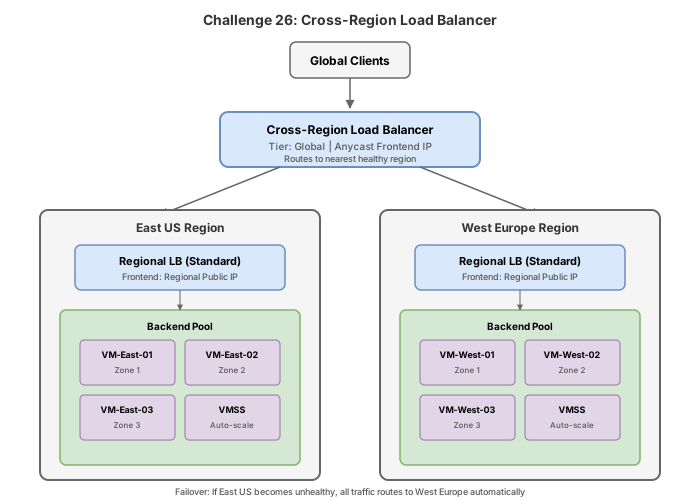
Deploy a global tier load balancer that fronts the regional LBs. Traffic is routed to the closest healthy region.
Azure CLI
# Create a Global tier public IP
az network public-ip create \
--resource-group $RG \
--name pip-lb-global \
--sku Standard \
--allocation-method Static \
--location $LOCATION1 \
--tier Global
# Create the cross-region (Global tier) Load Balancer
az network lb create \
--resource-group $RG \
--name lb-global-crossregion \
--sku Standard \
--tier Global \
--location $LOCATION1 \
--frontend-ip-name fe-global \
--public-ip-address pip-lb-global \
--backend-pool-name bp-global-regions
# Add the regional LB frontends as backend addresses
az network lb address-pool address add \
--resource-group $RG \
--lb-name lb-global-crossregion \
--pool-name bp-global-regions \
--name addr-eastus \
--frontend-ip-address /subscriptions/{sub-id}/resourceGroups/$RG/providers/Microsoft.Network/loadBalancers/lb-regional-eastus/frontendIPConfigurations/fe-eastus
az network lb address-pool address add \
--resource-group $RG \
--lb-name lb-global-crossregion \
--pool-name bp-global-regions \
--name addr-westeurope \
--frontend-ip-address /subscriptions/{sub-id}/resourceGroups/$RG/providers/Microsoft.Network/loadBalancers/lb-regional-westeurope/frontendIPConfigurations/fe-westeurope
# Create the cross-region LB rule
az network lb rule create \
--resource-group $RG \
--lb-name lb-global-crossregion \
--name rule-http-global \
--protocol Tcp \
--frontend-port 80 \
--backend-port 80 \
--frontend-ip-name fe-global \
--backend-pool-name bp-global-regions
### Portal steps
1. Navigate to **Load balancers** > **Create**.
2. Set SKU to **Standard**, Type to **Public**, Tier to **Global**.
3. Create a new Global tier public IP `pip-lb-global`.
4. In the backend pool, add the regional LB frontend IP configurations as backend addresses.
5. Create a rule on port 80 mapping to the global backend pool.
:::warning[Cross-region LB limitations]
- Only supports TCP and UDP protocols (no ICMP).
- Backend pool members must be Standard SKU regional load balancer frontends.
- Maximum of 600 frontend IPs across all regional LBs in the backend pool.
- Health probes are not configurable; the global LB uses the regional LB health status.
:::
## Task 3: Configure Gateway Load Balancer for NVA chaining
Deploy a Gateway Load Balancer that transparently inserts NVAs into the traffic path for packet inspection.
### Azure CLI
```bash
# Create VNet for NVAs
az network vnet create \
--resource-group $RG \
--name vnet-nva \
--location $LOCATION1 \
--address-prefixes 10.50.0.0/16 \
--subnet-name snet-nva \
--subnet-prefixes 10.50.1.0/24
# Create the Gateway Load Balancer
az network lb create \
--resource-group $RG \
--name lb-gateway-nva \
--sku Gateway \
--location $LOCATION1 \
--frontend-ip-name fe-gateway \
--vnet-name vnet-nva \
--subnet snet-nva \
--backend-pool-name bp-nva
# Configure the backend pool with tunnel interfaces
# Internal tunnel interface (from consumer LB to NVA)
# External tunnel interface (from NVA back to consumer LB)
az network lb address-pool tunnel-interface add \
--resource-group $RG \
--lb-name lb-gateway-nva \
--address-pool bp-nva \
--type Internal \
--protocol VXLAN \
--identifier 800 \
--port 10800
az network lb address-pool tunnel-interface add \
--resource-group $RG \
--lb-name lb-gateway-nva \
--address-pool bp-nva \
--type External \
--protocol VXLAN \
--identifier 801 \
--port 10801
# Health probe for NVA instances
az network lb probe create \
--resource-group $RG \
--lb-name lb-gateway-nva \
--name probe-nva-health \
--protocol Tcp \
--port 8080 \
--interval 5 \
--probe-threshold 2
# HA ports rule for Gateway LB (protocol=All, port=0 means all ports)
az network lb rule create \
--resource-group $RG \
--lb-name lb-gateway-nva \
--name rule-ha-ports-nva \
--protocol All \
--frontend-port 0 \
--backend-port 0 \
--frontend-ip-name fe-gateway \
--backend-pool-name bp-nva \
--probe-name probe-nva-health
# Chain the Gateway LB to the consumer (regional) LB frontend
az network lb frontend-ip update \
--resource-group $RG \
--lb-name lb-regional-eastus \
--name fe-eastus \
--gateway-lb /subscriptions/{sub-id}/resourceGroups/$RG/providers/Microsoft.Network/loadBalancers/lb-gateway-nva/frontendIPConfigurations/fe-gateway
Azure PowerShell
# Create VNet for NVAs
$snetNVA = New-AzVirtualNetworkSubnetConfig `
  -Name "snet-nva" `
  -AddressPrefix "10.50.1.0/24"

New-AzVirtualNetwork `
  -ResourceGroupName $rg `
  -Name "vnet-nva" `
  -Location $location1 `
  -AddressPrefix "10.50.0.0/16" `
  -Subnet $snetNVA

# Create Gateway LB frontend
$vnet = Get-AzVirtualNetwork -ResourceGroupName $rg -Name "vnet-nva"
$subnet = $vnet.Subnets | Where-Object { $_.Name -eq "snet-nva" }

$feGateway = New-AzLoadBalancerFrontendIpConfig `
  -Name "fe-gateway" `
  -Subnet $subnet

# Define tunnel interfaces for the backend pool
$tunnelInt = New-AzLoadBalancerBackendAddressPoolTunnelInterfaceConfig `
  -Protocol VXLAN `
  -Type Internal `
  -Port 10800 `
  -Identifier 800

$tunnelExt = New-AzLoadBalancerBackendAddressPoolTunnelInterfaceConfig `
  -Protocol VXLAN `
  -Type External `
  -Port 10801 `
  -Identifier 801

$bePoolNVA = New-AzLoadBalancerBackendAddressPoolConfig `
  -Name "bp-nva" `
  -TunnelInterface $tunnelInt, $tunnelExt

# Health probe for NVAs
$probeNVA = New-AzLoadBalancerProbeConfig `
  -Name "probe-nva-health" `
  -Protocol Tcp `
  -Port 8080 `
  -IntervalInSeconds 5 `
  -ProbeCount 2

# HA ports rule (All protocols, all ports)
$ruleHAPorts = New-AzLoadBalancerRuleConfig `
  -Name "rule-ha-ports-nva" `
  -Protocol All `
  -FrontendPort 0 `
  -BackendPort 0 `
  -FrontendIpConfiguration $feGateway `
  -BackendAddressPool $bePoolNVA `
  -Probe $probeNVA

# Create the Gateway Load Balancer
New-AzLoadBalancer `
  -ResourceGroupName $rg `
  -Name "lb-gateway-nva" `
  -Location $location1 `
  -Sku Gateway `
  -FrontendIpConfiguration $feGateway `
  -BackendAddressPool $bePoolNVA `
  -Probe $probeNVA `
  -LoadBalancingRule $ruleHAPorts
Portal steps
- Navigate to Load balancers > Create.
- Set SKU to Gateway, Type to Internal.
- Select VNet
vnet-nva, Subnetsnet-nva. - In backend pool configuration, add tunnel interfaces (Internal VXLAN:800:10800, External VXLAN:801:10801).
- Add health probe (TCP port 8080).
- Add HA ports rule (Protocol All, Port 0).
- Chain it by editing the consumer LB frontend and selecting the Gateway LB.
Task 4: Configure outbound rules with explicit SNAT port allocation
Configure explicit outbound rules to prevent SNAT port exhaustion. This replaces the default outbound behavior with predictable, allocated port counts.
Azure CLI
# Create a dedicated public IP for outbound traffic
az network public-ip create \
  --resource-group $RG \
  --name pip-outbound-eastus \
  --sku Standard \
  --allocation-method Static \
  --location $LOCATION1

# Add a second frontend IP for outbound (best practice: separate from inbound)
az network lb frontend-ip create \
  --resource-group $RG \
  --lb-name lb-regional-eastus \
  --name fe-outbound \
  --public-ip-address pip-outbound-eastus

# Disable outbound SNAT on the existing inbound rule
az network lb rule update \
  --resource-group $RG \
  --lb-name lb-regional-eastus \
  --name rule-http \
  --disable-outbound-snat true

# Create outbound rule with explicit port allocation
az network lb outbound-rule create \
  --resource-group $RG \
  --lb-name lb-regional-eastus \
  --name outbound-rule-snat \
  --protocol All \
  --address-pool bp-eastus \
  --frontend-ip-configs fe-outbound \
  --outbound-ports 10000 \
  --idle-timeout 15 \
  --enable-tcp-reset true
Azure PowerShell
# Create dedicated outbound public IP
$pipOutbound = New-AzPublicIpAddress `
  -ResourceGroupName $rg `
  -Name "pip-outbound-eastus" `
  -Location $location1 `
  -Sku Standard `
  -AllocationMethod Static

# Get the regional LB and add outbound frontend
$lb = Get-AzLoadBalancer -ResourceGroupName $rg -Name "lb-regional-eastus"

$lb | Add-AzLoadBalancerFrontendIpConfig `
  -Name "fe-outbound" `
  -PublicIpAddress $pipOutbound

$lb | Set-AzLoadBalancer

# Disable outbound SNAT on the inbound rule
$lb = Get-AzLoadBalancer -ResourceGroupName $rg -Name "lb-regional-eastus"
$inboundRule = $lb.LoadBalancingRules | Where-Object { $_.Name -eq "rule-http" }
$inboundRule.DisableOutboundSnat = $true
$lb | Set-AzLoadBalancer

# Add outbound rule
$lb = Get-AzLoadBalancer -ResourceGroupName $rg -Name "lb-regional-eastus"
$feOutbound = $lb.FrontendIpConfigurations | Where-Object { $_.Name -eq "fe-outbound" }
$bePool = $lb.BackendAddressPools[0]

$lb | Add-AzLoadBalancerOutboundRuleConfig `
  -Name "outbound-rule-snat" `
  -Protocol All `
  -FrontendIpConfiguration $feOutbound `
  -BackendAddressPool $bePool `
  -AllocatedOutboundPort 10000 `
  -IdleTimeoutInMinutes 15 `
  -EnableTcpReset

$lb | Set-AzLoadBalancer
Portal steps
- Create a new public IP
pip-outbound-eastus(Standard, Static). - In
lb-regional-eastus, add a new frontend IPfe-outboundpointing to the new IP. - Edit the existing inbound rule
rule-httpand set Outbound source network address translation (SNAT) to (Recommended) Use outbound rules to provide backend pool members access to the internet. - Under Outbound rules > Add: name
outbound-rule-snat, Frontend IPfe-outbound, Backend poolbp-eastus, Protocol All, Allocated ports 10000, Idle timeout 15 min, TCP reset Enabled.
Each public IP provides 64,512 SNAT ports. With manual allocation of 10,000 ports per instance: 64,512 / 10,000 = 6 backend instances per public IP. Add more frontend IPs to support larger backend pools.
Task 5: Configure HA ports rule for internal load balancer
Create an HA ports rule that load-balances all protocols and all ports simultaneously, commonly used for NVAs and SQL AlwaysOn.
Azure CLI
# Create an internal LB with HA ports
az network lb create \
  --resource-group $RG \
  --name lb-internal-ha \
  --sku Standard \
  --location $LOCATION1 \
  --frontend-ip-name fe-ha-internal \
  --vnet-name vnet-nva \
  --subnet snet-nva \
  --backend-pool-name bp-ha

az network lb probe create \
  --resource-group $RG \
  --lb-name lb-internal-ha \
  --name probe-ha-tcp \
  --protocol Tcp \
  --port 443 \
  --interval 5 \
  --probe-threshold 2

# HA Ports rule: protocol=All, frontend-port=0, backend-port=0
az network lb rule create \
  --resource-group $RG \
  --lb-name lb-internal-ha \
  --name rule-ha-ports \
  --protocol All \
  --frontend-port 0 \
  --backend-port 0 \
  --frontend-ip-name fe-ha-internal \
  --backend-pool-name bp-ha \
  --probe-name probe-ha-tcp \
  --enable-tcp-reset true
Azure PowerShell
$vnet = Get-AzVirtualNetwork -ResourceGroupName $rg -Name "vnet-nva"
$subnet = $vnet.Subnets | Where-Object { $_.Name -eq "snet-nva" }

$feHA = New-AzLoadBalancerFrontendIpConfig `
  -Name "fe-ha-internal" `
  -Subnet $subnet

$beHA = New-AzLoadBalancerBackendAddressPoolConfig `
  -Name "bp-ha"

$probeHA = New-AzLoadBalancerProbeConfig `
  -Name "probe-ha-tcp" `
  -Protocol Tcp `
  -Port 443 `
  -IntervalInSeconds 5 `
  -ProbeCount 2

# HA Ports: Protocol All, Port 0 means all protocols and all ports
$ruleHA = New-AzLoadBalancerRuleConfig `
  -Name "rule-ha-ports" `
  -Protocol All `
  -FrontendPort 0 `
  -BackendPort 0 `
  -FrontendIpConfiguration $feHA `
  -BackendAddressPool $beHA `
  -Probe $probeHA `
  -EnableTcpReset

New-AzLoadBalancer `
  -ResourceGroupName $rg `
  -Name "lb-internal-ha" `
  -Location $location1 `
  -Sku Standard `
  -FrontendIpConfiguration $feHA `
  -BackendAddressPool $beHA `
  -Probe $probeHA `
  -LoadBalancingRule $ruleHA
Portal steps
- Create an internal Standard Load Balancer
lb-internal-ha. - Add health probe (TCP 443, interval 5s).
- Add load-balancing rule: Protocol All, Frontend port 0, Backend port 0 (this enables HA ports).
- HA ports is only available on internal Standard Load Balancers.
Break & fix
Scenario 1: SNAT port exhaustion
# Misconfiguration: too few ports allocated for the number of backends
az network lb outbound-rule update \
  --resource-group $RG \
  --lb-name lb-regional-eastus \
  --name outbound-rule-snat \
  --outbound-ports 50000
Symptom: After adding more VMs to the backend pool, outbound connections fail with connection timeout errors. Azure Monitor shows SNAT port allocation failures.
Root cause: With 50,000 allocated ports per instance and a single public IP providing 64,512 total ports, only 1 backend instance can be supported (64,512 / 50,000 = 1). Additional VMs receive zero allocated ports and cannot make outbound connections.
Fix: Reduce per-instance allocation or add more frontend public IPs:
# Option A: Reduce allocation to support more backends
az network lb outbound-rule update \
  --resource-group $RG \
  --lb-name lb-regional-eastus \
  --name outbound-rule-snat \
  --outbound-ports 8000

# Option B: Add more public IPs for more total SNAT ports
az network public-ip create \
  --resource-group $RG \
  --name pip-outbound-2 \
  --sku Standard \
  --allocation-method Static \
  --location $LOCATION1

az network lb frontend-ip create \
  --resource-group $RG \
  --lb-name lb-regional-eastus \
  --name fe-outbound-2 \
  --public-ip-address pip-outbound-2

az network lb outbound-rule update \
  --resource-group $RG \
  --lb-name lb-regional-eastus \
  --name outbound-rule-snat \
  --frontend-ip-configs fe-outbound fe-outbound-2
Scenario 2: Gateway Load Balancer chain not working
# Attempt to chain but use wrong frontend reference
az network lb frontend-ip update \
  --resource-group $RG \
  --lb-name lb-regional-eastus \
  --name fe-eastus \
  --gateway-lb /subscriptions/{sub-id}/resourceGroups/$RG/providers/Microsoft.Network/loadBalancers/lb-gateway-nva/frontendIPConfigurations/wrong-fe-name
Symptom: Traffic to the consumer LB does not pass through the NVAs. The NVA sees no packets and packet inspection is bypassed.
Root cause: The Gateway LB frontend reference in the consumer LB is incorrect. The frontend IP configuration name does not match the actual Gateway LB frontend, so the chain is not established.
Fix: Use the correct frontend IP configuration name:
az network lb frontend-ip update \
  --resource-group $RG \
  --lb-name lb-regional-eastus \
  --name fe-eastus \
  --gateway-lb /subscriptions/{sub-id}/resourceGroups/$RG/providers/Microsoft.Network/loadBalancers/lb-gateway-nva/frontendIPConfigurations/fe-gateway
Check the consumer LB frontend to confirm the Gateway LB reference:
az network lb frontend-ip show \
  --resource-group $RG \
  --lb-name lb-regional-eastus \
  --name fe-eastus \
  --query "gatewayLoadBalancer.id"
Knowledge check
1. What types of resources can be added to a cross-region (Global tier) Load Balancer backend pool?
2. A Standard Load Balancer has one public IP for outbound and 10,000 allocated ports per backend instance. What is the maximum number of backend VMs this configuration can support?
3. What is the primary use case for Gateway Load Balancer?
4. An HA ports rule is configured on an internal Standard Load Balancer. Which protocol and port values define this rule?
5. Why should you use a separate frontend IP for outbound rules rather than sharing the inbound frontend?
6. The cross-region Load Balancer detects that all backends in East US are unhealthy. What happens to traffic?
Cleanup
Remove all resources created in this challenge.
Azure CLI
# Delete the resource group and all resources
az group delete --name rg-fabrikam-global-lb --yes --no-wait
Azure PowerShell
# Delete the resource group
Remove-AzResourceGroup -Name "rg-fabrikam-global-lb" -Force -AsJob
Cross-region Load Balancer incurs inter-region data transfer charges in addition to the standard LB hourly rate. Gateway Load Balancer also has its own hourly charge. Combined, these resources cost approximately $0.06/hour. Delete promptly after completing the lab.
az group show --name rg-fabrikam-global-lb 2>&1 | grep -q "not found" && echo "Deleted" || echo "Still exists"