Challenge 02: Subnet strategy for Azure services
60-90 minutes | ~$0.10 (VNets, subnets, and NSGs are free; Bastion incurs hourly cost if deployed) | Exam weight: 25-30%
Scenario
Contoso's network team is designing a hub VNet that will host multiple Azure services. Each service imposes specific subnet requirements around minimum size, naming conventions, and delegation. Your task is to plan and configure subnets correctly, apply delegation where required, and understand which subnets must be dedicated versus shared.
Objectives
After completing this challenge you will be able to:
- Plan and configure subnetting for Azure Virtual Network Gateways, Azure Firewall, Azure Bastion, Application Gateway, and Private Endpoints
- Configure subnet delegation for App Service VNet integration, Azure Container Instances, and API Management
- Distinguish between dedicated and shared subnet requirements
- Apply NSG rules required by Azure Bastion
Prerequisites
- Azure subscription with Contributor access
- Azure CLI 2.60+ installed
- Familiarity with CIDR notation and IP address planning
Task 1: Create the hub VNet with service-specific subnets
Azure services have strict requirements for subnet naming, minimum prefix length, and whether other resources may coexist in the same subnet. Create a hub VNet with address space 10.0.0.0/16 and the following subnets:
| Subnet name | Prefix | Min size | Naming required | Dedicated |
|---|---|---|---|---|
| GatewaySubnet | 10.0.0.0/27 | /27 | Yes (exact) | Yes |
| AzureFirewallSubnet | 10.0.1.0/26 | /26 | Yes (exact) | Yes |
| AzureFirewallManagementSubnet | 10.0.2.0/26 | /26 | Yes (exact) | Yes |
| AzureBastionSubnet | 10.0.3.0/26 | /26 | Yes (exact) | Yes |
| AppGatewaySubnet | 10.0.4.0/24 | /24 recommended | No | Recommended |
| PrivateEndpointSubnet | 10.0.5.0/24 | No minimum | No | No |
# Set variables
RG="rg-contoso-hub"
LOCATION="eastus2"
VNET_NAME="vnet-hub-eastus2"

# Create resource group
az group create --name $RG --location $LOCATION

# Create the hub VNet
az network vnet create \
  --resource-group $RG \
  --name $VNET_NAME \
  --location $LOCATION \
  --address-prefixes 10.0.0.0/16

# GatewaySubnet — exact name required, no NSG allowed, minimum /27
az network vnet subnet create \
  --resource-group $RG \
  --vnet-name $VNET_NAME \
  --name GatewaySubnet \
  --address-prefixes 10.0.0.0/27

# AzureFirewallSubnet — exact name required, minimum /26
az network vnet subnet create \
  --resource-group $RG \
  --vnet-name $VNET_NAME \
  --name AzureFirewallSubnet \
  --address-prefixes 10.0.1.0/26

# AzureFirewallManagementSubnet — required for forced tunneling scenarios
az network vnet subnet create \
  --resource-group $RG \
  --vnet-name $VNET_NAME \
  --name AzureFirewallManagementSubnet \
  --address-prefixes 10.0.2.0/26

# AzureBastionSubnet — exact name required, minimum /26, requires specific NSG
az network vnet subnet create \
  --resource-group $RG \
  --vnet-name $VNET_NAME \
  --name AzureBastionSubnet \
  --address-prefixes 10.0.3.0/26

# Application Gateway subnet — dedicated recommended, no delegation needed
az network vnet subnet create \
  --resource-group $RG \
  --vnet-name $VNET_NAME \
  --name AppGatewaySubnet \
  --address-prefixes 10.0.4.0/24

# Private Endpoints subnet — can share with other resources, NSG supported
az network vnet subnet create \
  --resource-group $RG \
  --vnet-name $VNET_NAME \
  --name PrivateEndpointSubnet \
  --address-prefixes 10.0.5.0/24
- GatewaySubnet must use that exact name. You cannot associate an NSG with it. Minimum /27 (recommended /27 for ExpressRoute coexistence).
- AzureFirewallSubnet must use that exact name. Minimum /26 to support scaling.
- AzureFirewallManagementSubnet is required only when using forced tunneling. It must also be /26 minimum.
- AzureBastionSubnet must use that exact name. Minimum /26. NSG is supported but requires specific rules.
- Application Gateway does not require a specific name but Microsoft recommends a dedicated subnet with no other resources.
- Private Endpoints can coexist with other resources in the same subnet. NSG support was added in 2023.
Task 2: Configure subnet delegation
Subnet delegation grants a designated Azure service permission to inject service-specific resources into the subnet. A subnet can be delegated to only one service at a time.
Create three additional subnets with delegation:
# Subnet delegated to App Service for VNet integration
az network vnet subnet create \
  --resource-group $RG \
  --vnet-name $VNET_NAME \
  --name AppServiceIntegrationSubnet \
  --address-prefixes 10.0.10.0/24 \
  --delegations Microsoft.Web/serverFarms

# Subnet delegated to Azure Container Instances
az network vnet subnet create \
  --resource-group $RG \
  --vnet-name $VNET_NAME \
  --name AciSubnet \
  --address-prefixes 10.0.11.0/24 \
  --delegations Microsoft.ContainerInstance/containerGroups

# Subnet delegated to API Management (internal mode)
az network vnet subnet create \
  --resource-group $RG \
  --vnet-name $VNET_NAME \
  --name ApimSubnet \
  --address-prefixes 10.0.12.0/24 \
  --delegations Microsoft.ApiManagement/service
You can also add delegation to an existing subnet using update:
# Add delegation to an existing subnet
az network vnet subnet update \
--resource-group $RG \
--vnet-name $VNET_NAME \
--name ApimSubnet \
--delegations Microsoft.ApiManagement/service
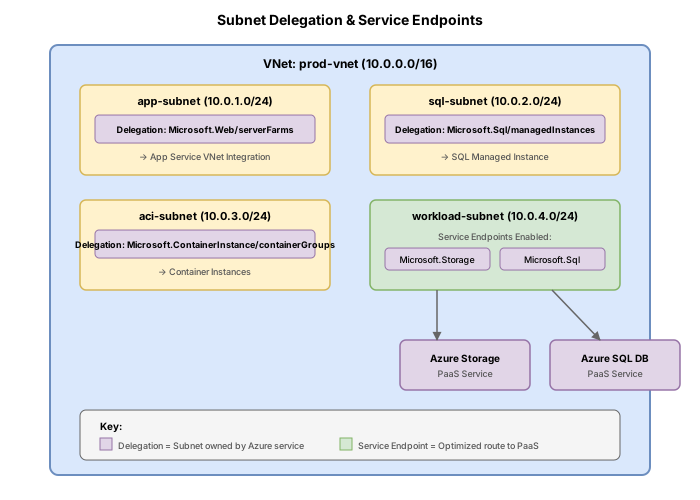
:::tip[Key facts for the exam]
- A subnet can only be delegated to **one** service at a time.
- Delegation does not prevent you from manually placing other resources in the subnet, but the delegated service may apply network policies that restrict what else can coexist.
- `Microsoft.Web/serverFarms` is the delegation value for App Service VNet integration (not `Microsoft.Web/sites`).
- Removing delegation requires removing all delegated resources from the subnet first.
:::
---
## Task 3: Shared versus dedicated subnets
Understanding which subnets must be dedicated is critical for exam scenarios:
| Subnet | Must be dedicated? | Reason |
|---|---|---|
| GatewaySubnet | Yes | Azure enforces this; no other resource types allowed |
| AzureFirewallSubnet | Yes | Azure Firewall requires exclusive use |
| AzureFirewallManagementSubnet | Yes | Management traffic only |
| AzureBastionSubnet | Yes | Azure Bastion requires exclusive use |
| Application Gateway | Recommended | Multiple App Gateways can share, but no other resource types |
| Private Endpoints | No | Can share with VMs, NICs, and other resources |
| Delegated subnets | Depends | The delegated service dictates what else can coexist |
Verify what is deployed in each subnet:
```bash
# List all resources in a subnet by checking IP configurations
az network vnet subnet show \
--resource-group $RG \
--vnet-name $VNET_NAME \
--name PrivateEndpointSubnet \
--query "{addressPrefix: addressPrefix, delegations: delegations[].serviceName, ipConfigurations: ipConfigurations[].id}" \
--output json
Task 4: Configure NSG for AzureBastionSubnet
Azure Bastion requires a specific set of NSG rules. If you apply an NSG to the AzureBastionSubnet, you must include all of the following rules. Omitting any rule will break Bastion connectivity or block platform updates.
Create the NSG
NSG_NAME="nsg-bastion"

az network nsg create \
  --resource-group $RG \
  --name $NSG_NAME \
  --location $LOCATION
Inbound rules
# Allow HTTPS from Internet (user browser connections)
az network nsg rule create \
  --resource-group $RG \
  --nsg-name $NSG_NAME \
  --name AllowHttpsInbound \
  --priority 120 \
  --direction Inbound \
  --access Allow \
  --protocol Tcp \
  --source-address-prefixes Internet \
  --source-port-ranges '*' \
  --destination-address-prefixes '*' \
  --destination-port-ranges 443

# Allow GatewayManager (control plane communication)
az network nsg rule create \
  --resource-group $RG \
  --nsg-name $NSG_NAME \
  --name AllowGatewayManagerInbound \
  --priority 130 \
  --direction Inbound \
  --access Allow \
  --protocol Tcp \
  --source-address-prefixes GatewayManager \
  --source-port-ranges '*' \
  --destination-address-prefixes '*' \
  --destination-port-ranges 443

# Allow Azure Load Balancer health probes
az network nsg rule create \
  --resource-group $RG \
  --nsg-name $NSG_NAME \
  --name AllowAzureLoadBalancerInbound \
  --priority 140 \
  --direction Inbound \
  --access Allow \
  --protocol Tcp \
  --source-address-prefixes AzureLoadBalancer \
  --source-port-ranges '*' \
  --destination-address-prefixes '*' \
  --destination-port-ranges 443

# Allow Bastion data-plane communication between hosts
az network nsg rule create \
  --resource-group $RG \
  --nsg-name $NSG_NAME \
  --name AllowBastionHostCommunicationInbound \
  --priority 150 \
  --direction Inbound \
  --access Allow \
  --protocol '*' \
  --source-address-prefixes VirtualNetwork \
  --source-port-ranges '*' \
  --destination-address-prefixes VirtualNetwork \
  --destination-port-ranges 8080 5701
Outbound rules
# Allow SSH and RDP to target VMs in VNet
az network nsg rule create \
  --resource-group $RG \
  --nsg-name $NSG_NAME \
  --name AllowSshRdpOutbound \
  --priority 100 \
  --direction Outbound \
  --access Allow \
  --protocol '*' \
  --source-address-prefixes '*' \
  --source-port-ranges '*' \
  --destination-address-prefixes VirtualNetwork \
  --destination-port-ranges 22 3389

# Allow outbound to Azure Cloud (diagnostics and metering)
az network nsg rule create \
  --resource-group $RG \
  --nsg-name $NSG_NAME \
  --name AllowAzureCloudOutbound \
  --priority 110 \
  --direction Outbound \
  --access Allow \
  --protocol Tcp \
  --source-address-prefixes '*' \
  --source-port-ranges '*' \
  --destination-address-prefixes AzureCloud \
  --destination-port-ranges 443

# Allow Bastion data-plane communication outbound
az network nsg rule create \
  --resource-group $RG \
  --nsg-name $NSG_NAME \
  --name AllowBastionCommunicationOutbound \
  --priority 120 \
  --direction Outbound \
  --access Allow \
  --protocol '*' \
  --source-address-prefixes VirtualNetwork \
  --source-port-ranges '*' \
  --destination-address-prefixes VirtualNetwork \
  --destination-port-ranges 8080 5701

# Allow HTTP outbound to Internet (certificate validation)
az network nsg rule create \
  --resource-group $RG \
  --nsg-name $NSG_NAME \
  --name AllowHttpOutbound \
  --priority 130 \
  --direction Outbound \
  --access Allow \
  --protocol '*' \
  --source-address-prefixes '*' \
  --source-port-ranges '*' \
  --destination-address-prefixes Internet \
  --destination-port-ranges 80
Associate the NSG with AzureBastionSubnet
az network vnet subnet update \
  --resource-group $RG \
  --vnet-name $VNET_NAME \
  --name AzureBastionSubnet \
  --network-security-group $NSG_NAME
All eight rules listed above are mandatory when you apply an NSG to the AzureBastionSubnet. Omitting any single rule will prevent Bastion from receiving platform updates or block VM connectivity. If in doubt, do not associate an NSG with the Bastion subnet at all.
Task 5: Verify delegation status and test constraints
Verify delegation
# Show delegation on the App Service integration subnet
az network vnet subnet show \
  --resource-group $RG \
  --vnet-name $VNET_NAME \
  --name AppServiceIntegrationSubnet \
  --query "delegations[].{service:serviceName, actions:actions}" \
  --output table

# Show all subnets and their delegations
az network vnet subnet list \
  --resource-group $RG \
  --vnet-name $VNET_NAME \
  --query "[].{name:name, prefix:addressPrefix, delegation:delegations[0].serviceName}" \
  --output table
Remove delegation (requires removal of delegated resources first)
# Clear delegation by passing empty value
az network vnet subnet update \
  --resource-group $RG \
  --vnet-name $VNET_NAME \
  --name AciSubnet \
  --delegations ""
Break & fix
These exercises demonstrate common mistakes and platform guardrails.
Scenario 1: Attempt to associate an NSG with GatewaySubnet
The GatewaySubnet does not support NSG association. Attempting this will result in an error:
# This will fail
az network nsg create \
  --resource-group $RG \
  --name nsg-gateway-test \
  --location $LOCATION

az network vnet subnet update \
  --resource-group $RG \
  --vnet-name $VNET_NAME \
  --name GatewaySubnet \
  --network-security-group nsg-gateway-test
Expected result: The operation will be rejected with an error indicating NSG cannot be associated with the GatewaySubnet.
Scenario 2: Deploy a non-matching resource in a delegated subnet
When a subnet is delegated, the service may enforce restrictions on what other resource types can be deployed:
# Attempt to create a VM NIC in the ACI-delegated subnet
az network nic create \
  --resource-group $RG \
  --name nic-test-aci \
  --vnet-name $VNET_NAME \
  --subnet AciSubnet
Expected result: Depending on the delegation, you may receive an error or the operation may succeed but with warnings. The Microsoft.ContainerInstance/containerGroups delegation restricts the subnet to container group resources only.
Scenario 3: Create AzureBastionSubnet with insufficient size
Azure Bastion requires a minimum /26 prefix. Attempting a smaller prefix will fail:
# This will fail — /28 is too small for AzureBastionSubnet
az network vnet subnet create \
  --resource-group $RG \
  --vnet-name $VNET_NAME \
  --name AzureBastionSubnet \
  --address-prefixes 10.0.100.0/28
Expected result: The operation will fail with a validation error stating the minimum subnet size for Azure Bastion is /26.
Clean up
az group delete --name $RG --yes --no-wait
Knowledge check
1. What is the minimum subnet prefix length for AzureBastionSubnet?
2. Which of the following subnets CANNOT have an NSG associated with it?
3. What is the correct delegation value for App Service VNet integration?
4. A subnet delegated to Microsoft.ContainerInstance/containerGroups already exists. You need to also delegate it to Microsoft.Web/serverFarms. What should you do?
5. Which outbound NSG rule is required on the AzureBastionSubnet for Bastion to connect to target VMs?
6. You need to deploy Private Endpoints and a set of VMs in the same subnet. Is this supported?