Challenge 09: Azure Route Server & NVA integration
90-120 minutes | ~$3-5/hour (Route Server + NVA VM running) | Exam weight: 10-15%
Challenge 08 covers user-defined routes and forced tunneling. This challenge builds on that foundation by replacing static UDR maintenance with dynamic BGP route exchange via Azure Route Server. Understanding of BGP fundamentals (ASN, peering, route advertisement) is helpful.
Scenario
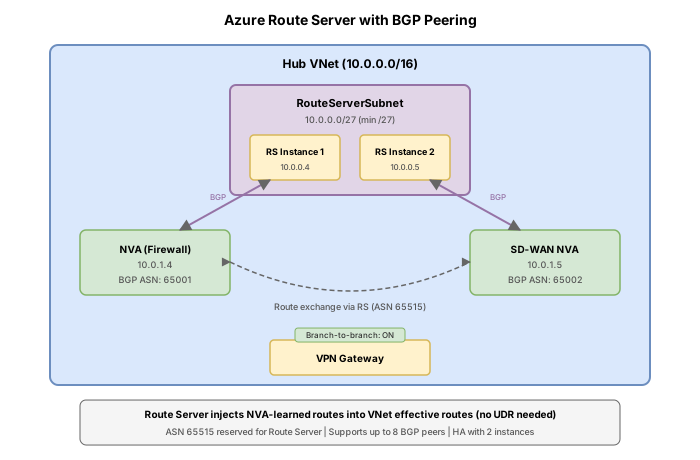
Contoso deploys third-party NVAs (Cisco, Palo Alto) in their hub VNet for traffic inspection. Currently, every time on-premises routes change, the network team must manually update UDRs. They want to implement Azure Route Server to establish BGP peering between the NVAs and Azure's routing fabric, enabling dynamic route exchange without manual UDR maintenance.
Network topology:
Learning objectives
After completing this challenge you will be able to:
- Deploy Azure Route Server in a dedicated RouteServerSubnet
- Configure BGP peering between Route Server and an NVA
- Verify route propagation from NVA to Azure virtual networks
- Enable branch-to-branch transit for VPN Gateway and NVA route exchange
- Inspect effective routes on VM NICs to confirm dynamically learned routes
- Diagnose BGP peering failures and route propagation issues
Prerequisites
- An Azure subscription with Contributor access
- Azure CLI installed and authenticated (
az login) - Basic understanding of BGP concepts (ASN, peering, route advertisement)
- Familiarity with UDRs (from Challenge 08)
Key concepts for AZ-700
| Concept | Detail |
|---|---|
| RouteServerSubnet | Dedicated subnet; minimum size /27; cannot have NSGs or UDRs attached |
| Route Server ASN | Fixed at 65515; cannot be changed |
| NVA ASN restriction | NVA must NOT use 65515, 65517, 65518, 65519, or 65520 (reserved by Azure) |
| BGP peers limit | Maximum 16 BGP peers per Route Server |
| Route limit per peer | Maximum 4,000 routes per BGP peer (session drops if exceeded) |
| Branch-to-branch | When enabled, Route Server exchanges routes between NVA and VPN/ExpressRoute gateway |
| Control plane only | Route Server exchanges BGP routes but does NOT sit in the data path |
| Dual instance peering | NVA must peer with both Route Server instances for high availability |
| Route propagation | Routes learned by Route Server are propagated to all VMs in the VNet and peered VNets |
| Public IP requirement | Route Server requires a Standard SKU public IP for management plane connectivity |
Task 1: Create resource group and network infrastructure
Set up the hub VNet with the dedicated RouteServerSubnet and NVA subnet.
Step 1: Create the resource group
az group create \
    --name rg-routeserver-lab \
    --location eastus2
Step 2: Create the hub virtual network with RouteServerSubnet
The RouteServerSubnet must be at least /27. The subnet name must be exactly RouteServerSubnet.
az network vnet create \
    --resource-group rg-routeserver-lab \
    --name vnet-hub \
    --location eastus2 \
    --address-prefixes 10.0.0.0/16 \
    --subnet-name RouteServerSubnet \
    --subnet-prefixes 10.0.1.0/26
Step 3: Create the NVA subnet
az network vnet subnet create \
    --resource-group rg-routeserver-lab \
    --vnet-name vnet-hub \
    --name snet-nva \
    --address-prefixes 10.0.2.0/24
Step 4: Create the spoke virtual network
az network vnet create \
    --resource-group rg-routeserver-lab \
    --name vnet-spoke \
    --location eastus2 \
    --address-prefixes 10.1.0.0/16 \
    --subnet-name snet-workload \
    --subnet-prefixes 10.1.1.0/24
Step 5: Peer the hub and spoke VNets
Enable "Use Remote Gateway or Route Server" on the spoke side so Route Server-learned routes propagate to the spoke.
az network vnet peering create \
    --resource-group rg-routeserver-lab \
    --name hub-to-spoke \
    --vnet-name vnet-hub \
    --remote-vnet vnet-spoke \
    --allow-forwarded-traffic \
    --allow-gateway-transit

az network vnet peering create \
    --resource-group rg-routeserver-lab \
    --name spoke-to-hub \
    --vnet-name vnet-spoke \
    --remote-vnet vnet-hub \
    --allow-forwarded-traffic \
    --use-remote-gateways true
The --use-remote-gateways true flag on the spoke peering requires that a gateway or Route Server exists in the hub VNet. If you create the peering before deploying Route Server, the command may fail. Deploy Route Server first (Task 2), then create the peering with this flag, or update the peering afterward.
Step 6: Deploy a simulated NVA (Linux VM with FRRouting)
az vm create \
--resource-group rg-routeserver-lab \
--name vm-nva \
--location eastus2 \
--image Ubuntu2204 \
--size Standard_B2s \
--vnet-name vnet-hub \
--subnet snet-nva \
--private-ip-address 10.0.2.4 \
--public-ip-sku Standard \
--admin-username azureuser \
--generate-ssh-keys
### Step 7: Deploy a workload VM in the spoke
```bash
az vm create \
--resource-group rg-routeserver-lab \
--name vm-workload \
--location eastus2 \
--image Ubuntu2204 \
--size Standard_B1s \
--vnet-name vnet-spoke \
--subnet snet-workload \
--private-ip-address 10.1.1.4 \
--public-ip-sku Standard \
--admin-username azureuser \
--generate-ssh-keys
Task 2: Deploy Azure Route Server
Step 1: Create a Standard public IP for Route Server
Route Server requires a Standard SKU public IP for its management plane connectivity.
az network public-ip create \
    --resource-group rg-routeserver-lab \
    --name pip-routeserver \
    --sku Standard \
    --version IPv4 \
    --location eastus2
Step 2: Get the RouteServerSubnet resource ID
SUBNET_ID=$(az network vnet subnet show \
    --resource-group rg-routeserver-lab \
    --vnet-name vnet-hub \
    --name RouteServerSubnet \
    --query "id" \
    --output tsv)

echo $SUBNET_ID
Step 3: Create Azure Route Server
az network routeserver create \
    --resource-group rg-routeserver-lab \
    --name rs-hub \
    --location eastus2 \
    --hosted-subnet "$SUBNET_ID" \
    --public-ip-address pip-routeserver
Route Server deployment can take 15-30 minutes to complete. The command blocks until provisioning finishes.
Step 4: Verify Route Server deployment
az network routeserver show \
    --resource-group rg-routeserver-lab \
    --name rs-hub \
    --query "{name:name, provisioningState:provisioningState, virtualRouterAsn:virtualRouterAsn, virtualRouterIps:virtualRouterIps}" \
    --output table
Expected output shows:
provisioningState: SucceededvirtualRouterAsn: 65515 (fixed, cannot be changed)virtualRouterIps: Two IP addresses (e.g., 10.0.1.4 and 10.0.1.5) representing the two Route Server instances
Route Server always uses ASN 65515. It exposes two peer IPs for high availability. Your NVA must establish BGP sessions with BOTH IPs to ensure routes are properly learned even during maintenance.
Task 3: Configure BGP peering between Route Server and NVA
Step 1: Create BGP peering on Route Server
Configure Route Server to peer with the NVA. The NVA uses ASN 65001 (must not conflict with Route Server's 65515).
az network routeserver peering create \
    --resource-group rg-routeserver-lab \
    --routeserver rs-hub \
    --name peer-nva \
    --peer-ip 10.0.2.4 \
    --peer-asn 65001
Step 2: Verify peering was created
az network routeserver peering show \
    --resource-group rg-routeserver-lab \
    --routeserver rs-hub \
    --name peer-nva \
    --query "{name:name, peerAsn:peerAsn, peerIp:peerIp, provisioningState:provisioningState}" \
    --output table
Step 3: Configure FRRouting on the NVA
SSH into the NVA VM and install FRRouting to establish the BGP session back to Route Server. Use the two Route Server peer IPs obtained in Task 2, Step 4.
ssh azureuser@<NVA_PUBLIC_IP>
Install FRRouting:
sudo apt update && sudo apt install -y frr

# Enable BGP daemon
sudo sed -i 's/bgpd=no/bgpd=yes/' /etc/frr/daemons

# Restart FRRouting
sudo systemctl restart frr
Configure BGP peering with both Route Server instances (replace IPs with your Route Server peer IPs):
sudo vtysh
configure terminal

router bgp 65001
 bgp router-id 10.0.2.4
 no bgp ebgp-requires-policy
 neighbor 10.0.1.4 remote-as 65515
 neighbor 10.0.1.4 ebgp-multihop 2
 neighbor 10.0.1.5 remote-as 65515
 neighbor 10.0.1.5 ebgp-multihop 2

 address-family ipv4 unicast
  neighbor 10.0.1.4 soft-reconfiguration inbound
  neighbor 10.0.1.5 soft-reconfiguration inbound
  ! Advertise simulated on-prem routes
  network 172.16.0.0/16
  network 172.17.0.0/16
 exit-address-family

end
write memory
exit
Route Server and the NVA are in different subnets within the same VNet. Because they are not directly connected at Layer 2, multi-hop eBGP is required. Azure Route Server requires multi-hop external BGP from all peered NVAs.
Step 4: Verify BGP session status on the NVA
sudo vtysh -c "show bgp summary"
Expected output should show two established neighbors (the two Route Server instances) with state showing a route count rather than "Active" or "Connect".
Task 4: Verify route propagation
Step 1: View routes learned by Route Server from the NVA
az network routeserver peering list-learned-routes \
    --resource-group rg-routeserver-lab \
    --routeserver rs-hub \
    --name peer-nva
Expected output includes the routes advertised by the NVA: 172.16.0.0/16 and 172.17.0.0/16, with next hop 10.0.2.4 and AS path containing 65001.
Step 2: View routes advertised by Route Server to the NVA
az network routeserver peering list-advertised-routes \
    --resource-group rg-routeserver-lab \
    --routeserver rs-hub \
    --name peer-nva
This shows the VNet address spaces (10.0.0.0/16 and 10.1.0.0/16 from the peered spoke) that Route Server advertises to the NVA.
Step 3: Check effective routes on the spoke workload VM NIC
The routes advertised by the NVA should appear in the effective routes of VMs in the hub and peered spoke VNets.
WORKLOAD_NIC_ID=$(az vm show \
    --resource-group rg-routeserver-lab \
    --name vm-workload \
    --query "networkProfile.networkInterfaces[0].id" \
    --output tsv)

az network nic show-effective-route-table \
    --ids "$WORKLOAD_NIC_ID" \
    --output table
Expected: You should see entries for 172.16.0.0/16 and 172.17.0.0/16 with next hop type VirtualAppliance and next hop address 10.0.2.4. These routes were dynamically learned via BGP through Route Server, not manually configured via UDR.
Step 4: Confirm with Network Watcher next-hop
az network watcher show-next-hop \
    --resource-group rg-routeserver-lab \
    --vm vm-workload \
    --source-ip 10.1.1.4 \
    --dest-ip 172.16.1.10
Expected: next hop type is VirtualAppliance with next hop IP 10.0.2.4 (the NVA).
With Route Server, these routes appeared automatically when the NVA advertised them via BGP. No manual route table creation or subnet association was needed. When on-premises routes change, the NVA updates its BGP advertisement and Route Server propagates the changes automatically.
Task 5: Enable branch-to-branch transit
Branch-to-branch allows the VPN Gateway and NVA to exchange routes through Route Server. Without this, the VPN Gateway does not learn NVA-advertised routes and vice versa.
Step 1: Enable branch-to-branch traffic
az network routeserver update \
    --resource-group rg-routeserver-lab \
    --name rs-hub \
    --allow-b2b-traffic true
Step 2: Verify the setting
az network routeserver show \
    --resource-group rg-routeserver-lab \
    --name rs-hub \
    --query "{name:name, allowBranchToBranchTraffic:allowBranchToBranchTraffic}" \
    --output table
Expected: allowBranchToBranchTraffic is true.
Step 3: Understand the effect
With branch-to-branch enabled:
- Routes from the VPN Gateway (on-premises prefixes) are shared with the NVA via Route Server
- Routes from the NVA are shared with the VPN Gateway via Route Server
- On-premises can learn about NVA-advertised routes and vice versa
Without branch-to-branch:
- Route Server only propagates NVA routes to VMs in the VNet and peered VNets
- VPN Gateway and NVA operate independently with no route exchange between them
The total number of routes advertised from the virtual network address space and Route Server towards an ExpressRoute circuit (when branch-to-branch is enabled) must not exceed 1,000. Plan your route advertisements carefully in environments with many prefixes.
Task 6: Test failover behavior
When an NVA goes down, the BGP session drops and routes are withdrawn. This demonstrates the self-healing nature of dynamic routing.
Step 1: Confirm current routes exist
az network nic show-effective-route-table \
    --ids "$WORKLOAD_NIC_ID" \
    --output table | grep "172.16"
You should see the 172.16.0.0/16 route with next hop 10.0.2.4.
Step 2: Simulate NVA failure (stop the VM)
az vm deallocate \
    --resource-group rg-routeserver-lab \
    --name vm-nva
Step 3: Wait for BGP hold timer expiry
Route Server uses a BGP keepalive timer of 60 seconds and a hold timer of 180 seconds. After approximately 180 seconds without keepalive messages, the BGP session is declared down and routes are withdrawn.
Wait 3-4 minutes, then check effective routes again:
az network nic show-effective-route-table \
    --ids "$WORKLOAD_NIC_ID" \
    --output table | grep "172.16"
Expected: The 172.16.0.0/16 and 172.17.0.0/16 routes should no longer appear in the effective route table, demonstrating automatic route withdrawal.
Step 4: Restore the NVA and verify route recovery
az vm start \
    --resource-group rg-routeserver-lab \
    --name vm-nva
After the VM boots and FRRouting re-establishes the BGP session (allow 2-3 minutes for boot plus BGP convergence):
az network routeserver peering list-learned-routes \
    --resource-group rg-routeserver-lab \
    --routeserver rs-hub \
    --name peer-nva
The routes should reappear once the BGP session re-establishes.
Route Server does not require manual intervention when an NVA fails or recovers. BGP timers handle session lifecycle automatically. This is the primary advantage over static UDRs, which require manual updates or custom automation via Azure API calls.
Break & fix
These scenarios represent common misconfigurations encountered in production and on the exam.
Scenario 1: NVA uses ASN 65515
Symptom: BGP peering creation fails or the BGP session never establishes.
Root cause: The NVA is configured with ASN 65515, which is the same ASN used by Route Server. BGP requires different ASNs for eBGP peering. Azure reserves ASNs 65515, 65517, 65518, 65519, and 65520.
Diagnosis:
az network routeserver peering show \
    --resource-group rg-routeserver-lab \
    --routeserver rs-hub \
    --name peer-nva \
    --query "peerAsn"
On the NVA, verify the configured ASN:
sudo vtysh -c "show running-config" | grep "router bgp"
Fix: Change the NVA BGP configuration to use a non-reserved ASN (e.g., 65001):
sudo vtysh
configure terminal
no router bgp 65515
router bgp 65001
 bgp router-id 10.0.2.4
 neighbor 10.0.1.4 remote-as 65515
 neighbor 10.0.1.4 ebgp-multihop 2
 neighbor 10.0.1.5 remote-as 65515
 neighbor 10.0.1.5 ebgp-multihop 2
end
write memory
Then update the Route Server peering:
az network routeserver peering delete \
    --resource-group rg-routeserver-lab \
    --routeserver rs-hub \
    --name peer-nva \
    --yes

az network routeserver peering create \
    --resource-group rg-routeserver-lab \
    --routeserver rs-hub \
    --name peer-nva \
    --peer-ip 10.0.2.4 \
    --peer-asn 65001
Scenario 2: Routes not propagating to spoke VNets
Symptom: NVA routes appear in the hub VNet effective routes but not in the spoke VNet.
Root cause: The VNet peering from the spoke side does not have "Use Remote Gateways or Route Server" enabled.
Diagnosis:
az network vnet peering show \
    --resource-group rg-routeserver-lab \
    --vnet-name vnet-spoke \
    --name spoke-to-hub \
    --query "{useRemoteGateways:useRemoteGateways, allowForwardedTraffic:allowForwardedTraffic}" \
    --output table
If useRemoteGateways is false, routes from Route Server are not propagated to the spoke.
Fix:
az network vnet peering update \
    --resource-group rg-routeserver-lab \
    --vnet-name vnet-spoke \
    --name spoke-to-hub \
    --use-remote-gateways true
Also verify the hub-to-spoke peering allows gateway transit:
az network vnet peering update \
    --resource-group rg-routeserver-lab \
    --vnet-name vnet-hub \
    --name hub-to-spoke \
    --allow-gateway-transit true
Scenario 3: VPN Gateway does not learn NVA routes
Symptom: On-premises cannot reach destinations advertised by the NVA even though the NVA is peered with Route Server and routes are visible in the VNet.
Root cause: Branch-to-branch traffic is not enabled on Route Server. Without it, Route Server does not exchange routes between the NVA and the VPN Gateway.
Diagnosis:
az network routeserver show \
    --resource-group rg-routeserver-lab \
    --name rs-hub \
    --query "allowBranchToBranchTraffic"
If the result is false, routes are not exchanged between the gateway and NVA.
Fix:
az network routeserver update \
    --resource-group rg-routeserver-lab \
    --name rs-hub \
    --allow-b2b-traffic true
Cleanup
Remove all resources created in this challenge:
az group delete \
    --name rg-routeserver-lab \
    --yes \
    --no-wait
Knowledge check
1. What is the fixed ASN used by Azure Route Server, and can it be changed?
2. What is the minimum subnet size required for RouteServerSubnet?
3. A network engineer enables branch-to-branch traffic on Route Server. What does this accomplish?
4. An NVA is peered with Route Server and advertising routes, but spoke VNet VMs do not see the routes in their effective route table. The hub-to-spoke peering has allowGatewayTransit enabled. What is the most likely cause?
5. What happens to dynamically learned routes when the NVA goes down and the BGP session with Route Server drops?
6. Does Azure Route Server sit in the data path between the NVA and destination VMs?