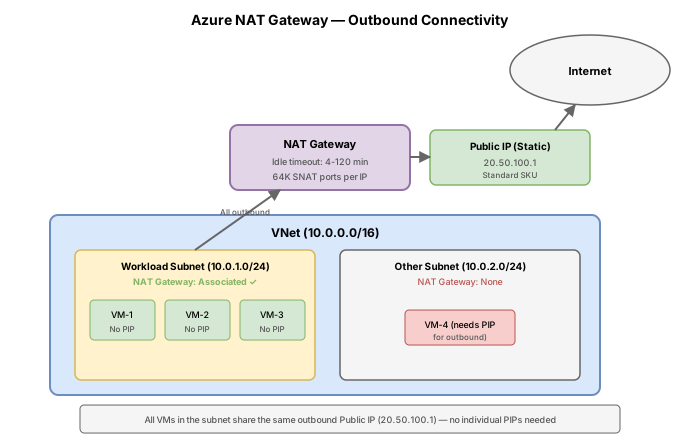
Challenge 10: NAT Gateway & outbound connectivity
60-90 minutes | ~$1-2/hour (NAT Gateway + Standard IP) | Exam weight: 10-15%
Scenario
Contoso runs 200+ VMs behind an internal Load Balancer for backend processing. These VMs need outbound internet access for package updates and API calls, but are experiencing intermittent connection failures caused by SNAT port exhaustion. The team needs to implement NAT Gateway to provide reliable, scalable outbound connectivity without exposing VMs to inbound internet traffic.
Current topology:
Target topology:
Learning objectives
After completing this challenge you will be able to:
- Identify appropriate use cases for Azure NAT Gateway
- Create a NAT Gateway with public IP addresses
- Associate a NAT Gateway with a virtual network subnet
- Scale outbound capacity using multiple public IPs or IP prefixes
- Configure TCP idle timeout settings
- Verify outbound connectivity uses the NAT Gateway IP
- Compare outbound connectivity methods in Azure
Prerequisites
- An Azure subscription with Contributor access
- Azure CLI installed and authenticated (
az login) - Basic understanding of outbound connectivity and SNAT (from AZ-104)
Key concepts for AZ-700
| Concept | Detail |
|---|---|
| SNAT ports per IP | 64,512 ports per public IP address on a NAT Gateway |
| Maximum public IPs | Up to 16 public IPs per NAT Gateway (1,032,192 total ports) |
| Precedence | NAT Gateway takes priority over LB outbound rules and instance-level PIPs |
| SKU requirement | NAT Gateway requires Standard SKU public IPs (not Basic) |
| Zonal resource | NAT Gateway is deployed into specific availability zones |
| TCP idle timeout | Configurable from 4 to 120 minutes (default 4 minutes) |
| UDP idle timeout | Fixed at 4 minutes (not configurable) |
| Direction | Outbound only; NAT Gateway does not allow inbound-initiated connections |
Task 1: Create resource group and virtual network
Set up the networking infrastructure that simulates Contoso's backend environment.
Step 1: Create the resource group
az group create \
    --name rg-natgw-lab \
    --location eastus2
Step 2: Create the virtual network with a backend subnet
az network vnet create \
    --resource-group rg-natgw-lab \
    --name vnet-backend \
    --location eastus2 \
    --address-prefixes 10.0.0.0/16 \
    --subnet-name snet-backend \
    --subnet-prefixes 10.0.1.0/24
Task 2: Create a NAT Gateway with a public IP address
Deploy the NAT Gateway resource with a Standard SKU public IP.
Step 1: Create a Standard SKU public IP for the NAT Gateway
NAT Gateway requires Standard SKU public IPs. Basic SKU is not supported.
az network public-ip create \
    --resource-group rg-natgw-lab \
    --name public-ip-nat \
    --sku Standard \
    --allocation-method Static \
    --location eastus2 \
    --zone 1 2 3
Step 2: Create the NAT Gateway resource
az network nat gateway create \
    --resource-group rg-natgw-lab \
    --name natgw-backend \
    --location eastus2 \
    --public-ip-addresses public-ip-nat \
    --idle-timeout 10
Key parameters:
--public-ip-addresses: space-separated list of public IP names or IDs--idle-timeout: TCP idle timeout in minutes (4-120, default 4)--zone: availability zone(s) for the NAT Gateway (omitted here for simplicity)
Step 3: Verify the NAT Gateway was created
az network nat gateway show \
    --resource-group rg-natgw-lab \
    --name natgw-backend \
    --output table
Task 3: Associate NAT Gateway with the subnet
Once a NAT Gateway is associated with a subnet, all outbound internet traffic from that subnet uses the NAT Gateway public IP.
Step 1: Associate the NAT Gateway with the backend subnet
az network vnet subnet update \
    --resource-group rg-natgw-lab \
    --vnet-name vnet-backend \
    --name snet-backend \
    --nat-gateway natgw-backend
Step 2: Verify the subnet association
az network vnet subnet show \
    --resource-group rg-natgw-lab \
    --vnet-name vnet-backend \
    --name snet-backend \
    --query "natGateway.id" \
    --output tsv
This should return the resource ID of natgw-backend.
Task 4: Scale outbound capacity with additional public IPs
A single public IP provides 64,512 SNAT ports. For 200+ VMs making many concurrent connections, you may need more. You can add up to 16 public IPs per NAT Gateway.
Option A: Add individual public IPs
Step 1: Create a second public IP
az network public-ip create \
    --resource-group rg-natgw-lab \
    --name public-ip-nat2 \
    --sku Standard \
    --allocation-method Static \
    --location eastus2 \
    --zone 1 2 3
Step 2: Update the NAT Gateway to include both IPs
az network nat gateway update \
    --resource-group rg-natgw-lab \
    --name natgw-backend \
    --public-ip-addresses public-ip-nat public-ip-nat2
Note: The --public-ip-addresses parameter replaces the entire list. You must include all IPs you want associated, not just the new one.
Option B: Use a public IP prefix
A public IP prefix allocates a contiguous range of IPs. A /28 prefix provides 16 addresses.
Step 1: Create a public IP prefix
az network public-ip prefix create \
    --resource-group rg-natgw-lab \
    --name public-ip-prefix-nat \
    --location eastus2 \
    --length 28
Step 2: Create a NAT Gateway using the prefix (alternative approach)
az network nat gateway create \
    --resource-group rg-natgw-lab \
    --name natgw-prefix-demo \
    --location eastus2 \
    --public-ip-prefixes public-ip-prefix-nat \
    --idle-timeout 10
You can also combine individual public IPs and prefixes on the same NAT Gateway using both --public-ip-addresses and --public-ip-prefixes.
Task 5: Configure and test idle timeout
The TCP idle timeout determines how long a NAT Gateway holds onto a SNAT port for an idle connection.
Step 1: Update the idle timeout
az network nat gateway update \
    --resource-group rg-natgw-lab \
    --name natgw-backend \
    --idle-timeout 120
Important considerations
| Protocol | Idle timeout | Configurable? |
|---|---|---|
| TCP | 4-120 minutes | Yes (via --idle-timeout) |
| UDP | 4 minutes | No (fixed) |
Long idle timeouts increase the risk of SNAT port exhaustion because ports are held longer. Microsoft recommends keeping the timeout as low as your application allows.
Step 2: Reset to a reasonable value
az network nat gateway update \
    --resource-group rg-natgw-lab \
    --name natgw-backend \
    --idle-timeout 10
Task 6: Verify outbound IP and connectivity
Deploy a test VM to confirm outbound traffic uses the NAT Gateway public IP.
Step 1: Create a test VM in the backend subnet
az vm create \
    --resource-group rg-natgw-lab \
    --name vm-test-nat \
    --image Ubuntu2204 \
    --vnet-name vnet-backend \
    --subnet snet-backend \
    --size Standard_B1s \
    --admin-username azureuser \
    --generate-ssh-keys \
    --public-ip-address "" \
    --no-wait
The --public-ip-address "" flag ensures the VM has no instance-level public IP. All outbound traffic will use the NAT Gateway.
Step 2: Check the NAT Gateway public IP address
az network public-ip show \
    --resource-group rg-natgw-lab \
    --name public-ip-nat \
    --query "ipAddress" \
    --output tsv
Step 3: Verify from the VM using serial console or Run Command
az vm run-command invoke \
    --resource-group rg-natgw-lab \
    --name vm-test-nat \
    --command-id RunShellScript \
    --scripts "curl -s https://ifconfig.me"
The output should match the NAT Gateway public IP, confirming that outbound traffic is routed through the NAT Gateway.
Outbound connectivity comparison
Understanding when to use each outbound method is critical for the AZ-700 exam.
| Method | SNAT ports | Precedence | Use case |
|---|---|---|---|
| NAT Gateway | 64,512 per IP (up to 16 IPs) | Highest | Production workloads needing scalable, reliable outbound |
| Instance-level public IP | All ports available to single VM | High (overridden by NAT GW) | Single VM needing dedicated outbound IP |
| LB outbound rules | Configurable per backend pool | Medium | When NAT Gateway is not an option |
| Default outbound access | Limited, unreliable | Fallback only | Not recommended for production |
Precedence order: NAT Gateway > instance-level public IP > LB outbound rules > default outbound access.
Azure is retiring default outbound access for new deployments. All new VMs without explicit outbound connectivity (NAT Gateway, LB outbound rules, or instance-level PIP) will have no outbound internet access. Always configure explicit outbound connectivity.
Break & fix
Scenario 1: NAT Gateway deployment fails with Basic SKU public IP
Symptom: The az network nat gateway create command fails with a SKU mismatch error.
Reproduce the error:
# This will fail
az network public-ip create \
    --resource-group rg-natgw-lab \
    --name public-ip-basic \
    --sku Basic \
    --allocation-method Dynamic \
    --location eastus2

az network nat gateway create \
    --resource-group rg-natgw-lab \
    --name natgw-broken \
    --location eastus2 \
    --public-ip-addresses public-ip-basic
Root cause: NAT Gateway only supports Standard SKU public IPs. Basic SKU IPs cannot be associated with a NAT Gateway.
Fix: Recreate the public IP with Standard SKU:
az network public-ip create \
    --resource-group rg-natgw-lab \
    --name public-ip-fixed \
    --sku Standard \
    --allocation-method Static \
    --location eastus2
Scenario 2: Outbound IP changed unexpectedly after adding NAT Gateway
Symptom: A VM previously used its instance-level public IP (e.g., 20.x.x.x) for outbound connections. After the NAT Gateway was associated with the subnet, outbound traffic now uses the NAT Gateway IP instead.
Root cause: NAT Gateway takes precedence over instance-level public IPs for outbound traffic. This is by design. When a subnet has a NAT Gateway, all outbound internet traffic from that subnet uses the NAT Gateway public IP regardless of whether individual VMs have their own public IPs.
Resolution: This is expected behavior. If a specific VM must use its own public IP for outbound traffic, move it to a subnet without a NAT Gateway.
Scenario 3: UDP connections timing out at 4 minutes
Symptom: Long-running UDP-based applications (e.g., DNS resolvers, gaming servers, VoIP) experience connection drops exactly at 4 minutes of idle time, even though the NAT Gateway idle timeout is set to 120 minutes.
Root cause: The configurable idle timeout on NAT Gateway only applies to TCP connections. UDP idle timeout is fixed at 4 minutes and cannot be changed.
Resolution: The application must implement keepalive packets or reconnection logic for UDP flows. Send a UDP packet at least once every 4 minutes to keep the connection alive.
Cleanup
Remove all resources created in this challenge:
az group delete \
--name rg-natgw-lab \
--yes \
--no-wait