Challenge 04: Azure DNS private zones & auto-registration
60-90 minutes | ~$0.50/zone/month (first 25 private zones) | Exam weight: 15-20%
Scenario
Contoso operates a hub-spoke network topology. They need to implement private DNS zones to enable name resolution between VMs across peered VNets without custom DNS servers. The team must configure auto-registration for the hub VNet, link additional spoke VNets for resolution (without auto-registration), and set up private DNS for Azure Private Endpoints (privatelink zones).
Learning objectives
After completing this challenge you will be able to:
- Create and configure Azure DNS private zones
- Link virtual networks with and without auto-registration
- Understand auto-registration behavior and constraints
- Configure privatelink DNS zones for Azure Private Endpoints
- Verify cross-VNet name resolution through private DNS
- Manage DNS records manually and understand SOA/NS behavior
Prerequisites
- An Azure subscription with Contributor access
- Azure CLI installed and authenticated (
az login) - Azure PowerShell module
Az.PrivateDnsinstalled - A resource group for this lab (or permission to create one)
- Basic understanding of DNS concepts and Azure VNet peering
Task 1: Create the hub-spoke network infrastructure
Build the foundational VNets that will be linked to private DNS zones.
Step 1: Create the resource group
az group create \
    --name rg-privatedns-lab \
    --location eastus2
Step 2: Create the hub VNet
az network vnet create \
    --resource-group rg-privatedns-lab \
    --name vnet-hub \
    --address-prefixes 10.0.0.0/16 \
    --subnet-name subnet-hub-default \
    --subnet-prefixes 10.0.1.0/24 \
    --location eastus2
Step 3: Create spoke VNets
az network vnet create \
    --resource-group rg-privatedns-lab \
    --name vnet-spoke1 \
    --address-prefixes 10.1.0.0/16 \
    --subnet-name subnet-spoke1-default \
    --subnet-prefixes 10.1.1.0/24 \
    --location eastus2

az network vnet create \
    --resource-group rg-privatedns-lab \
    --name vnet-spoke2 \
    --address-prefixes 10.2.0.0/16 \
    --subnet-name subnet-spoke2-default \
    --subnet-prefixes 10.2.1.0/24 \
    --location eastus2
Step 4: Establish VNet peering between hub and spokes
az network vnet peering create \
    --resource-group rg-privatedns-lab \
    --name hub-to-spoke1 \
    --vnet-name vnet-hub \
    --remote-vnet vnet-spoke1 \
    --allow-vnet-access

az network vnet peering create \
    --resource-group rg-privatedns-lab \
    --name spoke1-to-hub \
    --vnet-name vnet-spoke1 \
    --remote-vnet vnet-hub \
    --allow-vnet-access

az network vnet peering create \
    --resource-group rg-privatedns-lab \
    --name hub-to-spoke2 \
    --vnet-name vnet-hub \
    --remote-vnet vnet-spoke2 \
    --allow-vnet-access

az network vnet peering create \
    --resource-group rg-privatedns-lab \
    --name spoke2-to-hub \
    --vnet-name vnet-spoke2 \
    --remote-vnet vnet-hub \
    --allow-vnet-access
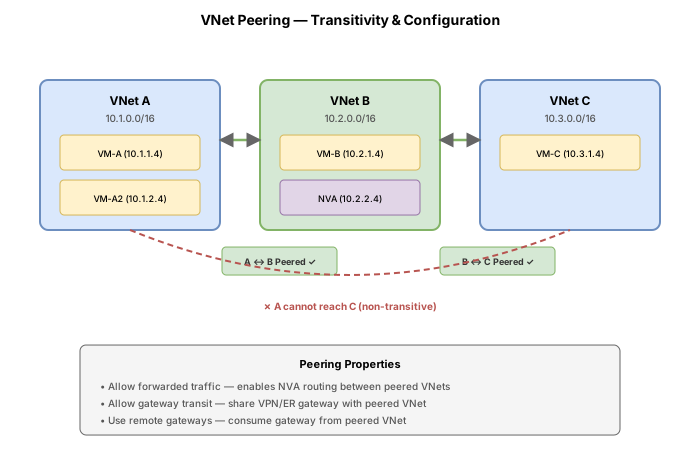
VNet peering is not required for private DNS resolution. Any VNet linked to a private DNS zone can resolve records in that zone, regardless of peering. However, peering is required for actual network connectivity between VMs across VNets.
Task 2: Create a private DNS zone and link to hub VNet with auto-registration
Create the primary private DNS zone and link it to the hub VNet with auto-registration enabled so that VMs deployed in the hub automatically get DNS records.
Step 1: Create the private DNS zone
az network private-dns zone create \
    --resource-group rg-privatedns-lab \
    --name contoso.internal
Step 2: View the auto-created SOA and NS records
az network private-dns record-set list \
    --resource-group rg-privatedns-lab \
    --zone-name contoso.internal \
    --output table
Every private DNS zone is created with a SOA record and an NS record at the zone apex. These records are managed by Azure and cannot be deleted.
Step 3: Link the hub VNet with auto-registration enabled
az network private-dns link vnet create \
    --resource-group rg-privatedns-lab \
    --zone-name contoso.internal \
    --name link-hub-registration \
    --virtual-network vnet-hub \
    --registration-enabled true
PowerShell equivalent
# Create the private DNS zone
New-AzPrivateDnsZone -ResourceGroupName rg-privatedns-lab `
    -Name contoso.internal

# Link VNet with auto-registration
$hubVnet = Get-AzVirtualNetwork -ResourceGroupName rg-privatedns-lab `
    -Name vnet-hub

New-AzPrivateDnsVirtualNetworkLink -ResourceGroupName rg-privatedns-lab `
    -ZoneName contoso.internal `
    -Name link-hub-registration `
    -VirtualNetworkId $hubVnet.Id `
    -EnableRegistration
Step 4: Verify the link was created
az network private-dns link vnet show \
    --resource-group rg-privatedns-lab \
    --zone-name contoso.internal \
    --name link-hub-registration \
    --query "{Name:name, VNet:virtualNetwork.id, Registration:registrationEnabled}" \
    --output table
Private DNS zones are global resources, not tied to any specific Azure region. You can link VNets from any region to the same private DNS zone. The zone name can be anything you choose (it does not need to match a real domain you own).
Task 3: Link spoke VNets for resolution only (no auto-registration)
Link the spoke VNets to the private DNS zone so VMs in those VNets can resolve names, but their hostnames will not be automatically registered.
Step 1: Link spoke1 for resolution only
az network private-dns link vnet create \
    --resource-group rg-privatedns-lab \
    --zone-name contoso.internal \
    --name link-spoke1-resolution \
    --virtual-network vnet-spoke1 \
    --registration-enabled false
Step 2: Link spoke2 for resolution only
az network private-dns link vnet create \
    --resource-group rg-privatedns-lab \
    --zone-name contoso.internal \
    --name link-spoke2-resolution \
    --virtual-network vnet-spoke2 \
    --registration-enabled false
Step 3: List all virtual network links for the zone
az network private-dns link vnet list \
    --resource-group rg-privatedns-lab \
    --zone-name contoso.internal \
    --output table
PowerShell equivalent
$spoke1Vnet = Get-AzVirtualNetwork -ResourceGroupName rg-privatedns-lab `
    -Name vnet-spoke1

New-AzPrivateDnsVirtualNetworkLink -ResourceGroupName rg-privatedns-lab `
    -ZoneName contoso.internal `
    -Name link-spoke1-resolution `
    -VirtualNetworkId $spoke1Vnet.Id

# Omitting -EnableRegistration defaults to registration disabled
A VNet linked without auto-registration is called a "resolution virtual network." VMs in these VNets can query and resolve records in the zone, but their own hostnames are not automatically registered. You must add records manually for VMs in resolution-only VNets.
Task 4: Deploy VMs and verify auto-registration
Deploy VMs into the hub and a spoke VNet to observe how auto-registration creates A records automatically for the hub VM, while the spoke VM requires manual record creation.
Step 1: Deploy a VM in the hub VNet
az vm create \
    --resource-group rg-privatedns-lab \
    --name vm-hub-web01 \
    --vnet-name vnet-hub \
    --subnet subnet-hub-default \
    --image Ubuntu2204 \
    --size Standard_B1s \
    --admin-username azureuser \
    --generate-ssh-keys \
    --public-ip-address "" \
    --no-wait
Step 2: Deploy a VM in spoke1 VNet
az vm create \
    --resource-group rg-privatedns-lab \
    --name vm-spoke1-app01 \
    --vnet-name vnet-spoke1 \
    --subnet subnet-spoke1-default \
    --image Ubuntu2204 \
    --size Standard_B1s \
    --admin-username azureuser \
    --generate-ssh-keys \
    --public-ip-address "" \
    --no-wait
Step 3: Verify auto-registration created a record for the hub VM
Wait a minute or two for the VMs to finish provisioning, then check the DNS records:
az network private-dns record-set a list \
    --resource-group rg-privatedns-lab \
    --zone-name contoso.internal \
    --output table
You should see an A record for vm-hub-web01 pointing to its private IP (for example, 10.0.1.4). The spoke VM vm-spoke1-app01 will not appear because spoke1 is linked for resolution only.
Step 4: Confirm the spoke VM has no auto-registered record
az network private-dns record-set a show \
    --resource-group rg-privatedns-lab \
    --zone-name contoso.internal \
    --name vm-spoke1-app01 2>&1 || echo "Record does not exist (expected)"
Auto-registration works only for virtual machines. Other resources (internal load balancers, application gateways, private endpoints) do not get auto-registered. Their DNS records must be created manually or through DNS zone groups for private endpoints.
Task 5: Create privatelink DNS zones for Azure Private Endpoints
When using Azure Private Endpoints, the recommended pattern is to create privatelink DNS zones and link them to your VNets so that private endpoint DNS records resolve correctly.
Step 1: Create a privatelink zone for Azure Blob Storage
az network private-dns zone create \
    --resource-group rg-privatedns-lab \
    --name privatelink.blob.core.windows.net
Step 2: Create a privatelink zone for Azure SQL Database
az network private-dns zone create \
    --resource-group rg-privatedns-lab \
    --name privatelink.database.windows.net
Step 3: Link the privatelink zones to all VNets (resolution only)
Private endpoint DNS zones should not have auto-registration enabled. Records are managed automatically by DNS zone groups associated with the private endpoints.
# Link blob privatelink zone to hub
az network private-dns link vnet create \
    --resource-group rg-privatedns-lab \
    --zone-name privatelink.blob.core.windows.net \
    --name link-hub-blob \
    --virtual-network vnet-hub \
    --registration-enabled false

# Link blob privatelink zone to spoke1
az network private-dns link vnet create \
    --resource-group rg-privatedns-lab \
    --zone-name privatelink.blob.core.windows.net \
    --name link-spoke1-blob \
    --virtual-network vnet-spoke1 \
    --registration-enabled false

# Link SQL privatelink zone to hub
az network private-dns link vnet create \
    --resource-group rg-privatedns-lab \
    --zone-name privatelink.database.windows.net \
    --name link-hub-sql \
    --virtual-network vnet-hub \
    --registration-enabled false

# Link SQL privatelink zone to spoke1
az network private-dns link vnet create \
    --resource-group rg-privatedns-lab \
    --zone-name privatelink.database.windows.net \
    --name link-spoke1-sql \
    --virtual-network vnet-spoke1 \
    --registration-enabled false
Step 4: List all private DNS zones in the resource group
az network private-dns zone list \
    --resource-group rg-privatedns-lab \
    --output table
PowerShell equivalent
New-AzPrivateDnsZone -ResourceGroupName rg-privatedns-lab `
    -Name "privatelink.blob.core.windows.net"

$hubVnet = Get-AzVirtualNetwork -ResourceGroupName rg-privatedns-lab `
    -Name vnet-hub

New-AzPrivateDnsVirtualNetworkLink -ResourceGroupName rg-privatedns-lab `
    -ZoneName "privatelink.blob.core.windows.net" `
    -Name link-hub-blob `
    -VirtualNetworkId $hubVnet.Id
Each Azure service has a specific privatelink zone name. Common examples include:
privatelink.blob.core.windows.net(Blob Storage)privatelink.database.windows.net(Azure SQL)privatelink.vaultcore.azure.net(Key Vault)privatelink.azurewebsites.net(App Service)privatelink.azurecr.io(Container Registry)
A VNet can be linked to up to 1000 private DNS zones for resolution. This makes it feasible to support many privatelink zones from a single VNet.
Task 6: Manage records manually and understand SOA/NS behavior
Add, update, and remove records manually in the private DNS zone. Understand which records are system-managed and which are user-managed.
Step 1: Add a manual A record for the spoke VM
SPOKE1_IP=$(az vm show \
    --resource-group rg-privatedns-lab \
    --name vm-spoke1-app01 \
    --show-details \
    --query privateIps \
    --output tsv)

az network private-dns record-set a add-record \
    --resource-group rg-privatedns-lab \
    --zone-name contoso.internal \
    --record-set-name vm-spoke1-app01 \
    --ipv4-address $SPOKE1_IP
Step 2: Add a CNAME record for a service alias
az network private-dns record-set cname create \
    --resource-group rg-privatedns-lab \
    --zone-name contoso.internal \
    --name webapp

az network private-dns record-set cname set-record \
    --resource-group rg-privatedns-lab \
    --zone-name contoso.internal \
    --record-set-name webapp \
    --cname vm-hub-web01.contoso.internal
Step 3: Update a record (change IP address)
To update an A record, remove the old entry and add the new one:
# Remove the old record
az network private-dns record-set a remove-record \
    --resource-group rg-privatedns-lab \
    --zone-name contoso.internal \
    --record-set-name vm-spoke1-app01 \
    --ipv4-address $SPOKE1_IP

# Add the updated record
az network private-dns record-set a add-record \
    --resource-group rg-privatedns-lab \
    --zone-name contoso.internal \
    --record-set-name vm-spoke1-app01 \
    --ipv4-address 10.1.1.100
Step 4: Delete a record set entirely
az network private-dns record-set a delete \
    --resource-group rg-privatedns-lab \
    --zone-name contoso.internal \
    --name vm-spoke1-app01 \
    --yes
Step 5: Attempt to delete the SOA record (will fail)
# This will FAIL - SOA records cannot be deleted
az network private-dns record-set soa delete \
    --resource-group rg-privatedns-lab \
    --zone-name contoso.internal 2>&1 || echo "SOA records are system-managed and cannot be deleted"
PowerShell equivalent for manual record management
# Create a new A record set
New-AzPrivateDnsRecordSet -Name "db-server" -RecordType A `
    -ZoneName contoso.internal `
    -ResourceGroupName rg-privatedns-lab -Ttl 3600 `
    -PrivateDnsRecords (New-AzPrivateDnsRecordConfig -IPv4Address "10.1.1.50")

# Remove a record set
Remove-AzPrivateDnsRecordSet -Name "db-server" -RecordType A `
    -ZoneName contoso.internal `
    -ResourceGroupName rg-privatedns-lab
Step 6: View all records including auto-registered entries
az network private-dns record-set list \
    --resource-group rg-privatedns-lab \
    --zone-name contoso.internal \
    --output table
Auto-registered records have isAutoRegistered: true in their metadata. Manually created records have isAutoRegistered: false or the field is absent.
You cannot manually edit or delete auto-registered records. If you need to override an auto-registered record, you must either disable auto-registration for that VNet or change the VM name/NIC configuration. Auto-registered records are managed entirely by the platform.
Break & fix
Scenario 1: Attempting auto-registration on two zones for the same VNet
A team member tries to enable auto-registration on a second private DNS zone for the hub VNet:
# Create a second private DNS zone
az network private-dns zone create \
    --resource-group rg-privatedns-lab \
    --name contoso.cloud

# This will FAIL because vnet-hub already has auto-registration
# enabled on contoso.internal
az network private-dns link vnet create \
    --resource-group rg-privatedns-lab \
    --zone-name contoso.cloud \
    --name link-hub-cloud-registration \
    --virtual-network vnet-hub \
    --registration-enabled true
Root cause: A virtual network can be linked to only one private DNS zone with auto-registration enabled. The hub VNet is already registered with contoso.internal.
Fix: Either disable auto-registration on the existing link first, or link the second zone with --registration-enabled false for resolution only.
# Option A: Link for resolution only
az network private-dns link vnet create \
    --resource-group rg-privatedns-lab \
    --zone-name contoso.cloud \
    --name link-hub-cloud-resolution \
    --virtual-network vnet-hub \
    --registration-enabled false
Scenario 2: DNS resolution fails from spoke VNet
A VM in spoke2 cannot resolve vm-hub-web01.contoso.internal despite VNet peering being established.
Root cause: The spoke2 VNet is not linked to the contoso.internal private DNS zone. VNet peering provides network connectivity, but DNS resolution through private zones requires an explicit virtual network link.
Fix: Create a virtual network link between the spoke2 VNet and the private DNS zone:
az network private-dns link vnet create \
    --resource-group rg-privatedns-lab \
    --zone-name contoso.internal \
    --name link-spoke2-resolution \
    --virtual-network vnet-spoke2 \
    --registration-enabled false
Scenario 3: VM auto-registration not working
A new VM deployed in spoke1 does not get an A record in the private DNS zone even though the VNet is linked.
Root cause: The spoke1 VNet link has registration-enabled set to false. Only VNets linked with auto-registration enabled will have their VM records created automatically.
Diagnosis:
az network private-dns link vnet show \
    --resource-group rg-privatedns-lab \
    --zone-name contoso.internal \
    --name link-spoke1-resolution \
    --query registrationEnabled
Fix: Either update the existing link to enable registration, or add the record manually. To update the link:
az network private-dns link vnet update \
    --resource-group rg-privatedns-lab \
    --zone-name contoso.internal \
    --name link-spoke1-resolution \
    --registration-enabled true
Note that enabling registration on spoke1 is only valid if spoke1 does not already have auto-registration enabled on another private DNS zone.
Clean up resources
az group delete --name rg-privatedns-lab --yes --no-wait